PNCConf Config (Think Im missing something)

More
7 years 5 months ago #133803 by cmorley
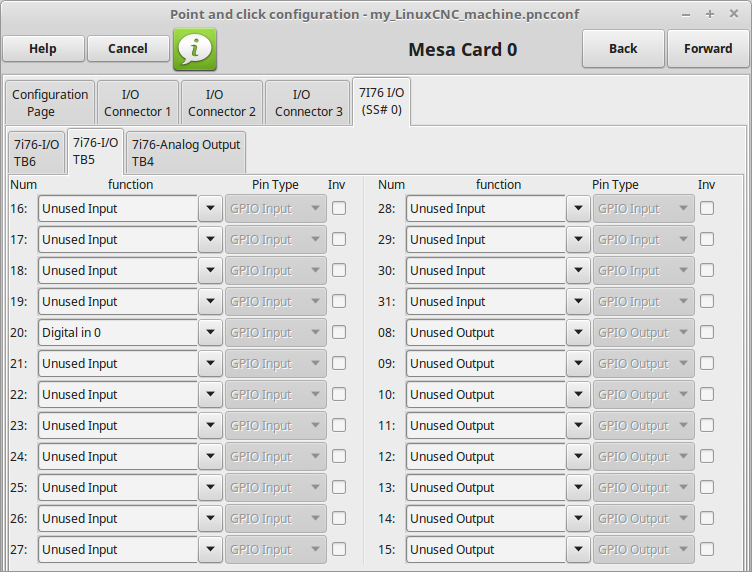
The 7i76 ss#0 tab holds the field I/O.
The I/O Connector 1 sets the step generators.


here I set input 20 as a digital in pin.

yes I know it is confusing - and I'm sorry :)

Chris M
The following user(s) said Thank You: Type_Zero_Design

Please Log in or Create an account to join the conversation.

More
7 years 5 months ago #133805 by Type_Zero_Design
Shit!
I feel like an idiot! :silly:

I just found the 7i76 tab Under the I/O with each connector. I have been looking at the I/O connector tabs this whole time.

So what are the I/O connector 1-3

Getting there but still confused,,,,

Please Log in or Create an account to join the conversation.
More
7 years 5 months ago #133807 by cmorley
I/O 1 is for the step generators.
I/O 2 and 3 are for the expansion connectors.

Chris M

Please Log in or Create an account to join the conversation.

More
7 years 5 months ago - 7 years 5 months ago #133808 by Type_Zero_Design
Chris Thank you!!! I missed that whole tab somehow

So say I want to hook an encoder to TB3 as depicted in Norberts wiring diagram at this link:

forum.linuxcnc.org/27-driver-boards/3191...ection-sheet?start=0

It looks like it would be under I/O 1 and I just search for the actual signal name?

But then that Idea seems to fall apart when looking for the spindle connections on TB4. Unless they are just fixed and dont need to be assigned? ******EDIT: TB4 is under 7i76 tab*******

Sorry for all the questions.
Last edit: 7 years 5 months ago by Type_Zero_Design.

Please Log in or Create an account to join the conversation.

More
7 years 5 months ago #133825 by rodw
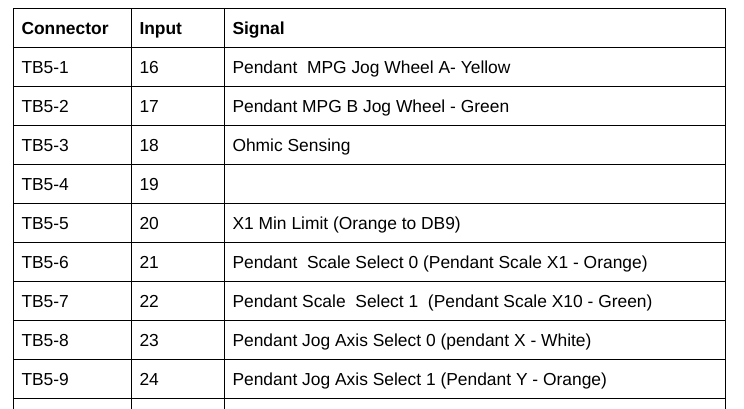
I recommend you create a table similar to this and always update it before you add a wire This is for my 7i76e including the MPG input for my pendant


So if I am looking for a hardware connection on the 7i76e, I use the left hand column but If I'm looking in halshow, I'll use the second column.

If you search for spaceship plasma you should find my build and on about page 4 there is a complete breakdown on how to wire in a MPG and an axis selection using a binary coded switch. Just note you need to change the mode in your hal.

It is best to just get a basic moving config with pncconf and not even worry about velocities and acceleration as its much quicker to edit the settings by hand in a text editor. When I installed mine, I just used another example and did everything by hand

Please Log in or Create an account to join the conversation.

More
7 years 5 months ago #133827 by pl7i92
gewting one Axis or joint moving and then adding by hand is in most cases the best you go
or as it is a simple mashine like plasma use redsy made configs

Please Log in or Create an account to join the conversation.

Moderators: cmorley
Time to create page: 0.431 seconds
Powered by Kunena Forum