
- Posts: 1931
- Thank you received: 394
Gscreen - a GTK / Glade / Python based screen
- newbynobi
- Offline
- Platinum Member
-

Less
More
13 years 9 months ago #28526
by newbynobi
Replied by newbynobi on topic Gscreen - a GTK / Glade / Python based screen
Hello Chris,
I am new with gscreen. I just pulled the newest version and tried it out.
First of all, I would say thanks for your work, but...
I am using it "run on place" on an Athlon 2000 (1300 MHz) with 1 GB Ram and SIS grafiks Card, so this isn't a new machine, but with gscreen it is getting an old lady, while it is running quiet well with axis. So I asume, that using an modern Computer will help. What specifications do you recommend?
When I start gscreen, an switch the machine on, all windows, or should I say elements makes a jump to the right.
The way to use it with custom gui is not easy to understand, I had to test a litttle arount to get used to it.
But I cound't find out how to come back to the main screen, after switching to the preference panel while there was running spiral.ngc.
I was working on an own screen, with is located also on mah's page, it is called moccapy, and based on the design of the german mocca surface.
I hope you don't mind, if I try to switch the design to an custom gui for gscreen, because I thing that is less work than finnishing my project, even, because I am just new with python.
I will test a litle more an give more feedback, but first I have to find a little more powerfull PC.
regards from Norbert
P.S. Sorry for my english, it is easier in german for me
I am new with gscreen. I just pulled the newest version and tried it out.
First of all, I would say thanks for your work, but...
I am using it "run on place" on an Athlon 2000 (1300 MHz) with 1 GB Ram and SIS grafiks Card, so this isn't a new machine, but with gscreen it is getting an old lady, while it is running quiet well with axis. So I asume, that using an modern Computer will help. What specifications do you recommend?
When I start gscreen, an switch the machine on, all windows, or should I say elements makes a jump to the right.
The way to use it with custom gui is not easy to understand, I had to test a litttle arount to get used to it.
But I cound't find out how to come back to the main screen, after switching to the preference panel while there was running spiral.ngc.
I was working on an own screen, with is located also on mah's page, it is called moccapy, and based on the design of the german mocca surface.
I hope you don't mind, if I try to switch the design to an custom gui for gscreen, because I thing that is less work than finnishing my project, even, because I am just new with python.
I will test a litle more an give more feedback, but first I have to find a little more powerfull PC.
regards from Norbert
P.S. Sorry for my english, it is easier in german for me
Please Log in or Create an account to join the conversation.
- cncbasher
- Offline
- Moderator
-

Less
More
- Posts: 1021
- Thank you received: 202
13 years 9 months ago #28527
by cncbasher
Replied by cncbasher on topic Gscreen - a GTK / Glade / Python based screen
you should see a menu button in the bottom right corner this should move you around the screens , gscreen was initialy targeted for touch screens .
I would say the initial jump of the graphics is probably because of your setup and slow machine , 2gb of memory will help along with probably a better graphics card .
would be helpful .
I use it day to day on machines without any major problems , i'd say overall for gscreen your just on the marginal edge any machine 1.8Mhz with 2gb memory should be more than enough
I would say the initial jump of the graphics is probably because of your setup and slow machine , 2gb of memory will help along with probably a better graphics card .
would be helpful .
I use it day to day on machines without any major problems , i'd say overall for gscreen your just on the marginal edge any machine 1.8Mhz with 2gb memory should be more than enough
Please Log in or Create an account to join the conversation.
- cmorley
- Offline
- Moderator
-
Less
More
- Posts: 7368
- Thank you received: 2181
13 years 9 months ago #28533
by cmorley
Replied by cmorley on topic Gscreen - a GTK / Glade / Python based screen
I test sometimes with a 1Ghz machine with onboard graphics - it is sluggish but usable.
but I develop on a 2.27 Ghz laptop with I5 Quad core and 2.5 Gigs on memory (not controlling a machine)
Gscreen will always be a bit of a resource hog. price we pay for flexibility and ease of development.
There are a few things to try:
Your base thread or servo thread can be adjusted to give linux more time to update graphics.
Not sure what kind of machine you are running or whether your using hardware cards to step/servo with.
I have the update rate set a 50 milli seconds I could change it to 100 I think this is what AXIS uses.
A add on graphics card could help if using onboard graphics
The jump to the right is noticeable on my slow machine and not on the fast machine.
I assume your trying the default screen:
switching back to the main screen can be done by the bottom right button ( it toggles between manual, MDI and Auto) or touch the 'main level' tab.
You must be out of Estop and machine on for the bottom right button to be available.
The custom screen options are really very new so are not documented that well.
Aside from the sample configs there is a wiki page:
wiki.linuxcnc.org/cgi-bin/wiki.pl?Gscreen
Of course I am still actively developing Gscreen so things can change and the wiki can get out of date.
Relatively easy custom screen development is one of the goals of Gscreen so yes please feel free to use it to build your screen.
If you need some changes to Gscreen to help let me know and we can talk about it though my primary goal is to get Gscreen finished.
The first goal for you is to build the basic screen in GLADE and have Gscreen display it without any of the controls working.
feel free to post your glade file or message me privately.
Chris M
but I develop on a 2.27 Ghz laptop with I5 Quad core and 2.5 Gigs on memory (not controlling a machine)
Gscreen will always be a bit of a resource hog. price we pay for flexibility and ease of development.
There are a few things to try:
Your base thread or servo thread can be adjusted to give linux more time to update graphics.
Not sure what kind of machine you are running or whether your using hardware cards to step/servo with.
I have the update rate set a 50 milli seconds I could change it to 100 I think this is what AXIS uses.
A add on graphics card could help if using onboard graphics
The jump to the right is noticeable on my slow machine and not on the fast machine.
I assume your trying the default screen:
switching back to the main screen can be done by the bottom right button ( it toggles between manual, MDI and Auto) or touch the 'main level' tab.
You must be out of Estop and machine on for the bottom right button to be available.
The custom screen options are really very new so are not documented that well.
Aside from the sample configs there is a wiki page:
wiki.linuxcnc.org/cgi-bin/wiki.pl?Gscreen
Of course I am still actively developing Gscreen so things can change and the wiki can get out of date.
Relatively easy custom screen development is one of the goals of Gscreen so yes please feel free to use it to build your screen.
If you need some changes to Gscreen to help let me know and we can talk about it though my primary goal is to get Gscreen finished.
The first goal for you is to build the basic screen in GLADE and have Gscreen display it without any of the controls working.
feel free to post your glade file or message me privately.
Chris M
Please Log in or Create an account to join the conversation.
- newbynobi
- Offline
- Platinum Member
-
Less
More
- Posts: 1931
- Thank you received: 394
13 years 9 months ago #28559
by newbynobi
Replied by newbynobi on topic Gscreen - a GTK / Glade / Python based screen
Hallo Chris,
I just found an AMD64-4800+ with 2 GB RAM an an GeForce 9600 GT in the basement. There I found also an HP with Intel Core 2 Duo and 2 GB Ram with on board graphics card. I think both should fit the requirements.
I use several machines just for hobby use:
A lathe with 125 x 660 without tool change or spindle control, witch is working with 1,6 Nm steppers controlled by the parallel port.
A mill with 350 x 300 x 300 (massive steel construction in C Form), controlled by 2 parallel ports with 3 Nm steppers, spindle control by PWM.
A mill with 1460 x 450 x 350 with a 24 places tool changer with 2 kW DC servos and an 15 kW spindle all controlled through MESA Cards (mostly 0-10 V), operated by an MINI ITX Board with an 1,6 GHz Dual Core and 4 GB Ram an 32 GB SSD. Thanks to the help of mah the tool changer works fine without changing the code, because T?; M6 and M61 are remapped
A mill with 220 x 150 x 200 with a 9 places turrent tool changer with 1.5 kW DC servos and an 2 kW spindle all controlled through MESA Cards (mostly 0-10 V), operated by an MINI ITX Board with an 1,6 GHz Dual Core and 4 GB Ram an 32 GB SSD. (Sorry, but this one isn't finished jet.
My other machines are just convectional.
Back to gscreen:
I have been reading this tutorial.
The documentation you mentioned is , as you already told, not very detailed. I will try to understand the custom gui example files.
I will try to get some screenshots from my GUI, but I cant get it running with the actual master, I will have to check this first.
Regards Norbert
I just found an AMD64-4800+ with 2 GB RAM an an GeForce 9600 GT in the basement. There I found also an HP with Intel Core 2 Duo and 2 GB Ram with on board graphics card. I think both should fit the requirements.
I use several machines just for hobby use:
A lathe with 125 x 660 without tool change or spindle control, witch is working with 1,6 Nm steppers controlled by the parallel port.
A mill with 350 x 300 x 300 (massive steel construction in C Form), controlled by 2 parallel ports with 3 Nm steppers, spindle control by PWM.
A mill with 1460 x 450 x 350 with a 24 places tool changer with 2 kW DC servos and an 15 kW spindle all controlled through MESA Cards (mostly 0-10 V), operated by an MINI ITX Board with an 1,6 GHz Dual Core and 4 GB Ram an 32 GB SSD. Thanks to the help of mah the tool changer works fine without changing the code, because T?; M6 and M61 are remapped
A mill with 220 x 150 x 200 with a 9 places turrent tool changer with 1.5 kW DC servos and an 2 kW spindle all controlled through MESA Cards (mostly 0-10 V), operated by an MINI ITX Board with an 1,6 GHz Dual Core and 4 GB Ram an 32 GB SSD. (Sorry, but this one isn't finished jet.
My other machines are just convectional.
Back to gscreen:
I have been reading this tutorial.
The documentation you mentioned is , as you already told, not very detailed. I will try to understand the custom gui example files.
I will try to get some screenshots from my GUI, but I cant get it running with the actual master, I will have to check this first.
Regards Norbert
Please Log in or Create an account to join the conversation.
- newbynobi
- Offline
- Platinum Member
-
Less
More
- Posts: 1931
- Thank you received: 394
13 years 9 months ago - 13 years 9 months ago #28561
by newbynobi
Replied by newbynobi on topic Gscreen - a GTK / Glade / Python based screen
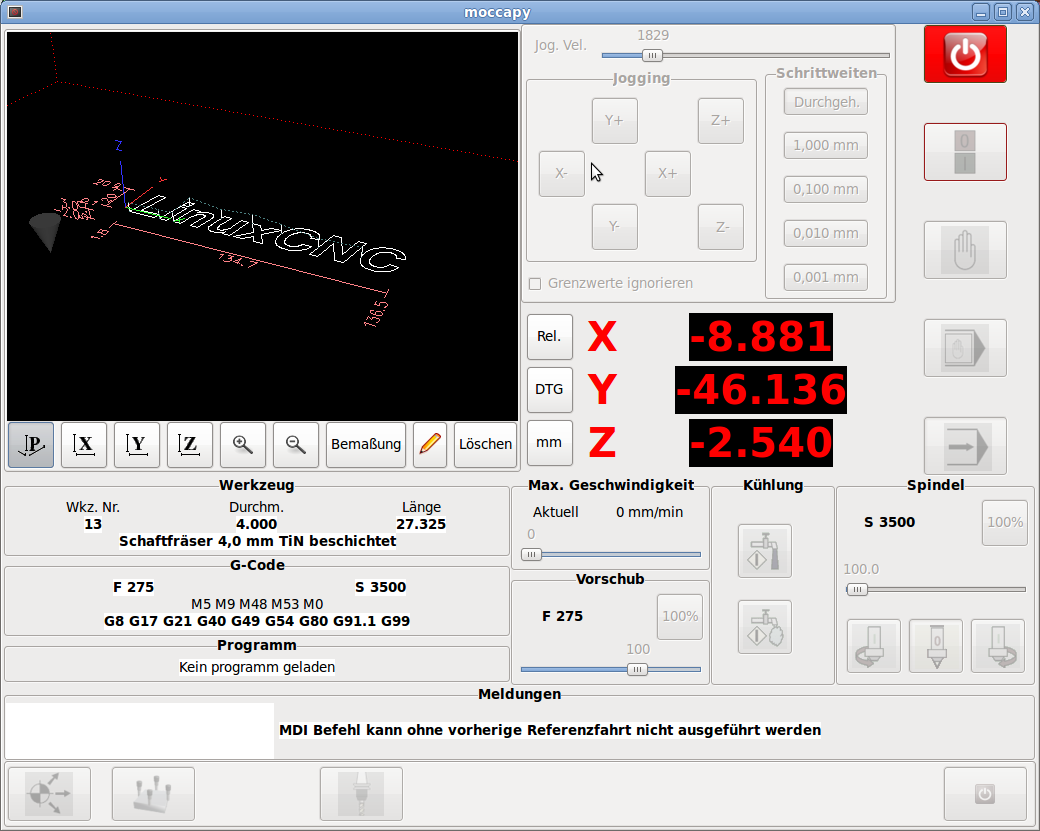
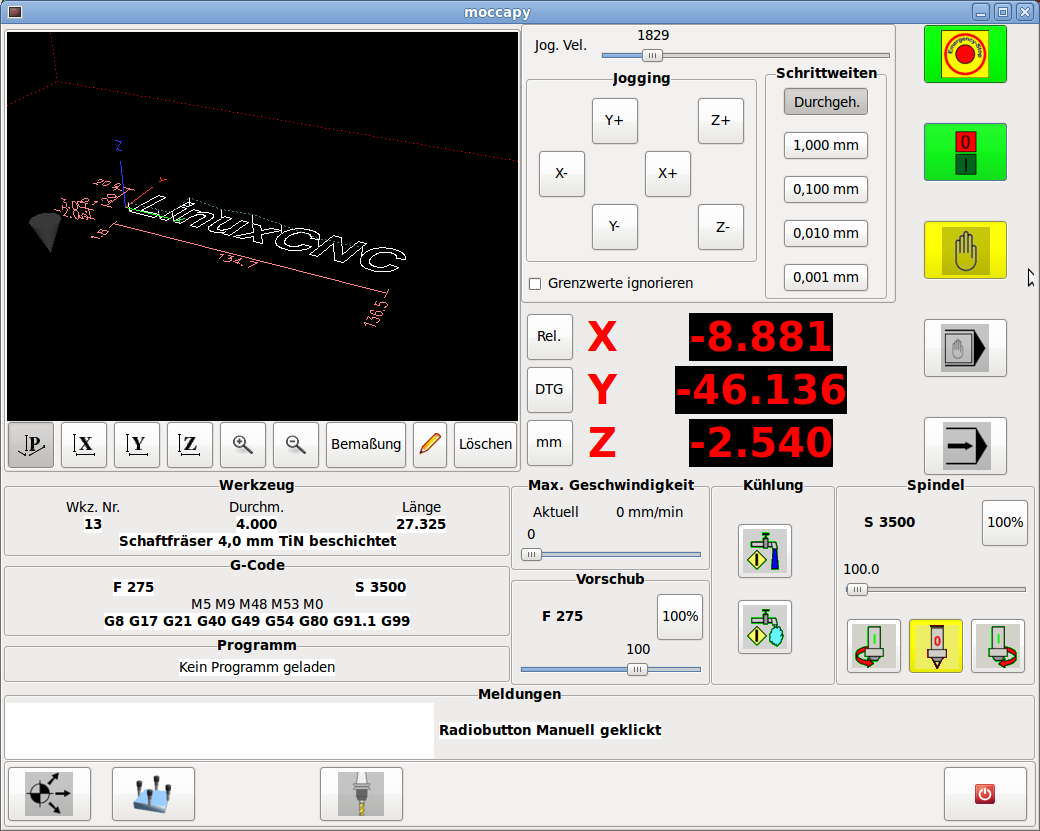
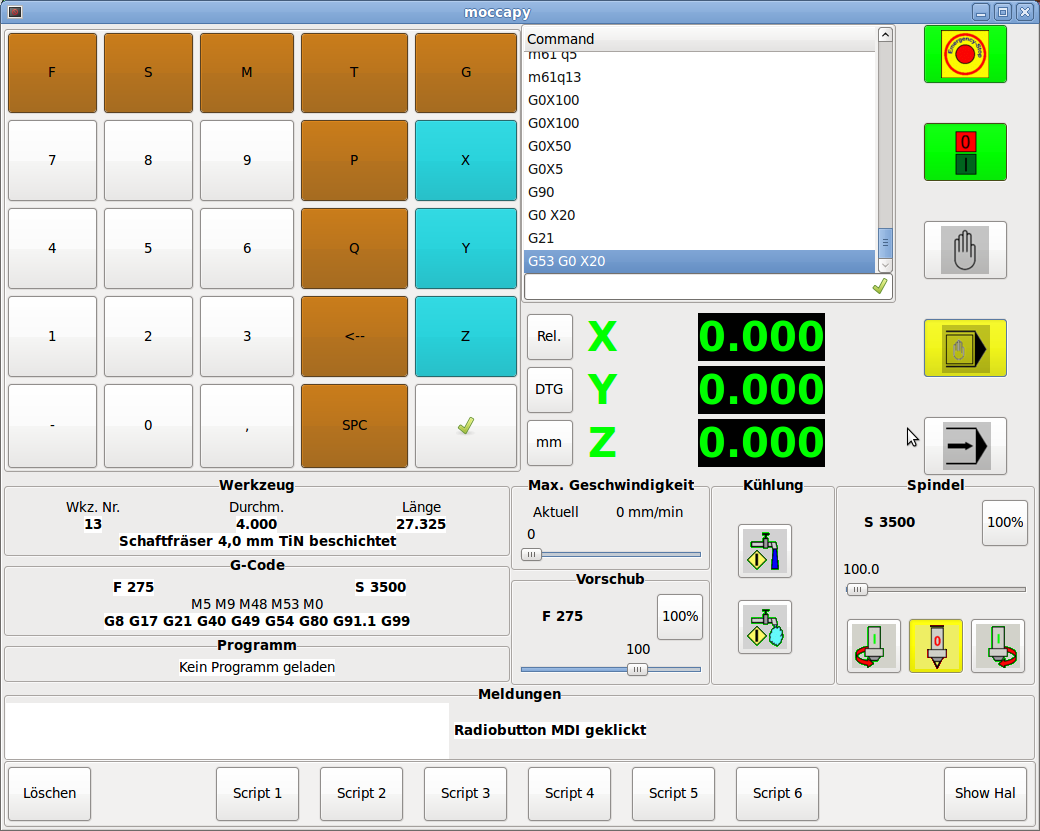
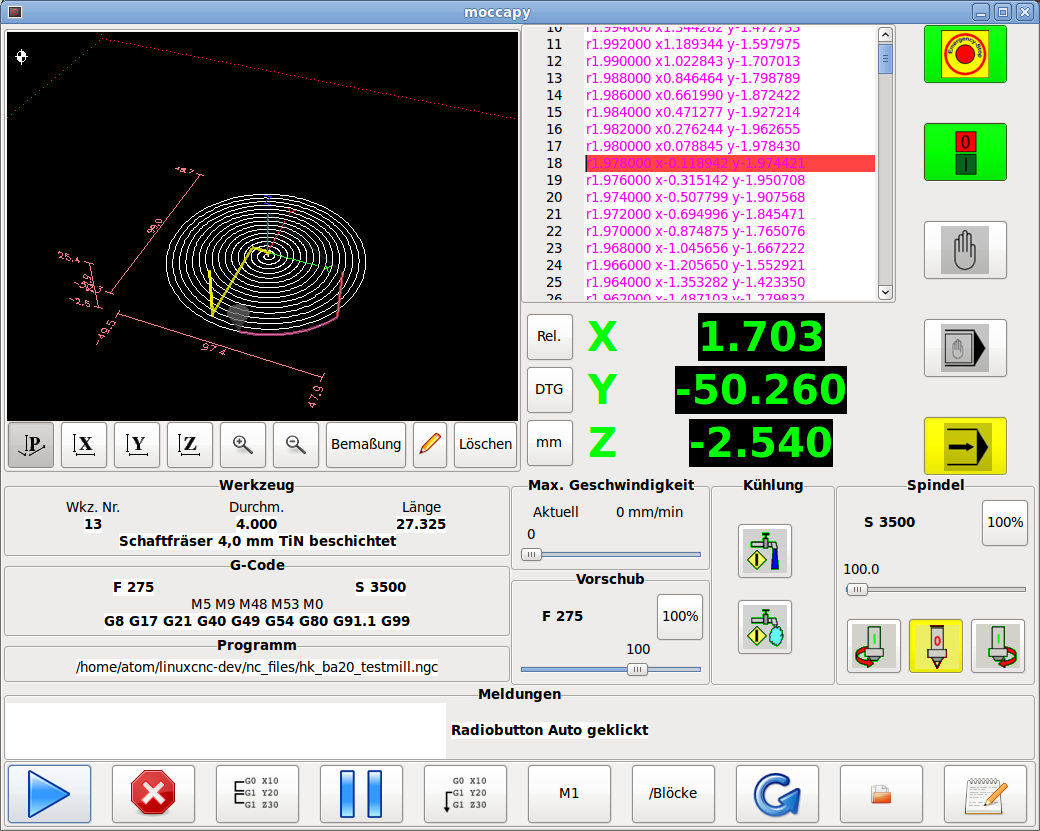
Here are some screenshots from my actual work
You can select the modes directly.
The button list on the bottom will change according to the mode.
In MDI mode you can select scripts
You will find a frame named Meldungen, where on the right you get the EMC reports and errors and on the left side it is a small debug window, with can be enlarged by double clicking it, then it fits the gremlin frame.
Most changes of the design are made by notebooks, chnging the page, so nothing is hopping around.
and some more stuff.
I like ICONS, but changing the button to text is easy.
So what are your opinions?
Regards Norbert
You can select the modes directly.
The button list on the bottom will change according to the mode.
In MDI mode you can select scripts
You will find a frame named Meldungen, where on the right you get the EMC reports and errors and on the left side it is a small debug window, with can be enlarged by double clicking it, then it fits the gremlin frame.
Most changes of the design are made by notebooks, chnging the page, so nothing is hopping around.
and some more stuff.
I like ICONS, but changing the button to text is easy.
So what are your opinions?
Regards Norbert


Last edit: 13 years 9 months ago by newbynobi.
Please Log in or Create an account to join the conversation.
- BigJohnT
- Offline
- Administrator
-

Less
More
- Posts: 3981
- Thank you received: 994
13 years 9 months ago - 13 years 9 months ago #28565
by BigJohnT
Replied by BigJohnT on topic Gscreen - a GTK / Glade / Python based screen
Cool screens, you should start a new topic to show them off.
John
John
Last edit: 13 years 9 months ago by BigJohnT.
Please Log in or Create an account to join the conversation.
Time to create page: 0.181 seconds