
- Posts: 7368
- Thank you received: 2181
Gscreen - a GTK / Glade / Python based screen
- cmorley
- Offline
- Moderator
-

Less
More
13 years 9 months ago #28634
by cmorley
Replied by cmorley on topic Gscreen - a GTK / Glade / Python based screen
In reference to a cycle start button:
I have to decide on behaviour for run-at-line.
Do we select the line with run-at-line dialog then use cycle start or
Do we select the line with run-at-line dialog and start the cycle from that dialog button?
I have to decide on behaviour for run-at-line.
Do we select the line with run-at-line dialog then use cycle start or
Do we select the line with run-at-line dialog and start the cycle from that dialog button?
Please Log in or Create an account to join the conversation.
- cmorley
- Offline
- Moderator
-
Less
More
- Posts: 7368
- Thank you received: 2181
13 years 9 months ago #28636
by cmorley
Replied by cmorley on topic Gscreen - a GTK / Glade / Python based screen
Well I pushed the cycle-start work.
as it stands this is how it (hopefully) works:
the pin name is gscreen.cycle-start
If in MDI mode the command in the MDI text box will execute.
if in AUTO mode the program will either start at line 0 or if linuxcnc is already paused it will step the program.
Note this stepping behaviour is different from the on screen buttons (there is a separate single-step button)
I actually like this better and am considering changing the on screen buttons to match.
Also note. as it stands now, run-at-line will start the program without the cycle-start button being pressed.
Chris M
as it stands this is how it (hopefully) works:
the pin name is gscreen.cycle-start
If in MDI mode the command in the MDI text box will execute.
if in AUTO mode the program will either start at line 0 or if linuxcnc is already paused it will step the program.
Note this stepping behaviour is different from the on screen buttons (there is a separate single-step button)
I actually like this better and am considering changing the on screen buttons to match.
Also note. as it stands now, run-at-line will start the program without the cycle-start button being pressed.
Chris M
Please Log in or Create an account to join the conversation.
- newbynobi
- Offline
- Platinum Member
-

Less
More
- Posts: 1931
- Thank you received: 394
13 years 9 months ago - 13 years 9 months ago #28646
by newbynobi
Replied by newbynobi on topic Gscreen - a GTK / Glade / Python based screen
Hallo Chris,
will "Start of Line" check the code in front of the startline?
This will be needed!
Otherwise the machine may begin it's work without coolant and a stopped spindle.
Also the position may be incorrect, if the program contains G53 steps and some other stuff may occur.
We discussed that matter in the german mocca thread and mocca do check all lines from the beginning of the program, sets the G and M values and reaches then the strartline, now the G Code is transmitted to the interpreter, all other code is gone to a cero device. So all start parameters should be set up correctly.
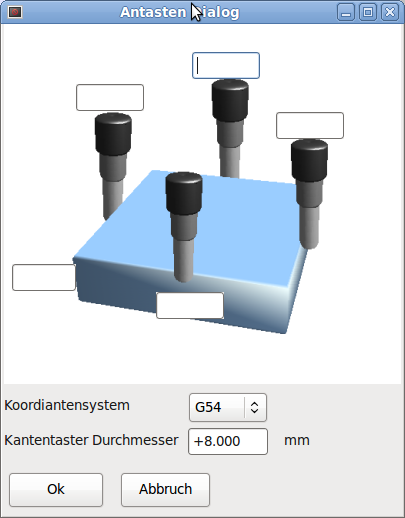
If you build an offset screen, have you thought about an touch off screen to?
Are you able to integrate an touch off dialog to calculate the angle error of the position of the workpiece?
I meen an angle error of the workpiece to the table axis.
I added the touch off dialog of original mocca.
Regards Norbert
P.S. Kantentaster Durchmesser = diameter of the touch off tool (will be taken in care when touching)
will "Start of Line" check the code in front of the startline?
This will be needed!
Otherwise the machine may begin it's work without coolant and a stopped spindle.
Also the position may be incorrect, if the program contains G53 steps and some other stuff may occur.
We discussed that matter in the german mocca thread and mocca do check all lines from the beginning of the program, sets the G and M values and reaches then the strartline, now the G Code is transmitted to the interpreter, all other code is gone to a cero device. So all start parameters should be set up correctly.
If you build an offset screen, have you thought about an touch off screen to?
Are you able to integrate an touch off dialog to calculate the angle error of the position of the workpiece?
I meen an angle error of the workpiece to the table axis.
I added the touch off dialog of original mocca.
Regards Norbert
P.S. Kantentaster Durchmesser = diameter of the touch off tool (will be taken in care when touching)
Last edit: 13 years 9 months ago by newbynobi. Reason: errors
Please Log in or Create an account to join the conversation.
- newbynobi
- Offline
- Platinum Member
-
Less
More
- Posts: 1931
- Thank you received: 394
13 years 9 months ago #28658
by newbynobi
Replied by newbynobi on topic Gscreen - a GTK / Glade / Python based screen
Hallo,
now the new computer is working!
AMD64-4800 with 2 GB Ram and an GeForce 9600GT and 17" Touchscreen.
Now gscreen is running well!
I just play a little around with gscreen (default screen) and I got two questions:
- Where can I set the feed rate? I know I can set it with an MDI Command, but how to do it on an touch screen?
clicking in the MDI Input label should open an screen as it does in the entry spin box.
(Launch Keyboard do not work)
- I like the function "Move To", but it reduces the feed rate to 60, this is in metric very sow!
Just do enter F300 in MDI, then 250 in the entry box and then move to.
And how can I get rid of the big dial showing the spindle rpm?
Norbert
now the new computer is working!
AMD64-4800 with 2 GB Ram and an GeForce 9600GT and 17" Touchscreen.
Now gscreen is running well!
I just play a little around with gscreen (default screen) and I got two questions:
- Where can I set the feed rate? I know I can set it with an MDI Command, but how to do it on an touch screen?
clicking in the MDI Input label should open an screen as it does in the entry spin box.
(Launch Keyboard do not work)
- I like the function "Move To", but it reduces the feed rate to 60, this is in metric very sow!
Just do enter F300 in MDI, then 250 in the entry box and then move to.
And how can I get rid of the big dial showing the spindle rpm?
Norbert
Please Log in or Create an account to join the conversation.
- cmorley
- Offline
- Moderator
-
Less
More
- Posts: 7368
- Thank you received: 2181
13 years 9 months ago #28659
by cmorley
Replied by cmorley on topic Gscreen - a GTK / Glade / Python based screen
If you are seeing a velocity of 60 then you must be in inch mode (unless I'm missing a bug)
the button on the top right tells you what metrics you are using at the moment. you can press it to change.
If you want gscreen to always start in metric mode then select metric in the preference page.
The Gscreen will always start in metric mode but you can always change it with the upper right button
to set manual feedrates select 'set overrides' ( I know not a very clear name )
now select jog rate
use the +- keys to adjust up or down
use the 'set at' key to set the rate at the entrybox number.
Hmm it seems you can't set the default jog velocity - I will fix this
There seems to be some conversion error too I will look into this ( I confess I don't test metric enough )
As for the launch keyboard button. What version of Ubuntu are you using Onboard is the name of the keyboard program.
It should be on 10.04 and 12.04, possibly in 8.04 too.
open a terminal and enter 'onboard' and see what it says
MDI requires a full keyboard and that is what Onboard is for I am not interested in building a keyboard dialog screen.
'Move to' should use the current jog rate.
The sample Gscreen config has added gladeVCP panels (thats what the spindle dial is from)
in the INI file remove these lines:
EMBED_TAB_NAME = Embedded 1
EMBED_TAB_LOCATION = vcp_box
EMBED_TAB_COMMAND = gladevcp -x {XID} -t Redmond vcp_box.glade
EMBED_TAB_NAME = Embedded 2
EMBED_TAB_LOCATION = notebook_mode
EMBED_TAB_COMMAND = gladevcp -x {XID} -t Redmond gladevcp-test.ui
now both the VCP panels are gone.
There is also some sample popup message dialogs that you don't need:
remove:
MESSAGE_BOLDTEXT =NONE
MESSAGE_TEXT = This is a statusbar test
MESSAGE_TYPE = status
MESSAGE_PINNAME = statustest
MESSAGE_BOLDTEXT = NONE
MESSAGE_TEXT = This is a yes no dialog test
MESSAGE_TYPE = yesnodialog
MESSAGE_PINNAME = yndialogtest
MESSAGE_BOLDTEXT = This is the short text
MESSAGE_TEXT = This is the longer text of the both type test. It can be longer then the status bar text
MESSAGE_TYPE = okdialog status
MESSAGE_PINNAME = bothtest
Chris M
the button on the top right tells you what metrics you are using at the moment. you can press it to change.
If you want gscreen to always start in metric mode then select metric in the preference page.
The Gscreen will always start in metric mode but you can always change it with the upper right button
to set manual feedrates select 'set overrides' ( I know not a very clear name )
now select jog rate
use the +- keys to adjust up or down
use the 'set at' key to set the rate at the entrybox number.
Hmm it seems you can't set the default jog velocity - I will fix this
There seems to be some conversion error too I will look into this ( I confess I don't test metric enough )
As for the launch keyboard button. What version of Ubuntu are you using Onboard is the name of the keyboard program.
It should be on 10.04 and 12.04, possibly in 8.04 too.
open a terminal and enter 'onboard' and see what it says
MDI requires a full keyboard and that is what Onboard is for I am not interested in building a keyboard dialog screen.
'Move to' should use the current jog rate.
The sample Gscreen config has added gladeVCP panels (thats what the spindle dial is from)
in the INI file remove these lines:
EMBED_TAB_NAME = Embedded 1
EMBED_TAB_LOCATION = vcp_box
EMBED_TAB_COMMAND = gladevcp -x {XID} -t Redmond vcp_box.glade
EMBED_TAB_NAME = Embedded 2
EMBED_TAB_LOCATION = notebook_mode
EMBED_TAB_COMMAND = gladevcp -x {XID} -t Redmond gladevcp-test.ui
now both the VCP panels are gone.
There is also some sample popup message dialogs that you don't need:
remove:
MESSAGE_BOLDTEXT =NONE
MESSAGE_TEXT = This is a statusbar test
MESSAGE_TYPE = status
MESSAGE_PINNAME = statustest
MESSAGE_BOLDTEXT = NONE
MESSAGE_TEXT = This is a yes no dialog test
MESSAGE_TYPE = yesnodialog
MESSAGE_PINNAME = yndialogtest
MESSAGE_BOLDTEXT = This is the short text
MESSAGE_TEXT = This is the longer text of the both type test. It can be longer then the status bar text
MESSAGE_TYPE = okdialog status
MESSAGE_PINNAME = bothtest
Chris M
Please Log in or Create an account to join the conversation.
- cmorley
- Offline
- Moderator
-
Less
More
- Posts: 7368
- Thank you received: 2181
13 years 9 months ago #28668
by cmorley
No I wasn't planning on having run-at-line go through the gcode to set spindle etc.
I think that is a great idea - the Lathe I used at work did that.
I'd like to know how successful that is with really fancy gcode with O words and remaps etc in it.
A probing screen would be nice too but I will wait on that.
Chris M
Replied by cmorley on topic Gscreen - a GTK / Glade / Python based screen
newbynobi wrote: Hallo Chris,
will "Start of Line" check the code in front of the startline?
This will be needed!
Otherwise the machine may begin it's work without coolant and a stopped spindle.
Also the position may be incorrect, if the program contains G53 steps and some other stuff may occur.
We discussed that matter in the german mocca thread and mocca do check all lines from the beginning of the program, sets the G and M values and reaches then the strartline, now the G Code is transmitted to the interpreter, all other code is gone to a cero device. So all start parameters should be set up correctly.
If you build an offset screen, have you thought about an touch off screen to?
Are you able to integrate an touch off dialog to calculate the angle error of the position of the workpiece?
I meen an angle error of the workpiece to the table axis.
I added the touch off dialog of original mocca.
Regards Norbert
P.S. Kantentaster Durchmesser = diameter of the touch off tool (will be taken in care when touching)
No I wasn't planning on having run-at-line go through the gcode to set spindle etc.
I think that is a great idea - the Lathe I used at work did that.
I'd like to know how successful that is with really fancy gcode with O words and remaps etc in it.
A probing screen would be nice too but I will wait on that.
Chris M
Please Log in or Create an account to join the conversation.
Time to create page: 1.269 seconds