
Gscreen - a GTK / Glade / Python based screen
- ditechcnc
- Offline
- New Member
-

Less
More
- Posts: 16
- Thank you received: 2
02 Mar 2013 20:41 #30770
by ditechcnc
Replied by ditechcnc on topic Gscreen - a GTK / Glade / Python based screen
Please Log in or Create an account to join the conversation.
- cmorley
- Offline
- Moderator
-

Less
More
- Posts: 7315
- Thank you received: 2146
03 Mar 2013 07:49 #30784
by cmorley
Replied by cmorley on topic Gscreen - a GTK / Glade / Python based screen
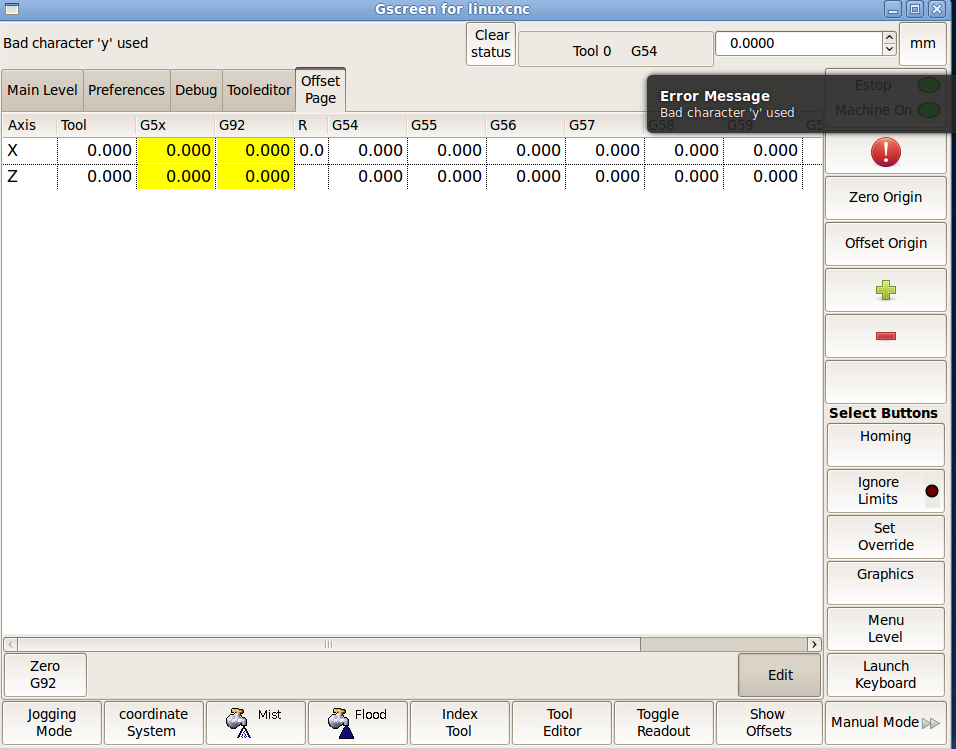
Thanks for the report and the error pinpointing.
I pushed the fix.
Chris M
I pushed the fix.
Chris M
Please Log in or Create an account to join the conversation.
- cmorley
- Offline
- Moderator
-
Less
More
- Posts: 7315
- Thank you received: 2146
03 Mar 2013 16:27 #30787
by cmorley
Replied by cmorley on topic Gscreen - a GTK / Glade / Python based screen
ok you can add 'continuous' to the DISPLAY INCREMENTS section in any order.
hopefully the DRO in industrial is a little more stable.
The restart dialog has a numerical entry and pops up with the last line number run. you can type directly into the dialog and move it.
industrial has home indicators and DTG. The indicators only pop up when all the axis are homed, that should be changed.
Chris M
hopefully the DRO in industrial is a little more stable.
The restart dialog has a numerical entry and pops up with the last line number run. you can type directly into the dialog and move it.
industrial has home indicators and DTG. The indicators only pop up when all the axis are homed, that should be changed.
Chris M
Please Log in or Create an account to join the conversation.
- emcPT
-

- Offline
- Platinum Member
-

Less
More
- Posts: 424
- Thank you received: 95
04 Mar 2013 05:18 #30809
by emcPT
Replied by emcPT on topic Gscreen - a GTK / Glade / Python based screen
I was trying to get Gscreen running just for simulation while I am preparing my lathe and I could not.
I have installed from the buildbot the sim version:
LINUXCNC - 2.6.0-pre0-3890-g5075862
I can run others simulations including axis, so I think I did not mess anything. Not sure if I am helping in reporting this, but here it goes.
All tests with all the possible configurations of gscreen returned an error:
LINUXCNC - 2.6.0-pre0-3890-g5075862
Machine configuration directory is '/home/me/linuxcnc/configs/sim/gscreen'
Machine configuration file is 'gscreen_lathe.ini'
Starting LinuxCNC...
redis server started as: 'redis-server ', logging to: /dev/null
io started
halcmd loadusr io started
Could not open command file 'core_sim.hal'
Shutting down and cleaning up LinuxCNC...
Cleanup done
and the debug file contains:
Can not find -sec MOT -var MOT -num 1
Can not find -sec IO -var IO -num 1
Can not find -sec LINUXCNC -var NML_FILE -num 1
Can not find -sec EMC -var NML_FILE -num 1
Can not find -sec REDIS -var DISABLE_SERVER -num 1
Can not find -sec REDIS -var SERVER_PATH -num 1
Can not find -sec REDIS -var SERVER_ARGS -num 1
Can not find -sec REDIS -var SERVER_LOG -num 1
16279
PID TTY STAT TIME COMMAND
16278
PID TTY STAT TIME COMMAND
16278 pts/0 Dl+ 0:00 redis-server
PID TTY STAT TIME COMMAND
Stopping realtime threads
Unloading hal components
I have installed from the buildbot the sim version:
LINUXCNC - 2.6.0-pre0-3890-g5075862
I can run others simulations including axis, so I think I did not mess anything. Not sure if I am helping in reporting this, but here it goes.
All tests with all the possible configurations of gscreen returned an error:
LINUXCNC - 2.6.0-pre0-3890-g5075862
Machine configuration directory is '/home/me/linuxcnc/configs/sim/gscreen'
Machine configuration file is 'gscreen_lathe.ini'
Starting LinuxCNC...
redis server started as: 'redis-server ', logging to: /dev/null
io started
halcmd loadusr io started
Could not open command file 'core_sim.hal'
Shutting down and cleaning up LinuxCNC...
Cleanup done
and the debug file contains:
Can not find -sec MOT -var MOT -num 1
Can not find -sec IO -var IO -num 1
Can not find -sec LINUXCNC -var NML_FILE -num 1
Can not find -sec EMC -var NML_FILE -num 1
Can not find -sec REDIS -var DISABLE_SERVER -num 1
Can not find -sec REDIS -var SERVER_PATH -num 1
Can not find -sec REDIS -var SERVER_ARGS -num 1
Can not find -sec REDIS -var SERVER_LOG -num 1
16279
PID TTY STAT TIME COMMAND
16278
PID TTY STAT TIME COMMAND
16278 pts/0 Dl+ 0:00 redis-server
PID TTY STAT TIME COMMAND
Stopping realtime threads
Unloading hal components
Please Log in or Create an account to join the conversation.
- cmorley
- Offline
- Moderator
-
Less
More
- Posts: 7315
- Thank you received: 2146
04 Mar 2013 07:24 - 04 Mar 2013 08:03 #30812
by cmorley
Replied by cmorley on topic Gscreen - a GTK / Glade / Python based screen
sim/axis9 works?
can you look in configs/sim folder and see if
core_sim.hal
is there?
If it isn't then sim/axis shouldn't work either.
Chris M
can you look in configs/sim folder and see if
core_sim.hal
is there?
If it isn't then sim/axis shouldn't work either.
Chris M
Last edit: 04 Mar 2013 08:03 by cmorley.
Please Log in or Create an account to join the conversation.
- cmorley
- Offline
- Moderator
-
Less
More
- Posts: 7315
- Thank you received: 2146
04 Mar 2013 08:13 - 04 Mar 2013 08:17 #30814
by cmorley
Replied by cmorley on topic Gscreen - a GTK / Glade / Python based screen
I think this is a problem with the system links.
I only have worked with Gcsreen as a Run-in-place build.
by using buildbot it's an installed build which moves a few things around.
There are system-links (shortcuts) that are pointing to the wrong place.
Where ever sim/axis/core_sim.hal is pointing to
sim/gscreen/core_sim.hal must point to
There are probably a couple others too. hal_manual_toolchange.hal etc
Chris M
Or maybe the system links are missing when copied into your linuxcnc folder...
I only have worked with Gcsreen as a Run-in-place build.
by using buildbot it's an installed build which moves a few things around.
There are system-links (shortcuts) that are pointing to the wrong place.
Where ever sim/axis/core_sim.hal is pointing to
sim/gscreen/core_sim.hal must point to
There are probably a couple others too. hal_manual_toolchange.hal etc
Chris M
Or maybe the system links are missing when copied into your linuxcnc folder...
Last edit: 04 Mar 2013 08:17 by cmorley.
Please Log in or Create an account to join the conversation.
- karlkec
- Offline
- Junior Member
-

Less
More
- Posts: 39
- Thank you received: 0
04 Mar 2013 10:17 #30817
by karlkec
Chris,
Thanks for adding this.
As an exercise I tried putting in code to set the initial jog increment. I modified industrial_handler.py and in the __init__ function for HandlerClass I inserted the following:
self.gscreen.set_jog_increments(vector=1)
When run it gave this error:
File "/home/milluser/linuxcnc-dev/bin/gscreen", line 1886, in set_jog_increments
self.halcomp["jog-increment.out"] = distance
AttributeError: Pin 'jog-increment.out' does not exist
I assume jog-increment has not been set up at the point HandlerClass is being initialized. Is there a different place I could make a call to set_jog_increments, after everything is initialized, to set the initial jog increment?
Thanks.
Karl
Replied by karlkec on topic Gscreen - a GTK / Glade / Python based screen
ok you can add 'continuous' to the DISPLAY INCREMENTS section in any order.
Chris M
Chris,
Thanks for adding this.
As an exercise I tried putting in code to set the initial jog increment. I modified industrial_handler.py and in the __init__ function for HandlerClass I inserted the following:
self.gscreen.set_jog_increments(vector=1)
When run it gave this error:
File "/home/milluser/linuxcnc-dev/bin/gscreen", line 1886, in set_jog_increments
self.halcomp["jog-increment.out"] = distance
AttributeError: Pin 'jog-increment.out' does not exist
I assume jog-increment has not been set up at the point HandlerClass is being initialized. Is there a different place I could make a call to set_jog_increments, after everything is initialized, to set the initial jog increment?
Thanks.
Karl
Please Log in or Create an account to join the conversation.
- cmorley
- Offline
- Moderator
-
Less
More
- Posts: 7315
- Thank you received: 2146
04 Mar 2013 12:25 - 04 Mar 2013 13:14 #30819
by cmorley
Replied by cmorley on topic Gscreen - a GTK / Glade / Python based screen
That would need to go in the init_widgets section.
In Gscreen proper the order is:
parse handler file and call it's __init__
make basic Hal component
initialize_pins
connect_signals
initialize_widgets
any one or all of the last three can be in the handler_file and the order is the same.
try adding it to the initialize_widgets section
you'll see a couple of others there as well as a lot of calls to gscreen's individual initializing functions.
Chris M
In Gscreen proper the order is:
parse handler file and call it's __init__
make basic Hal component
initialize_pins
connect_signals
initialize_widgets
any one or all of the last three can be in the handler_file and the order is the same.
try adding it to the initialize_widgets section
you'll see a couple of others there as well as a lot of calls to gscreen's individual initializing functions.
Chris M
Last edit: 04 Mar 2013 13:14 by cmorley.
Please Log in or Create an account to join the conversation.
- emcPT
-
- Offline
- Platinum Member
-
Less
More
- Posts: 424
- Thank you received: 95
05 Mar 2013 00:17 #30855
by emcPT
I had to copy files from the axis sim directory and create empty files, named xxxx_postgui.hal, and it is working.
Replied by emcPT on topic Gscreen - a GTK / Glade / Python based screen
I think this is a problem with the system links.
I only have worked with Gcsreen as a Run-in-place build.
by using buildbot it's an installed build which moves a few things around.
There are system-links (shortcuts) that are pointing to the wrong place.
Where ever sim/axis/core_sim.hal is pointing to
sim/gscreen/core_sim.hal must point to
There are probably a couple others too. hal_manual_toolchange.hal etc
Chris M
Or maybe the system links are missing when copied into your linuxcnc folder...
I had to copy files from the axis sim directory and create empty files, named xxxx_postgui.hal, and it is working.
Please Log in or Create an account to join the conversation.
- tjamscad
- Offline
- Elite Member
-

Less
More
- Posts: 238
- Thank you received: 1
05 Mar 2013 06:22 #30883
by tjamscad
Replied by tjamscad on topic Gscreen - a GTK / Glade / Python based screen
Chris,
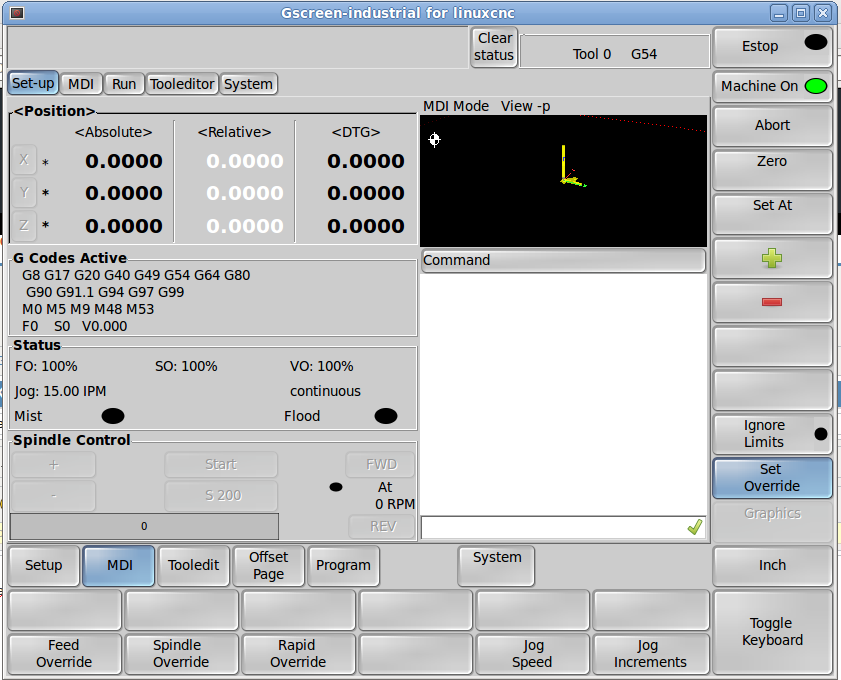
gscreen-industrial has some new issues since the last push
gscreen-industrial has some new issues since the last push
Please Log in or Create an account to join the conversation.
Time to create page: 1.046 seconds