
- Posts: 7368
- Thank you received: 2181
Gscreen - a GTK / Glade / Python based screen
- cmorley
- Offline
- Moderator
-

Less
More
12 years 9 months ago #42272
by cmorley
Replied by cmorley on topic Gscreen - a GTK / Glade / Python based screen
Are you using a RIP compiled from sources? If so:
When you edit the GLADE file, you must start GLADE from the terminal after . scripts/rip_environment (in the linuxcnc directory)
That tells GLADE about the special widgets. The DRO widgets won't even show up other wise.
Could be the trouble.
Chris M
When you edit the GLADE file, you must start GLADE from the terminal after . scripts/rip_environment (in the linuxcnc directory)
That tells GLADE about the special widgets. The DRO widgets won't even show up other wise.
Could be the trouble.
Chris M
Please Log in or Create an account to join the conversation.
- LAIR82
- Offline
- Elite Member
-

Less
More
- Posts: 197
- Thank you received: 3
12 years 9 months ago #42283
by LAIR82
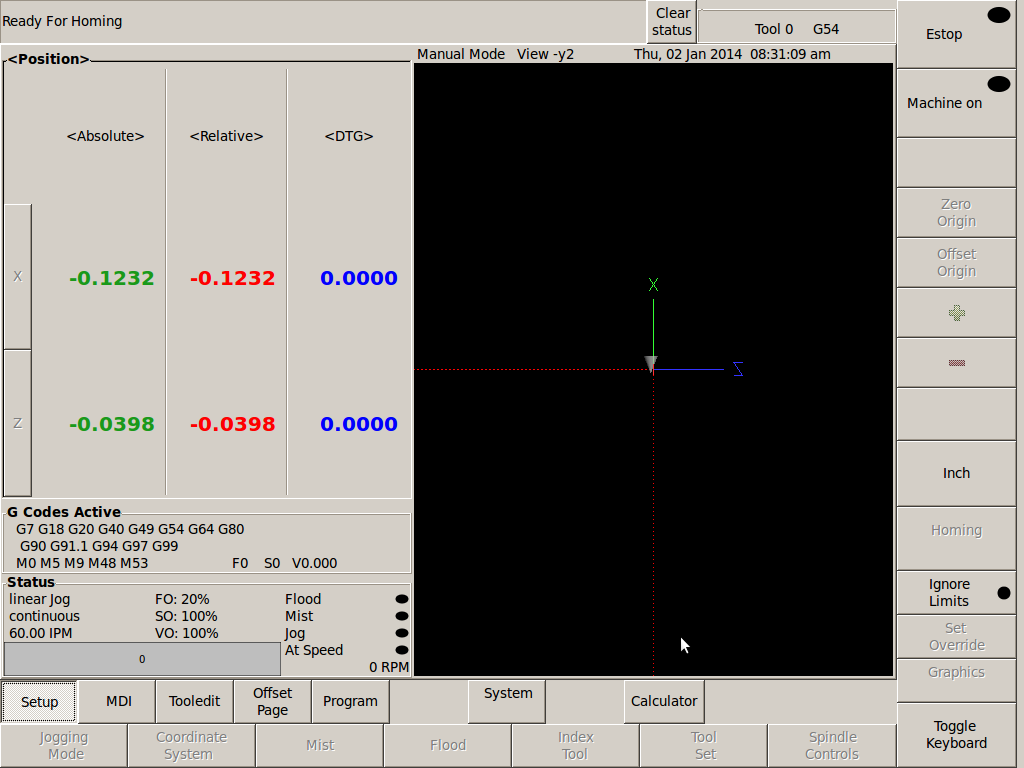
Its funny how things work as they should when following the proper procedures.
Worked fine, and back to what I was wanting it to look like.
Thanks
Rick
Replied by LAIR82 on topic Gscreen - a GTK / Glade / Python based screen
cmorley wrote: Are you using a RIP compiled from sources? If so:
When you edit the GLADE file, you must start GLADE from the terminal after . scripts/rip_environment (in the linuxcnc directory)
That tells GLADE about the special widgets. The DRO widgets won't even show up other wise.
Could be the trouble.
Chris M
Its funny how things work as they should when following the proper procedures.
Worked fine, and back to what I was wanting it to look like.
Thanks
Rick
Please Log in or Create an account to join the conversation.
- cmorley
- Offline
- Moderator
-
Less
More
- Posts: 7368
- Thank you received: 2181
12 years 9 months ago #42308
by cmorley
Replied by cmorley on topic Gscreen - a GTK / Glade / Python based screen
Excellent.
I've even done that myself
Chris M
I've even done that myself
Chris M
Please Log in or Create an account to join the conversation.
- jbunch
- Offline
- Senior Member
-

Less
More
- Posts: 79
- Thank you received: 3
12 years 9 months ago - 12 years 9 months ago #43098
by jbunch
Replied by jbunch on topic Gscreen - a GTK / Glade / Python based screen
Chris,
Norbert said this was your baby.
Working with the tool table today. There are a couple of things.
When adding new tool or editing the TAB key should add the number into the location and then move to the net entry location for entry of the next number.
When I try to touchoff X or Z it takes me out of the tool editor and does not enter this number into the tool table. It should input the actual machine locaton into the tool table.
When I have a tool already entered into the tool table when I try to touchoff Z I receive a conversion error. Wrong entry for touchoff Z.
Is there anyway when setup for the lathe that you can put up the diagram for tool Orientation. I have to grab a piece of paper every time I setup a new tool.
Also is there anyway to rename the fields to make sense for turning tools.
T - tool number - integer, 0-99999 (you can have a large number of tools in inventory)
P - pocket number - integer, 1-99999 (tool table has a lower number of entries, currently 56)
D - tool diameter - floating-point, absolute value
X..W - tool length offset on specified axis - floating-point
I - front angle (lathe only) - floating-point
J - back angle (lathe only) - floating-point
Q - tool orientation (lathe only) - integer, 0-9
More playing with the tool table.
It should only allow one tool to be selected checked at a time.
The check box should check if you touch anywhere on a line for a tool.
Thanks between you and Norbert lifes good.
Jim
Norbert said this was your baby.
Working with the tool table today. There are a couple of things.
When adding new tool or editing the TAB key should add the number into the location and then move to the net entry location for entry of the next number.
When I try to touchoff X or Z it takes me out of the tool editor and does not enter this number into the tool table. It should input the actual machine locaton into the tool table.
When I have a tool already entered into the tool table when I try to touchoff Z I receive a conversion error. Wrong entry for touchoff Z.
Is there anyway when setup for the lathe that you can put up the diagram for tool Orientation. I have to grab a piece of paper every time I setup a new tool.
Also is there anyway to rename the fields to make sense for turning tools.
T - tool number - integer, 0-99999 (you can have a large number of tools in inventory)
P - pocket number - integer, 1-99999 (tool table has a lower number of entries, currently 56)
D - tool diameter - floating-point, absolute value
X..W - tool length offset on specified axis - floating-point
I - front angle (lathe only) - floating-point
J - back angle (lathe only) - floating-point
Q - tool orientation (lathe only) - integer, 0-9
More playing with the tool table.
It should only allow one tool to be selected checked at a time.
The check box should check if you touch anywhere on a line for a tool.
Thanks between you and Norbert lifes good.
Jim
Last edit: 12 years 9 months ago by jbunch.
Please Log in or Create an account to join the conversation.
- newbynobi
- Offline
- Platinum Member
-

Less
More
- Posts: 1931
- Thank you received: 394
12 years 9 months ago - 12 years 9 months ago #43099
by newbynobi
Replied by newbynobi on topic Gscreen - a GTK / Glade / Python based screen
Halo Jim,
there are several points, in your complain, some are glade widget related and some are gmoccapy isues.
Thats why I asked you for some time in the gmoccapy thread.
I will check all your points of view and than I will discuse with Chris how to fix or change thinks to work.
It does not mean on every point that they will be included or changed, because there are a lot of users, with different points of view and we will try to make all happy, what is not easy
So please be patient.
at least this seems to be gmoccapy issues:
May be they are related to locale settings, what locale are you using?
Norbert
there are several points, in your complain, some are glade widget related and some are gmoccapy isues.
Thats why I asked you for some time in the gmoccapy thread.
I will check all your points of view and than I will discuse with Chris how to fix or change thinks to work.
It does not mean on every point that they will be included or changed, because there are a lot of users, with different points of view and we will try to make all happy, what is not easy
So please be patient.
at least this seems to be gmoccapy issues:
When I try to touchoff X or Z it takes me out of the tool editor and does not enter this number into the tool table. It should input the actual machine locaton into the tool table.
When I have a tool already entered into the tool table when I try to touchoff Z I receive a conversion error. Wrong entry for touchoff Z.
May be they are related to locale settings, what locale are you using?
Norbert
Last edit: 12 years 9 months ago by newbynobi. Reason: added a additional comment
Please Log in or Create an account to join the conversation.
- cmorley
- Offline
- Moderator
-
Less
More
- Posts: 7368
- Thank you received: 2181
12 years 9 months ago #43102
by cmorley
1)I experimented a bit with TAB key and so far not working great, but using the enter key did work...Are you really set on the TAB key?
2) Touch off - So you want to highlight a tool and then touch off to enter each axis directly. (this does seem reasonable)
If you touch off with the say Gmoccapy it will update the tooleditor, but I believe you must uncheck the selected tool and wait a second.
Why do you need to select the tool in the tool editor yet touch off with gmoccapy? Oh wait the tooleditor is how Gmoccapy selects the tool isn't it...
Sorry I'm not very familiar with how Gmoccapy does things.
Ok I have a couple ideas to look at for that. First off when the tool select is checked it suspense the tooleditor from checking to see if linuxcnc
has changed the tool offsets (eg through touchoff) I could look at not suspending that again. Other wise I could add some code to have Gmoccapy to it directly....
3) have to explain in more detail how this happens.
4) orientation diagram - hmm like a pop up? This is something Norbert could add to Gmoccapy maybe I could add a tab ...hmmm
5) renaming fields -not sure what you mean - all those fields are available - or do you want something else?
6) 7) yes I can probably get rid of the checkboxes - like the offset editor... this mat screw updating of offsets...works with 2)
One other problem is I actual have not used a tool table so the desired work flow is not completely clear to me.
The Okuma lathe I used had a reference tool and tool offsets were based on it. Well actually it had two front and back but linuxcnc doesn't support that.
It had mirror image capability.
The tooleditor was one of my first widgets and was patterned after AXIS's tool editor, I've learned more since so will try to look at these things.
though I am fairly busy with Pncconf refactor....
Chris M
Replied by cmorley on topic Gscreen - a GTK / Glade / Python based screen
jbunch wrote: Chris,
Norbert said this was your baby.
Working with the tool table today. There are a couple of things.
When adding new tool or editing the TAB key should add the number into the location and then move to the net entry location for entry of the next number.
When I try to touchoff X or Z it takes me out of the tool editor and does not enter this number into the tool table. It should input the actual machine locaton into the tool table.
When I have a tool already entered into the tool table when I try to touchoff Z I receive a conversion error. Wrong entry for touchoff Z.
Is there anyway when setup for the lathe that you can put up the diagram for tool Orientation. I have to grab a piece of paper every time I setup a new tool.
Also is there anyway to rename the fields to make sense for turning tools.
T - tool number - integer, 0-99999 (you can have a large number of tools in inventory)
P - pocket number - integer, 1-99999 (tool table has a lower number of entries, currently 56)
D - tool diameter - floating-point, absolute value
X..W - tool length offset on specified axis - floating-point
I - front angle (lathe only) - floating-point
J - back angle (lathe only) - floating-point
Q - tool orientation (lathe only) - integer, 0-9
More playing with the tool table.
It should only allow one tool to be selected checked at a time.
The check box should check if you touch anywhere on a line for a tool.
Thanks between you and Norbert lifes good.
Jim
1)I experimented a bit with TAB key and so far not working great, but using the enter key did work...Are you really set on the TAB key?
2) Touch off - So you want to highlight a tool and then touch off to enter each axis directly. (this does seem reasonable)
If you touch off with the say Gmoccapy it will update the tooleditor, but I believe you must uncheck the selected tool and wait a second.
Why do you need to select the tool in the tool editor yet touch off with gmoccapy? Oh wait the tooleditor is how Gmoccapy selects the tool isn't it...
Sorry I'm not very familiar with how Gmoccapy does things.
Ok I have a couple ideas to look at for that. First off when the tool select is checked it suspense the tooleditor from checking to see if linuxcnc
has changed the tool offsets (eg through touchoff) I could look at not suspending that again. Other wise I could add some code to have Gmoccapy to it directly....
3) have to explain in more detail how this happens.
4) orientation diagram - hmm like a pop up? This is something Norbert could add to Gmoccapy maybe I could add a tab ...hmmm
5) renaming fields -not sure what you mean - all those fields are available - or do you want something else?
6) 7) yes I can probably get rid of the checkboxes - like the offset editor... this mat screw updating of offsets...works with 2)
One other problem is I actual have not used a tool table so the desired work flow is not completely clear to me.
The Okuma lathe I used had a reference tool and tool offsets were based on it. Well actually it had two front and back but linuxcnc doesn't support that.
It had mirror image capability.
The tooleditor was one of my first widgets and was patterned after AXIS's tool editor, I've learned more since so will try to look at these things.
though I am fairly busy with Pncconf refactor....
Chris M
Please Log in or Create an account to join the conversation.
Time to create page: 0.442 seconds