
- Posts: 2419
- Thank you received: 2349
QT C++ code samples
- Grotius
- Offline
- Platinum Member
-

Less
More
7 years 4 months ago - 7 years 4 months ago #137759
by Grotius
Replied by Grotius on topic QT C++ code samples
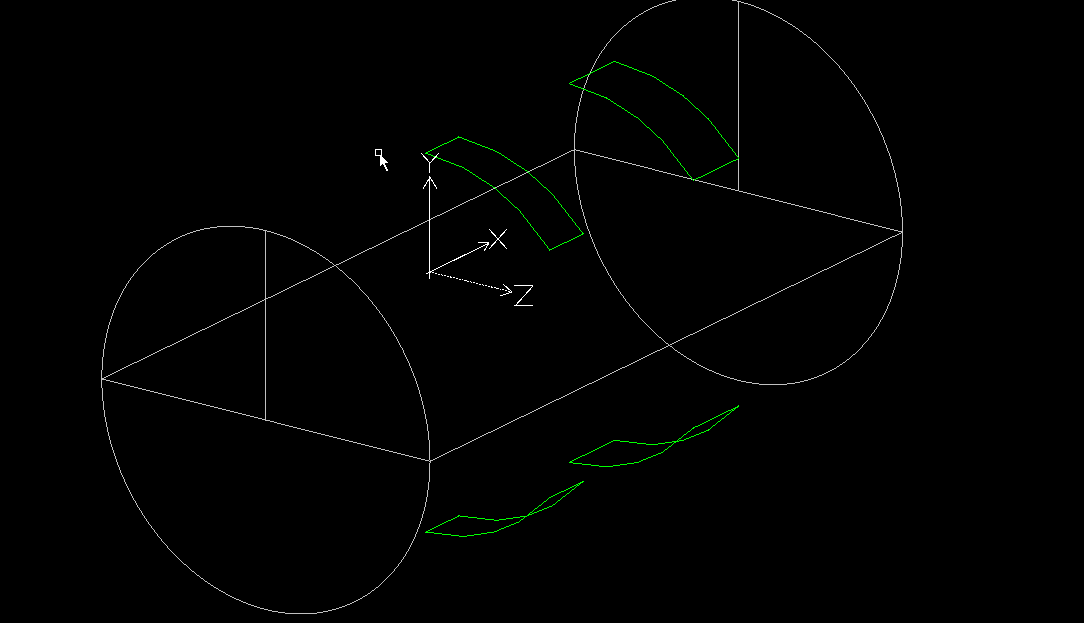
A nice 3d tube cutting example.
This is special because the torch will stay in vertical position related to the tube.
It fit's a rectangular tube straight trough the tube profile. This is important for inox balcony profiles.
They must fit tight.
The 3d tube drawing :
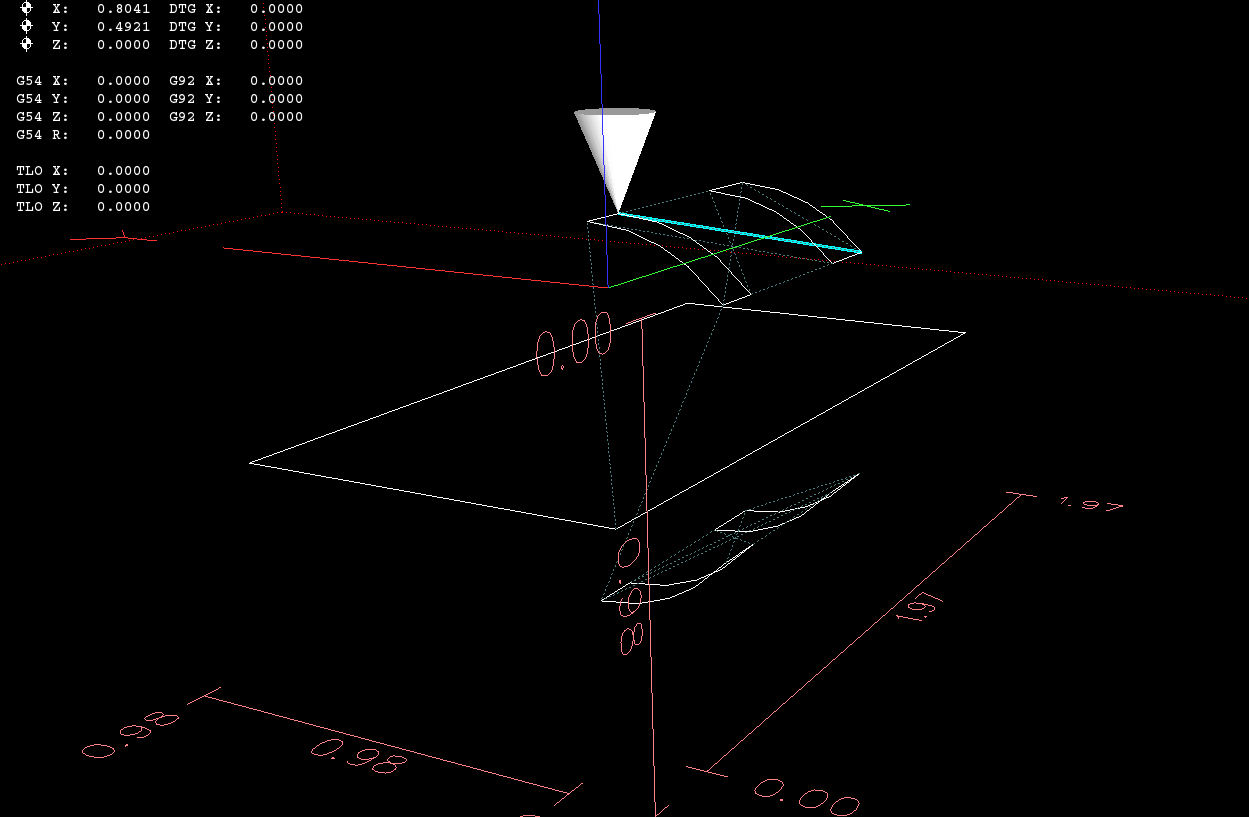
the linux output :
the dxfdecoder output :
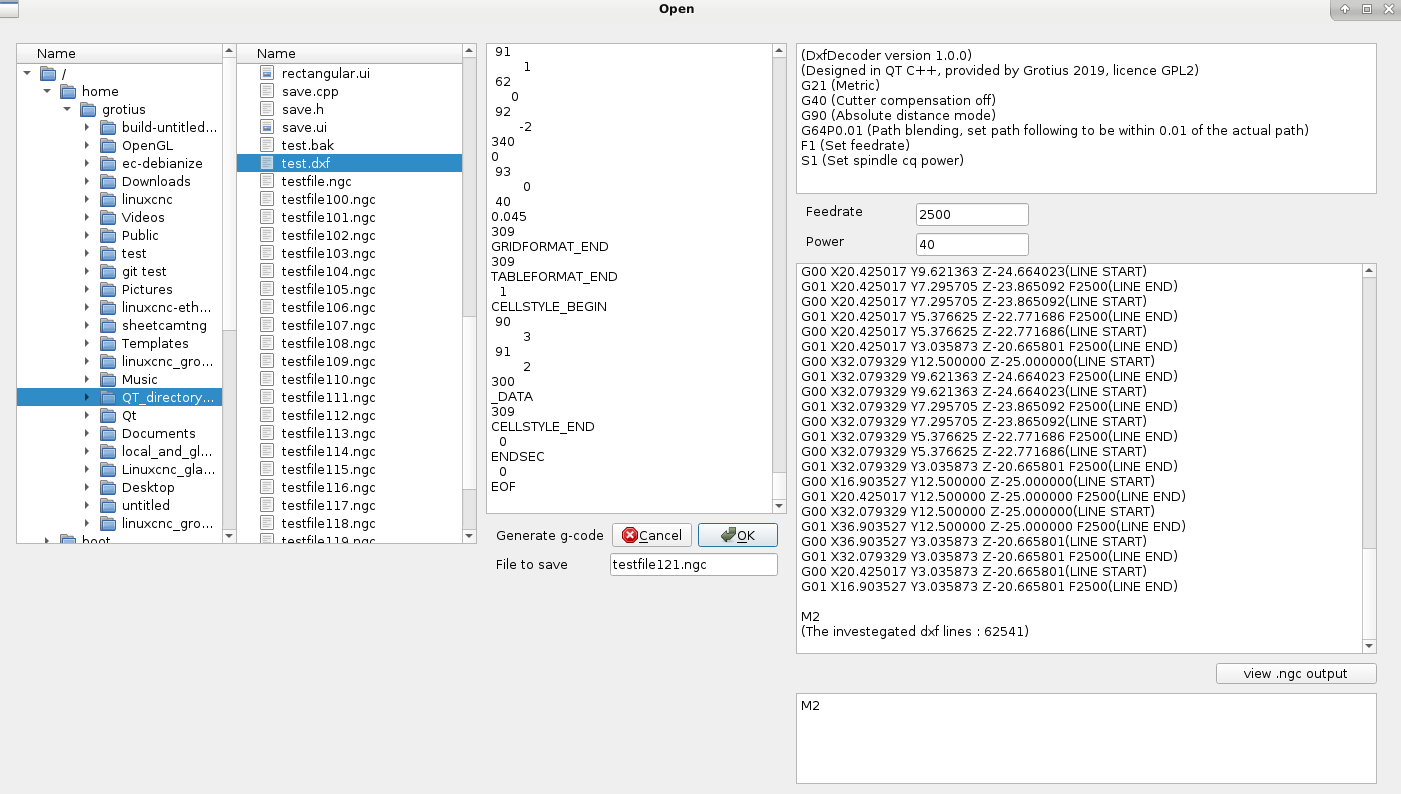
In the code i spotted a circle plane problem. So i will investegate this later on. I have to solve this in the C++ code i see.
Have to transform circle's and arc's into a other plane. I think i will make a calculation for this later on.
At this moment, for this example i have used only lines and no circles and arc's into the g-code.
The g-code that you can load in axis simulation :
So far so good.
This is special because the torch will stay in vertical position related to the tube.
It fit's a rectangular tube straight trough the tube profile. This is important for inox balcony profiles.
They must fit tight.
The 3d tube drawing :
the linux output :
the dxfdecoder output :
In the code i spotted a circle plane problem. So i will investegate this later on. I have to solve this in the C++ code i see.
Have to transform circle's and arc's into a other plane. I think i will make a calculation for this later on.
At this moment, for this example i have used only lines and no circles and arc's into the g-code.
The g-code that you can load in axis simulation :
Warning: Spoiler!
Code:
(DxfDecoder version 1.0.0)
(Designed in QT C++, provided by Grotius 2019, licence GPL2)
G21 (Metric)
G40 (Cutter compensation off)
G90 (Absolute distance mode)
G64P0.01 (Path blending, set path following to be within 0.01 of the actual path)
F1 (Set feedrate)
S1 (Set spindle cq power)
G00 X0.000000 Y0.000000 Z-12.500000(LINE START)
G01 X50.000000 Y0.000000 Z-12.500000 F2500(LINE END)
G00 X50.000000 Y0.000000 Z-12.500000(LINE START)
G01 X50.000000 Y25.000000 Z-12.500000 F2500(LINE END)
G00 X50.000000 Y25.000000 Z-12.500000(LINE START)
G01 X0.000000 Y25.000000 Z-12.500000 F2500(LINE END)
G00 X0.000000 Y25.000000 Z-12.500000(LINE START)
G01 X0.000000 Y0.000000 Z-12.500000 F2500(LINE END)
G00 X16.903527 Y12.500000 Z0.000000(LINE START)
G01 X16.903527 Y9.621363 Z-0.335977 F2500(LINE END)
G00 X16.903527 Y9.621363 Z-0.335977(LINE START)
G01 X16.903527 Y7.295705 Z-1.134908 F2500(LINE END)
G00 X16.903527 Y7.295705 Z-1.134908(LINE START)
G01 X16.903527 Y5.376625 Z-2.228314 F2500(LINE END)
G00 X16.903527 Y5.376625 Z-2.228314(LINE START)
G01 X16.903527 Y3.035873 Z-4.334199 F2500(LINE END)
G00 X36.903527 Y12.500000 Z0.000000(LINE START)
G01 X36.903527 Y9.621363 Z-0.335977 F2500(LINE END)
G00 X36.903527 Y9.621363 Z-0.335977(LINE START)
G01 X36.903527 Y7.295705 Z-1.134908 F2500(LINE END)
G00 X36.903527 Y7.295705 Z-1.134908(LINE START)
G01 X36.903527 Y5.376625 Z-2.228314 F2500(LINE END)
G00 X36.903527 Y5.376625 Z-2.228314(LINE START)
G01 X36.903527 Y3.035873 Z-4.334199 F2500(LINE END)
G00 X20.425017 Y12.500000 Z0.000000(LINE START)
G01 X20.425017 Y9.621363 Z-0.335977 F2500(LINE END)
G00 X20.425017 Y9.621363 Z-0.335977(LINE START)
G01 X20.425017 Y7.295705 Z-1.134908 F2500(LINE END)
G00 X20.425017 Y7.295705 Z-1.134908(LINE START)
G01 X20.425017 Y5.376625 Z-2.228314 F2500(LINE END)
G00 X20.425017 Y5.376625 Z-2.228314(LINE START)
G01 X20.425017 Y3.035873 Z-4.334199 F2500(LINE END)
G00 X32.079329 Y12.500000 Z0.000000(LINE START)
G01 X32.079329 Y9.621363 Z-0.335977 F2500(LINE END)
G00 X32.079329 Y9.621363 Z-0.335977(LINE START)
G01 X32.079329 Y7.295705 Z-1.134908 F2500(LINE END)
G00 X32.079329 Y7.295705 Z-1.134908(LINE START)
G01 X32.079329 Y5.376625 Z-2.228314 F2500(LINE END)
G00 X32.079329 Y5.376625 Z-2.228314(LINE START)
G01 X32.079329 Y3.035873 Z-4.334199 F2500(LINE END)
G00 X16.903527 Y12.500000 Z0.000000(LINE START)
G01 X20.425017 Y12.500000 Z0.000000 F2500(LINE END)
G00 X32.079329 Y12.500000 Z0.000000(LINE START)
G01 X36.903527 Y12.500000 Z0.000000 F2500(LINE END)
G00 X36.903527 Y3.035873 Z-4.334199(LINE START)
G01 X32.079329 Y3.035873 Z-4.334199 F2500(LINE END)
G00 X20.425017 Y3.035873 Z-4.334199(LINE START)
G01 X16.903527 Y3.035873 Z-4.334199 F2500(LINE END)
G00 X16.903527 Y12.500000 Z-25.000000(LINE START)
G01 X16.903527 Y9.621363 Z-24.664023 F2500(LINE END)
G00 X16.903527 Y9.621363 Z-24.664023(LINE START)
G01 X16.903527 Y7.295705 Z-23.865092 F2500(LINE END)
G00 X16.903527 Y7.295705 Z-23.865092(LINE START)
G01 X16.903527 Y5.376625 Z-22.771686 F2500(LINE END)
G00 X16.903527 Y5.376625 Z-22.771686(LINE START)
G01 X16.903527 Y3.035873 Z-20.665801 F2500(LINE END)
G00 X36.903527 Y12.500000 Z-25.000000(LINE START)
G01 X36.903527 Y9.621363 Z-24.664023 F2500(LINE END)
G00 X36.903527 Y9.621363 Z-24.664023(LINE START)
G01 X36.903527 Y7.295705 Z-23.865092 F2500(LINE END)
G00 X36.903527 Y7.295705 Z-23.865092(LINE START)
G01 X36.903527 Y5.376625 Z-22.771686 F2500(LINE END)
G00 X36.903527 Y5.376625 Z-22.771686(LINE START)
G01 X36.903527 Y3.035873 Z-20.665801 F2500(LINE END)
G00 X20.425017 Y12.500000 Z-25.000000(LINE START)
G01 X20.425017 Y9.621363 Z-24.664023 F2500(LINE END)
G00 X20.425017 Y9.621363 Z-24.664023(LINE START)
G01 X20.425017 Y7.295705 Z-23.865092 F2500(LINE END)
G00 X20.425017 Y7.295705 Z-23.865092(LINE START)
G01 X20.425017 Y5.376625 Z-22.771686 F2500(LINE END)
G00 X20.425017 Y5.376625 Z-22.771686(LINE START)
G01 X20.425017 Y3.035873 Z-20.665801 F2500(LINE END)
G00 X32.079329 Y12.500000 Z-25.000000(LINE START)
G01 X32.079329 Y9.621363 Z-24.664023 F2500(LINE END)
G00 X32.079329 Y9.621363 Z-24.664023(LINE START)
G01 X32.079329 Y7.295705 Z-23.865092 F2500(LINE END)
G00 X32.079329 Y7.295705 Z-23.865092(LINE START)
G01 X32.079329 Y5.376625 Z-22.771686 F2500(LINE END)
G00 X32.079329 Y5.376625 Z-22.771686(LINE START)
G01 X32.079329 Y3.035873 Z-20.665801 F2500(LINE END)
G00 X16.903527 Y12.500000 Z-25.000000(LINE START)
G01 X20.425017 Y12.500000 Z-25.000000 F2500(LINE END)
G00 X32.079329 Y12.500000 Z-25.000000(LINE START)
G01 X36.903527 Y12.500000 Z-25.000000 F2500(LINE END)
G00 X36.903527 Y3.035873 Z-20.665801(LINE START)
G01 X32.079329 Y3.035873 Z-20.665801 F2500(LINE END)
G00 X20.425017 Y3.035873 Z-20.665801(LINE START)
G01 X16.903527 Y3.035873 Z-20.665801 F2500(LINE END)
M2
(The investegated dxf lines : 62541)
So far so good.
Last edit: 7 years 4 months ago by Grotius.
The following user(s) said Thank You: chimeno
Please Log in or Create an account to join the conversation.
- Grotius
- Offline
- Platinum Member
-
Less
More
- Posts: 2419
- Thank you received: 2349
7 years 4 months ago - 7 years 4 months ago #137830
by Grotius
Replied by Grotius on topic QT C++ code samples
Today i added code for recognizing closed contours, i used the Qlist library to make array's.
Qlist array's are nice. Maybe i use Hash array's some day. They are allocating memory different and can be faster when
using huge files. The Hash array is not switching allocated memory. The Hash array can have memory all around, so it does not have to change the whole Qlist one memory line down. Maybe the name Hash is allocated to Bitcoin.
The program now specifies a inside offset, a outside offset and no offset (open contours).
It's working for line function's at the moment. I have to integrate it also for circle and arc's.
My software vision about the program work flow can make a little change coming day's.
I write the textfile output in one sequence at this moment, very fast, but a very hard to do for this program.
I will try to stay at this workflow, but when we use for example auto-nesting we have to change g-code object's up or down in
the g-code list. A tiny example is "keep parts together", rotate them an fit them in a certain area.
The cad drawing :
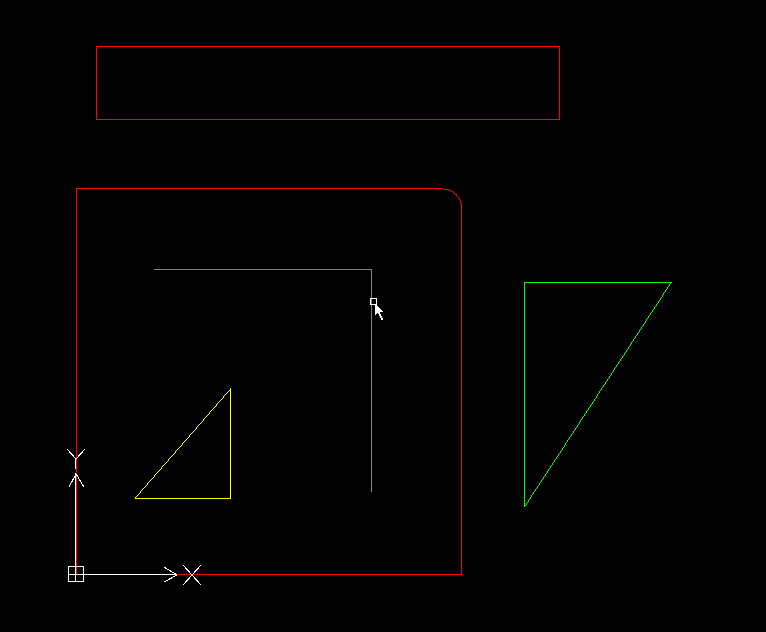
Red = outside offset
Yellow = inside offset
Grey = no offset
Green = can be marking or what we want to do...
Cyan = slower
The linuxcnc output :
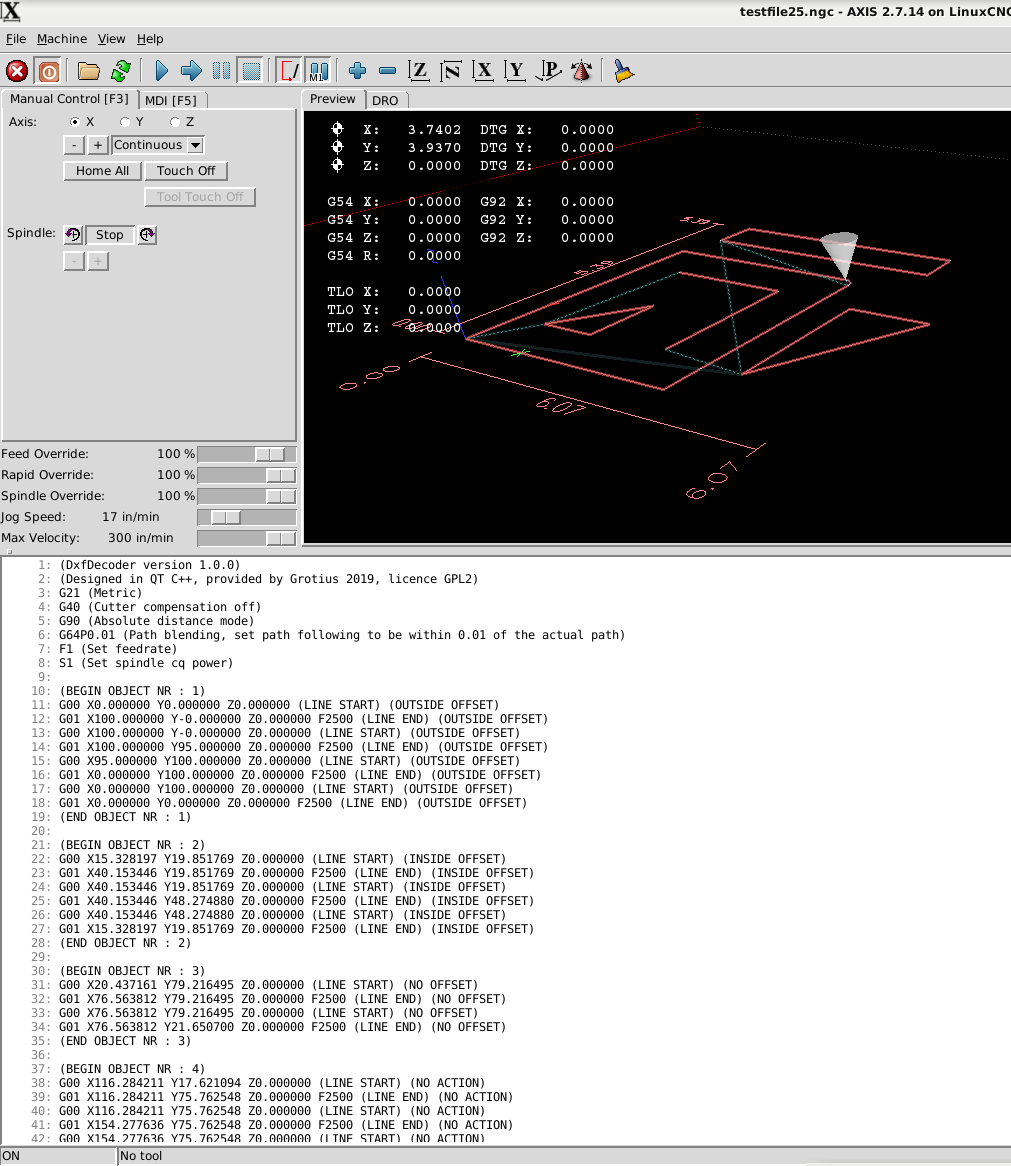
If you look at the g-code output you see double g-code lines, G0 and G1. So far this is no problem.
This can be deleted, but i can use this for inversing the cw to
ccw movement at the object. They will be deleted when the G41.1 and G42.1 are integrated.
The idea is to make for each object, one array.
For a example A little C++ code how to swap an array (Qlist) I have to write this code soon. But i write now how to do it, before
writing actual C++ code...
This is the vision :
Array 1 = Object 1 (gcode object, see picture)
Array 2 = Object 2 (gcode object, can be 1000 lines of code, no problem for the array's)
We can use multiple parameters for each array....
We put value's in the array's...
Array 1 = x_start, y_start, z_start, x_end, y_end, z_end, cw, ccw
To inverse from clockwise (cw) to counterclockwise (ccw). It's a kind of interpolation, a very easy way of this kind...
If we use a swap function from the Qlist C++ library we can swap (change) the x_start value with the x_end value,
when this is done for all parameters, we have inverted the cutting path from cw to ccw. The swap function is very fast.
Array 1 = x_start(100), y_start, z_start, x_end(50), y_end, z_end, cw(1), ccw(0)
after swap :
Array 1 = x_start(50), y_start, z_start, x_end(100), y_end, z_end, cw(0), ccw(1)
For tubes, it's handy to have defined inside, outside and no offset's for each tube.
The used cad color lines are perfect to define this.
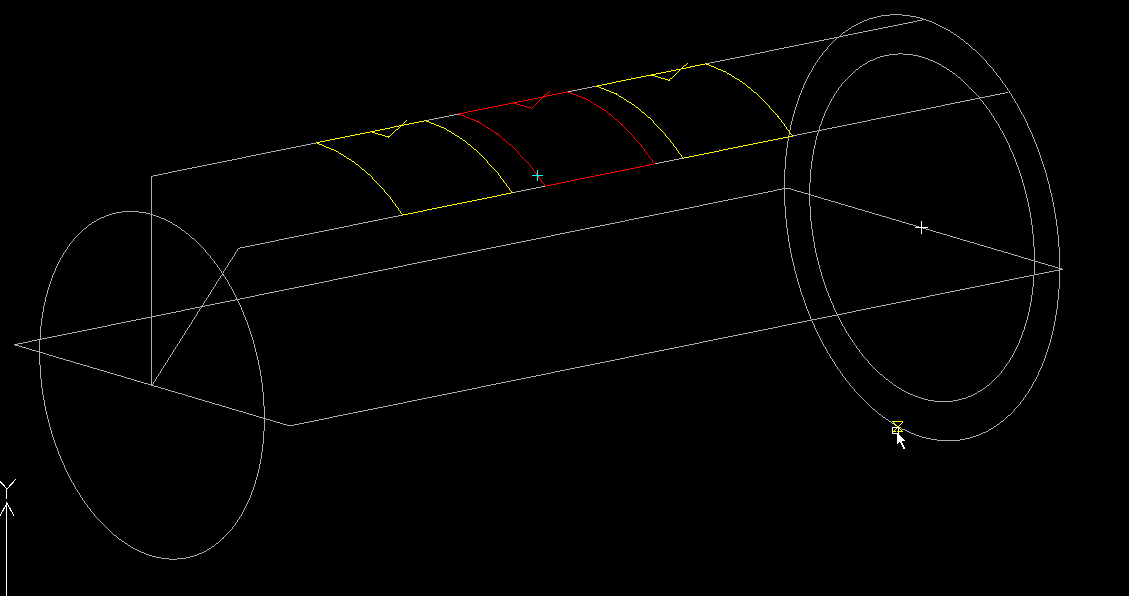
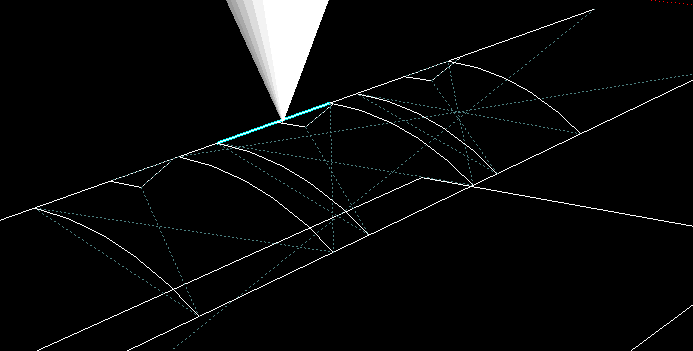
3d lead in.
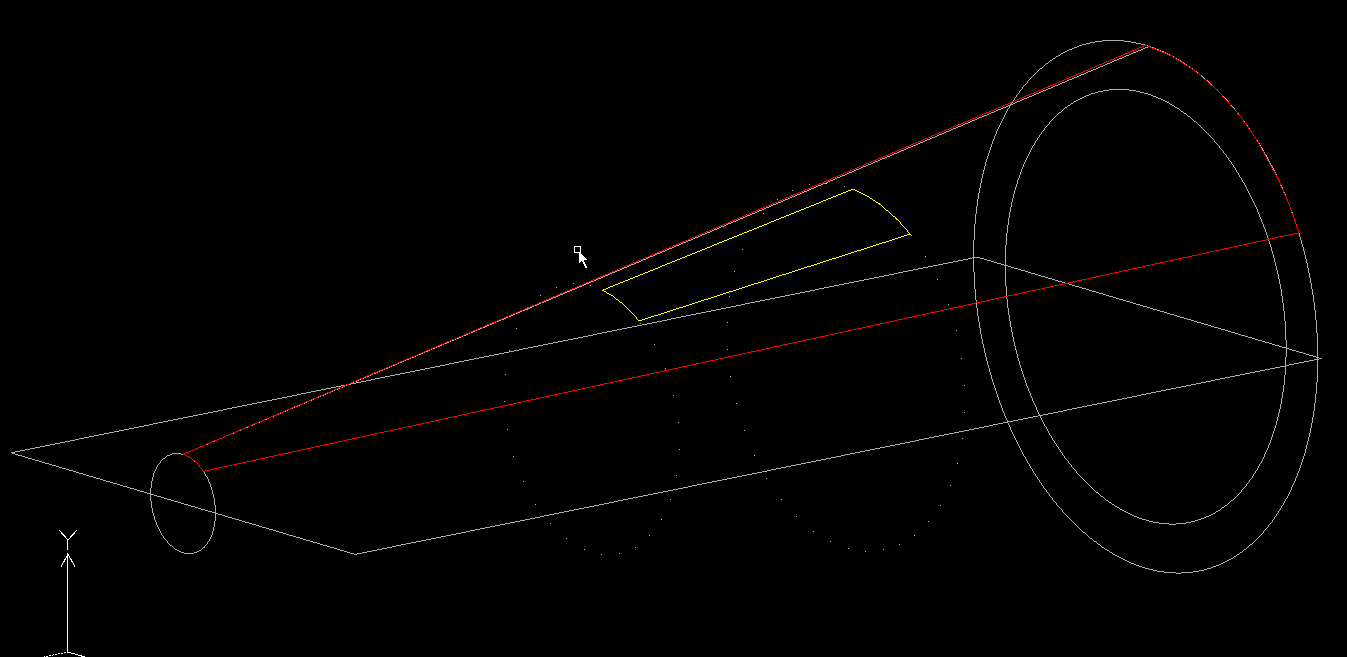
Cutting a part of a space craft with a free program :woohoo:
It's the top window of the space craft, a 3d cone shape...
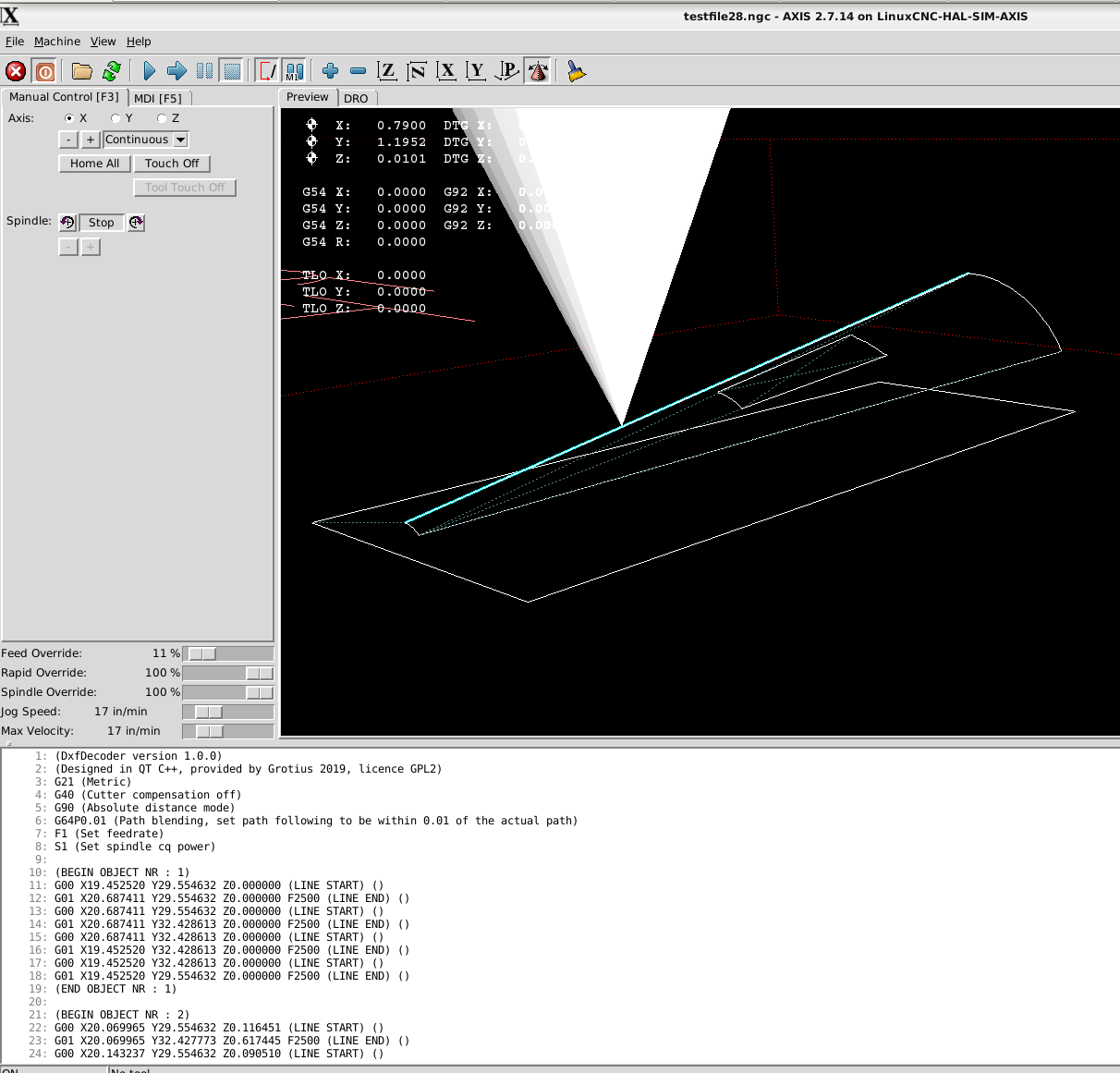
So far so good.
Qlist array's are nice. Maybe i use Hash array's some day. They are allocating memory different and can be faster when
using huge files. The Hash array is not switching allocated memory. The Hash array can have memory all around, so it does not have to change the whole Qlist one memory line down.
Maybe the name Hash is allocated to Bitcoin.The program now specifies a inside offset, a outside offset and no offset (open contours).
It's working for line function's at the moment. I have to integrate it also for circle and arc's.
My software vision about the program work flow can make a little change coming day's.
I write the textfile output in one sequence at this moment, very fast, but a very hard to do for this program.
I will try to stay at this workflow, but when we use for example auto-nesting we have to change g-code object's up or down in
the g-code list. A tiny example is "keep parts together", rotate them an fit them in a certain area.
The cad drawing :
Red = outside offset
Yellow = inside offset
Grey = no offset
Green = can be marking or what we want to do...
Cyan = slower
The linuxcnc output :
If you look at the g-code output you see double g-code lines, G0 and G1. So far this is no problem.
This can be deleted, but i can use this for inversing the cw to
ccw movement at the object. They will be deleted when the G41.1 and G42.1 are integrated.
The idea is to make for each object, one array.
For a example A little C++ code how to swap an array (Qlist) I have to write this code soon. But i write now how to do it, before
writing actual C++ code...
This is the vision :
Array 1 = Object 1 (gcode object, see picture)
Array 2 = Object 2 (gcode object, can be 1000 lines of code, no problem for the array's)
We can use multiple parameters for each array....
We put value's in the array's...
Array 1 = x_start, y_start, z_start, x_end, y_end, z_end, cw, ccw
To inverse from clockwise (cw) to counterclockwise (ccw). It's a kind of interpolation, a very easy way of this kind...
If we use a swap function from the Qlist C++ library we can swap (change) the x_start value with the x_end value,
when this is done for all parameters, we have inverted the cutting path from cw to ccw. The swap function is very fast.
Array 1 = x_start(100), y_start, z_start, x_end(50), y_end, z_end, cw(1), ccw(0)
after swap :
Array 1 = x_start(50), y_start, z_start, x_end(100), y_end, z_end, cw(0), ccw(1)
For tubes, it's handy to have defined inside, outside and no offset's for each tube.
The used cad color lines are perfect to define this.
3d lead in.
Cutting a part of a space craft with a free program :woohoo:
It's the top window of the space craft, a 3d cone shape...
So far so good.
Last edit: 7 years 4 months ago by Grotius.
The following user(s) said Thank You: chimeno
Please Log in or Create an account to join the conversation.
- Grotius
- Offline
- Platinum Member
-
Less
More
- Posts: 2419
- Thank you received: 2349
7 years 4 months ago - 7 years 4 months ago #138006
by Grotius
Replied by Grotius on topic QT C++ code samples
Today i started a coding technique with a new filosofy. It's just fall, stand up, and try again, and try to expand our limited knowledge.
We really need to load the entire dxf file into the memory of the linux pc.
And after the file is loaded into a huge array (memory), we can do calculation's like cosinus for i and j, sorting, swapping, hashing etc.
An sich manipulating an array is quite easy to do.
For the contour recognize i use the matching of double values from x,y,z value's. Double value's are big values that can be round off by pc in different way's. So it's dangerous to do without any safetybeld.
So we use a relative change and difference formula for this with a tollerance user input value.
Just made a program template that could be very interesting for the dxf decoder program.
The idea is to load the dxf file into a multi dimension array at once.
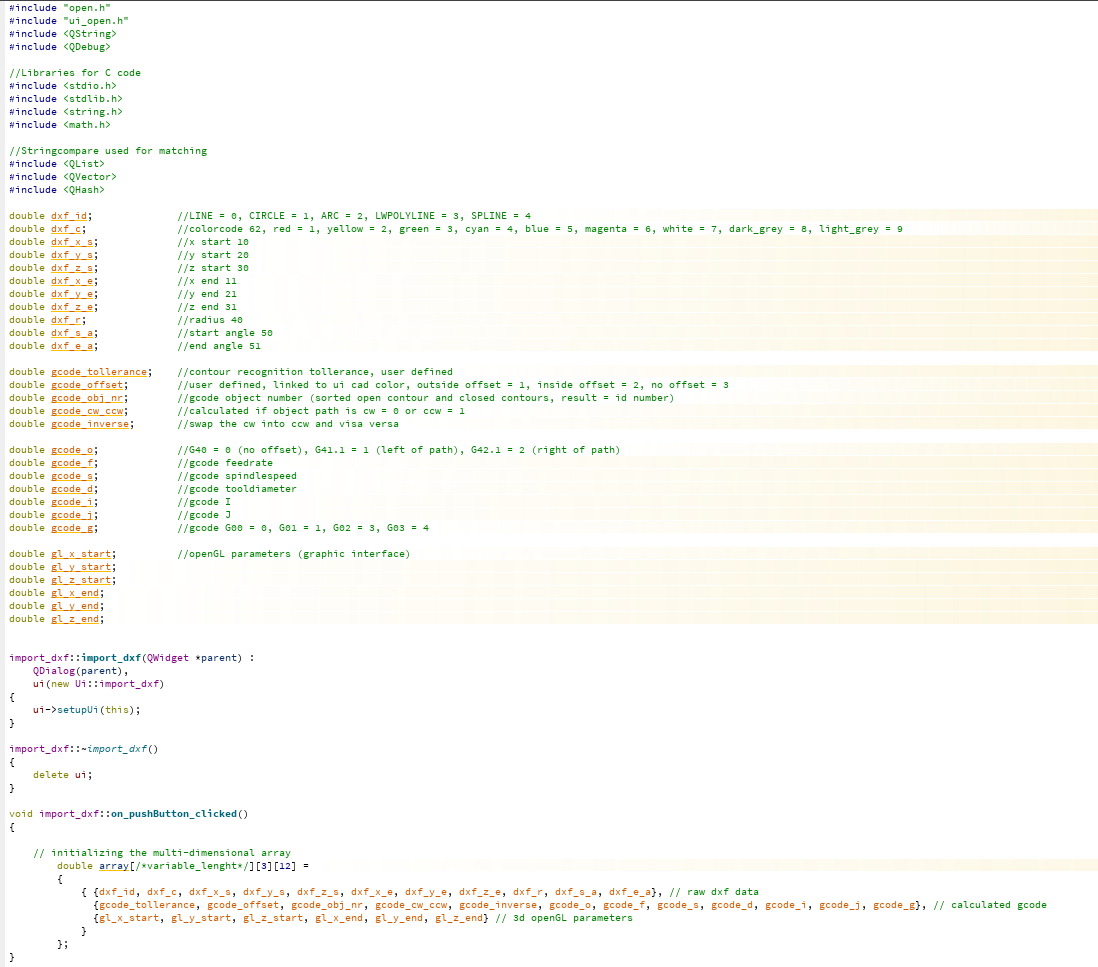
As you see. The core of the program can be very compact this way. The array is also easy to expand after all.
We can export from source to svg, stl, etc with a extra array line.... The program flow is perfect.
In fact the multidimensional array can be seen as the heartbeat of the program. It's inside a C++ class wich is a part of the program.
Some one could ask me : In some cases you could better use a "integer" instead of a "double" in the <double>multidimensional array?
The problem is. If i wrote the source code for the array's in C and C++. Mixing double's and integers, strings, etc in the same array would be possible for sure ! But that time will come soon. QT is the first that will do that. It will be called the QArray.
We really need to load the entire dxf file into the memory of the linux pc.
And after the file is loaded into a huge array (memory), we can do calculation's like cosinus for i and j, sorting, swapping, hashing etc.
An sich manipulating an array is quite easy to do.
For the contour recognize i use the matching of double values from x,y,z value's. Double value's are big values that can be round off by pc in different way's. So it's dangerous to do without any safetybeld.
So we use a relative change and difference formula for this with a tollerance user input value.
Just made a program template that could be very interesting for the dxf decoder program.
The idea is to load the dxf file into a multi dimension array at once.
As you see. The core of the program can be very compact this way. The array is also easy to expand after all.
We can export from source to svg, stl, etc with a extra array line.... The program flow is perfect.
In fact the multidimensional array can be seen as the heartbeat of the program. It's inside a C++ class wich is a part of the program.
Some one could ask me : In some cases you could better use a "integer" instead of a "double" in the <double>multidimensional array?
The problem is. If i wrote the source code for the array's in C and C++. Mixing double's and integers, strings, etc in the same array would be possible for sure ! But that time will come soon. QT is the first that will do that. It will be called the QArray.
Last edit: 7 years 4 months ago by Grotius.
Please Log in or Create an account to join the conversation.
- rodw
- Offline
- Platinum Member
-
Less
More
- Posts: 12170
- Thank you received: 4153
7 years 4 months ago #138033
by rodw
Replied by rodw on topic QT C++ code samples
It seems to me that the next lesson on C coding you need is about structures and pointers. A structure gathers the attributes about your object with different data types into one easy to understand variable object.
So then you can create an array of structures which will be much easier and cleaner to understand
So this brings you to needing to understand pointers so you can use a pointer variable to point to the array element you wish to access
And then finally, this application may well lend itself to a linked list which means you would define a new structure containing your dxf structure an two pointers (next and previous). This lets you build a dynamic system where each element knows where the one before it lives and the one after it lives (the first one has a NULL for previous and the last one has a NULL for next). Linked lists are extremely powerful advanced techniques because you can reorder the list just by manipulating the pointers.
So master pointers by writing your own versions of some of the string functions and new ones like upperstr() and lowerstr()
Then learn about structures and how to access them by use of a pointer
Then you will be able to think bout a linked list
Read some of the Linuxcnc source code in the emc folder and understand how it manages data.
By then, you will be a master kenobi of C
So then you can create an array of structures which will be much easier and cleaner to understand
So this brings you to needing to understand pointers so you can use a pointer variable to point to the array element you wish to access
And then finally, this application may well lend itself to a linked list which means you would define a new structure containing your dxf structure an two pointers (next and previous). This lets you build a dynamic system where each element knows where the one before it lives and the one after it lives (the first one has a NULL for previous and the last one has a NULL for next). Linked lists are extremely powerful advanced techniques because you can reorder the list just by manipulating the pointers.
So master pointers by writing your own versions of some of the string functions and new ones like upperstr() and lowerstr()
Then learn about structures and how to access them by use of a pointer
Then you will be able to think bout a linked list
Read some of the Linuxcnc source code in the emc folder and understand how it manages data.
By then, you will be a master kenobi of C
The following user(s) said Thank You: Grotius
Please Log in or Create an account to join the conversation.
- Grotius
- Offline
- Platinum Member
-
Less
More
- Posts: 2419
- Thank you received: 2349
7 years 4 months ago #138137
by Grotius
Replied by Grotius on topic QT C++ code samples
Hi Rod,
Thanks for your reply.
By then, you will be a master kenobi of C
It's not my purpose to become a good programmer. Sometimes i read abracadabra code.. And i think, i will never
understand this.
It's my purpose to write something for the community that can be helpful for at least 10-15 years.
The community has given Linux, Linuxcnc and so on.
It's my job now to give something back to the community. If this course takes time, it will be so.
Every day i become more and more powerful in coding. So i keep faith. Giving up is the easy part.
I made the same template for a structure, see the picture. The structure is indeed very easy in usage.
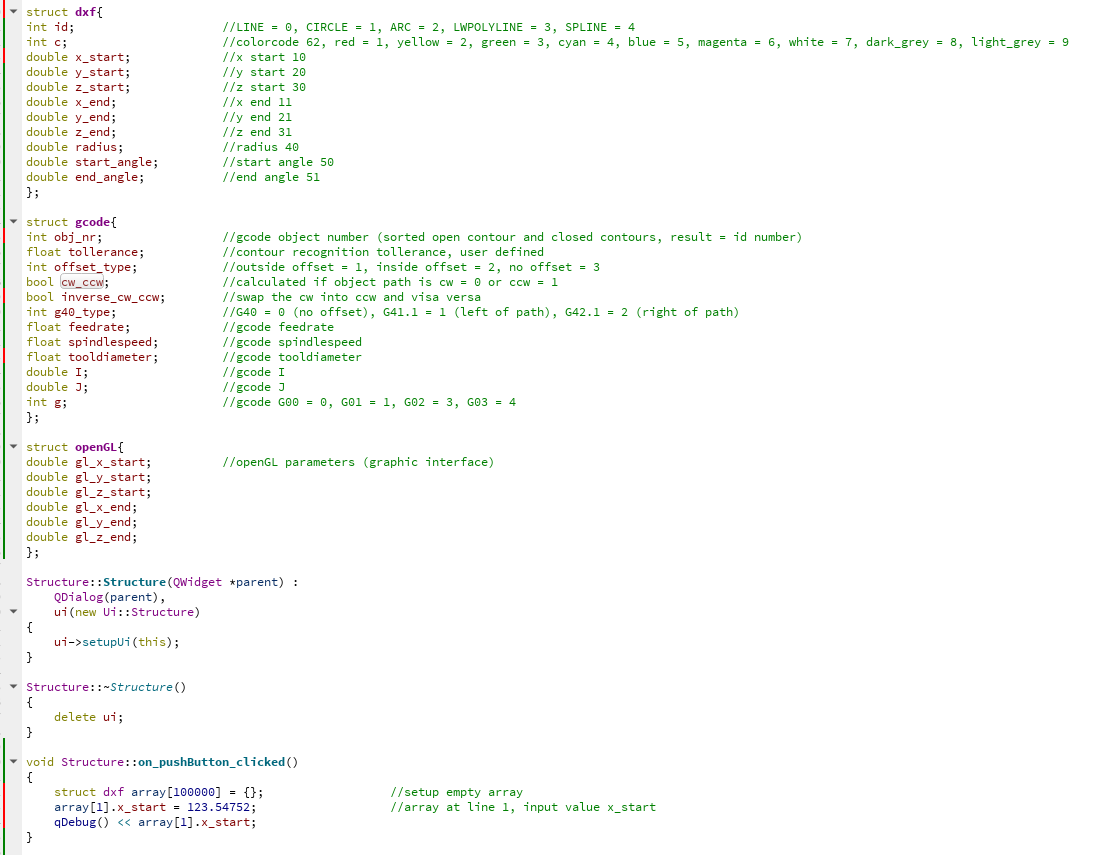
What i did not show in the previous post is that all variables are defined as extern variables.
This has to do with the OpenGL viewer that lives in a other C++ class and uses the extern variables to display the graphical output.
For example, when the program is upgraded with autonesting in future, we need the same exernal variables in the Autonesting Class.
I tested the Structure as extern structure for usage with extern variables, but this seems a problem at this moment.
The coding of a Array input field is just a little more work, because i will have to look at the input field number [] instead of a easy name when using a Structure.
Thanks for your reply.
By then, you will be a master kenobi of C
It's not my purpose to become a good programmer. Sometimes i read abracadabra code.. And i think, i will never
understand this.
It's my purpose to write something for the community that can be helpful for at least 10-15 years.
The community has given Linux, Linuxcnc and so on.
It's my job now to give something back to the community. If this course takes time, it will be so.
Every day i become more and more powerful in coding. So i keep faith. Giving up is the easy part.
I made the same template for a structure, see the picture. The structure is indeed very easy in usage.
What i did not show in the previous post is that all variables are defined as extern variables.
This has to do with the OpenGL viewer that lives in a other C++ class and uses the extern variables to display the graphical output.
For example, when the program is upgraded with autonesting in future, we need the same exernal variables in the Autonesting Class.
I tested the Structure as extern structure for usage with extern variables, but this seems a problem at this moment.
The coding of a Array input field is just a little more work, because i will have to look at the input field number [] instead of a easy name when using a Structure.
The following user(s) said Thank You: tommylight, rodw
Please Log in or Create an account to join the conversation.
- Grotius
- Offline
- Platinum Member
-
Less
More
- Posts: 2419
- Thank you received: 2349
7 years 4 months ago - 7 years 4 months ago #138191
by Grotius
Replied by Grotius on topic QT C++ code samples
I used the Array template today.
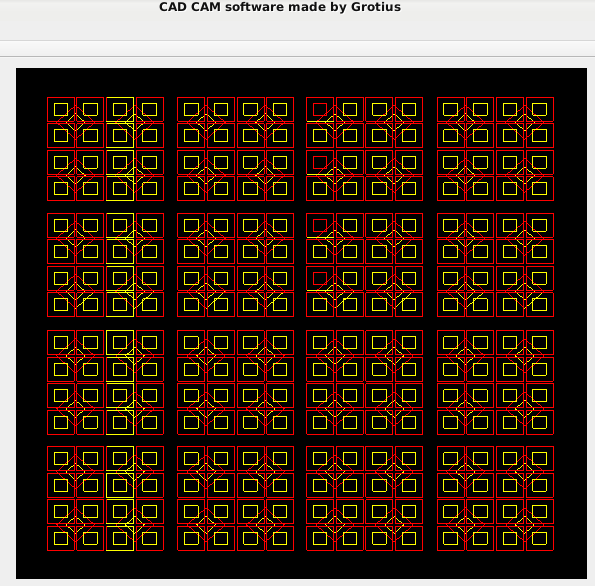
Made a simple cad drawing :
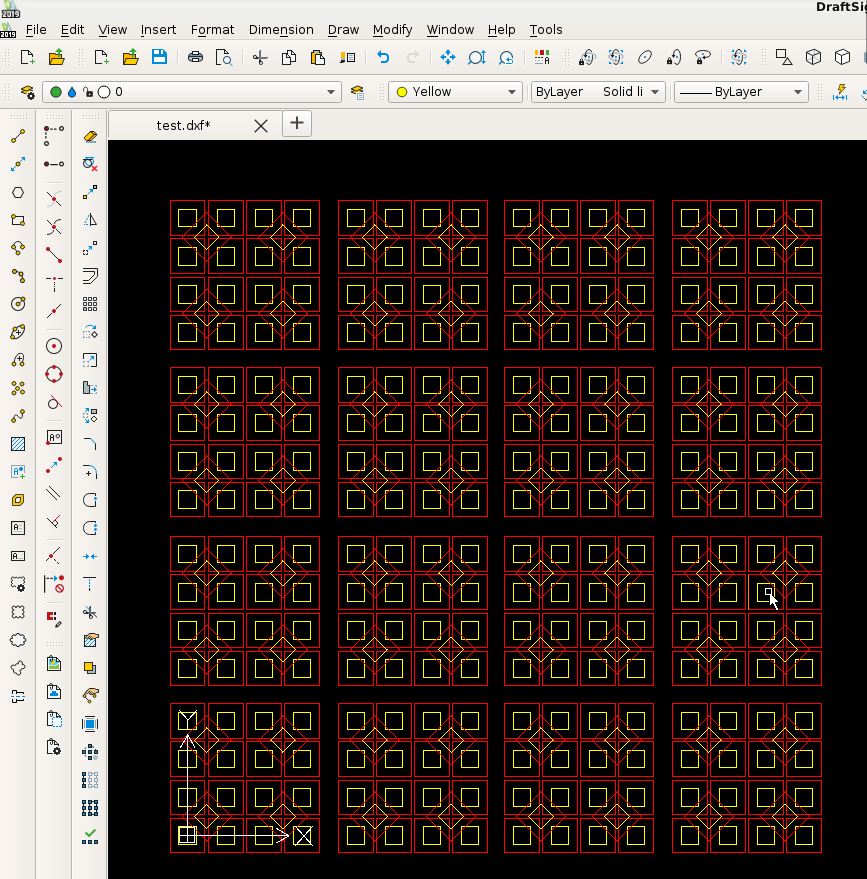
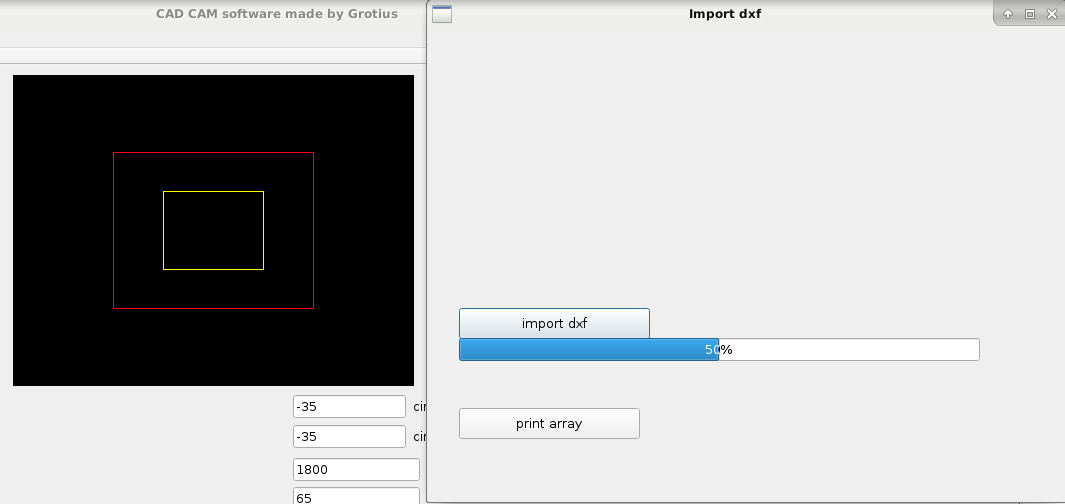
The dxf Decoder output screen :
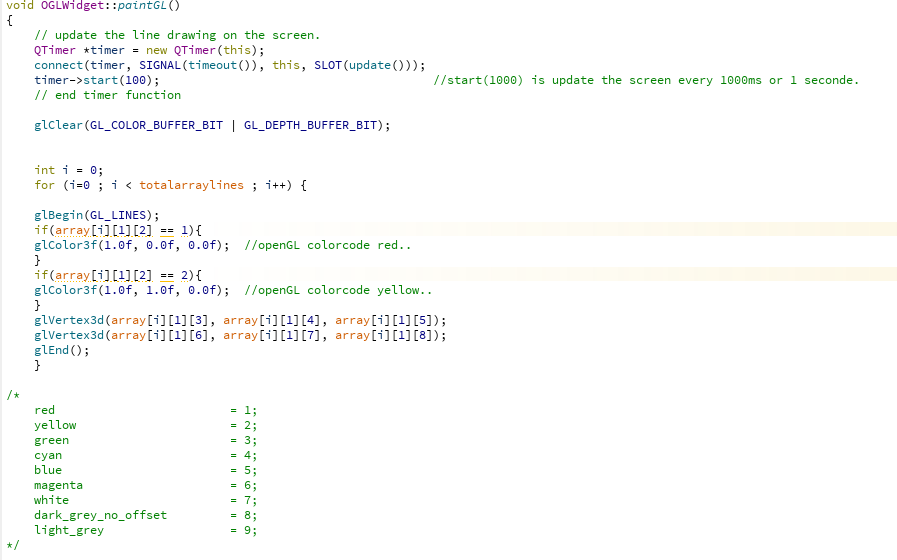
The used Array : (not dynamic allocating extra memory at this moment, limited to 2 milion gcode lines at this moment)

OpenGL reading the Array : ( it looks for the cad colors also.... )
The array is working very nice and has a 3d template.
The opengl is a 3d double output format. Perfect ! The dxf Decoder is fully 3d.
Todo :
Make some nice 3d views in the dxf Decoder OpenGL screen. Zoom in and zoom out is working on mouse scroll button.
I have to adapt the left mouse button to move the drawing, and connect the right mouse button to do a 3d rotate manipulation.
Made a simple cad drawing :
The dxf Decoder output screen :
The used Array : (not dynamic allocating extra memory at this moment, limited to 2 milion gcode lines at this moment)
OpenGL reading the Array : ( it looks for the cad colors also.... )
The array is working very nice and has a 3d template.
The opengl is a 3d double output format. Perfect ! The dxf Decoder is fully 3d.
Todo :
Make some nice 3d views in the dxf Decoder OpenGL screen. Zoom in and zoom out is working on mouse scroll button.
I have to adapt the left mouse button to move the drawing, and connect the right mouse button to do a 3d rotate manipulation.
Last edit: 7 years 4 months ago by Grotius.
The following user(s) said Thank You: phillc54, tommylight
Please Log in or Create an account to join the conversation.
Time to create page: 0.186 seconds