Labview UI project for Linuxcnc

More
7 years 1 month ago - 7 years 1 month ago #144119 by auto-mation-assist
In getting the feel of how fast LinuxCnc can handle commands from the network without running into some NML queue issues I found that my normal execution rate of LinuxCnc had to be increased. Thus in the .ini file under [EMCIO] Cycle time was decreased from 0.100 to 0.001 which is still pretty slow for modern computers.

This change allowed sending 500 mist on/off commands which is convenient for testing at the change rate of 10ms without running into queue issues and delay of command execution. At the original rate it was possible to send three of the same commands at approximately 30ms intervals and run into an occasional problem of data backing up in the NML queue.

I have pushed enough commands at a 100ms change rate to cause the queue minutes to empty. This had no ill effect during testing other than the execution of the commands being delayed by a long time. They all appeared to execute.
Last edit: 7 years 1 month ago by auto-mation-assist.

Please Log in or Create an account to join the conversation.

More
7 years 1 month ago - 7 years 1 month ago #144561 by auto-mation-assist
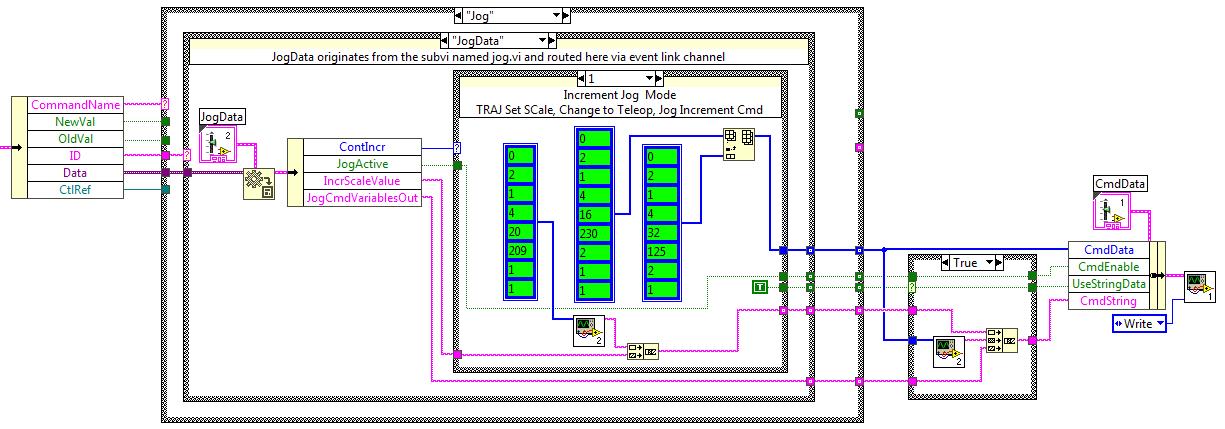
I think there many who have never seen Labview code so I have attached a screen shot of part of my code that handles sending commands to LinuxCnc to TCP port 5005. This one is for final command encoding for Jogging in linear continuous and Incremental modes. The term Vi used in the text below refers to virtual instruments and is used extensively in Labview.

The data arrives from the Gui's Subpanel Vi's on the left via a cluster that contains the values of variables that jogging buttons area coded to create when selected. This data is decoded from other data and separated out via the name 'Jog' and then further in to the actual data.

After this you can see the NML Hex coded commands in green. These are arrays. They are coded for NML types 209, 230 and 125. The type 209 and 230 require external data along with the contents of the arrays. The continuous jog mode is handled by case selection 0 in a similar way. It uses NML types 230,124 and 136. Type 136 being the Jog stop command.

The part on the very right sends data from the command generator section to the Sub Vi that does the actual talking to LinuxCnc command link at TCP port 5005.

The jogging part is completely operational now and the Milling machine is responding all jogging commands perfectly.

The below is part of my Labview command encoder function and is a picture of part of the actual code.

Last edit: 7 years 1 month ago by auto-mation-assist.
The following user(s) said Thank You: phillc54, snoozer77

Please Log in or Create an account to join the conversation.

More
7 years 1 month ago #144602 by pl7i92
did you get any movment so far

Please Log in or Create an account to join the conversation.

More
7 years 1 month ago #144616 by auto-mation-assist
Yes. Jogging in continuous and incremental modes move the machines axis properly in both positive and negative directions.

Please Log in or Create an account to join the conversation.

More
7 years 1 month ago - 7 years 1 month ago #144618 by auto-mation-assist
Since it is likely that the command arrays of the same type will be used in multiple locations the command arrays will be changed to 'type defines'.

Type defines in Labview have a name extension name of .ctl and If changes are made to a type define then each location that uses it will be automatically updated to match and thus save a lot potential future code editing if changes to a command are required.
Last edit: 7 years 1 month ago by auto-mation-assist. Reason: Removed the word 'so'

Please Log in or Create an account to join the conversation.

More
7 years 1 month ago #144671 by auto-mation-assist
I programmed in the following into my command encoder; flood on and off , mist on and off , lube on and off, estop, estop reset, power on and off, manual mode, mdi mode, auto mode, abort, continuous and incremental jogging functions so far. All are working now from my Labview Gui buttons and Linuxcnc is responding properly.

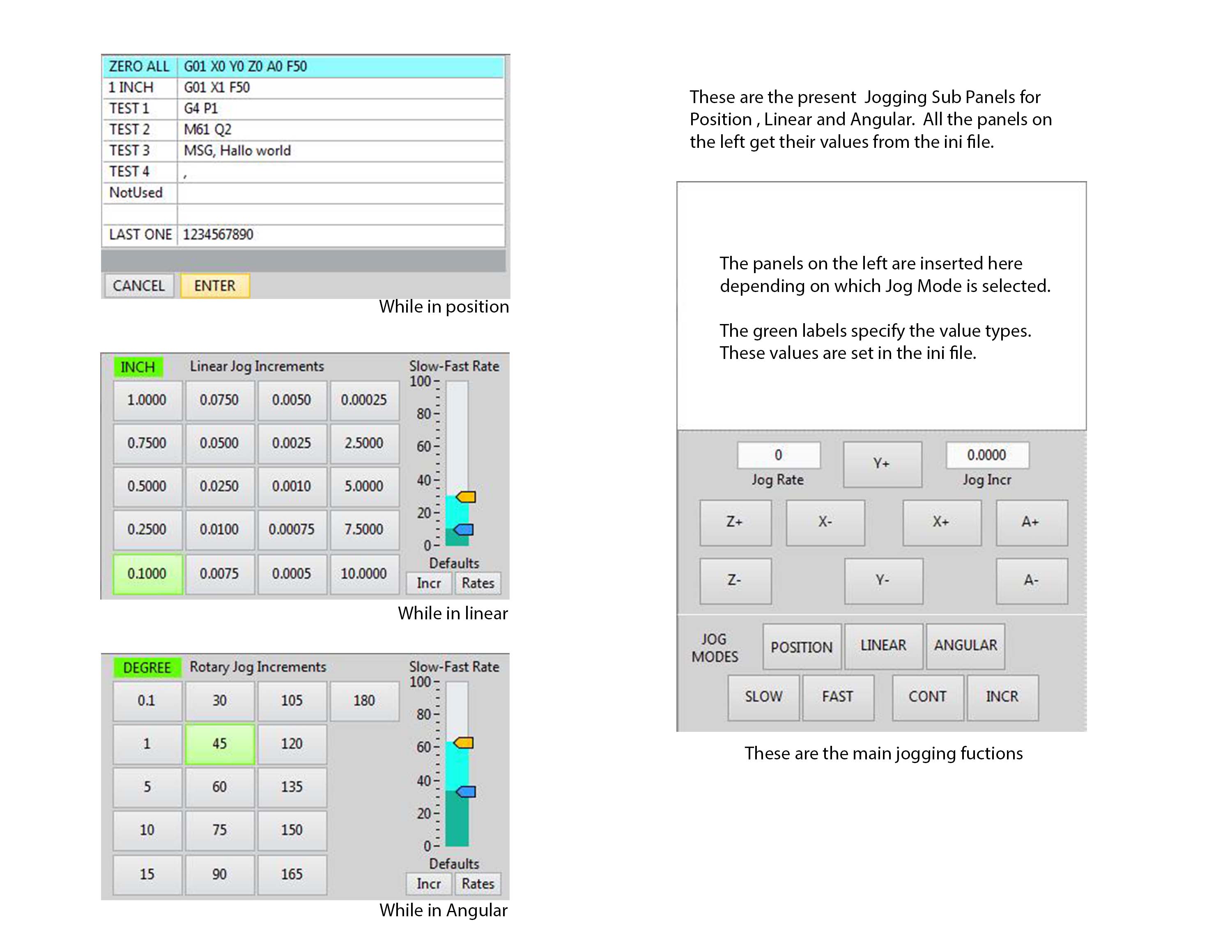
I will work on the spindle controls next and after that will do some testing with the position jogging functions which are available from a list in the position subpanel in the jogging section. It gets its list from the .ini file. As do all the button values for linear and angular jogging. Separate list is used for mm and inch modes.

This is a picture of the jogging buttons and position command list that I used for testing in the past.

The following user(s) said Thank You: tommylight

Please Log in or Create an account to join the conversation.

Time to create page: 0.452 seconds
Powered by Kunena Forum