Labview UI project for Linuxcnc

More
7 years 2 months ago - 7 years 2 months ago #143747 by auto-mation-assist
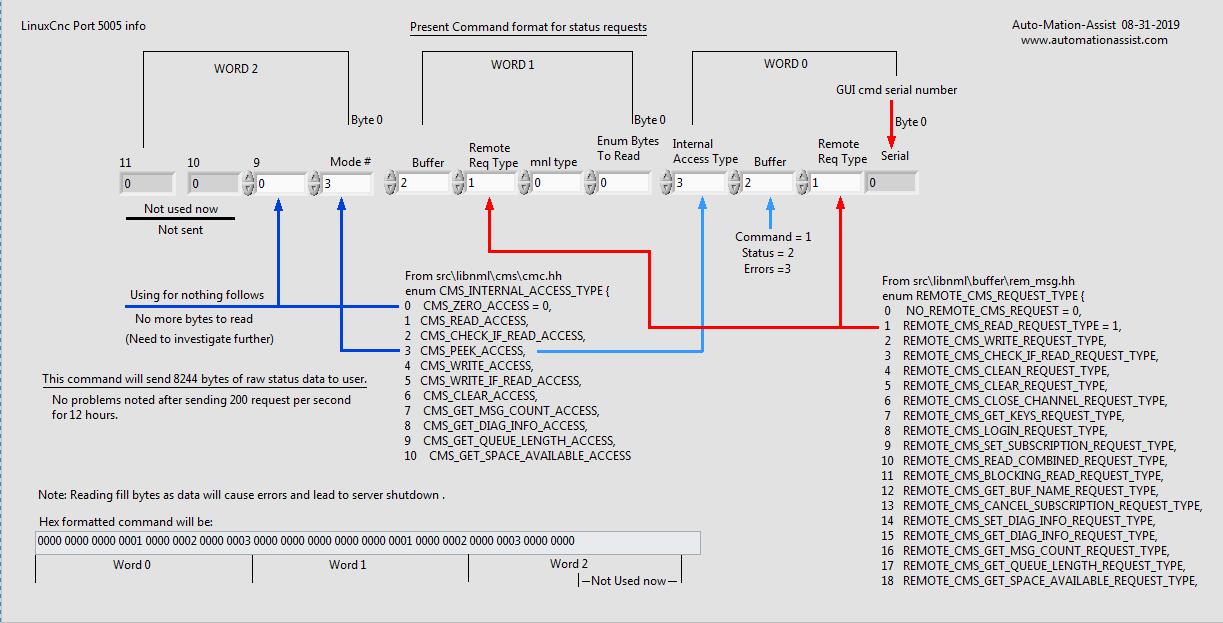
I have been working refining some code and further testing. Here are my present helper notes for requesting status data. If anyone has any info on data offsets within the received status data I would love to get that information. Actual position values are no problem since the values can be found easily in the 8244 bytes of status data.


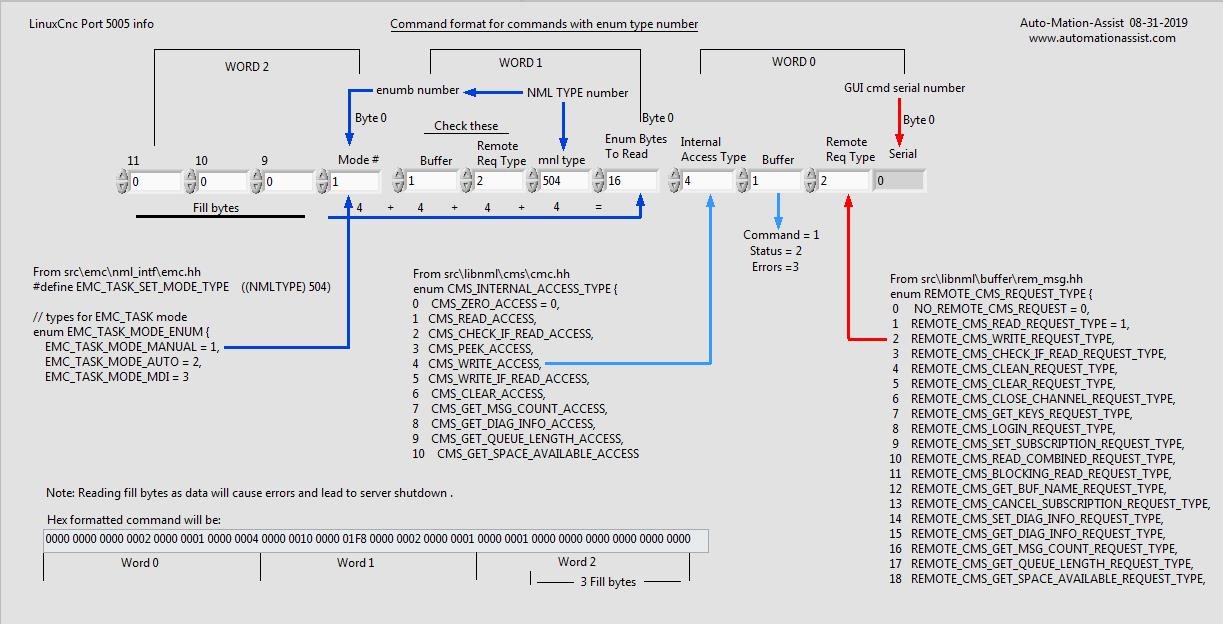
And here is some of my info for sending commands with those that have options available via enums. The arrow on the buffer is pointing the wrong way. I will fix that in my notes.


I will be working on the command formats that use and require variable user data to be entered instead of enums next.
Last edit: 7 years 2 months ago by auto-mation-assist. Reason: The arrow on the buffer is pointing the wrong way. I will fix that in my notes.

Please Log in or Create an account to join the conversation.

More
7 years 2 months ago #143756 by auto-mation-assist
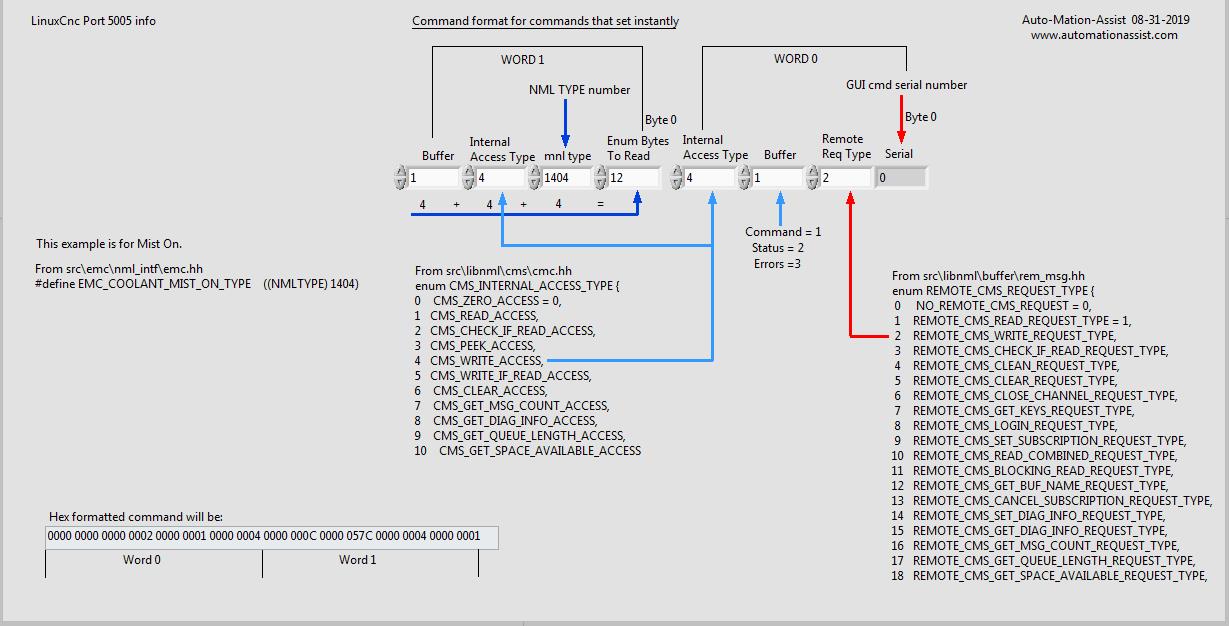
Converted more of my notes into a drawing. This one is for the command format to send to port 5005 for commands that set instantly with no further input required. In this sample I use Mist On.

Please Log in or Create an account to join the conversation.

More
7 years 2 months ago #143759 by pl7i92
this will get into a real new system
WHERE is C Axis in the testgui
only 8 from 9 Axis present

Please Log in or Create an account to join the conversation.

More
7 years 2 months ago - 7 years 2 months ago #143782 by auto-mation-assist
The C axis display was left out by error before and was corrected shortly after posting. It was actually processing the C axis position data, just not displaying it. I'm pleased that you noticed this.

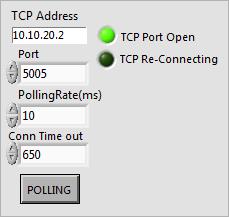
That particular test setup for status data is not available anymore and was re-coded into the below picture.
It automatically connects to LinuxCnc and designed to pass status data to other user processes that require its data.

Last edit: 7 years 2 months ago by auto-mation-assist. Reason: Added picture

Please Log in or Create an account to join the conversation.

More
7 years 1 month ago - 7 years 1 month ago #144051 by auto-mation-assist
All my testing involved sending commands from my Windows development computer to my Linux Mint computer over TCP to port 5005 via hex encoded commands and getting status info back. I have sufficient commands working now to actually start work on building them into my Labview based Gui. The GUI itself is coded as a event driven state-machine.

The commands I have working and verified are:

Estop
Estop reset
Power on
Power off
Manual mode selection
Auto mode selection
Mdi mode selection
Jog stop for continuous jog mode
Traj scale scale set
Teleop mode selection
Continuous jog mode
Incremental jog mode
Spindle selection by number along with speed and directional control

I think enough to get basic machine functions working from the gui.

I will need to think a bit on how to best implement sending commands but this will likely use arrays or clusters or a combination of both.

Have not had much time to spent on decoding the status info yet but the data for the Dro's data is properly decoded so that I can monitor movement when ready to test further. I'm hoping that there is a map or at least part of a map of the status data returned from a status request somewhere. A small hint can help a lot and it would save a lot of time.
Last edit: 7 years 1 month ago by auto-mation-assist.
The following user(s) said Thank You: rodw

Please Log in or Create an account to join the conversation.

More
7 years 1 month ago - 7 years 1 month ago #144079 by auto-mation-assist
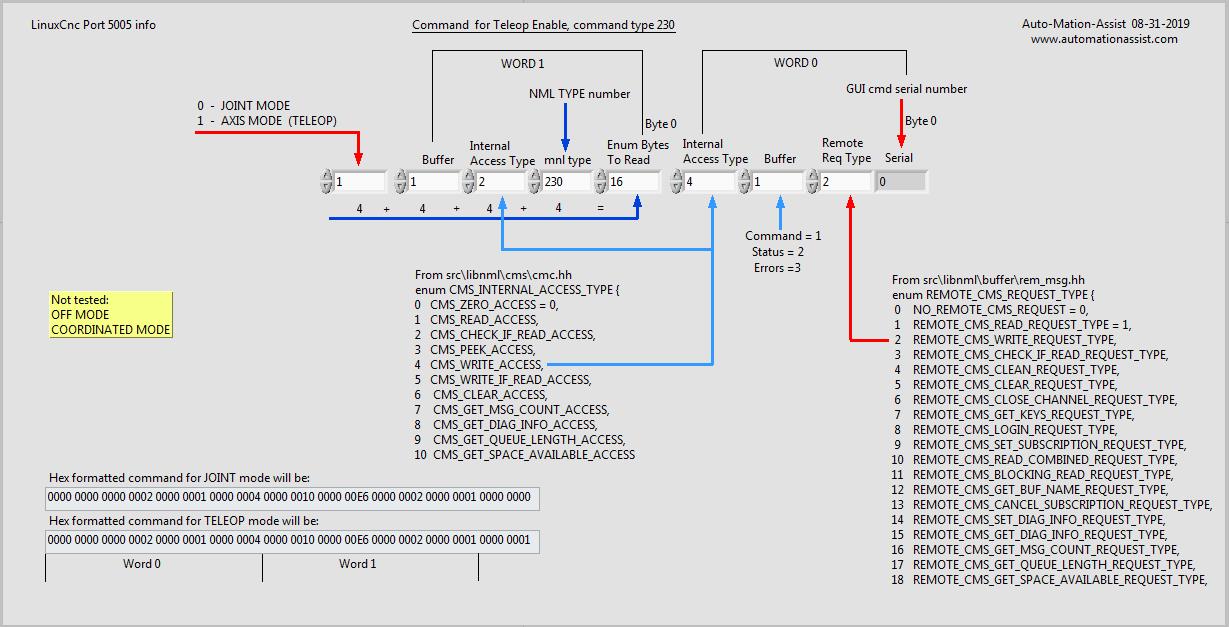
Here the map I'm using for the TELEOP mode changes right now.


Improper TELEOP mode will prevent some actions from being available. Once such case is not being in joint mode during joint specific homing.


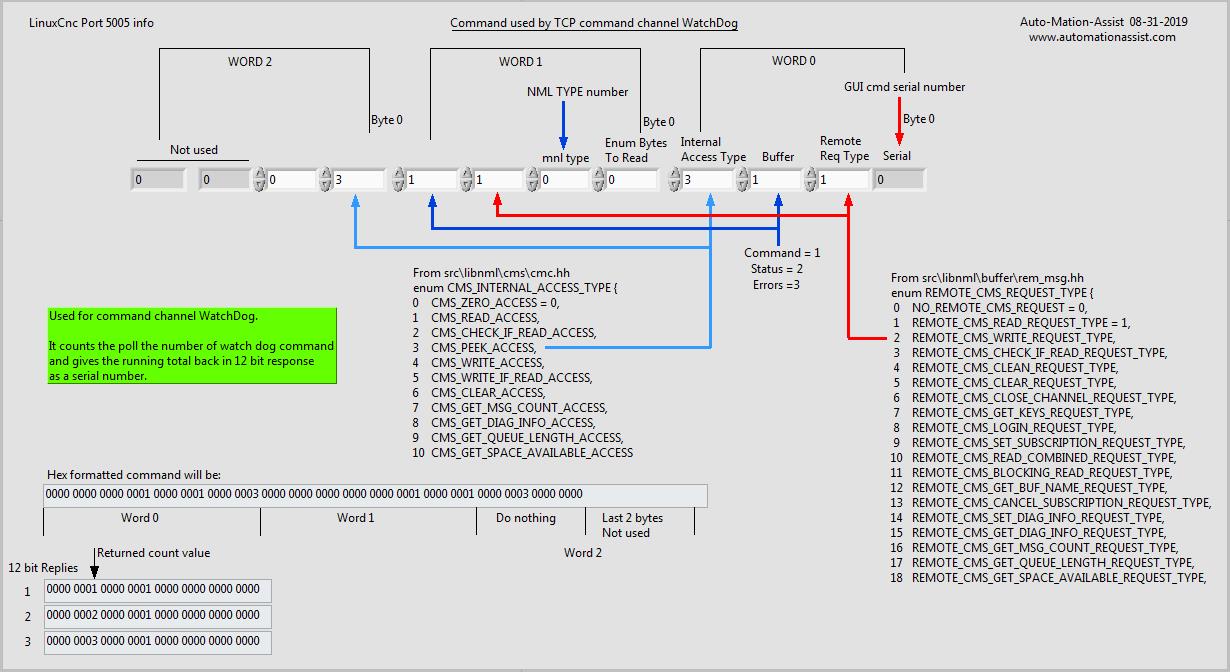
I have started work on the network interface code for the command channel. This is uses the same code as the status channel network interface with only minor changes (which has been fully tested already). The command channel does need a WatchDog feature and I have that running right now on the command channel. It is over 800000 WatchDog polling request now with no problems noted.

To speed testing up I raised the normal expected rate of once per second to 10ms for testing purposes in the above note. The command channel watchdog returns 12 bits of data with the serial number of the WatchDog command. Then immediately adds 1 and sends 12 more bits and returns serial number plus 1. Thus this is a paired response and can be decoded as 24 bits as below..

The number at bit location 0, length 4 is equal to the WatchDog sent serial number that was sent. The serial number returned at bit location 12, length 4 needs to be divided by two to get the sent serial number of the WatchDog command.

This is the command map for command channel WatchDog polling.

Last edit: 7 years 1 month ago by auto-mation-assist. Reason: Added: Serial number divide by two note.

Please Log in or Create an account to join the conversation.

Time to create page: 0.516 seconds
Powered by Kunena Forum