Labview UI project for Linuxcnc

More
7 years 1 month ago #146448 by KCJ
Replied by KCJ on topic Labview UI project for Linuxcnc
Absolutely fastening, thank you for taking the time to document your efforts!

I made a GRBL interface for a plasma tube notcher using LabVIEW, and later redone using MATLAB GUIDE (What a disaster that was!). These days I could not imagine choosing to use LabVIEW for a hobby project, but my enjoyment of it may be tainted from some of the circumstances I've used it in...

Cheers!
Kurt

Please Log in or Create an account to join the conversation.

More
7 years 1 month ago #146450 by auto-mation-assist
Kurt, I have always enjoyed using Labview. Perhaps it is because before retiring I spend most of my life as an electronics technician. As a electronics technician a lot of my time was spent doing design work which required working with a lot of complex diagrams. Thus a diagram on top of underlying C code works extremely well for me.

Please Log in or Create an account to join the conversation.

More
7 years 1 month ago - 7 years 1 month ago #146451 by auto-mation-assist
I have been thinking about what will be required to get a 3D preview working to show Gcode travel paths. So as the first step I needed to get a Gcode parser coded in Labview for Linuxcnc.

Back in Feb/March of 2015 johnwu130 on github had posted a gcode parser for Labview 2014 that was partially completed as a sample but written for NI Motion hardware controllers. His code however looked like a good starting point for use with Linuxcnc and I was able to make the required changes and additions to get it working with Linuxcnc .ngc files.

For my preliminary work on getting a Gcode 3D preview working I'm using the arcspiral.ngc file from the NC folder with some minor changes in Z axis values to keep my machine from going into limits if it is raised more than .05 above its homed zero.

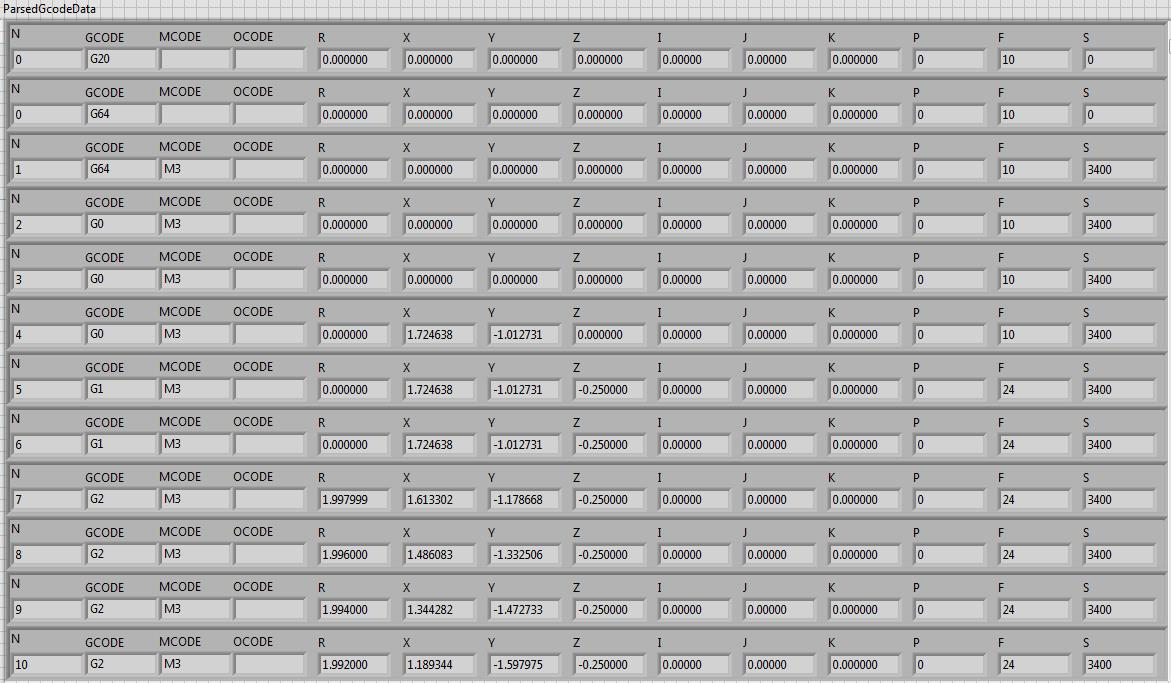
I have the Gcode parser breaking out my added line numbers, Gcode, Mcode, Ocode, R, X, Y, Z, I , J, K, P, feed and speed data for now. A code will carry forward in a line until changed by another code. The arcspiral.ngc test file has 1007 lines of Gcode

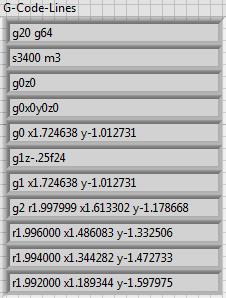
The first 10 lines of the input file. The spaces are removed and all are changed to upper case prior to entering the parser.


The parsed result in a array containing the values in clusters.


I can now use the data in the clusters to start work on the 3D preview display.

Last edit: 7 years 1 month ago by auto-mation-assist.

Please Log in or Create an account to join the conversation.

More
7 years 1 month ago #146589 by andypugh
Have you spotted the Stand Alone Interpreter?
github.com/LinuxCNC/linuxcnc/tree/master/src/emc/sai
I suspect that passing the G-code to that would provide something more easily rendered.
The following user(s) said Thank You: auto-mation-assist, KCJ, Grotius

Please Log in or Create an account to join the conversation.

More
7 years 1 month ago #146615 by auto-mation-assist
I was not aware that there was a stand alone interpreter but will keep it in mind.

Please Log in or Create an account to join the conversation.

More
7 years 1 month ago - 7 years 1 month ago #146616 by auto-mation-assist
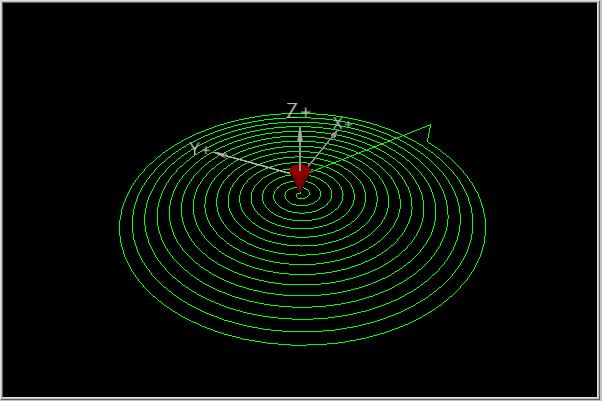
I have used the data from the Parser to generate a 3D picture that can be dragged by the mouse to give views from any angle. Not totally happy with it and since it can have its view angle changed it presents a problem with inserting text and have it remain in the desired location. This could likely be compensated for by just using preset views. I will work on this.

Here is a rendering of the code as I have it right now. Size of the display is 600x400.

Last edit: 7 years 1 month ago by auto-mation-assist.

Please Log in or Create an account to join the conversation.

Time to create page: 0.084 seconds
Powered by Kunena Forum