Mesa modbus and pktUart

More
3 years 1 month ago - 3 years 1 month ago #279631 by Donno
Replied by Donno on topic Mesa modbus and pktUart
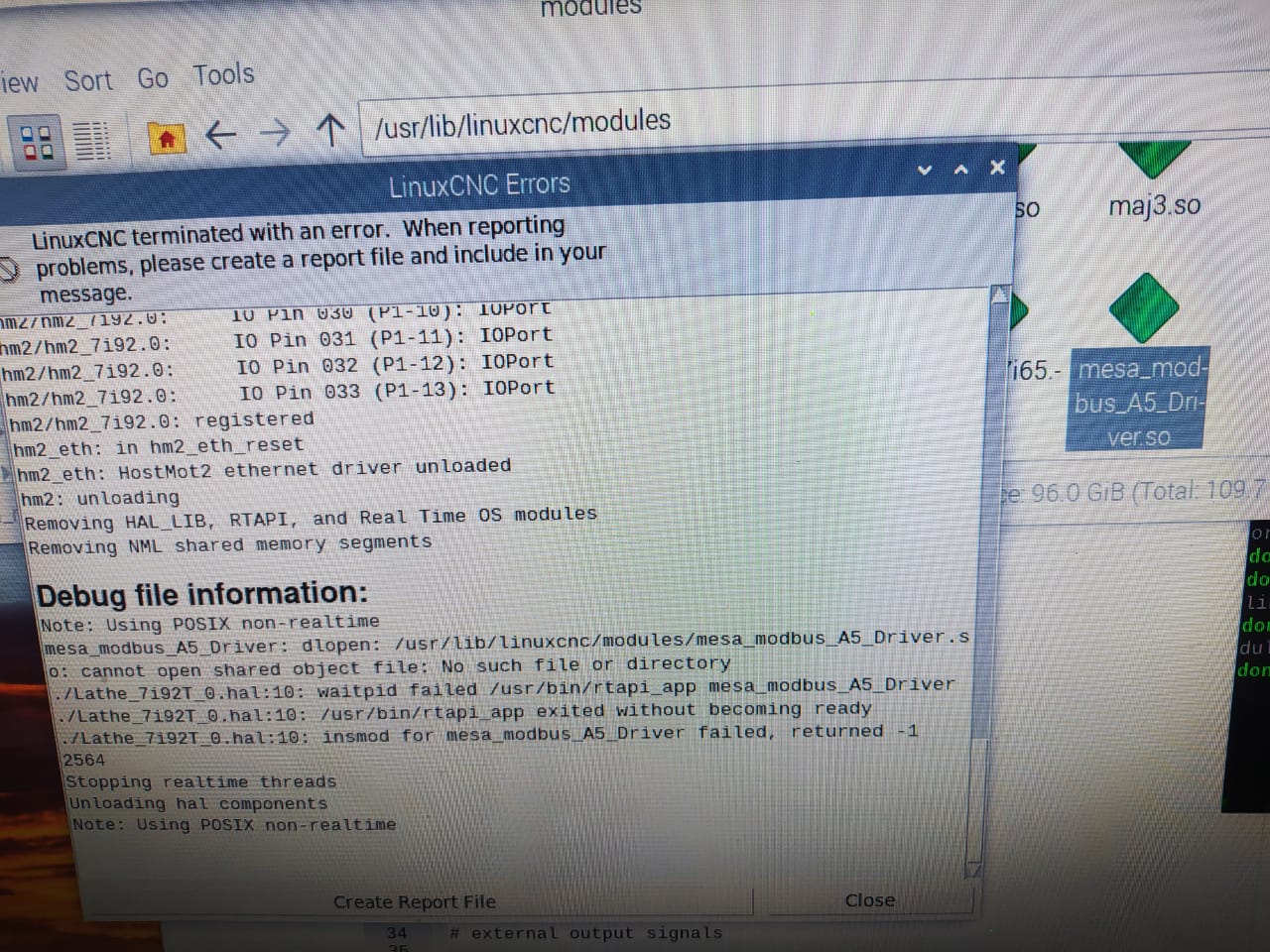
I am running into another problem :


I modcompile mesa_modbus_A5_Driver driver on x64 PC and copy the mesa_modbus_A5_Driver.so file to the raspberry Pi

added to .HAL file

Code:
loadrt mesa_modbus_A5_Driver ports=hm2_7i92.0.pktuart.0 addf mesa_modbus_A5_Driver servo-thread


I get error image as attached, but the file is in directory as shown.

Is there anther directory the mesa_modbus_A5_Driver.so has to be in ?
Last edit: 3 years 1 month ago by Donno. Reason: typo

Please Log in or Create an account to join the conversation.

More
3 years 1 month ago #279632 by tommylight

Please Log in or Create an account to join the conversation.

More
3 years 1 month ago #279633 by PCW
Replied by PCW on topic Mesa modbus and pktUart
Unless you cross compiled the mesa_modbus_AS_Driver.so on the X86 system,
it will not run on a ARM system

Please Log in or Create an account to join the conversation.

More
3 years 1 month ago #279666 by Donno
Replied by Donno on topic Mesa modbus and pktUart
I downloaded Linuxcnc 2.9pre image for raspberry pi 4B and compiled linuxcnc-dev
Code:
git clone https://github.com/LinuxCNC/linuxcnc.git linuxcnc-dev cd linuxcnc-dev/src sudo apt install automake ./autogen.sh sudo apt-get install libmodbus-dev sudo apt-get install libusb-1.0-0-dev sudo apt-get install yapps2 sudo apt-get install intltool sudo apt-get install libboost sudo apt install devscripts sudo apt install dh-python libudev-dev tcl8.6-dev tk8.6-dev asciidoc dblatex sudo apt install libreadline-gplv2-dev docbook-xsl dvipng ghostscript graphviz sudo apt install groff imagemagick inkscape python-lxml source-highlight sudo apt install texlive-extra-utils texlive-font-utils texlive-fonts-recommended sudo apt install texlive-lang-cyrillic texlive-lang-french texlive-lang-german sudo apt install texlive-lang-polish texlive-lang-spanish texlive-latex-recommended sudo apt install w3c-linkchecker xsltproc python-dev python-tk libxmu-dev sudo apt install libglu1-mesa-dev libgtk2.0-dev intltool libboost-python-dev sudo apt install libmodbus-dev libusb-1.0-0-dev desktop-file-utils yapps2 sudo apt install python-yapps bwidget libtk-img mesa-utils tclx8.4 sudo apt install tcl-tclreadline python-configobj python-gtkglext1 sudo apt install python-xlib gstreamer0.10-plugins-base netcat sudo apt install python-pil python-glade2 python-pil.imagetk sudo apt install python-gst-1.0 w3c-linkchecker libxmu-dev libtirpc-dev sudo apt install gdebi gdebi-core sudo apt install libreadline-dev sudo apt install libeditreadline-dev sudo apt install libxmu-headers sudo apt install libxmu-dev ./configure --with-realtime=uspace make sudo make setuid source ../scripts/rip-environment cd ~/linuxcnc-dev/bin (edit modcompile to use ../src instead of src else it will not find makefile.modinc) ./modcompile mesa_modbus_A5_Driver.mod

I copied driver to another raspberry with linuxcnc2.9pre and copied driver to /usr/lib/linuxcnc/modules/mesa_modbus_A5_Driver.so

I now get the following error in linuxcnc
Code:
Debug file information: Note: Using POSIX non-realtime mesa_modbus_A5_Driver: dlopen: /usr/lib/linuxcnc/modules/mesa_modbus_A5_Driver.so: undefined symbol: hm2_pktuart_setup_rx ./Lathe_7i92T_0.hal:10: waitpid failed /usr/bin/rtapi_app mesa_modbus_A5_Driver ./Lathe_7i92T_0.hal:10: /usr/bin/rtapi_app exited without becoming ready ./Lathe_7i92T_0.hal:10: insmod for mesa_modbus_A5_Driver failed, returned -1 2759 Stopping realtime threads Unloading hal components Note: Using POSIX non-realtime

Any help PCW ?

Please Log in or Create an account to join the conversation.

More
3 years 1 month ago #279667 by Donno
Replied by Donno on topic Mesa modbus and pktUart
Driver :
Code:
// Lichuan A5 AC Servo Drive Driver #define MAX_MSG_LEN 16   // may be increased if necessary to max 251 #define DEBUG 1 static const hm2_modbus_chan_descriptor_t channels[] = { /*  {TYPE,     FUNC, ADDR,   COUNT, pin_name} */     {HAL_U32,   3,   0x9C8, 1,     "speed-actual"},     {HAL_U32,   3,   0x9C9, 1,     "speed-instruction"},     {HAL_U32,   3,   0x9CA, 1,     "torque-instruction"},     {HAL_U32,   3,   0x9D4, 1,     "avg-load-rate"},     {HAL_U32,   3,   0x9E0, 1,     "phase-current"},     {HAL_U32,   3,   0x9E2, 1,     "bus-voltage"},     {HAL_U32,   3,   0x9E3, 1,     "tempreture"},     {HAL_U32,   6,   0x4CB, 1,     "set-speed"}, };

Please Log in or Create an account to join the conversation.

More
3 years 1 month ago #279668 by PCW
Replied by PCW on topic Mesa modbus and pktUart
What is you loardrt line in your hal file?
Does your firmware have a pktuart?

Please Log in or Create an account to join the conversation.

Time to create page: 0.366 seconds
Powered by Kunena Forum