Latency Test OK, dennoch Fehlermeldung

More
2 years 2 months ago #306916 by Muftijaja
Hmm I tried both, changed priorities eno1 to 1 and auto/enp2 to 0 - no effect.
Then I changed the position of the lines in /etc/network/interfaces - no effect at all.

On what reason ever, the network definitions are faulty.

WTF is going on there?

Please Log in or Create an account to join the conversation.
More
2 years 2 months ago - 2 years 2 months ago #306917 by PCW
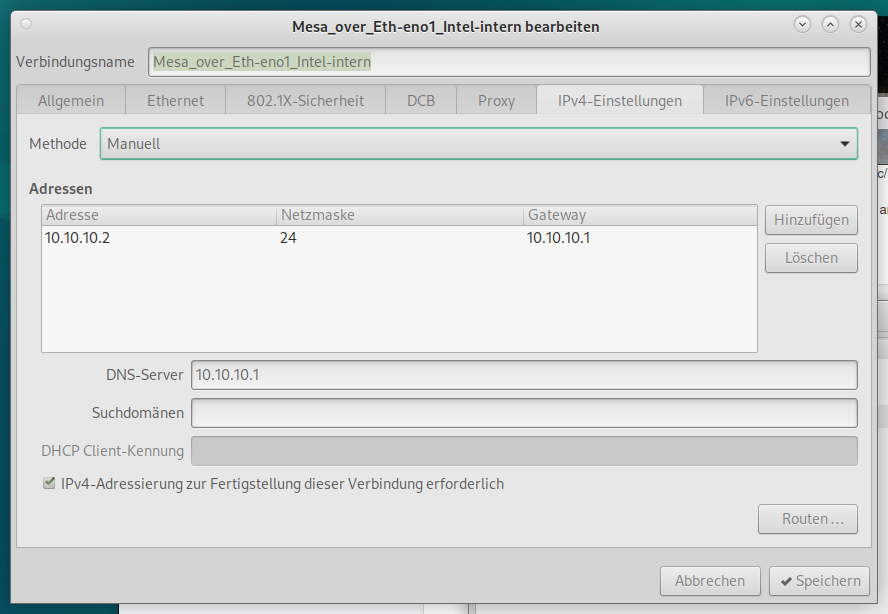
The only thing that I see is  different is the netmask

you might try

address 10.10.10.2/24

Also ipv6 has been enabled, which is really odd
Last edit: 2 years 2 months ago by PCW.
The following user(s) said Thank You: Muftijaja

Please Log in or Create an account to join the conversation.

More
2 years 2 months ago #306918 by Muftijaja
netmask is set to 10.10.10.2/24. Any alternative netmask? 

Please Log in or Create an account to join the conversation.

More
2 years 2 months ago - 2 years 2 months ago #306919 by Muftijaja
OK, I switched ipv6 off in both networks, no effect. And I added the adress 10.10.10.2/24 in the four lines in etc/network/interfaces
Same issue as before. I'm asking me why there is this altname fault in ip a. I definitely have the right definitions in the two network settings, eno1 and eth2

(coming back later, have to bring the dog back to my son)
Last edit: 2 years 2 months ago by Muftijaja.

Please Log in or Create an account to join the conversation.

More
2 years 2 months ago #306920 by tommylight
You will most probably have to reinstall everything.
In the networking HOWTO it is clearly stated to use that OR the /etc/network method, NEVER both!
You are using both. It also states to edit the existing wired connection, you did not, you added another one to the same interface.
Now you have 3 networks with the 2 of the same IP on a single interface, as you did not edit the existing one, but you added another one.
-
Try deleting every wired connection from the network manager and reboot.
If this does not work, reinstalling everything is the fastest way to get up and running, trying to fix this mess takes much longer.
The following user(s) said Thank You: Muftijaja

Please Log in or Create an account to join the conversation.

More
2 years 2 months ago - 2 years 2 months ago #306930 by chris@cnc

Hello PCW,
thank you for your answers! (sorry for delay, I was very busy the last days and couldn't do anything at my machine.)

I tried the lines in /etc/network/interfaces file and  after reboot my internal Intel network was disabled. Just  auto internet with RLT8111 is possible. The file is as follows:
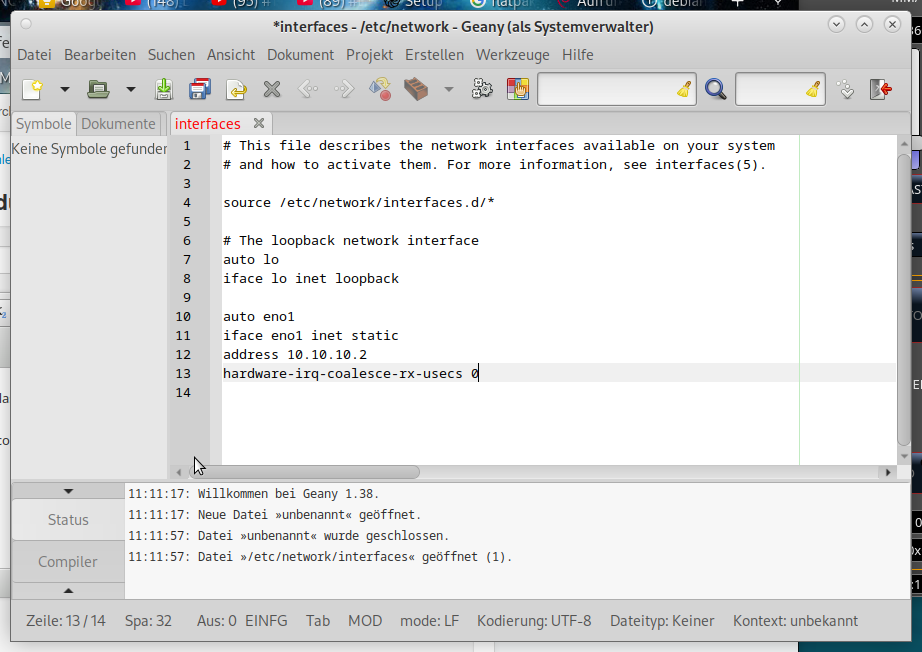
 

Well, internet network is ok. What is the faulty setting here?


That's fine, but the wrong card was configured. I suspect that the Intelcard is calling enp2s0. Try modifying the file this way.
Code:
auto enp2s0        iface enp2s0 inet static            address 10.10.10.2            hardware-irq-coalesce-rx-usecs 0 auto eno1 iface eno1 inet dhcp
Last edit: 2 years 2 months ago by chris@cnc.

Please Log in or Create an account to join the conversation.

Moderators: Muecke
Time to create page: 0.502 seconds
Powered by Kunena Forum
