Hi Dave,
In the past i have done projects like that.
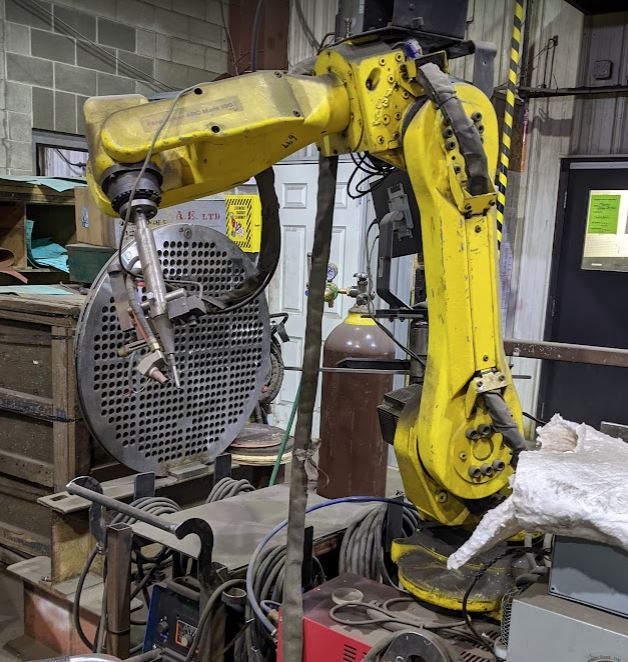
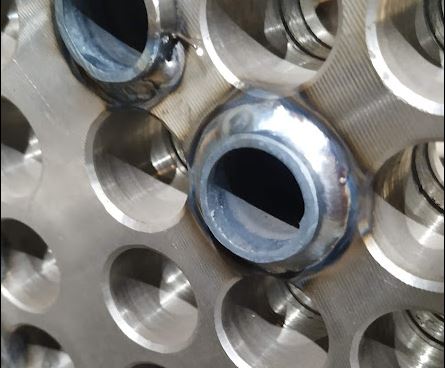
Professional inox heat exchangers where most of time welded with a polysoude welding machine.
I have welded a inox tube heat exchanger with sheetcam and mach3 in the past on a standard cnc, the result was ok.
For Valk Welding we used also a wire feeder on the robotic tig torch, but if the pipes are a little longer, you can do it without that option.
Hal-core is just the interface to the kernel (hal) modules. Hal-core is universal. It's like the big hardware & software connector between your robot motors,encoders and your c++ programs. Hal-core is realtime and fast because it operates from within the kernel. (golden keyring).
If you have installed hal-core you are able to connect your robot motors, encoders to hal. I use the ethercat bus for this. But you could also use other things like mesa, parport, rpi4 ethercat, etc as long as the driver is compiled and is placed in the hal-core/rtlib/
To send motion command's to your robot you need the kdl kinematic library. Wich contains your robot setup values.
Hal_kinematics is quite nice. You can insert your robot model parameters with hal commands. Examples are provided as runtests.
It's just like loading a bash script.
github.com/grotius-cnc/hal-kinematics
After that you are able to send motion commands like :
$ halcmd
$ setp kinematic.cart-x 500
But what you could test is :
1.
github.com/grotius-cnc/hal_trajectory
- this is a hal component that does a traject (s-curve motion) for you. It is good enough to weld (multipele) circles.
-
github.com/grotius-cnc/simple_cam
-> this can load a dxf and make a gcode for you.
- create a gcode with simple_cam to weld a circle, check if it contains the m3 and m5.
- the dxf coordinates has to be at your robot tcp coordinates. Usually the robot tcp is something like x0 y500 z800.
- load the gcode file into hal_trajectory. You can do this entirely by hal-commands or use the c++ interface gui.
2.
github.com/grotius-cnc/hal-kinematics
- connect inputs to hal_trajectory, connect hal outputs to your robot. Hal kinematics only does the converse from joints to cartestian.
you will see a inverse kinematics and forward kinematics. If your piece to weld is in a quite save position, the kinematics will do a good job.
If your workpiece is in a difficult position, the kinematics can fail. Currently there is no solver script when kinematics fail.
If you want to rotate your workpiece 3d in the future trough the software, i use a 3d rotation matrix. But for now i would try it without.
If you think you are lost in my ansfer, don't hesitate to ask for help.
Another solution is to use Lcnc, load a gcode and only use the hal_kinematic library with lcnc. You can place the hal_kinematic.so in the lcnc/rtlib. Also the next.so has to be copied over there. Next.so is a c++ helper library wich contains the kdl source.
do you have anything for probing?
No. But we have a component template to write this probe function.
github.com/grotius-cnc/hal-core/blob/mai...mponents/test/test.c
Line 82:
static void the_function(){
if(pin_search==1){
move_x_plus=1;
}
if(myprobe==1){
// We get a signal
save_x_pos=currentpos-tooldiameter
}
} etc, etc.
A totally different option is to use
github.com/grotius-cnc/skynet_robot_cont.../releases/tag/1.0.24
This is a teach in program for robots and can teach-in and follow arc's etc in 3d. It outputs textfiles that are streamed to hal.
Also this program makes jogging easy. It's liked multiple times by other githubbers.
But again at that time i didn't managed to get a robot move realtime. That is now solved so streaming can be replaced by realtime
hal components that work with c++ helper libs.
xxxhttps://user-images.githubusercontent.com/44880102/122229068-6e83c100-ce86-11eb-9814-1199550dd265.mp4