
- Posts: 4793
- Thank you received: 1480
no option to home just Y axis on gantry with 2 Y motors
- Todd Zuercher
- Offline
- Platinum Member
-

Less
More
4 years 8 months ago #234886
by Todd Zuercher
Replied by Todd Zuercher on topic no option to home just Y axis on gantry with 2 Y motors
Looking at your ini file. I'm not sure if it matters but you may want to try moving the [JOINT_3] so that it is after the joint 2 section.
How you have the home sequence with 0,1,-2 is perfectly valid and isn't a problem.
How you have the home sequence with 0,1,-2 is perfectly valid and isn't a problem.
- dbotos
- Offline
- Senior Member
-

Less
More
- Posts: 65
- Thank you received: 4
4 years 8 months ago #234997
by dbotos
Replied by dbotos on topic no option to home just Y axis on gantry with 2 Y motors
I was able to get LinuxCNC to open without error and show my custom panel. See
this thread
for details.
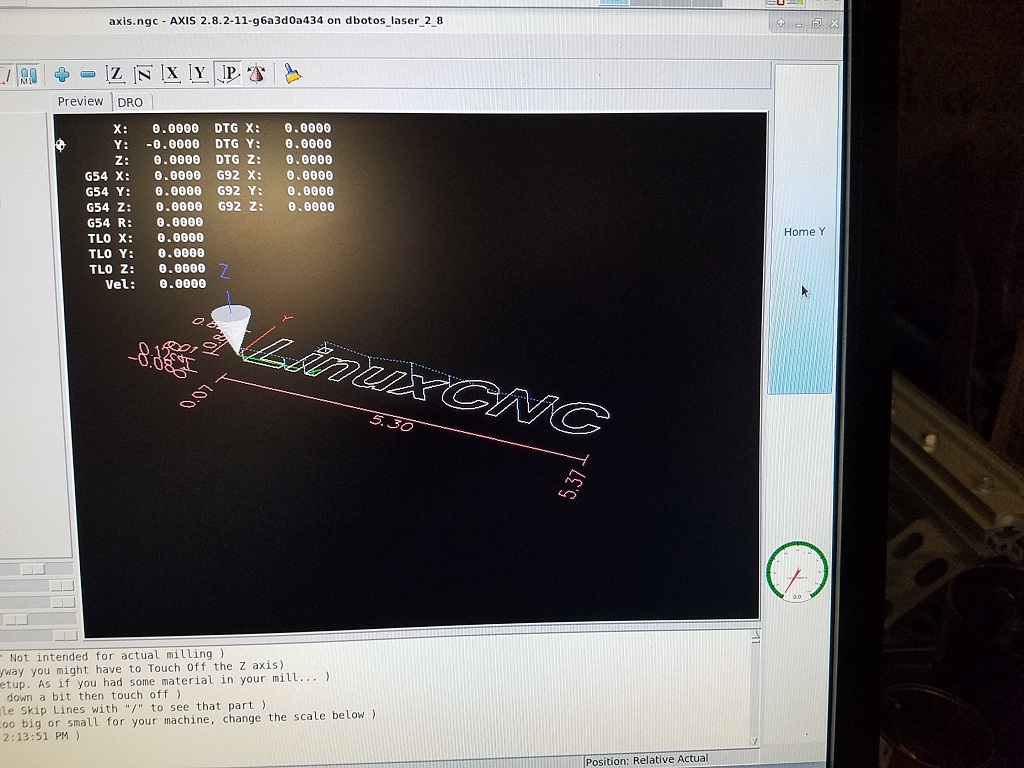
But now I have new issues. Once I turn physical and software e-stops off and toggle machine power on in the software, I can jog X and Z, but if I try to jog Y, I get the following error:
"Homing is REQUIRED to jog the requested coordinate because joint (1) home_sequence is synchronized (-2)"
If you press the Home Y button (which you can only do at G53 Y0 since you can't jog it anywhere), it will show the little homed icon (see attached pic), so it's not totally non-functional.
If you Home All, then you can jog the Y axis. But, if you press the Home Y button after homing all, it gives the following error:
"must be in joint mode to home"
Any ideas?
But now I have new issues. Once I turn physical and software e-stops off and toggle machine power on in the software, I can jog X and Z, but if I try to jog Y, I get the following error:
"Homing is REQUIRED to jog the requested coordinate because joint (1) home_sequence is synchronized (-2)"
If you press the Home Y button (which you can only do at G53 Y0 since you can't jog it anywhere), it will show the little homed icon (see attached pic), so it's not totally non-functional.
If you Home All, then you can jog the Y axis. But, if you press the Home Y button after homing all, it gives the following error:
"must be in joint mode to home"
Any ideas?
- dbotos
- Offline
- Senior Member
-
Less
More
- Posts: 65
- Thank you received: 4
4 years 8 months ago - 4 years 8 months ago #235077
by dbotos
Replied by dbotos on topic no option to home just Y axis on gantry with 2 Y motors
Thinking out loud about a possible two-pronged solution:
1) Have a script that runs when LinuxCNC starts that homes all axes (causes no actual movement the way I've got my config). This will make Y able to be jogged. Basically an automated pressing of the Home All button. There's a halui pin called halui.home-all that sounds like it would do the trick.
2) Make the Home Y button do the following, in order:
a) put LinuxCNC in joint mode (using halui pin halui.mode.joint)
b) home joints 1 and 3 (Y1 and Y3) (what it's already coded to do)
c) put LinuxCNC back in world mode (using halui pin halui.mode.teleop)
1) Have a script that runs when LinuxCNC starts that homes all axes (causes no actual movement the way I've got my config). This will make Y able to be jogged. Basically an automated pressing of the Home All button. There's a halui pin called halui.home-all that sounds like it would do the trick.
2) Make the Home Y button do the following, in order:
a) put LinuxCNC in joint mode (using halui pin halui.mode.joint)
b) home joints 1 and 3 (Y1 and Y3) (what it's already coded to do)
c) put LinuxCNC back in world mode (using halui pin halui.mode.teleop)
Last edit: 4 years 8 months ago by dbotos.
- dbotos
- Offline
- Senior Member
-
Less
More
- Posts: 65
- Thank you received: 4
4 years 8 months ago #235291
by dbotos
Replied by dbotos on topic no option to home just Y axis on gantry with 2 Y motors
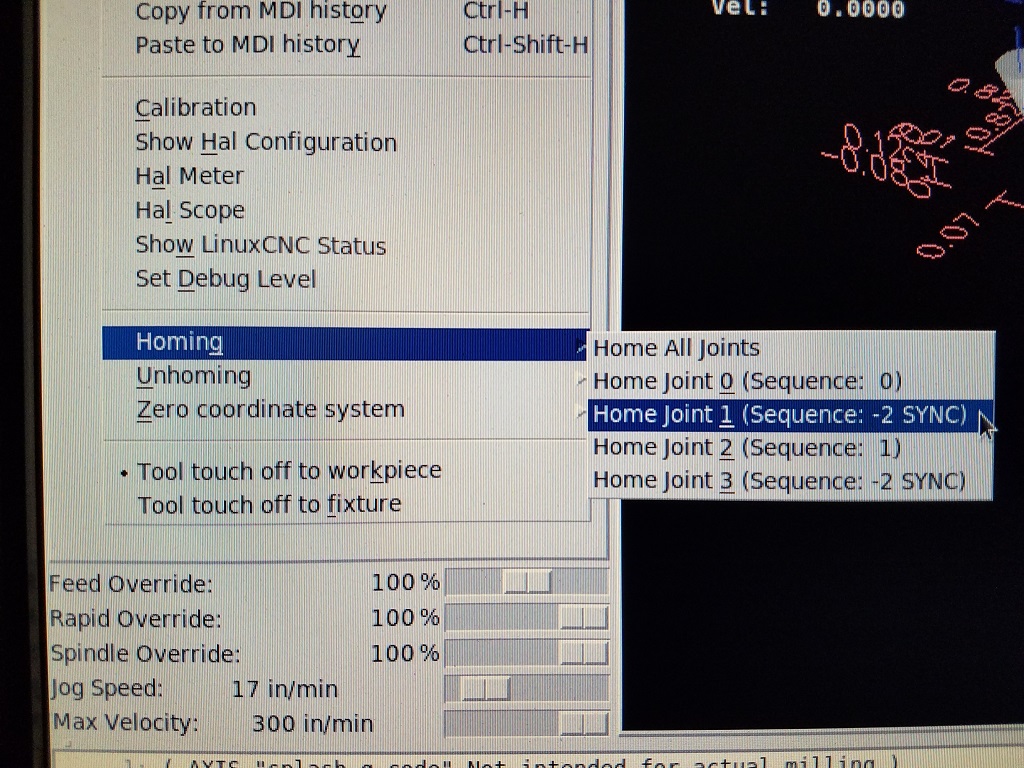
Was getting close to figuring out how to accomplish with GladeVCP and a Python handler, but then I discovered it's as easy as:
1) setting kinstype=BOTH on the KINEMATICS line of the INI file
2) homing all (from the Machine menu) once you start LinuxCNC (takes you from joint mode into world mode and lets you jog)
3) homing either joint 1 or joint 3 (from the Machine menu) (either will home the Y axis)
Problem solved.

1) setting kinstype=BOTH on the KINEMATICS line of the INI file
2) homing all (from the Machine menu) once you start LinuxCNC (takes you from joint mode into world mode and lets you jog)
3) homing either joint 1 or joint 3 (from the Machine menu) (either will home the Y axis)
Problem solved.
- jtrantow
- Offline
- Premium Member
-

Less
More
- Posts: 146
- Thank you received: 26
4 years 7 months ago #236206
by jtrantow
Replied by jtrantow on topic no option to home just Y axis on gantry with 2 Y motors
I'm not sure that's the best way to implement a gantry??? Will it safely home a racked gantry? What happens if your gantry is racked and your home positions aren't close to the switches and you use a faster HOME_FINAL_VEL than HOME_SEARCH_VEL or HOME_LATCH_VEL? A big advantage of gantry is waiting for both to find the home switch before going to the home position.
I just updated the configs/by_interface/parport/gantry in github's 2.8 branch.
gantry_joint.ini uses kinstype=BOTH and you can individually home each axis in joint mode. Once homed, it will let you move in world mode. Use this config with slow home velocities and keep your home position near the switch. Once you have your setup correct switch to gantry.ini.
gantry.ini uses the same .hal file but does NOT require mucking around in joint space. You will need to home all and use negative HOME_SEQUENCE values for the dual joints.
Previous gantry configs (in the 2.8.2 release) looked outdated. The updated examples:
1) Shows how to reduce coordinate dimensions Example: XYZA -> XYZY
2) Shows this change in [TRAJ] and [KINS] sections.
3) Shows proper use of negative HOME_SEQUENCE.
4) Optional changes adir,astep,etc to y2dir, y2step, y2 limits
I think this is the best practice for implementing a gantry machine.
I just updated the configs/by_interface/parport/gantry in github's 2.8 branch.
gantry_joint.ini uses kinstype=BOTH and you can individually home each axis in joint mode. Once homed, it will let you move in world mode. Use this config with slow home velocities and keep your home position near the switch. Once you have your setup correct switch to gantry.ini.
gantry.ini uses the same .hal file but does NOT require mucking around in joint space. You will need to home all and use negative HOME_SEQUENCE values for the dual joints.
Previous gantry configs (in the 2.8.2 release) looked outdated. The updated examples:
1) Shows how to reduce coordinate dimensions Example: XYZA -> XYZY
2) Shows this change in [TRAJ] and [KINS] sections.
3) Shows proper use of negative HOME_SEQUENCE.
4) Optional changes adir,astep,etc to y2dir, y2step, y2 limits
I think this is the best practice for implementing a gantry machine.
The following user(s) said Thank You: tommylight, Aciera
- jtrantow
- Offline
- Premium Member
-
Less
More
- Posts: 146
- Thank you received: 26
4 years 7 months ago #236209
by jtrantow
Replied by jtrantow on topic no option to home just Y axis on gantry with 2 Y motors
Attached are files from latest github 2.8 branch configs/by_interface/parport/gantry.
Follow gantry_joints.ini if you want to home each Y axis individually during machine setup.
Follow gantry.ini once you have motors moving the correct directions and limit switches adjusted to remove racking. When you home just Y it will home both Y motors intelligently. No need for joint mode.
gantry.ini is a typical router setup. It will home Z to maximum first, then X to minimum, then Y and Y2. My router homes X,Y,Y2 at the same time by setting [JOINT_1] and [JOINT_3] HOME_SEQUENCE -1. You could home all axis simultaneously, but I like to get spindle up before homing XY.
Follow gantry_joints.ini if you want to home each Y axis individually during machine setup.
Follow gantry.ini once you have motors moving the correct directions and limit switches adjusted to remove racking. When you home just Y it will home both Y motors intelligently. No need for joint mode.
gantry.ini is a typical router setup. It will home Z to maximum first, then X to minimum, then Y and Y2. My router homes X,Y,Y2 at the same time by setting [JOINT_1] and [JOINT_3] HOME_SEQUENCE -1. You could home all axis simultaneously, but I like to get spindle up before homing XY.
Time to create page: 0.674 seconds