
- Posts: 2204
- Thank you received: 486
LinuxCNC on Debian 10 Buster quick and easy install
- Clive S
- Offline
- Platinum Member
-

Less
More
6 years 2 months ago - 6 years 2 months ago #177677
by Clive S
I used Ethcher to make the USB stick.
Live install works as expected and can ping my Naz from it.
Graphical install hung at configure network . about 3 mins in
Install hung at configure network . about 3 mins in
Then I tried unplugging the network cable then it let me carry on when it got to the DHCP stuff .
I re-plugged the network cable and it all went fine and installed completely
Edit: It does not recognise my usb dongle that has worked on all previous installs
And things like screen shot seem to be missing. Also I did not see an option for auto login
Replied by Clive S on topic LinuxCNC on Debian 10 Buster quick and easy install
Clive S wrote:
andypugh wrote: That's weird. And frankly I don't know what I can do about that, as this is only a slightly-tweaked standard Debian installer.
I am just downloading it now so will try it in the morning and report back
I used Ethcher to make the USB stick.
Live install works as expected and can ping my Naz from it.
Graphical install hung at configure network . about 3 mins in
Install hung at configure network . about 3 mins in
Then I tried unplugging the network cable then it let me carry on when it got to the DHCP stuff .
I re-plugged the network cable and it all went fine and installed completely
Edit: It does not recognise my usb dongle that has worked on all previous installs
And things like screen shot seem to be missing. Also I did not see an option for auto login
Last edit: 6 years 2 months ago by Clive S.
Please Log in or Create an account to join the conversation.
- tommylight
- Offline
- Moderator
-

Less
More
- Posts: 22011
- Thank you received: 7491
6 years 2 months ago - 6 years 2 months ago #177685
by tommylight
Replied by tommylight on topic LinuxCNC on Debian 10 Buster quick and easy install
Tested with another USB stick, everything works properly and does not ask for root password.
-Taking screenshots should be on the accessories menu,
-If having trouble with WiFi, check the first post.
P.S.
Also edited the above posts to reflect the current results.
-Taking screenshots should be on the accessories menu,
-If having trouble with WiFi, check the first post.
P.S.
Also edited the above posts to reflect the current results.
Last edit: 6 years 2 months ago by tommylight. Reason: More info
Please Log in or Create an account to join the conversation.
- lrak
- Offline
- Premium Member
-

Less
More
- Posts: 114
- Thank you received: 22
6 years 2 months ago #177984
by lrak
Replied by lrak on topic LinuxCNC on Debian 10 Buster quick and easy install
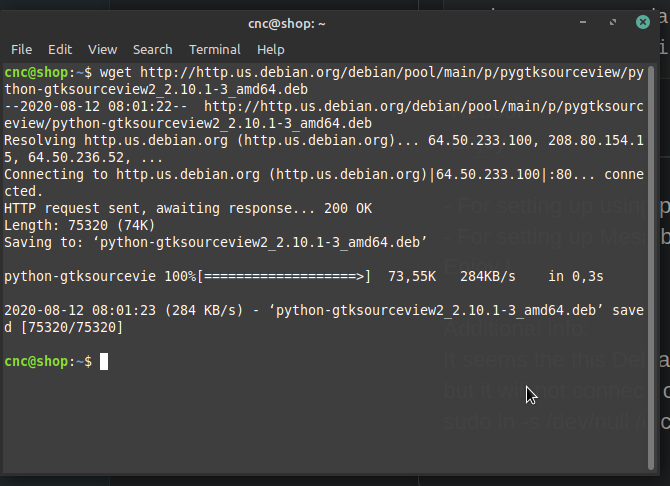
python-gtksourceview2_2.10.1-3_amd64.deb is no longer in sid
bugs.debian.org/cgi-bin/bugreport.cgi?bug=947854
Added :
deb ftp.us.debian.org/debian/ stretch main non-free contrib
to /etc/apt/sources.list and did:
$ apt-get install -t stretch python-gtksourceview2
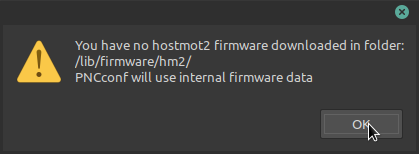
Not finding where the hostmot2 debian package is? - appears to need a special source?
Best would be if someone can post the contents of sources.list of the ISO for me?
How different is 2.8 from 2.9? (for someone running mesa )
(New to linuxcnc - old time Debian user )
bugs.debian.org/cgi-bin/bugreport.cgi?bug=947854
Added :
deb ftp.us.debian.org/debian/ stretch main non-free contrib
to /etc/apt/sources.list and did:
$ apt-get install -t stretch python-gtksourceview2
Not finding where the hostmot2 debian package is? - appears to need a special source?
Best would be if someone can post the contents of sources.list of the ISO for me?
How different is 2.8 from 2.9? (for someone running mesa )
(New to linuxcnc - old time Debian user )
Please Log in or Create an account to join the conversation.
- tommylight
- Offline
- Moderator
-
Less
More
- Posts: 22011
- Thank you received: 7491
6 years 2 months ago #177985
by tommylight
Replied by tommylight on topic LinuxCNC on Debian 10 Buster quick and easy install
It works
-
Hostmot2 firmware can be downloaded form the www.Mesanet.com website for their cards, but it is not needed for most of the cards as they have it in a flash memory, but they are needed if there is a need to change the existing internal configuration of those cards.
Is this regarding this:
-
Hostmot2 firmware can be downloaded form the www.Mesanet.com website for their cards, but it is not needed for most of the cards as they have it in a flash memory, but they are needed if there is a need to change the existing internal configuration of those cards.
Is this regarding this:
Please Log in or Create an account to join the conversation.
- seuchato
- Offline
- Platinum Member
-
Less
More
- Posts: 381
- Thank you received: 126
6 years 2 months ago #178180
by seuchato
Hi Andy
Will get anther pc to play with your iso. The reference you provide does a lot of sudo stuff. That is while installing. As menstioned. I could get around the sudo stuff easily, logging in a terminal and change to root, then running all commands without the preceeding sudo. I do run a number of servers and have come to convince myself, a root passwd is helpful. Also, I can run axis and the latency tests without any problems as a different user.
So: where after installng LinuxCNC does need sudo?
Greez
chris
PS: Great work! Thanks a ton!
Replied by seuchato on topic LinuxCNC on Debian 10 Buster quick and easy install
andypugh wrote:
seuchato wrote: Off curse I had to specify a root passwd, so I had to remove all the sudo references in your script.
It is important _not_ to specify a root password in the Debian installer as this disables sudo for all users.
LinuxCNC relies on setuid, so needs sudo.
This is mentioned briefly in the Buster install notes:
linuxcnc.org/docs/2.8/html/getting-start...th_preempt_rt_kernel
Hi Andy
Will get anther pc to play with your iso. The reference you provide does a lot of sudo stuff. That is while installing. As menstioned. I could get around the sudo stuff easily, logging in a terminal and change to root, then running all commands without the preceeding sudo. I do run a number of servers and have come to convince myself, a root passwd is helpful. Also, I can run axis and the latency tests without any problems as a different user.
So: where after installng LinuxCNC does need sudo?
Greez
chris
PS: Great work! Thanks a ton!
Please Log in or Create an account to join the conversation.
- lrak
- Offline
- Premium Member
-
Less
More
- Posts: 114
- Thank you received: 22
6 years 2 months ago - 6 years 2 months ago #178348
by lrak
Replied by lrak on topic LinuxCNC on Debian 10 Buster quick and easy install
A bit misleading on:
linuxcnc.org/docs/2.8/html/getting-start...th_preempt_rt_kernel
This isn't exactly true:
"Warning Do not enter a root password, if you do sudo is disabled and you won’t be able to complete the following steps."
Non of those steps require sudo. They work just fine with a root password - just become root and leave out the sudo (or you might want to configure sudo so you still use it for GUI applications.)
Easy to set up - just make a file (replace "user" with your user name) /etc/sudoers.d/local with :
Sudo confuses new Linux users - it was a way to give usually root like permissions to people with out giving them THE root password. Sudo was mostly for multiuser systems - or more typical today - an X-user that needs root while running GUI apps. ( There are GUI things that I use sudo for - like a GUI editor - or meld that might need root powers - most applications know how to drop excess privileges ).
But most often - I don't need to mess with sudo if I can just become root and work from a command-line editor.
If the main user has sudo power (he has root - simple as $sudo passwd ) the system is vulnerable if it is connected to a LAN that has internet connectivity. The bad guys do try to log in as root - but they also try every other name you can think of - 24/7 - better to have root behind a very long password or ssh-key - Windoze machines are the usual attack source - once infected with some click bait they will try the locks on every LAN host they can. (OT: long passwords matter - especially if you can remember them - use something like alongphraseisnice - but a bit longer - people don't remember symbols/caps/numbers and thus write them down - thus not secure). Some of the attacks coming out of windoze boxes only crash the Linux boxes (not good if you are running a job). One of the reasons to use more recent kernels. Really hard to explain just how good the bad guys have gotten at breaking in.
Hope this is helpful - I think some of the people here are fairly new to Liunx.. I've been running Linux firewalls/servers and my personal desktop from back in 1999-2000.
linuxcnc.org/docs/2.8/html/getting-start...th_preempt_rt_kernel
This isn't exactly true:
"Warning Do not enter a root password, if you do sudo is disabled and you won’t be able to complete the following steps."
Non of those steps require sudo. They work just fine with a root password - just become root and leave out the sudo (or you might want to configure sudo so you still use it for GUI applications.)
Easy to set up - just make a file (replace "user" with your user name) /etc/sudoers.d/local with :
Code:
cat /etc/sudoers.d/local
# User privilege specification
root ALL=(ALL) ALL
user ALL=(ALL) ALL
# Allow members of group sudo to execute any command
# (Note that later entries override this, so you might need to move
# it further down)
%sudo ALL=(ALL) ALL
Sudo confuses new Linux users - it was a way to give usually root like permissions to people with out giving them THE root password. Sudo was mostly for multiuser systems - or more typical today - an X-user that needs root while running GUI apps. ( There are GUI things that I use sudo for - like a GUI editor - or meld that might need root powers - most applications know how to drop excess privileges ).
But most often - I don't need to mess with sudo if I can just become root and work from a command-line editor.
If the main user has sudo power (he has root - simple as $sudo passwd ) the system is vulnerable if it is connected to a LAN that has internet connectivity. The bad guys do try to log in as root - but they also try every other name you can think of - 24/7 - better to have root behind a very long password or ssh-key - Windoze machines are the usual attack source - once infected with some click bait they will try the locks on every LAN host they can. (OT: long passwords matter - especially if you can remember them - use something like alongphraseisnice - but a bit longer - people don't remember symbols/caps/numbers and thus write them down - thus not secure). Some of the attacks coming out of windoze boxes only crash the Linux boxes (not good if you are running a job). One of the reasons to use more recent kernels. Really hard to explain just how good the bad guys have gotten at breaking in.
Hope this is helpful - I think some of the people here are fairly new to Liunx.. I've been running Linux firewalls/servers and my personal desktop from back in 1999-2000.
Last edit: 6 years 2 months ago by lrak. Reason: clarification
The following user(s) said Thank You: seuchato
Please Log in or Create an account to join the conversation.
Time to create page: 0.933 seconds