Raspberry Pi OS PREEMPT RT 6.13 Kernel Cookbook

More
1 year 9 months ago #319126 by gene_weber
I edited my original post to include changing the display protocol from Wayland to X11. Comments by rodw and cornholio were based on the terrible jitter that Wayland induces as shown above.

Note that Kunena has the worst forum editor I've ever used, and it was quite a job to edit those posts and restore the formatting. I wonder if forum posting would increase with forum software that was more user friendly.
The following user(s) said Thank You: behai

Please Log in or Create an account to join the conversation.

More
1 year 9 months ago #319128 by Cant do this anymore bye all
Ah yes the editor. Truly you have come of age and walked the path of darkness ;)
The following user(s) said Thank You: behai

Please Log in or Create an account to join the conversation.

More
1 year 9 months ago #319192 by gene_weber
Rather than starting a new thread about jitter mitigation, I'm just going to add it here.

First, I'm keeping in mind that Peter Wallace said " The jitter is basically unimportant with a 7C81 unless its so bad you
get real time errors at the normal servo thread rate
."

I'm also treating the Raspberry Pi + 7C81 as a dedicated controller, not a PC. By that I mean I'm not going to be doing anything on the Pi except LinuxCNC. I may turn on WIFI to update packages, or use email to transfer a file. But I plan to even turn off WIFI before I launch LinuxCNC.


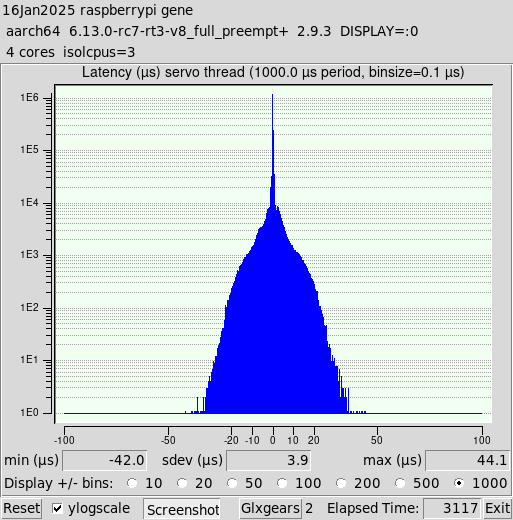
I ran several tests to see which combination of settings offered the most optimized jitter. I ran two Glxgears for all tests as I though that was reasonable, and ran the tests for long periods of time unless they looked bad early on.

I thought that turning off all unused services would decrease Jitter. So I turned off 9 of the 23 services, such as CUPS, Bluetooth, etc. To my surprise this did not decrease jitter.

Screen blank increased jitter a bit, so I turned that off. It doesn't make much sense anyway on a CNC controller.


These are the settings I added to the line already in /boot/firmware/cmdline.txt:
Code:
skew_tick=1 kthread_cpus=0-2 irqaffinity=0-2 rcu_nocb_poll rcu_nocbs=3 nohz=on nohz_full=3 isolcpus=3

I tried a few others that some people recommended on various blogs. Nothing else I tried had any noticeable positive impact on jitter, and some noticeably slowed down the responsiveness of the Pi.


Turning off timer_migration did reduce jitter. What I read said that you could make this setting permanent by adding it to the boot command line, or setting it in either of two different system files. Oddly none of that worked. So I setup a cron job to disable it at boot, and that works.
Code:
crontab -e
Add the following line:
Code:
@reboot sudo sysctl kernel.timer_migration=0


The other thing that helped reduce jitter was changing the scheduling policy to real-time and increasing the priority. I decided to create a shell script to launch latency-histogram, and eventually linuxcnc, which changes these things on the process.
Code:
#!/bin/bash # # Run with the SCHED_RR real-time policy at the highest priority level (99) # Uses chrt to switch the process policy and priority immediately after launch. # # Gene Weber - January 2025 # # "The difference between SCHED_FIFO and SCHED_RR is that among tasks with the same priority, # SCHED_RR performs a round-robin with a certain timeslice; SCHED_FIFO, instead, needs the task # to explicitly yield the processor." -Claudio priority=99 # Truncate $1 (the command) to 15 characters starting at 0. command=${1:0:15} # Execute the command line provided to rrt as a background task. `$@` & # Get the process ID of the command. PID=`pgrep $command` # Change the real-time policy to SCHED_FIFO with a priority of $priority. sudo chrt -r -p $priority $PID

I named it rrt (run real-time). So to launch latency-histogram it's simply:
Code:
rrt latency-histogram --nobase --sbins 1000

All spawned sub-processes inherit the policy and priority. So if linuxcnc is launched with rrt:
Code:
rrt linuxcnc
all of the processes that are part of LinuxCNC have the policy of SCHED_RR and priority of 99. I used Round Robin scheduling to make sure no LinuxCNC process "starves" another.

I don't know if this will work in the end, but I'm going to give it a try. Nothing ventured, nothing gained.

Implementing all of these, here is the jitter histogram. Good enough.

 
The following user(s) said Thank You: rodw, behai

Please Log in or Create an account to join the conversation.
More
1 year 9 months ago - 1 year 9 months ago #319860 by VincentValentine
Getting a Hunk #1-9 succeeded, and a few lines later (right after trace.c) a HUNK #1 failed during the patch. 

install and kernel activation does seem to complete if it’s ignored. 
Last edit: 1 year 9 months ago by VincentValentine.

Please Log in or Create an account to join the conversation.

More
1 year 9 months ago #319862 by Cant do this anymore bye all
One thing that might be worth of note, as development moves along, is to check the Makelfile in the top of the directory as minor revisions can change for the the rpi-linux kernel.

Or you can run
Code:
make kernelversion

Please Log in or Create an account to join the conversation.

More
1 year 9 months ago #319863 by Cant do this anymore bye all

Rather than starting a new thread about jitter mitigation, I'm just going to add it here.

First, I'm keeping in mind that Peter Wallace said " The jitter is basically unimportant with a 7C81 unless its so bad you
get real time errors at the normal servo thread rate."

I'm also treating the Raspberry Pi + 7C81 as a dedicated controller, not a PC. By that I mean I'm not going to be doing anything on the Pi except LinuxCNC. I may turn on WIFI to update packages, or use email to transfer a file. But I plan to even turn off WIFI before I launch LinuxCNC.


I ran several tests to see which combination of settings offered the most optimized jitter. I ran two Glxgears for all tests as I though that was reasonable, and ran the tests for long periods of time unless they looked bad early on.

I thought that turning off all unused services would decrease Jitter. So I turned off 9 of the 23 services, such as CUPS, Bluetooth, etc. To my surprise this did not decrease jitter.

Screen blank increased jitter a bit, so I turned that off. It doesn't make much sense anyway on a CNC controller.


These are the settings I added to the line already in /boot/firmware/cmdline.txt:
Code:
skew_tick=1 kthread_cpus=0-2 irqaffinity=0-2 rcu_nocb_poll rcu_nocbs=3 nohz=on nohz_full=3 isolcpus=3 I tried a few others that some people recommended on various blogs. Nothing else I tried had any noticeable positive impact on jitter, and some noticeably slowed down the responsiveness of the Pi. Turning off timer_migration did reduce jitter. What I read said that you could make this setting permanent by adding it to the boot command line, or setting it in either of two different system files. Oddly none of that worked. So I setup a cron job to disable it at boot, and that works. [code]crontab -e Add the following line: [code]@reboot sudo sysctl kernel.timer_migration=0 The other thing that helped reduce jitter was changing the scheduling policy to real-time and increasing the priority. I decided to create a shell script to launch latency-histogram, and eventually linuxcnc, which changes these things on the process. [code]#!/bin/bash # # Run with the SCHED_RR real-time policy at the highest priority level (99) # Uses chrt to switch the process policy and priority immediately after launch. # # Gene Weber - January 2025 # # "The difference between SCHED_FIFO and SCHED_RR is that among tasks with the same priority, # SCHED_RR performs a round-robin with a certain timeslice; SCHED_FIFO, instead, needs the task # to explicitly yield the processor." -Claudio priority=99 # Truncate $1 (the command) to 15 characters starting at 0. command=${1:0:15} # Execute the command line provided to rrt as a background task. `$@` & # Get the process ID of the command. PID=`pgrep $command` # Change the real-time policy to SCHED_FIFO with a priority of $priority. sudo chrt -r -p $priority $PID I named it rrt (run real-time). So to launch latency-histogram it's simply: [code]rrt latency-histogram --nobase --sbins 1000 All spawned sub-processes inherit the policy and priority. So if linuxcnc is launched with rrt: [code]rrt linuxcnc all of the processes that are part of LinuxCNC have the policy of SCHED_RR and priority of 99. I used Round Robin scheduling to make sure no LinuxCNC process "starves" another. I don't know if this will work in the end, but I'm going to give it a try. Nothing ventured, nothing gained. Implementing all of these, here is the jitter histogram. Good enough. [attachment=67004]final-16Jan2025-3117.png[/attachment]  
[/code][/code][/code][/code][/code]

 
I think it's just easier to isolate 2 cores, it really doesn't affect performance. And reading the docs, mainly pertaining to amd64, the general rule is to isolate cores on the same physical die, for reason beyond my pay grade.

Please Log in or Create an account to join the conversation.

Time to create page: 0.285 seconds
Powered by Kunena Forum
