Raspberry Pi OS PREEMPT RT 6.13 Kernel Cookbook

More
1 year 9 months ago #319067 by Cant do this anymore bye all
It would be interesting to see the latency values after switching to X. This can be done via the config utility for the Rpi, the actual binary name escapes me ATM.

Please Log in or Create an account to join the conversation.

More
1 year 9 months ago #319074 by rodw
In a Debian environment tasksel allows you to install a number of desktops. There is a (X) reason why we use XFCE in the linuxcnc images. It uses X windows not wayland

Please Log in or Create an account to join the conversation.

More
1 year 9 months ago #319076 by Cant do this anymore bye all
First of all your opening post was great. I'm actaully giving it a go now, just wish I had a nvme drive hooked up to the PCIe bus.
There's a couple of points regarding Linux kernels.

Sometimes the latest kernel may not be the optimum for your hardware.
The kernel you are using is a "release candidate" whilst usable for all intents is still going through some work.
The 6.1.y branch works fine on the RPi4, I think the kernel in the Linuxcnc image maybe 6.1.54
The RPi platforms with regards to Linuxcnc are a little different to the x86 platforms. Your Rpi4 & Rpi5 hardware is what it is. Whereas you may need a specific kernel dpending which x86 motherboard you buy.
The Rpi branch that appears to be active is the 6.6.y branch, so one could assume this is the branch that is receiving the most "bug fixies".
Simple things like isolating cores 2,3 will see latency drop. There doesn't seem to be as many options/tricks for latency on the RPi platforms as the x86 platforms.
I would chose to use a kernel that is a couple of version behind the the latest and greatest if it more tried in the real world and has better latency.
In my discussions with royka we talked about the fact that a kernel that is a little older is sometimes the better option.
Due to the issues with wayland I would recommend the use of the image form the Download page, Xorg is used. Plus it's easier to deploy ;)

Mind tho I'm not saying this is the only way to do it.
What I would suggest is trying some of the earlier kernels to see how performance differs.

One thing regarding the 6.6.y branch.
The latest version is 6.6.70 which I couldn't find any real time patches for.
The previous commit is 6.6.65 for which there are rt patches, but for some reason the overlay's aren't in the source. Which is a pain when building an image using Rod's image builder.

It seems, ATM, the deeper you dive it can seem a little confusing.

Sorry for the multiple posts but this editor is PITA.

Please Log in or Create an account to join the conversation.

More
1 year 9 months ago #319081 by Cant do this anymore bye all
Kernel as built following instructions

The following user(s) said Thank You: rodw

Please Log in or Create an account to join the conversation.

More
1 year 9 months ago #319119 by gene_weber
The good news is switching to X11 is trivial.

You can check the session type:
Code:
echo $XDG_SESSION_TYPE
    wayland

Launch Rasp-config command line tool in a terminal:
Code:
sudo raspi-config

Arrow down to "Advanced Options", and enter.
Arrow down to "Wayland                 Switch between X and Wayland backends", and enter.
If not on the line that says "W1 X11     Openbox window manager with X11 backend", arrow to it and enter.
The popup should say "Openbox on X11 is active" and have "Ok" highlighted. Enter.
It will return to the main screen. Use left-righ arrows to select "Finish". Enter.
Popup asks if you would like to reboot now, with "Yes" highlighted. Enter.

After reboot:
Code:
echo $XDG_SESSION_TYPE
    x11

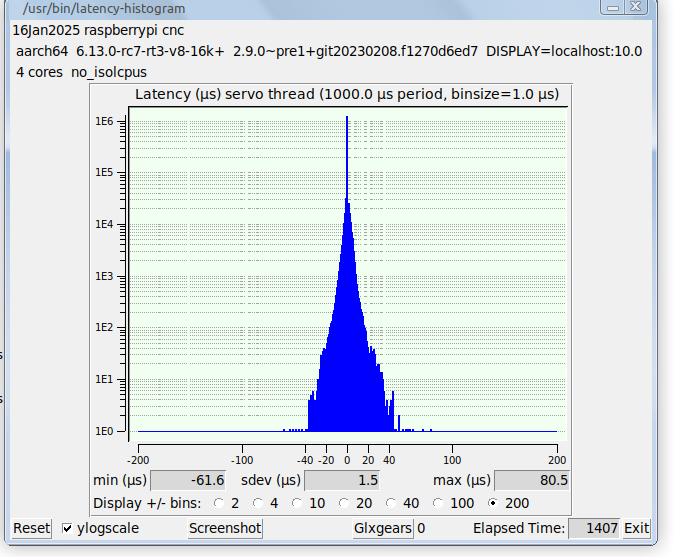
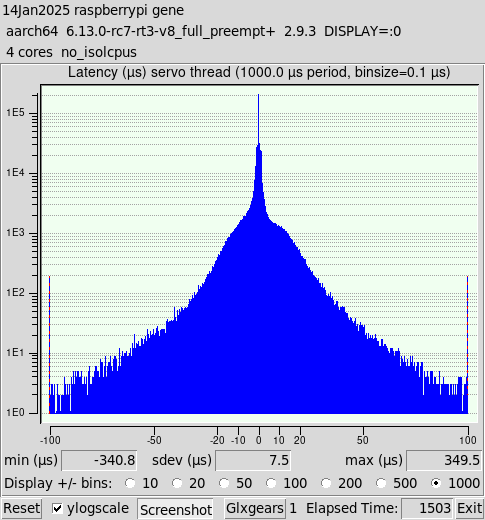
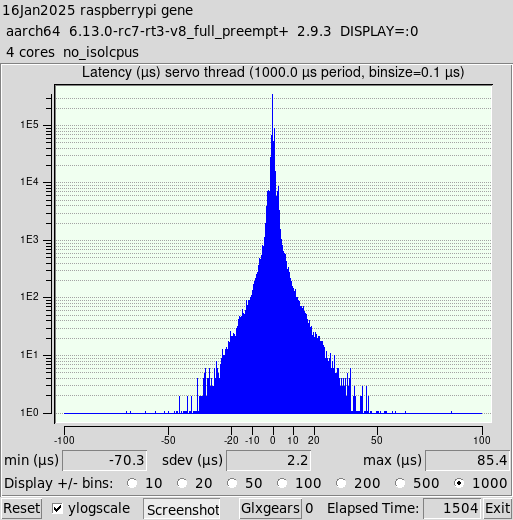
Now here's the interesting apples to apples comparison. The only difference between these two pre-jitter-optimization baseline latency runs is Wayland vs X11.

Wayland:
 

X11:


Please Log in or Create an account to join the conversation.

More
1 year 9 months ago #319121 by Cant do this anymore bye all
Looks a lot better.

One thing that was strange when running a basic config I got a real time error. hmmmmm

ATM the best image I've come across is Joco's rpi5 image rod has on his googledrive, that has a 6.6.54 kernel. It's my choice of the pre-built images.

I installed mate desktop, with 2 cores isolated, watching youtube latency is about 17-18us on my pi.

Please Log in or Create an account to join the conversation.

Time to create page: 0.159 seconds
Powered by Kunena Forum