
- Posts: 12170
- Thank you received: 4153
Ethercat - newbie guidelines
- rodw
- Offline
- Platinum Member
-

Less
More
4 years 9 months ago #231238
by rodw
Replied by rodw on topic Ethercat - newbie guidelines
OK, that works! Thanks so much for catching my silly mistake. I've never had to worry about the order of things before in components I've written.
What I ended up with
I need to check it against a standard version of homing.c But I'm sure it will work!
What I ended up with
I need to check it against a standard version of homing.c But I'm sure it will work!
Please Log in or Create an account to join the conversation.
- rodw
- Offline
- Platinum Member
-
Less
More
- Posts: 12170
- Thank you received: 4153
4 years 9 months ago #231239
by rodw
Replied by rodw on topic Ethercat - newbie guidelines
Actually, its not right yet. It needs some logic to manage if the sensor is enabled when homing is requested. It does not like that at all. Another day!.
I think we can check if the home switch is enabled in 0x60FD and set my homing_mode to HOME_CONFIRM if the home input is true when homing is requested
I think also we need a pin to unhome the drives as they can be left in a unexpected state sometimes.
Anyway, its looking good.
I think we can check if the home switch is enabled in 0x60FD and set my homing_mode to HOME_CONFIRM if the home input is true when homing is requested
I think also we need a pin to unhome the drives as they can be left in a unexpected state sometimes.
Anyway, its looking good.
Please Log in or Create an account to join the conversation.
- db1981
- Offline
- Platinum Member
-
Less
More
- Posts: 790
- Thank you received: 276
4 years 9 months ago #231253
by db1981
Replied by db1981 on topic Ethercat - newbie guidelines
okay, but these cases have to be caught by the drive. Maybe the drive config is not right, yet.
-the home sensor is only connected to the drive?
at the moment the drives gets an rising edge of the home bit after the opmode is changed the drive should:
-clear the is_homed bit (unhome)
-start its home procedure and set the is_homing bit
in the case the home_switch is enabled while starting homing, the drive adds an step to leave the sensor first or skips the search step.
-after finishing its internal procedure, the drive clears is_homing and set the homed bit (this is noticed by the cia comp and triggers lcnc)
this is the normal behaviour of an home function and all drives that i know are working like that...
-the home sensor is only connected to the drive?
at the moment the drives gets an rising edge of the home bit after the opmode is changed the drive should:
-clear the is_homed bit (unhome)
-start its home procedure and set the is_homing bit
in the case the home_switch is enabled while starting homing, the drive adds an step to leave the sensor first or skips the search step.
-after finishing its internal procedure, the drive clears is_homing and set the homed bit (this is noticed by the cia comp and triggers lcnc)
this is the normal behaviour of an home function and all drives that i know are working like that...
Please Log in or Create an account to join the conversation.
- rodw
- Offline
- Platinum Member
-
Less
More
- Posts: 12170
- Thank you received: 4153
4 years 9 months ago #231261
by rodw
Replied by rodw on topic Ethercat - newbie guidelines
Yeh, I had a bit of a play this morning before work and did not have much luck.
I added an input for the home switch which is fed by an output from lcec.
Take homing method 19
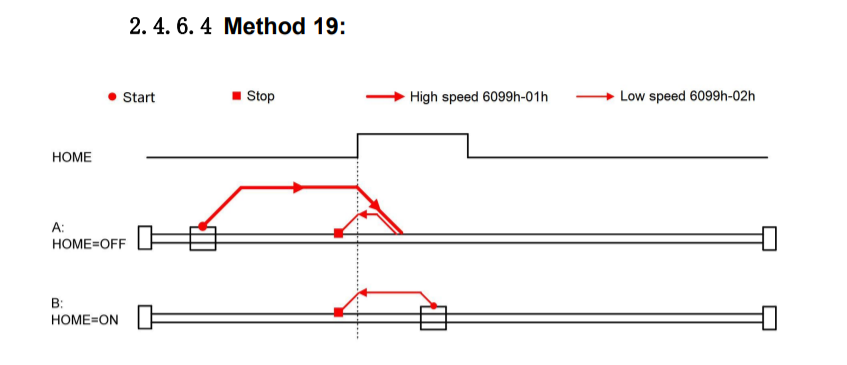
When the home switch (attached only to the drive) is activated per the top diagram, the drive halts movement. It should halt and reverse to find the edge which its not doing. Deactivate the switch and the move to position finishes (applying offset set in the drive).
I did get it to force lcnc homing but the drive was not in correct state. I will try your ideas.
Somehow I think linuxcnc still has its finger in the pie and possibly overriding our desired behaviour.
I added an input for the home switch which is fed by an output from lcec.
Take homing method 19
When the home switch (attached only to the drive) is activated per the top diagram, the drive halts movement. It should halt and reverse to find the edge which its not doing. Deactivate the switch and the move to position finishes (applying offset set in the drive).
I did get it to force lcnc homing but the drive was not in correct state. I will try your ideas.
Somehow I think linuxcnc still has its finger in the pie and possibly overriding our desired behaviour.
Please Log in or Create an account to join the conversation.
- tommylight
- Offline
- Moderator
-

Less
More
- Posts: 22011
- Thank you received: 7491
4 years 9 months ago #231263
by tommylight
Replied by tommylight on topic Ethercat - newbie guidelines
Homing from the wrong side of the switch would result in what you describe, see lover part of the drawing.
Just a stab in the dark.
Just a stab in the dark.
Please Log in or Create an account to join the conversation.
- rodw
- Offline
- Platinum Member
-
Less
More
- Posts: 12170
- Thank you received: 4153
4 years 9 months ago #231265
by rodw
Replied by rodw on topic Ethercat - newbie guidelines
Yes its possible the HOME_LATCH_VELOCITY has an incorrect sign. I did think of that. But this is all happening external to Linuxcnc. Eg Linuxcnc is not commanding the motor to move, the drive is.Homing from the wrong side of the switch would result in what you describe, see lover part of the drawing.
Just a stab in the dark.
Please Log in or Create an account to join the conversation.
Time to create page: 0.145 seconds