EtherCAT Communication Issues, Lost Frames, Interruptions in Program Execution

More
2 years 1 month ago - 2 years 1 month ago #310059 by stenly
I'm still having trouble booting to RTAI. I did try to follow the steps from the official docs, but running the linuxcnc-install.sh script would cause source conflicts on a LinuxCNC ISO, leaving me unable to use apt. On a vanilla Debian 12 ISO, it would still install linuxcnc-uspace and all, but then on trying to run sudo apt install linuxcnc it would cause conflicts again, even when I try to purge linuxcnc-uspace and linuxcnc-doc*.

I tried it following the instructions from the pinned RTAI thread , install a fresh vanilla Debian 12 ISO, download the 4 .deb files and install them with dpkg, yet the linuxcnc package would fail to build with dpkg. Either way, it still leaves me with the same error about the root filesystem on attempting to boot. I even tried to go with BIOS boot instead of UEFI.

Am I still doing something wrong? Should I open a new thread in the Installing LinuxCNC forum section regarding this?

Edit: in the rescue shell I am dropped in, uname -r does confirm I am running the RTAI kernel. So the issue is not the kernel installation allegedly, but it somehow not finding the correct root filesystem? I double and triple checked the UUID, it is indeed the correct one.
Last edit: 2 years 1 month ago by stenly.

Please Log in or Create an account to join the conversation.

More
2 years 1 month ago #310134 by stenly
I managed to figure my way around the conflicts, I was interpreting the docs incorrectly probably. Also not sure what exactly I did differently, but after a few reinstalls through varying methods, I got past that error and onto a new problem.

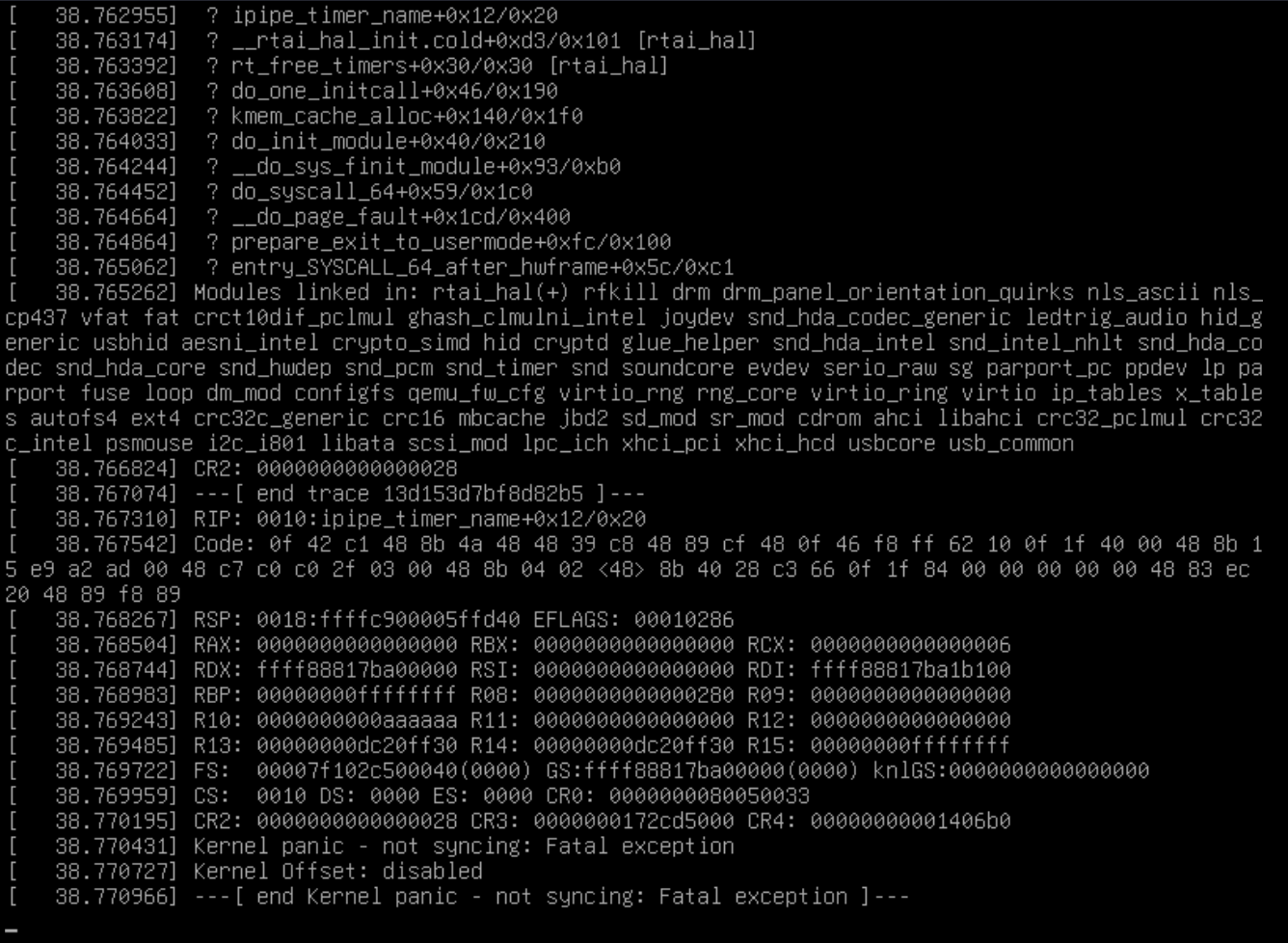
Upon booting to the RTAI kernel, the display manager service fails to start entirely. I am able to press Ctrl+Alt+F1 to log into a tty, though and uname -r does tell me I am booted to the correct kernel. I am still unable to start the display manager or the desktop environment at all, even manually. Interestingly, when I start latency-test, a kernel panic occurs and the system freezes up entirely. I am attaching an image.

All this on UEFI boot and on both a vanilla Debian 12 install and an install of the LinuxCNC 2.9.3 ISO as well.

Quite honestly, I have no idea what to think.

Please Log in or Create an account to join the conversation.

More
2 years 1 month ago #310140 by tommylight
Try setting the BIOS in Legacy mode or with CMS enabled.
The following user(s) said Thank You: stenly

Please Log in or Create an account to join the conversation.

More
2 years 1 month ago #310141 by tommylight
Wait, i just saw the tittle, EtherCAT did not work with RTAI at all, are you sure it works now?
The following user(s) said Thank You: stenly

Please Log in or Create an account to join the conversation.

More
2 years 1 month ago - 2 years 1 month ago #310142 by stenly
Oh, I already did that as I mentioned a few posts ago. However, I didn't mention in the latest post that trying it in Legacy boot doesn't get me past the initial root filesystem error. No clue...

I will attempt to try some different RTAI versions and will also see if I can try it out on a different computer altogether. In the pinned RTAI thread I saw some talk of unstable versions and on differing behavior across different motherboards.

Will give it a few more tries before I look into buying new hardware, lol.

EDIT: Did not see your last response as it seems you posted it as I was typing mine. I have no clue about EtherCAT on RTAI at this point as I am simply trying to boot w/ RTAI for the sake of seeing if the latency spikes issues are resolved. The idea was to go back to EtherCAT testing as the next step after this is settled. Or do you mean that RTAI in general is entirely incompatible with EtherCAT and I shouldn't pursue this line of thinking at all?
Last edit: 2 years 1 month ago by stenly.

Please Log in or Create an account to join the conversation.

More
2 years 1 month ago - 2 years 1 month ago #310147 by CORBETT
@stenly

I am positive Sascha dropped support for RTAI back years ago, and this would have been before Scott started the new branch that everyone is working from on the REPO.  (I can remember Sascha stating that no one is using RTAI now and he was dropping support)

Be aware that RTAI had a lot of work arounds back in the day.  The last time that I built with RTAI was back in 2015 and that was under Debian 7 Wheezy with LCNC 2.6...  Back before 2015, RTAI was dominate as LCNC did not play well with PREEMPT.  But somewhere around 2015-2017, PREEMPT took over.  I am pretty sure that Sascha fixed the "mutex" problem back before PREEMPT came into play.  I worked heavily on the RTAI builds back between 2013-2015, and I am sure I have all my notes from back then on the work arounds.  Also, you mentioned about "missing modules", I am sure you are talking about the "kernel modules" as that was a problem back with RTAI builds.  I am extremely busy and never on here, but I will try to do a RTAI build over the weekend and see if it will work without doing a bunch extra work.  Two weeks ago, I did a minimal Debian 12 with LCNC 2.10, ECAT 1.6, and Sascha's code, but that was with PREEMPT...  I will do my best to try and do a build and let you know something.

Also, in the BIOS... yes you have to be "legacy" and under the "drives' section you need to check if it is in "RAID" mode.  If you have more than one SSD/drive hooked up, it will try to automatically turn RAID on and you will get the BOOT errors you are describing.


Hope it helps...
Robert


"""EDIT"""    
I forgot to add that you MUST get the "kernel modules" installed to get RTAI working.  If you do not get them installed, you will NOT be able to do the build as it will fail while building.  Just wanted to make sure you were aware of that.

 
Last edit: 2 years 1 month ago by CORBETT.
The following user(s) said Thank You: tommylight, stenly

Please Log in or Create an account to join the conversation.

Time to create page: 0.382 seconds
Powered by Kunena Forum