Flexible GUI

More
1 year 8 months ago #321687 by Nserega.90
Replied by Nserega.90 on topic Flexible GUI
yes everything worked out! Thank you!
The following user(s) said Thank You: JT

Please Log in or Create an account to join the conversation.
More
1 year 8 months ago #321738 by Nserega.90
Replied by Nserega.90 on topic Flexible GUI
John, tell me! Is it possible to somehow use buttons with the same functions on different forms? It’s just that when you create a button, for example, E-stop (its name is in objectName:estop_pb), when you create the same button on another form/page, its name will become objectName:estop_pb_2 and its function will not work

Please Log in or Create an account to join the conversation.

More
1 year 8 months ago #321761 by JT
Replied by JT on topic Flexible GUI
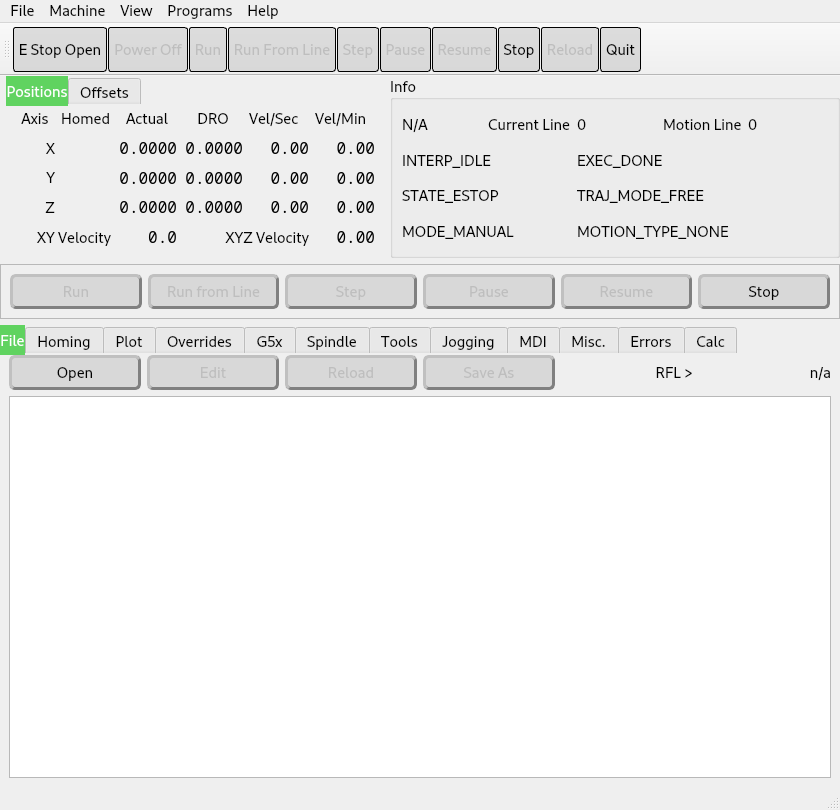
No it's not possible to make a copy of controls. What you can do for things like power and E Stop is to have them on the main part of the QMainWindow so it's always visible.

You can see in this sample that the top frame that contains the estop, power, run and quit buttons is always visible no matter what tab you select because they are in the tool bar. Also the DRO and Information box are always visible in this example. It does have duplicate run buttons as it's an example and the upper ones are menu items so they can also be in the tool bar.


JT
The following user(s) said Thank You: Nserega.90

Please Log in or Create an account to join the conversation.

More
1 year 8 months ago - 1 year 8 months ago #321762 by JT
Replied by JT on topic Flexible GUI


JT
Last edit: 1 year 8 months ago by JT.
The following user(s) said Thank You: tommylight, Nserega.90

Please Log in or Create an account to join the conversation.

More
1 year 8 months ago #321802 by Nserega.90
Replied by Nserega.90 on topic Flexible GUI
Thanks John, that's what I thought. Yes, I noticed that the top menu items are the same on all tabs. That’s why I decided to ask you, since I wasn’t completely sure myself))))

Please Log in or Create an account to join the conversation.

More
1 year 8 months ago - 1 year 8 months ago #322266 by Nserega.90
Replied by Nserega.90 on topic Flexible GUI
Hi John! Need your help! I ran into a problem: in the style sheet I made a style for buttons, I showed it in the video. That is, in the style there are different settings, but the main one is using an image as a button background! So I do absolutely the same thing for other buttons, that is, I apply the same style to other buttons and it does not work, or rather it works, but not quite correctly: in the video you can see that the button is not displayed. And when you hover over it, it applies the :hover and :pressed style, but the button inactivity style is not applied)))) what could be wrong? I attached the archive!
Last edit: 1 year 8 months ago by Nserega.90.

Please Log in or Create an account to join the conversation.

Moderators: JT
Time to create page: 0.203 seconds
Powered by Kunena Forum
