
Flexible GUI

More
1 year 9 months ago #319881 by JT
Replied by JT on topic Flexible GUI

Your screen shot looks correct. I added multi state labels on the 20th, how are you updating?
JT
 
I'm downloading the deb release from the git page. It's still at 1.1.1 but is says it's been updated since then.

Looks like apt didn't update it right this time since it's still version 1.1.1, I used gdebi and now it works. I did get a wierd error about a different label already having that hal pin name but that wasn't the case. I'm not sure if that stems from the multi-state label having the same widget name as it's hal pin name or the hal pin name having underscores. I had other regular labels with a single hal pin with underscore in the name and it was fine. I just changed the underscores in the hal pin name to dashes and the error went away.
 
I don't change the version for every addition, if I did it would be 1.1.125 LOL.

Sometimes I forget to hit the apt update button so downloading the deb and using gdebi to install will always be the latest code.

JT

Please Log in or Create an account to join the conversation.
More
1 year 9 months ago #319882 by blazini36
Replied by blazini36 on topic Flexible GUI
If it's of any use this is the HAL logic I use to operate the Estop and power buttons. "flash" is a custom blinking component I use for indicating states on my control panel. This seems to work perfectly with flex as of now. I didn't wire in the separate NC contacts for my Estop which is why the not is there, I may actually do that in the next rev.
Code:
net estop-NO-switch   => halui.estop.activate net estop-NO-switch   => oneshot.estop.in     #Oneshot triggers reset from hardware Estop release net estop-NO-switch   => not.estop.in net estop-NC-switch   <= not.estop.out net ui-estop-out      <= iocontrol.0.user-enable-out net ui-estop-out      => and2.estop-sync.in0 net estop-NC-switch   => and2.estop-sync.in1 net estop-sync        => and2.estop-sync.out net estop-sync        => iocontrol.0.emc-enable-in net estop-out         => motion.enable net estop-reset       <= oneshot.estop.out net estop-reset       => halui.estop.reset net estop-in          <= halui.estop.is-activated net estop-in          => flash.estop.enable net estop-led         <= flash.estop.out setp flash.estop.hold-prec       false setp flash.estop.hold-prec-inv   false setp flash.estop.hold            false setp flash.estop.flash-rate-ms   500 setp oneshot.estop.width         0.5 setp oneshot.estop.retriggerable false setp oneshot.estop.rising        false setp oneshot.estop.falling       true ##Power-On Connection net machine-pwr-btn  => toggle.power.in net machine-pwr      <= toggle.power.out net machine-pwr      => halui.machine.on net machine-pwr      => not.power.in net machine-pwr-not  <= not.power.out net machine-pwr-not  => halui.machine.off net machine-pwr-stat <= halui.machine.is-on net estop-sync        => flash.pwr.enable net machine-pwr-stat => flash.pwr.hold net machine-pwr-led  => flash.pwr.out setp flash.pwr.hold-prec         true setp flash.pwr.hold-prec-inv     true setp flash.pwr.flash-rate-ms     500
The following user(s) said Thank You: JT

Please Log in or Create an account to join the conversation.

More
1 year 9 months ago #319889 by blazini36
Replied by blazini36 on topic Flexible GUI
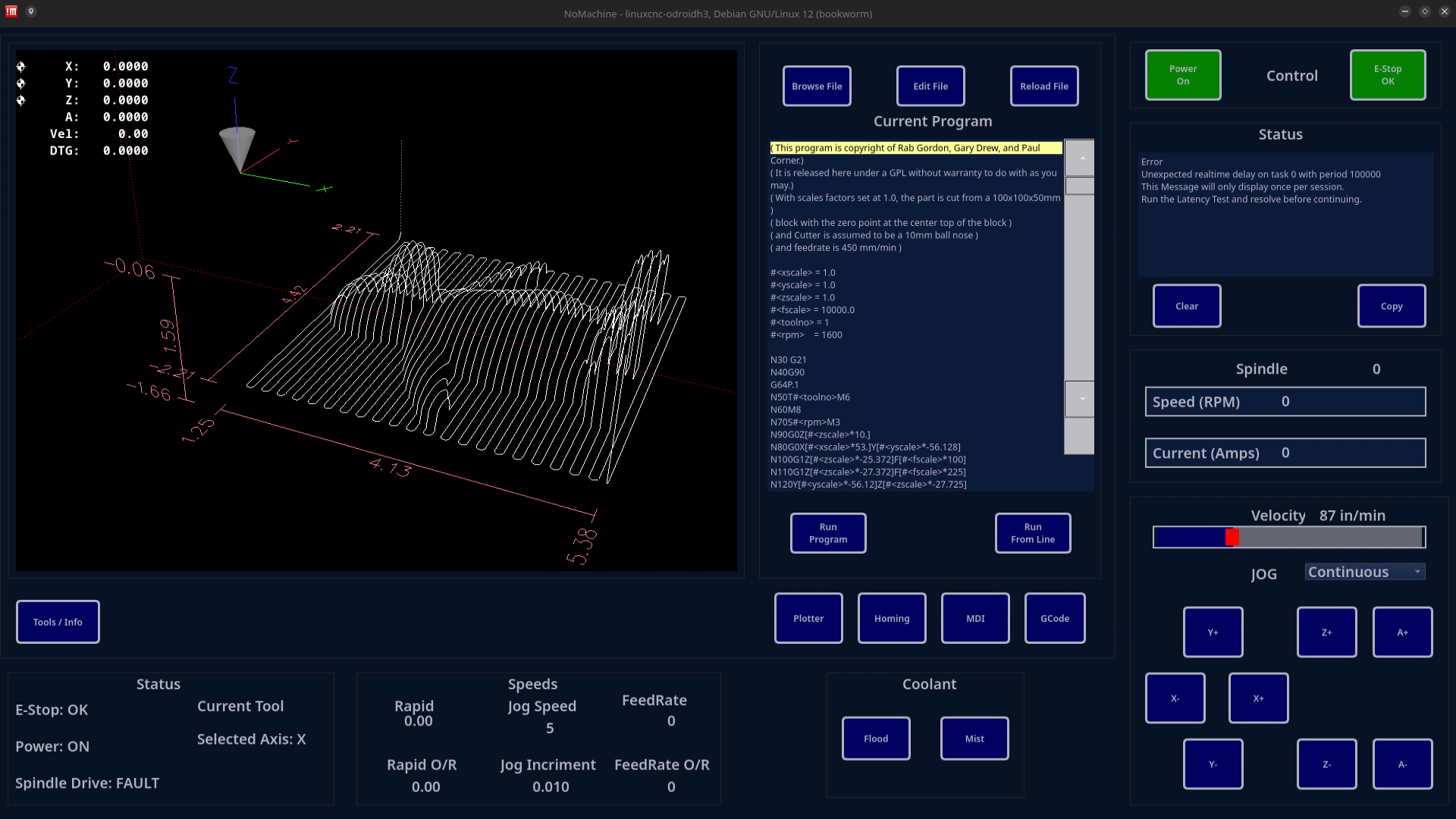
Still have some tweaking to do but I think this is about how it'll be...

 
The following user(s) said Thank You: tlightus, JT, Nserega.90

Please Log in or Create an account to join the conversation.

More
1 year 8 months ago - 1 year 8 months ago #320587 by Nserega.90
Replied by Nserega.90 on topic Flexible GUI
Hello guys! I want to thank JT very much for the work done! This is very cool! After reading the documentation, I want to try to make a graphical interface for a CNC lathe. I'm not good at programming, it's easier for me to sit with a soldering iron in my hands))). But I think something will work out))) Question: I want to implement a light and dark theme. Can I make a switch to change the theme (light/dark)? So as not to write this in the .ini file. So that I would have the opportunity to switch the topic from the program! 
Last edit: 1 year 8 months ago by Nserega.90.
The following user(s) said Thank You: JT

Please Log in or Create an account to join the conversation.

More
1 year 8 months ago - 1 year 8 months ago #321224 by Nserega.90
Replied by Nserega.90 on topic Flexible GUI
Hello. I started making my own GUI little by little. When creating a Stacked Widget, I add buttons to switch between pages. I did it according to the instructions: added PushButton->added Dynamic Property->Name: change_page - stackedWidget Index-1. I press Ctrl R and nothing happens.
 
 When you click on the button to go to another page, nothing happens in preview mode (Ctrl+R). And if I launch the GUI via lcnc, then when I press the button I get an error:
Warning: Spoiler!
Last edit: 1 year 8 months ago by Nserega.90.

Please Log in or Create an account to join the conversation.

Moderators: JT
Time to create page: 0.307 seconds
Powered by Kunena Forum
