Advanced Search

Search Results (Searched for: 7i77 spindle)

  • Masiwood123
  • Masiwood123's Avatar
26 Nov 2025 18:35 - 26 Nov 2025 18:37
Replied by Masiwood123 on topic Physical buttons to 7i96s+7i77

Physical buttons to 7i96s+7i77

Category: HAL
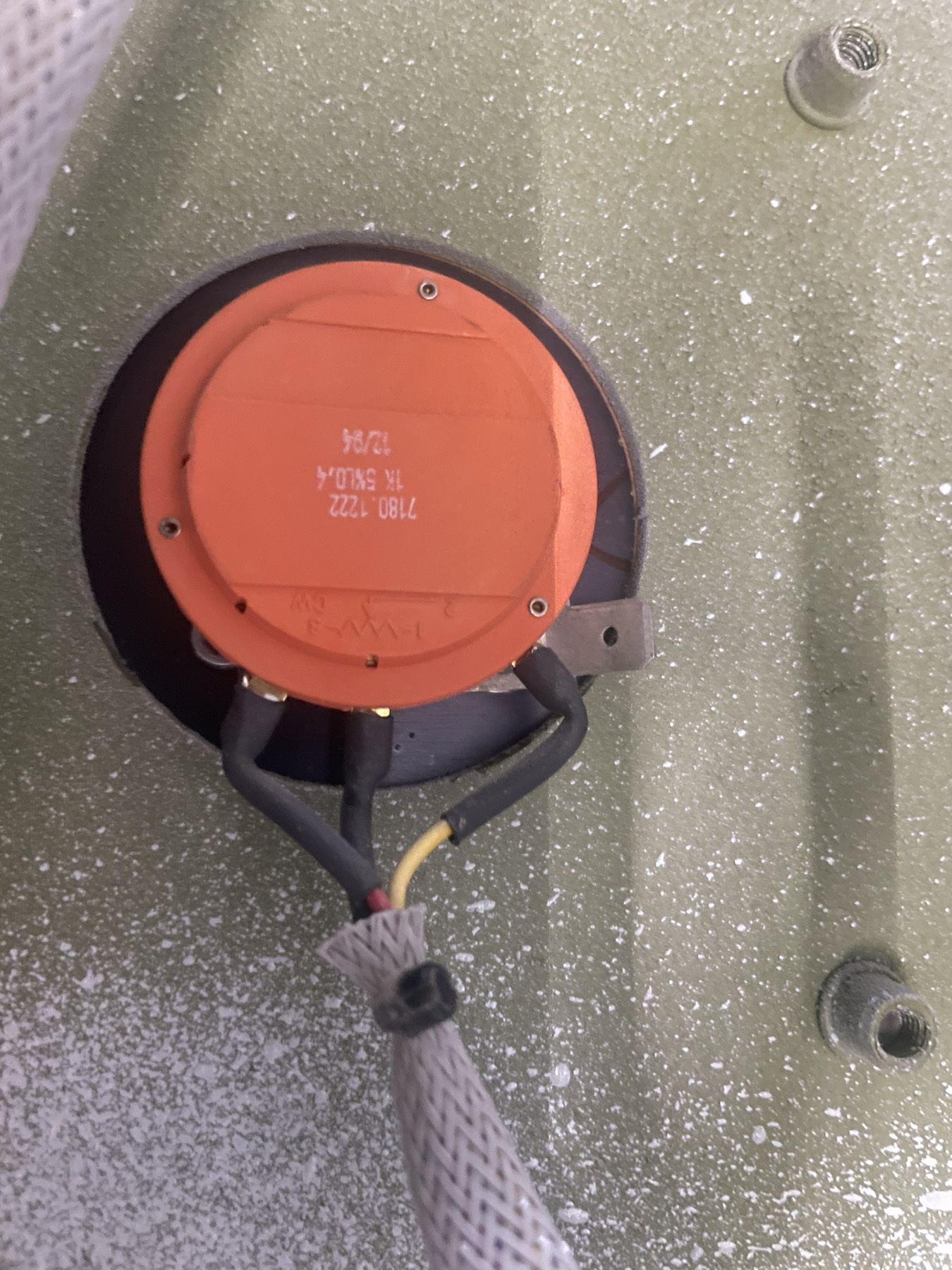
2.9.0. I didn't have a 7i92 with me, so I used a 7i96s as the main card, which turned out to be better because I'm planning two additional axes later that will use steppers...now about mpg, maybe and I have an example to try...but I didn't have any experience with connecting potentiometers for feed and spindle override, and any Hal example would be valuable to me.
  • Masiwood123
  • Masiwood123's Avatar
26 Nov 2025 11:06 - 26 Nov 2025 11:11
Physical buttons to 7i96s+7i77 was created by Masiwood123

Physical buttons to 7i96s+7i77

Category: HAL
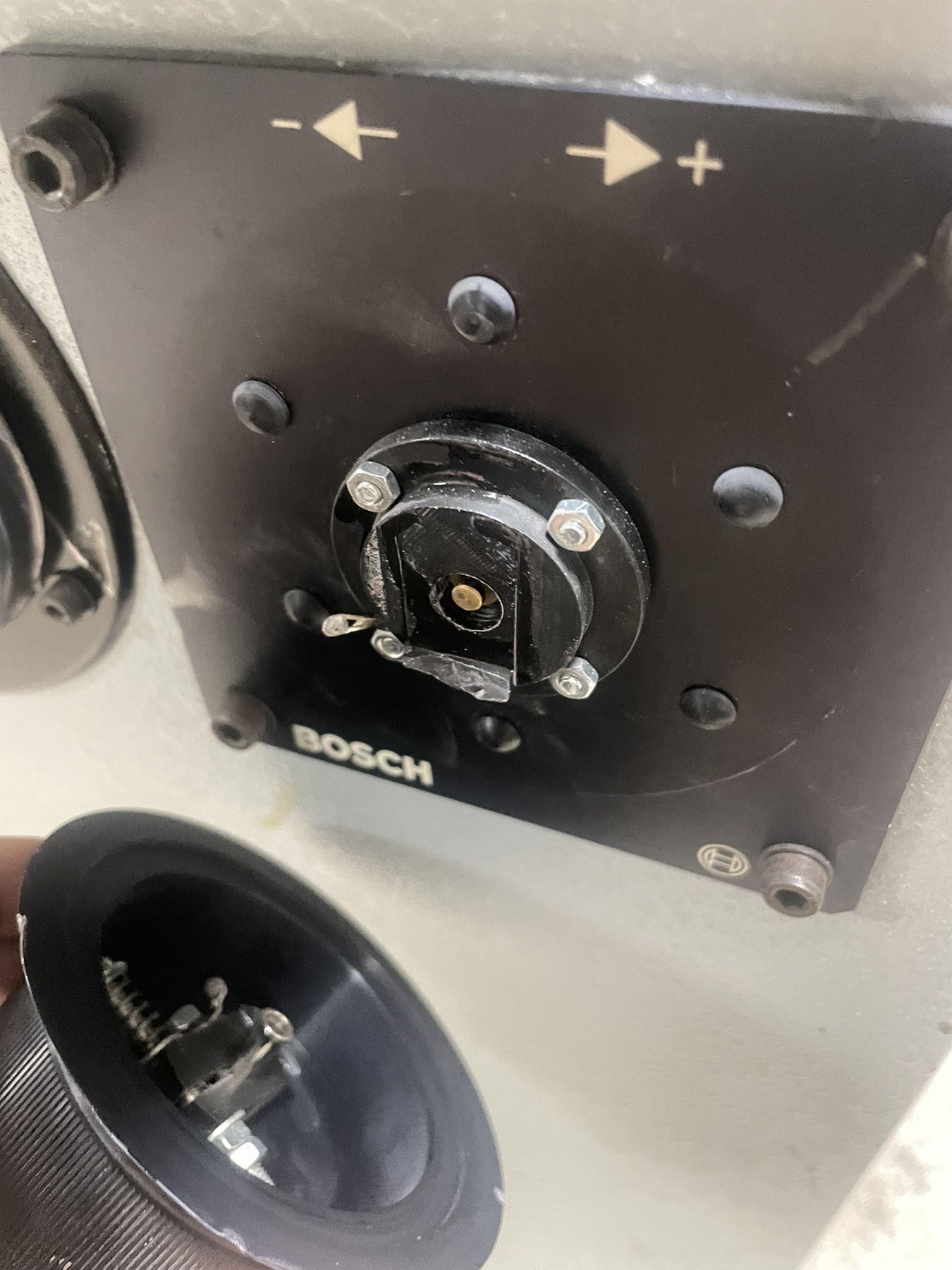
..in connection with the machine retrofit #338210
, I would like to include the hardware buttons in the configuration, also calculating the mpg. I have a lot of free inputs (all on 7i96s) and about twenty on 7i77 where I left the first three free as I understood that they are analog because of the potentiometer) now I need a suggestion, since dont have schematic for the old controller and not for the buttons, I think they are all on 24vdc including mpg. the outputs that I connected to 7i77 lit the bulbs of these buttons at 24v. should I try the configuration in terms of the mpg pendant for selector increments and mpg, and for spindle and feed override how should I connect? Thanks
  • Z3n
  • Z3n
26 Nov 2025 10:45 - 26 Nov 2025 10:49

Converting a Brother TC215 to LinuxCNC

Category: Milling Machines

Hello everyone,

I’ve been lucky enough to be the recipient of a Brother TC215 midway through a LinuxCNC conversion. I’ve always wanted to try my hand at CNC work, as I’ve done a little bit of manual milling and a lot of fabrication work over the years, and I’m always curious to learn and build new things. It’s been a pretty steep learning curve, as I’m new to basically all of this, but I’ve leaned a lot via search and previous forum threads and I think I’m at the point where starting a thread is worthwhile. 

On the hardware side: 
  • Mill is a Brother TC215
  • Dyn4 AC Servo Drivers/motors
  • Mesa 7i92 / 7i76 / 7i77D control boards
  • HP Elite 8300 USDT running LinuxCNC / ProbeBasic
I'm currently planning on running some of the older Brother boards for things like coolant, safety switches, limit switches, etc, just to keep things simple for now, as I already have breakout boards for all the connectors. I can clean everything up later if it gets that far.  My friend validated that the mill’s mechanical functions are in good shape and made it about halfway through the wiring - but my current priority is to wire everything up such that I can get XYZ servo movement first, and then I will add additional functionality. So I’ll try and keep this thread focused on the help I need to get things moving under their own power. 

What I’ve got so far is: The hardware is mounted in the mill, I roughly understand how things are laid out. I feel like i have a broad sense of how this should go together, but the details are oftentimes a little more opaque than I’d like.  What I’ll be doing when I have a minute :
  1. Test all my servo controllers and drives (easy to do, just need to get my windows laptop out to the mill)
  2. Power up the Mesa board (pretty easy, just need to spend some time looking at all the wiring and make sure I don’t fry anything)

The thing that’s blocking me right now is that I don’t really know enough to confirm that I’m wiring the servo drivers in a reasonable way. My understanding is: I should be able to wire my X / Y / Z servos in the following way, to do analog +10v control as a simple starting point. I need to set it up so I’m wiring: 
  • 7i77D +24v from field power to Dyn4 JP4-15 (Servo Enable) 
  • 7i77D TB5 (Analog Drive Interface) To Dyn4 JP4-13 (Analog +10v) & JP4-25 (Analog GND)
  • 7i77D TB3 (Encoder 0-2) to Dyn4 JP5-2 through 8 (Encoder outputs)


My plan was to disconnect all the motors from the mill and test them on the bench, but running through LinuxCNC, so I can confirm my understanding on how LinuxCNC operates. Once the motors are confirmed to work on the bench, then I would start on wiring up the Estop, limit switches, and other things I would need to get the mill safely moving, and then follow that with wiring in the spindle.


Here's a picture of how things it sits:


Any and all feedback appreciated, as well as suggestions about if I should approach this another way. I've learned a lot here and I hope that documenting this in the long run helps someone else :)
  • zoeper
  • zoeper
25 Nov 2025 20:54
Replied by zoeper on topic Avon 3000 Mill retrofit

Avon 3000 Mill retrofit

Category: Milling Machines

I spent a lot of time studying the machine schematics and have a decent grasp of the workings thereof. 
I removed the old Anilam GXM control, screen and manual control panel. The MESA 7i77 connected up to the encoders and I can read XYZ in the DRO screen. I can plot W in the HAL Scope, but it does not show on the DRO yet. (I think I selected encoder as rotary axis in PNCConf and will sort this out later.)
I now want to start connecting the limit switches and other IO's but have some things I am not clear on. 
On the schematic attached: 
D_A/18 and EXP/18  (37) would connect to V-Field on TB2
D_A/17 and EXP/17 (00) would connect to Ground on TB2
D-A/21, D-A/24, D-A/26, EXP/22 can be ignored for now. Was only pulled high to prevent fault condition for axis not in use on GXM
D-A/23 (83) is a input to indicate E-Stop active when not high.
D-A/25 (62) is a input to indicate Lubrication unit fail. (Feed Hold/ External Stop)
D-A/22 (820) is a input to indicate no axis overtravel and E-stop out.
D-A/26 (87) X Positive vector (Input)
D-A/24 (88) X Negative vector (Input)
D-A/23 (89) Y Positive vector (Input)
D-A/25 (90) Y Negative vector (Input)
D-A/19 (91) Z Positive vector (Input)
D-A/21 (92) Z Negative vector (Input)
D-A/09 (81) E-Stop Out and Reset Pressed (Input)

D-A/02 (72) M8 Coolant Off (Output, Drain)
D-A/08 (69) M5 Spindle Stop(Output, Drain)
D-A/04 (71) M7 Coolant On (Output, Drain)
D-A/12 (67) M3 Spindle Forward (Output, Drain)
D-A/10 (68) M4 Spindle Reverse (Output, Drain)
D-A/06 (70) M6 Tool Override (Output, Drain)
EXP/10 (236) "M Strobe" (Output, Drain)
EXP/20 (230) "Fin" (Output, Drain)
EXP/14 (235) "S Strobe" (Output, Drain)
EXP/06 (2311) "T Strobe" (Output, Drain)

Once I can get the limits and E-Stop circuits connected, I should be able to connect the motors and start tuning them. 
Any thoughts or comments welcome.


  • RotarySMP
  • RotarySMP's Avatar
21 Nov 2025 06:35
Replied by RotarySMP on topic Maho 500 W4 Retrofit

Maho 500 W4 Retrofit

Category: General LinuxCNC Questions

Hi Tom, I did my 400E with Mesa 5i25 (PCI), 7i77, and 7i84,  but back then the 7i97 did not yet exist.

If I were starting again, I would use the 7i97 and 7i84. I hard wired everything in my Bedienpul. Today I would use a 7i73 to interface that.
Does your 400W4 still have the 18 speed gearbox, or does it use a big DC servo on the spindle with just a back gearbox?

I would also suggest you take a look at Peter (Talla83 on Youtube's) Pendant.


Peter hat die beste Mesa Info auf DE.
Cheers,
Mark
  • Masiwood123
  • Masiwood123's Avatar
10 Nov 2025 10:22
Replied by Masiwood123 on topic beta bulleri for retrofit?

beta bulleri for retrofit?

Category: CNC Machines


Thanks, I'm on the way to a solution for the drivers, what's left of the cables is clear to me, and the rest are: analog +-10v signals, one 25pin input cable, which are partly connected as soon as the machine is turned on, and partly I realized which ones are for homing and for inductive sensors from the tool. and this 25 pin output cable remains, there are a total of about 10 outputs, my plan is to activate them all manually, together, by hand out of 7i77card, to see what will happen on the other side of the machine where this TB3 (see schematic) terminal block is. the cable from the pendant remained, that is, the one  from external buttons to the controller, I mean jog, feed override, spindle override, axis select, step select, estop. I will have to find a way to activate the K1 switch, it turns on the drivers, but also to connect the estop to turn it off. My question is, do I need analog inputs for the pendant later, or could a configuration be made using buttons and potentiometers that would support mpg, potentiometers and buttons with digital inputs?
  • Cooped-Up
  • Cooped-Up
06 Oct 2025 10:30
Replied by Cooped-Up on topic 5i25t firmware screwup

5i25t firmware screwup

Category: Driver Boards

I think I have gotten the firmware situation figured out, but now I am trying to add some things to the machines hal file for the retrofit based off a guide for a maho 400e. I added the following and now the cnc panel gives me an error. it seems to be saying it cant find pins on the 7i77

added to the machines.hal file=

loadrt matrix_kb config=5x5s names=maho_panel
addf maho_panel servo-thread
setp maho_panel.negative-logic 0
#scan out
net maho_panel.row_00_sig-out maho_panel.row-00-out => hm2_5i25.0.7i77.0.0.output-01
net maho_panel.row_01_sig-out maho_panel.row-01-out => hm2_5i25.0.7i77.0.0.output-02
net maho_panel.row_02_sig-out maho_panel.row-02-out => hm2_5i25.0.7i77.0.0.output-03
net maho_panel.row_03_sig-out maho_panel.row-03-out => hm2_5i25.0.7i77.0.0.output-04
net maho_panel.row_04_sig-out maho_panel.row-04-out => hm2_5i25.0.7i77.0.0.output-05
#scan in
net maho_panel.col_00_sig-in maho_panel.col-00-in <= hm2_5i25.0.7i77.0.0.input-05
net maho_panel.col_01_sig-in maho_panel.col-01-in <= hm2_5i25.0.7i77.0.0.input-06
net maho_panel.col_02_sig-in maho_panel.col-02-in <= hm2_5i25.0.7i77.0.0.input-07
net maho_panel.col_03_sig-in maho_panel.col-03-in <= hm2_5i25.0.7i77.0.0.input-08
net maho_panel.col_04_sig-in maho_panel.col-04-in <= hm2_5i25.0.7i77.0.0.input-09

loadrt mh400e_gearbox
addf mh400e-gearbox servo-thread
# --- GEARBOX CONTROL ---

net sig_return_actual_speed mh400e-gearbox.spindle-speed-out => motion.spindle-
speed-in

net sig_return_spindle-at-speed mh400e-gearbox.spindle-at-speed => motion.spindle-at-
speed

net sig_stop_spindle mh400e-gearbox.stop-spindle => halui.spindle.stop
net set-gear-shift-start mh400e-gearbox.start-gear-shift =>
hm2_5i25.0.7i84.0.2.output-05
net set-reverse-shaft-motor mh400e-gearbox.reverse-direction =>
hm2_5i25.0.7i84.0.2.output-04
net activate-reducer-motor mh400e-gearbox.reducer-motor =>
hm2_5i25.0.7i84.0.2.output-01
net activate-midrange-motor mh400e-gearbox.midrange-motor =>
hm2_5i25.0.7i84.0.2.output-02

net set-shaft-motor-lowspeed mh400e-gearbox.motor-lowspeed =>
hm2_5i25.0.7i84.0.2.output-00 # MAHO calls this Anwahl Mittelstellung
net activate-input-stage-motor mh400e-gearbox.input-stage-motor =>
hm2_5i25.0.7i84.0.2.output-03
net activate-spindle-twitch-cw mh400e-gearbox.twitch-cw =>
hm2_5i25.0.7i84.0.2.output-06
net activate-spindle-twitch-ccw mh400e-gearbox.twitch-ccw =>
hm2_5i25.0.7i84.0.2.output-07

Error I now get

RUN_IN_PLACE=no
LINUXCNC_DIR=
LINUXCNC_BIN_DIR=/usr/bin
LINUXCNC_TCL_DIR=/usr/lib/tcltk/linuxcnc
LINUXCNC_SCRIPT_DIR=
LINUXCNC_RTLIB_DIR=/usr/lib/linuxcnc/modules
LINUXCNC_CONFIG_DIR=
LINUXCNC_LANG_DIR=/usr/lib/tcltk/linuxcnc/msgs
INIVAR=inivar
HALCMD=halcmd
LINUXCNC_EMCSH=/usr/bin/wish8.6
LINUXCNC - 2.9.4
Machine configuration directory is '/home/coopedup/linuxcnc/configs/my_LinuxCNC_machine'
Machine configuration file is 'my_LinuxCNC_machine.ini'
INIFILE=/home/coopedup/linuxcnc/configs/my_LinuxCNC_machine/my_LinuxCNC_machine.ini
VERSION=1.1
PARAMETER_FILE=linuxcnc.var
TPMOD=
HOMEMOD=
TASK=milltask
HALUI=halui
DISPLAY=gmoccapy
COORDINATES=XYZ
KINEMATICS=trivkins coordinates=XYZ
Starting LinuxCNC...
Starting LinuxCNC server program: linuxcncsvr
Loading Real Time OS, RTAPI, and HAL_LIB modules
Starting LinuxCNC IO program: io
Starting HAL User Interface program: halui
linuxcnc TPMOD=tpmod HOMEMOD=homemod EMCMOT=motmod
Found file(REL): ./my_LinuxCNC_machine.hal
Shutting down and cleaning up LinuxCNC...
Running HAL shutdown script
hm2: loading Mesa HostMot2 driver version 0.15
hm2_pci: loading Mesa AnyIO HostMot2 driver version 0.7
hm2_pci: discovered 5i25t at 0000:04:06.0
hm2/hm2_5i25.0: Low Level init 0.15
hm2/hm2_5i25.0: Smart Serial Firmware Version 43
Board hm2_5i25.0.7i77.0.1 Hardware Mode 0 = standard
Board hm2_5i25.0.7i77.0.1 Software Mode 0 = analogout_enables
hm2/hm2_5i25.0: Smart Serial Firmware Version 43
hm2/hm2_5i25.0: 34 I/O Pins used:
hm2/hm2_5i25.0: IO Pin 000 (P3-01): IOPort
hm2/hm2_5i25.0: IO Pin 001 (P3-14): IOPort
hm2/hm2_5i25.0: IO Pin 002 (P3-02): IOPort
hm2/hm2_5i25.0: IO Pin 003 (P3-15): Smart Serial Interface #0, pin tx1 (Output)
hm2/hm2_5i25.0: IO Pin 004 (P3-03): Smart Serial Interface #0, pin rx1 (Input)
hm2/hm2_5i25.0: IO Pin 005 (P3-16): IOPort
hm2/hm2_5i25.0: IO Pin 006 (P3-04): IOPort
hm2/hm2_5i25.0: IO Pin 007 (P3-17): Muxed Encoder Select #0, pin Mux Select 0 (Output)
hm2/hm2_5i25.0: IO Pin 008 (P3-05): Muxed Encoder #0, pin Muxed A (Input)
hm2/hm2_5i25.0: IO Pin 009 (P3-06): Muxed Encoder #0, pin Muxed B (Input)
hm2/hm2_5i25.0: IO Pin 010 (P3-07): Muxed Encoder #0, pin Muxed Index (Input)
hm2/hm2_5i25.0: IO Pin 011 (P3-08): Muxed Encoder #1, pin Muxed A (Input)
hm2/hm2_5i25.0: IO Pin 012 (P3-09): Muxed Encoder #1, pin Muxed B (Input)
hm2/hm2_5i25.0: IO Pin 013 (P3-10): Muxed Encoder #1, pin Muxed Index (Input)
hm2/hm2_5i25.0: IO Pin 014 (P3-11): Muxed Encoder #2, pin Muxed A (Input)
hm2/hm2_5i25.0: IO Pin 015 (P3-12): Muxed Encoder #2, pin Muxed B (Input)
hm2/hm2_5i25.0: IO Pin 016 (P3-13): Muxed Encoder #2, pin Muxed Index (Input)
hm2/hm2_5i25.0: IO Pin 017 (P2-01): IOPort
hm2/hm2_5i25.0: IO Pin 018 (P2-14): IOPort
hm2/hm2_5i25.0: IO Pin 019 (P2-02): IOPort
hm2/hm2_5i25.0: IO Pin 020 (P2-15): IOPort
hm2/hm2_5i25.0: IO Pin 021 (P2-03): IOPort
hm2/hm2_5i25.0: IO Pin 022 (P2-16): IOPort
hm2/hm2_5i25.0: IO Pin 023 (P2-04): IOPort
hm2/hm2_5i25.0: IO Pin 024 (P2-17): IOPort
hm2/hm2_5i25.0: IO Pin 025 (P2-05): IOPort
hm2/hm2_5i25.0: IO Pin 026 (P2-06): IOPort
hm2/hm2_5i25.0: IO Pin 027 (P2-07): IOPort
hm2/hm2_5i25.0: IO Pin 028 (P2-08): IOPort
hm2/hm2_5i25.0: IO Pin 029 (P2-09): IOPort
hm2/hm2_5i25.0: IO Pin 030 (P2-10): IOPort
hm2/hm2_5i25.0: IO Pin 031 (P2-11): IOPort
hm2/hm2_5i25.0: IO Pin 032 (P2-12): IOPort
hm2/hm2_5i25.0: IO Pin 033 (P2-13): IOPort
hm2/hm2_5i25.0: registered
hm2_5i25.0: initialized AnyIO board at 0000:04:06.0
hm2_5i25.0: dropping AnyIO board at 0000:04:06.0
hm2/hm2_5i25.0: unregistered
hm2_pci: driver unloaded
hm2: unloading
Removing HAL_LIB, RTAPI, and Real Time OS modules
Removing NML shared memory segments

Debug file information:
Note: Using POSIX realtime
./my_LinuxCNC_machine.hal:298: Pin 'hm2_5i25.0.7i77.0.0.output-01' does not exist
1999
Stopping realtime threads
Unloading hal components
RTAPI_PCI: Unmapped 65536 bytes at 0x7f5cd11d7000
Note: Using POSIX realtime
  • PCW
  • PCW's Avatar
12 Sep 2025 01:03

PnCconf Mesa 7i96s PWM speed control OUTPUT_SCALE

Category: Driver Boards

Yes, but the pncconf spindle setup also works with other devices with fixed 10V or +-10V  full scale
(7I77,7I76,7I83 etc)

It really should have an additional field for potentiometer type outputs based on the card type
Maybe "Full Scale Analog Output" and "Voltage For Maximum RPM" or some such
  • andypugh
  • andypugh's Avatar
04 Sep 2025 12:04
Replied by andypugh on topic 7i77 and VFD spindle control

7i77 and VFD spindle control

Category: Basic Configuration

Which version of LinuxCNC are you running? I would expect the spindle pins to look more like "spindle.0.speed-out" on any recent LinuxCNC version.

To get a list of HAL pins that you can copy and paste from, in the HAL file insert the line
show pin
just after the block of "loadrt" commands
Then start LinuxCNC from the command line
linuxcnc &
LinuxCNC probably won't start, but you will see a list of all the pins, and also a message about the first problem it has found in the HAL file.
Copy the pin list from the terminal window and squirrel it away in a text file for reference.
(Copy and paste in the terminal window is generally ctrl-shift-C and ctrl-shift-V as "normal" Ctrl-C is "Cancel")
  • SPH
  • SPH's Avatar
04 Sep 2025 07:46
7i77 and VFD spindle control was created by SPH

7i77 and VFD spindle control

Category: Basic Configuration

I've been having a hard time trying to figure out how to get my router's Yaskawa 616g5 vfd connected up and running with my 5i25 - 7i77 setup.
I can't seem to find a good example of the HAL code and I'm not across HAL enough to figure it out for myself. 
Just trying to get the absolute basics working. Spindle on is already connected and working. I just need to figure out the 0-10v output from analogue5.
The VFD can be configured for 0-10v or +-10v. I'll be setting it to 0-10v, no need for it to reverse direction.
I've seen versions with scaling and versions without, versions that set the scaling directly in HAL and others that set the scaling parameters in INI.
As I understand it I shouldn't need any scaling, just SCALE, MAX and MIN values of 24000 and 0 (or maybe 6000, the slowest the spindle is rated for) 

I think I had it close to working at one point but the scaling must have been off. I've not gone as far as connecting the vfd to the 7i77 yet, just probing the output pins on the 7i77 with a multimeter. I was reading 0.4v when the spindle was on and 0 when off but in trying to figure out why the scaling was off on that particular iteration of the HAL file I deleted something and couldn't get LCNC to run. That was about the 15th attempt so I gave up for the day.

Most of the code I've tried to work from has looked like this or some version of it.
If someone has a similar setup and could share their HAL file or give me some direction on the bare bones that are required to get 0-10v working I'd really appreciate it.
#******************************
# SPINDLE S
#******************************


# ---PWM Generator signals/setup---

setp   hm2_5i25.0.7i77.0.1.analogout5-scalemax  [SPINDLE_9]OUTPUT_SCALE
setp   hm2_5i25.0.7i77.0.1.analogout5-minlim    [SPINDLE_9]OUTPUT_MIN_LIMIT
setp   hm2_5i25.0.7i77.0.1.analogout5-maxlim    [SPINDLE_9]OUTPUT_MAX_LIMIT

net spindle-vel-cmd  => hm2_5i25.0.7i77.0.1.analogout5
net machine-is-enabled      => hm2_5i25.0.7i77.0.1.spinena

# ---setup spindle control signals---

net spindle-vel-cmd-rps    <=  motion.spindle-speed-out-rps
net spindle-vel-cmd        <=  motion.spindle-speed-out
net spindle-on             <=  motion.spindle-on
net spindle-cw             <=  motion.spindle-forward
net spindle-ccw            <=  motion.spindle-reverse
net spindle-brake          <=  motion.spindle-brake
net spindle-revs           =>  motion.spindle-revs
net spindle-at-speed       =>  motion.spindle-at-speed
net spindle-vel-fb         =>  motion.spindle-speed-in
net spindle-index-enable  <=>  motion.spindle-index-enable

# ---Setup spindle at speed signals---

sets spindle-at-speed true

#SPINDLE-CW
net spindle-cw  motion.spindle-forward  => hm2_5i25.0.7i77.0.0.output-08

#SPINDLE-CCW
net spindle-ccw  motion.spindle-reverse => hm2_5i25.0.7i77.0.0.output-09

#SPINDLE-STOP
#net spindle-on  motion.spindle-on       => hm2_5i25.0.7i84.0.2.output-13
  • Japoo_Ness
  • Japoo_Ness
01 Sep 2025 11:07

Retrofitting a 3-axis VMC with DC servos - guidance needed

Category: Driver Boards

Excellent, thanks again for the help. Now, looking at what @Andy mentioned, what would be the advantage of the 6i24-16 (I understand this is the one being referred to) over the 6i25? I see that it has more expansion possibilities for the future, but in terms of processing capability and other aspects, is there any difference?

From what I’ve checked, I think that with the 6i25, 7i77 and 7i74 I already have a very large working possibility. Also, I couldn’t find a way to use a 4th axis in the future with the 50-pin options, since they come with control for 4 analog servos, and I understand that one of them would have to be used for the spindle. That means I’d have to use one of the 6i24 configurations that allows 8 servos (which in my case seems unnecessary). So I’d like to know what would be the advantages of using a configuration with the 6i24.

@Tommy, thank you very much as well for your reply to Andy. I was checking which workstation models I could use with these configurations, and I noticed that the ones you mentioned are actually available here in my country (Argentina, which has a lot of issues with getting certain hardware). So thanks to both of you, I’ll keep researching the advantages and options.
  • GDTH
  • GDTH's Avatar
27 Aug 2025 07:33 - 16 Sep 2025 17:18

Solved: Help with Busellato JET 2 spindle retrofit – VFD overload

Category: Driver Boards

Hi all,I’m in the process of retrofitting a Busellato JET 2 CNC machine. The machine has one main spindle, a side spindle, and drills, but I only need to control the main spindle.The spindle is still running on the original VFD, which has not been altered or replaced.Originally, the VFD was controlled via serial communication, but since I’m using a Mesa 7i77 card, I converted it to 0–10 V analog control (the serial setup seemed unnecessarily complex and hard to understand).Here’s what I’ve tried so far:
  • Using the original VFD (unchanged).
    • Converted VFD control from serial → 0–10 V (Mesa 7i77).
      • Adjusted VFD parameters to allow external analog speed control.
        • Able to start the spindle successfully.
          • Spindle ramps up but only reaches ~50 Hz.
            • After about 10 seconds at 50 Hz, the VFD trips into overload.

              My observations:
              • It sounds like the spindle wants to accelerate further but is somehow being held back.
                • I’ve spent several hours tweaking and checking parameters, but I can’t figure out where it’s going wrong.

                  Any tips, suggestions, or guidance on how to properly configure the VFD (or what to check mechanically/electrically) would be hugely appreciated.Thanks in advance!

                  Omron F7 guide

                  Omron F7 full manual
  • Japoo_Ness
  • Japoo_Ness
07 Aug 2025 11:07

Retrofitting a 3-axis VMC with DC servos - guidance needed

Category: Driver Boards

Hi everyone,

I'm currently working on the retrofit of a 3-axis vertical machining center (from 1995) and have decided to use LinuxCNC with Mesa boards. The machine is in excellent mechanical condition, but the original controller (Fagor 8025M) is beginning to fail. I’m still evaluating whether it’s worth repairing, but I’m leaning toward fully modernizing it instead.

Here are the key technical details of the system:
  •  **Machine type**: 3-axis vertical milling machine
  •  **Original controller**: Fagor 8025M
  •  **Motors**: SEM MT30R4-46 brushed DC servos, each with internal tachometers
  •  **Drives**: Axor analog drives (Miniclamp 140, Minispeed, Minispeed 140, Minispeed 200) with ±10 V control input
  •  **Spindle drive**: Fanuc A06B-6060-H003#H503 (also analog control)
  •  **Feedback**:
  •  **Main feedback**: KA300 linear scales (Extent 570D), 5 µm resolution, differential outputs (A/B/Z, A-/B-/Z-)
  •  **Velocity loop** is handled inside the servo drives via tachometers
  •  **Planned control strategy**: Full closed-loop position control via linear scales in LinuxCNC
  •  **I/O needs**: At least 18 digital inputs for limits, emergency stop, lubrication pump, coolant, etc.
  •  **Desired precision**: Hundredths of a millimeter (0.01 mm) or better
  •  **Budget**: About $1500 or less
  •  **Planned Mesa boards**: Leaning toward a 5i25 (PCIe) + 7i77 for analog servo control and I/O

The machine will be used for both production and toolmaking, so reliability and precision are key. The current system performs interpolation and achieves 0.01 mm precision, and I’d like to match or improve upon that.

I’d like to ask:

- Has anyone here done a similar retrofit with SEM DC motors and Axor drives?
- Is it reasonable to expect similar or better precision from LinuxCNC using KA300 scales and Mesa hardware?
- Are there any specific concerns when using analog ±10 V control with older servo amplifiers?
- Any advice or experience you could share with full closed-loop systems based on linear feedback?
- I’m also interested in your thoughts on encoder scaling, latency tuning, and best practices for safety inputs and interlocks.

Info:
digital-readout.com/wp-content/uploads/2...stallation-guide.pdf
www.axorindustries.com/wp-content/upload...ce-Manual-MS-Eng.pdf
www.mroelectric.com/static/app/product/p...a06b-6044-manual.pdf
forum.linuxcnc.org/media/kunena/attachme...17/MT30R4Extract.pdf

Thanks in advance for any help or tips you can share! I’ve already started digging into the documentation but would really value input from those who’ve done similar projects.

Best regards,  
Santiago
 
  • pommen
  • pommen's Avatar
03 Aug 2025 20:11
Encoder started misbehaving was created by pommen

Encoder started misbehaving

Category: Driver Boards

Today something strange happened to my setup. I was tidying some cables up in the control cabinet and must have fried something.
I have been running my machine for about a year now without any problems. 
Now my Y encoder readout follows my X axis. Even when I disconnect the encoder from the 7i77 it happens.
Changing from hm2_[MESA](BOARD).0.encoder.01.position
to hm2_[MESA](BOARD).0.encoder.04.position (and updating the other encoder lines from 01 to 04) and plugging it in encoder 04 position did not work.

X Z still works though. Spindle encoder reads nothing, although the actual encoder is functioning.

Have i fried my 7i77?

/Peter

File Attachment:

File Name: main.hal
File Size:8 KB

File Attachment:

File Name: dmu50.ini
File Size:6 KB
  • PCW
  • PCW's Avatar
01 Aug 2025 18:39
Replied by PCW on topic Spindle speed?

Spindle speed?

Category: Basic Configuration

You probably mean a 7I83 or 7I77 (the 7I87 is an analog _input_ card)

My guess is that there is a missing abs function in the hal file.

The 7I83 and 7I77 have bipolar +-10V analog outputs, but most VFDs
only take a unipolar ( typically 0 to +10V) input range, so you either need to
use the absolute spindle speed pin from motion or add an abs function
if you have an old enough LinuxCNC version that does not have the absolute
spindle speed pin.
Displaying 16 - 30 out of 41 results.
Time to create page: 0.619 seconds
Powered by Kunena Forum