Advanced Search

Search Results (Searched for: )

  • programador
  • programador's Avatar
25 Feb 2025 20:14 - 25 Feb 2025 20:19
How to increase the Z axis punch speed? was created by programador

How to increase the Z axis punch speed?

Category: Basic Configuration

Good afternoon
Everyone

First of all, I would like to thank you for all the help I received in this forum, especially from Mr. PCW. With this help, I was able to go far and achieve a satisfactory result.

However, although the machine is working, the customer wants more speed on the Z axis. I don't know if I'm already at the mechanical limit of this machine, but what parameters can I change and how can I change and calculate them to test the limit of this machine? If anyone can give me a tip on how to change the INI file to improve performance, I would be very grateful.

Below is the video of the machine that was retrofitted and working perfectly with the boards from the manufacturer Mesa.


Below is the INI code
[code]# Generated by PNCconf at Sat Apr 27 14:56:11 2024
# Using LinuxCNC version:  2.8
# If you make changes to this file, they will be
# overwritten when you run PNCconf again

[EMC]
MACHINE = 7i96s+7i84d
DEBUG = 0
VERSION = 1.1

[DISPLAY]
DISPLAY = gmoccapy
POSITION_OFFSET = RELATIVE
POSITION_FEEDBACK = ACTUAL
MAX_FEED_OVERRIDE = 2.000000
MAX_SPINDLE_OVERRIDE = 1.000000
MIN_SPINDLE_OVERRIDE = 0.500000
INTRO_GRAPHIC = linuxcnc.gif
INTRO_TIME = 5
PROGRAM_PREFIX = /home/linoteck/linuxcnc/nc_files
INCREMENTS = 5mm 1mm .5mm .1mm .05mm .01mm .005mm
POSITION_FEEDBACK = ACTUAL
DEFAULT_LINEAR_VELOCITY = 6.000000
MAX_LINEAR_VELOCITY = 25.000000
MIN_LINEAR_VELOCITY = 0.500000
DEFAULT_ANGULAR_VELOCITY = 12.000000
MAX_ANGULAR_VELOCITY = 180.000000
MIN_ANGULAR_VELOCITY = 1.666667
EDITOR = gedit
GEOMETRY = xyzab
#ABATELA
EMBED_TAB_NAME=Alarmes
EMBED_TAB_COMMAND = gladevcp -x {XID} -H ui-alarmes.hal alarmes.ui
EMBED_TAB_LOCATION = ntb_user_tabs

[FILTER]
PROGRAM_EXTENSION = .png,.gif,.jpg Greyscale Depth Image
PROGRAM_EXTENSION = .py Python Script
png = image-to-gcode
gif = image-to-gcode
jpg = image-to-gcode
py = python

[TASK]
TASK = milltask
CYCLE_TIME = 0.010

[RS274NGC]
PARAMETER_FILE = linuxcnc.var
RS274NGC_STARTUP_CODE = G21 G40 G90 G94 G97 G64 P0.025
REMAP= M6 modalgroup=6 ngc=sub_progs/troca_ferramenta
USER_M_PATH = /home/linoteck/linuxcnc/nc_files/m_codigos/

[EMCMOT]
EMCMOT = motmod
COMM_TIMEOUT = 1.0
SERVO_PERIOD = 1000000

[HMOT]
# **** This is for info only ****
CARD0=hm2_7i96s.0

[HAL]
HALUI = halui
HALFILE = 7i96s+7i84d.hal
HALFILE = custom.hal
POSTGUI_HALFILE = postgui_call_list.hal
SHUTDOWN = shutdown.hal
HALFILE = classicladder.hal

[HALUI]

[HALUI]
# add halui MDI commands here (max 64) 


[KINS]
JOINTS = 5
KINEMATICS = trivkins coordinates=XYZAB

[TRAJ]
COORDINATES =  XYZAB
MAX_ANGULAR_VELOCITY = 360.00
DEFAULT_ANGULAR_VELOCITY = 36.00
LINEAR_UNITS = mm
ANGULAR_UNITS = degree
DEFAULT_LINEAR_VELOCITY = 16.00
MAX_LINEAR_VELOCITY = 160.00

[EMCIO]
EMCIO = io
CYCLE_TIME = 0.100
TOOL_TABLE = tool.tbl

#******************************************
[AXIS_X]
MAX_VELOCITY = 160.0
MAX_ACCELERATION = 10000.0
MIN_LIMIT = -0.01
MAX_LIMIT = 1250.0

[JOINT_0]
TYPE = LINEAR
HOME = 0.0
FERROR = 10.0
MIN_FERROR = 1.0
MAX_VELOCITY = 160.0
MAX_ACCELERATION = 10000.0
# The values below should be 25% larger than MAX_VELOCITY and MAX_ACCELERATION
# If using BACKLASH compensation STEPGEN_MAXACCEL should be 100% larger.
STEPGEN_MAXVEL = 200
STEPGEN_MAXACCEL = 12500
P = 1000
I = 0
D = 0
FF0 = 0
FF1 = 1
FF2 = 0
BIAS = 0
DEADBAND = 0
MAX_OUTPUT = 0
# these are in nanoseconds
DIRSETUP   = 10000
DIRHOLD    = 10000
STEPLEN    = 10000
STEPSPACE  = 10000
STEP_SCALE = 250
MIN_LIMIT = -0.01
MAX_LIMIT = 1250.0
HOME_OFFSET = 0.000000
HOME_SEARCH_VEL = -33.316667
HOME_LATCH_VEL = -33.316667
HOME_FINAL_VEL = 0.000000
#HOME_USE_INDEX = NO
#HOME_SEQUENCE = 1
#******************************************

#******************************************
[AXIS_Y]
MAX_VELOCITY = 160.0
MAX_ACCELERATION = 10000.0
MIN_LIMIT = -0.01
#MAX_LIMIT = 1293.0
MAX_LIMIT = 1164.0

[JOINT_1]
TYPE = LINEAR
HOME = 0.0
FERROR = 10.0
MIN_FERROR = 1.0
MAX_VELOCITY = 160.0
MAX_ACCELERATION = 10000.0
# The values below should be 25% larger than MAX_VELOCITY and MAX_ACCELERATION
# If using BACKLASH compensation STEPGEN_MAXACCEL should be 100% larger.
STEPGEN_MAXVEL = 200
STEPGEN_MAXACCEL = 12500
P = 1000
I = 0
D = 0
FF0 = 0
FF1 = 1
FF2 = 0
BIAS = 0
DEADBAND = 0
MAX_OUTPUT = 0
# these are in nanoseconds
DIRSETUP   = 10000
DIRHOLD    = 10000
STEPLEN    = 9000
STEPSPACE  = 10000
STEP_SCALE = 250
MIN_LIMIT = -0.01
MAX_LIMIT = 1293.0
HOME_OFFSET = 0.000000
HOME_SEARCH_VEL = -33.316667
HOME_LATCH_VEL = -33.316667
HOME_FINAL_VEL = 0.000000
#HOME_USE_INDEX = NO
#HOME_SEQUENCE = 1
#******************************************

#******************************************
[AXIS_Z]
#MAX_VELOCITY = 25.0
MAX_VELOCITY = 50.0
#MAX_ACCELERATION = 750.0
MAX_ACCELERATION = 1000.0
#MIN_LIMIT = -100.0
#MAX_LIMIT = 0.01
MIN_LIMIT = -100.0
MAX_LIMIT = 100.0

[JOINT_2]
TYPE = LINEAR
HOME = 0.0
FERROR = 50
MIN_FERROR = 50
#MAX_VELOCITY = 25.0
MAX_VELOCITY = 125.0
#MAX_ACCELERATION = 750.0
MAX_ACCELERATION = 1750.0
P = 50.0
I = 0.0
D = 0.0
FF0 = 0.0
FF1 = 1.0
FF2 = 0.0
BIAS = 0.0
DEADBAND = 0.0
MAX_OUTPUT = 0.0
ENCODER_SCALE = 415
OUTPUT_SCALE = 10
OUTPUT_MIN_LIMIT = -10.0
OUTPUT_MAX_LIMIT = 10.0
MIN_LIMIT = -100.0
MAX_LIMIT = 100.0
HOME_OFFSET = 0.0
#HOME_SEQUENCE = 0
#******************************************
[AXIS_A]
MAX_VELOCITY = 360.0
MAX_ACCELERATION = 1200.0
MIN_LIMIT = -500.0
MAX_LIMIT = 500.0

[JOINT_3]
#TYPE = ANGULAR
TYPE = LINEAR
HOME = 0.0
FERROR = 0.5
MIN_FERROR = 0.05
MAX_VELOCITY = 360.0
MAX_ACCELERATION = 1200.0
# The values below should be 25% larger than MAX_VELOCITY and MAX_ACCELERATION
# If using BACKLASH compensation STEPGEN_MAXACCEL should be 100% larger.
STEPGEN_MAXVEL = 450
STEPGEN_MAXACCEL = 1500
P = 1000
I = 0
D = 0
FF0 = 0
FF1 = 1
FF2 = 0
BIAS = 0
DEADBAND = 0
MAX_OUTPUT = 0
# these are in nanoseconds
DIRSETUP   = 10000
DIRHOLD    = 10000
STEPLEN    = 5000
STEPSPACE  = 5000
STEP_SCALE = 222
MIN_LIMIT = -500.0
MAX_LIMIT = 500.0
HOME_OFFSET = 0.0
#HOME_SEQUENCE = 1
#******************************************
[AXIS_B]
MAX_VELOCITY = 160.0
MAX_ACCELERATION = 10000.0
MIN_LIMIT = -45000.0
MAX_LIMIT = 45000.0

[JOINT_4]
TYPE = LINEAR
HOME = 0.0
FERROR = 10.0
MIN_FERROR = 1.0
MAX_VELOCITY = 160.0
MAX_ACCELERATION = 10000.0
# The values below should be 25% larger than MAX_VELOCITY and MAX_ACCELERATION
# If using BACKLASH compensation STEPGEN_MAXACCEL should be 100% larger.
STEPGEN_MAXVEL = 200
STEPGEN_MAXACCEL = 12500
P = 1000
I = 0
D = 0
FF0 = 0
FF1 = 1
FF2 = 0
BIAS = 0
DEADBAND = 0
MAX_OUTPUT = 0
# these are in nanoseconds
DIRSETUP   = 10000
DIRHOLD    = 10000
STEPLEN    = 10000
STEPSPACE  = 10000
STEP_SCALE = 142
MIN_LIMIT = -45000.0
MAX_LIMIT = 45000.0
HOME_OFFSET = -92.000000
HOME_SEARCH_VEL = -33.316667
HOME_LATCH_VEL = -33.316667
HOME_FINAL_VEL = 0.000000
#HOME_USE_INDEX = NO
#HOME_SEQUENCE = 1
[SPINDLE_0]
P = 0
I = 0
D = 0
FF0 = 1
FF1 = 0
FF2 = 0
BIAS = 0
DEADBAND = 0
MAX_OUTPUT = 2000


[/code]

  • jst
  • jst
25 Feb 2025 20:08
Replied by jst on topic Lathe project

Lathe project

Category: Turning

RotarySMP post=322596 userid=2917I like that sturdy cast base they put this lathe on. You are making a really nice job on that retrofit.

At least with my Knuth lathe, the base is out of rather thin sheet metal and tends to vibrate.
  • jst
  • jst
25 Feb 2025 20:04
Replied by jst on topic Lathe project

Lathe project

Category: Turning

Mechanically similar machines where sold by Knuth in Germany with a Sinumerik control.
The toolchanger is fiddly to adjust, if you have to take it apart, I can look for my notes on how to assemble it.
I have changed the pulley ratio to get a higher spindle speed.
  • Hakan
  • Hakan
25 Feb 2025 20:01 - 25 Feb 2025 20:06

EtherCAT XML Configuration help (Elmo drive)

Category: EtherCAT

Ok, I see. Have a look here, it outlines what you need to do. Save the output in ethercat-conf.xml and have a look at some examples.
github.com/linuxcnc-ethercat/linuxcnc-ethercat

There is also some good info in the sticky here forum.linuxcnc.org/ethercat/45336-etherc...-how-to-step-by-step

At a minimum you need some lines in the hal file, like
loadusr -W lcec_conf ethercat-conf.xml

and you need to have the ethercat-conf.xml (which you got from lcec_configgen)


  • cakeslob
  • cakeslob
25 Feb 2025 19:48
Replied by cakeslob on topic Modify AXIS GUI

Modify AXIS GUI

Category: General LinuxCNC Questions

linuxcnc.org/docs/html/gui/axis.html#_user_command_file

modify it using this local file instead. no need to change source, its easily deployable and is mostly safe from updates.

linuxcnc.org/docs/html/gui/axis.html#_axis_customization_hints
  • Aciera
  • Aciera's Avatar
25 Feb 2025 19:19 - 25 Feb 2025 19:22
Replied by Aciera on topic Modify AXIS GUI

Modify AXIS GUI

Category: General LinuxCNC Questions

The classic axis gui is written in python so there is no need to compile anything here.
Source code is here:
github.com/LinuxCNC/linuxcnc/tree/master/src/emc/usr_intf/axis

It has nothing to do with qtvcp, but there is a qtvcp version of axis.
  • Hastrh2o
  • Hastrh2o
25 Feb 2025 18:48 - 25 Feb 2025 18:49
Replied by Hastrh2o on topic Modify AXIS GUI

Modify AXIS GUI

Category: General LinuxCNC Questions

Hi,
Start with this help file : linuxcnc.org/docs/html/gui/axis.html
And then have a look at qtvcp although : linuxcnc.org/docs/html/gui/qtvcp.html#sec:qtvcp-overview .

I found it's a bit confusing at the beginning, but once you start to put the hand in, you'll begin to learn.
If you want to use qtvcp, you will need to install QtDesigner and the linuxcnc widgets.
  • Hastrh2o
  • Hastrh2o
25 Feb 2025 18:42

Using transformer with 3 28.5V secondary windings to supply 57VAC/80VDC

Category: General LinuxCNC Questions

They use SMD fuse because the stepper driver is usually a controlled current source, so impossible to have an overcurrent.
  • SteveCap
  • SteveCap
25 Feb 2025 18:29
Replied by SteveCap on topic EtherCAT XML Configuration help (Elmo drive)

EtherCAT XML Configuration help (Elmo drive)

Category: EtherCAT

I did copy the output of `lcec_configgen` into `~/linuxcnc-dev/configs/` . After rebooting I did not notice anything different. Is there some initialization or command to get this xml processed by HAL? I have attached my xml to ensure it appears as expected.

Regards,

Steve Cap
  • noqui
  • noqui
25 Feb 2025 18:14 - 25 Feb 2025 18:19
Modify AXIS GUI was created by noqui

Modify AXIS GUI

Category: General LinuxCNC Questions

HI, I need to modify the AXIS GUI, and so I have some questions about it:

1) Whatś the name of the file ?
2) Is written in Python?
3) Which application I need to work with or compile it?

I have to work with it on a Debian 12.

Thanks a lot
  • Hakan
  • Hakan
25 Feb 2025 17:57

EtherCAT XML Configuration help (Elmo drive)

Category: EtherCAT

It's a relatively recent tool, developed by Scott when he overhauled lcec.
Bits and pieces are around, but I am not aware of any structured documentation on
how to set up Ethercat and find info like the one you asked for.
  • Huliofane
  • Huliofane
25 Feb 2025 17:24
Replied by Huliofane on topic Remora - ethernet NVEM / EC300 / EC500 cnc board

Remora - ethernet NVEM / EC300 / EC500 cnc board

Category: Computers and Hardware

Sorry for disturb,i have an problem with my nvem board,is same as board on this topic,im write here but im undestand we are expert on pcb .....when im power on the grren led blink at 10% of light and speed,the item on pcbU7 "DE=G12" is hot and ,the led "D15" blink when insert a cable,the situation of led not change and switch or pc not blink he light.
we have any idea for solve my situation ??
sorry for disturb
  • tommylight
  • tommylight's Avatar
25 Feb 2025 17:13

Using transformer with 3 28.5V secondary windings to supply 57VAC/80VDC

Category: General LinuxCNC Questions

Maybe i was not "tactful" enough:
-no need to be sorry at all
-i was trying to give you a push to move forward
-when you start wiring stuff it will be stressful, but when you see things move you will be very happy
-when you see the machine actually working, oh what a joy ! :)
  • 109jb
  • 109jb
25 Feb 2025 16:51 - 25 Feb 2025 16:52
Replied by 109jb on topic Flexible GUI

Flexible GUI

Category: Flex GUI

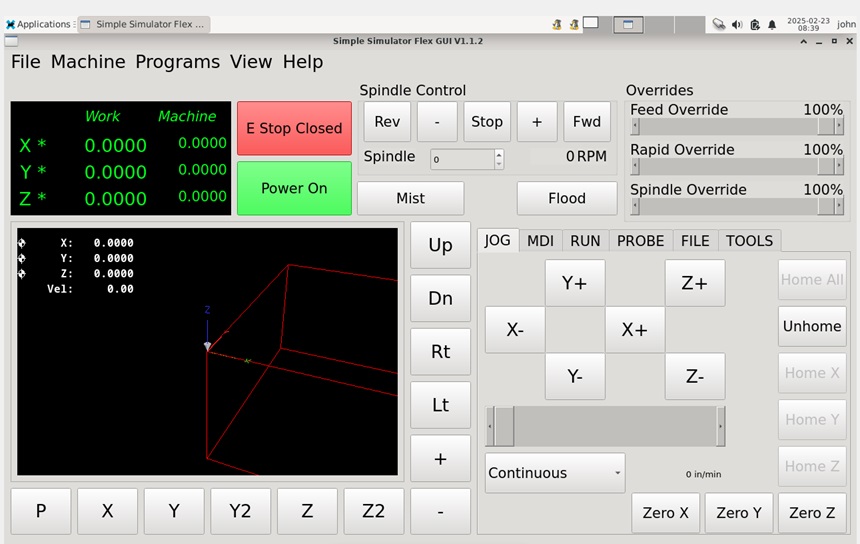
I got my touchscreen monitor delivered yesterday and just wanted to confirm that the issue I was having with touchscreen button not working right was a consequence of using Flex GUI in a virtual machine on windows. The Flex GUI that I made works perfectly on a real machine with touchscreen. For the real machine I am using a RPi 4b and a generic 10" touchscreen monitor.

For anyone else designing their GUI this way, I am using VirtualBox on a Windows 10 machine. The virtual Machine has LinuxCNC 2.9.4 installed from the live iso download. Here are the couple quirks I have found running it in the virtual machine. I want to stress that these issues don't exist once the .ui file is put on my RPi machine.
  1. touchscreen buttons don't respond as expected in virtual machine
  2. The machine will unexpectedly go to "Power Off" as soon as a motion command (Jog, MDI, or in a program) completes. Doesn't do it every time, but pretty often. Again, only in the virtual machine.

    I also want to again give thanks for this wonderful tool and to give a peek at what I am working on. I have a 3 axis benchtop mill (RF-45 size) that I converted to CNC a few years ago. I did this as a hobby and use the machine for my hobbies. It has been run with many things including LinuxCNC on an old tower PC with ancient monitor, keyboard and mouse, with GRBL on an Arduino hooked to a Netbook with my own Visual Basic interface, and I tried one of those standalone controllers, but sent it back because it was junk. I finally decided to just do it better and got a RPi 4b, installed LinuxCNC and have been working on an interface that for most of the way I use the mill can be done without ever touching a keyboard. I'll still have a small wireless keyboard with trackpad available if needed though. This is the interface I'm working on and I think it will suit me. I have the UI sized to perfectly fit the display that I bought to use as much space as possible. Thanks again for the very useful tool.

    John B

     
  • PCW
  • PCW's Avatar
25 Feb 2025 16:23

7i76e - Spindle FWD/ENA ok, but no speed output

Category: Basic Configuration

The spindle is off:

bit FALSE pdnt.spindle.is-on ==> hm2_7i76e.0.7i76.0.0.spinena
 
Displaying 18526 - 18540 out of 18777 results.
Time to create page: 0.385 seconds
Powered by Kunena Forum