
- Posts: 29
- Thank you received: 1
GMoccaPy doesn't fit in 1024x768 resolution
- hwylie
- Offline
- Junior Member
-

Less
More
9 years 5 months ago #93534
by hwylie
Replied by hwylie on topic GMoccaPy doesn't fit in 1024x768 resolution
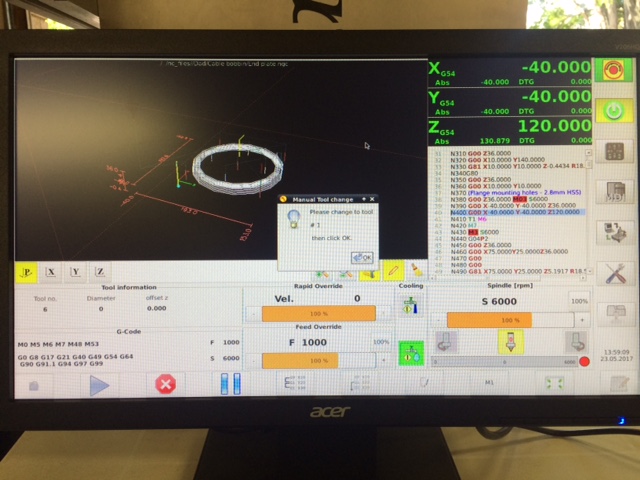
Following online documentation, downloading the required macro and python files from Master, and adapting .ini and .hal files as required, the Gmoccapy manual tool change prompt appears as expected.
However, the crucial requirement to perform manual jogging and touch-off after tool change is not met, since Gmoccapy manual/mdi control is inhibited while the tool change prompt is in focus (see attached image), irrespective of choice of full-screen, maximised or floating window.
Is it in fact possible to perform manual / mdi functions via the Gmoccapy GUI while awaiting confirmation of tool change? Is something overlooked or incorrect in attached .ini &, .hal files?
However, the crucial requirement to perform manual jogging and touch-off after tool change is not met, since Gmoccapy manual/mdi control is inhibited while the tool change prompt is in focus (see attached image), irrespective of choice of full-screen, maximised or floating window.
Is it in fact possible to perform manual / mdi functions via the Gmoccapy GUI while awaiting confirmation of tool change? Is something overlooked or incorrect in attached .ini &, .hal files?
Please Log in or Create an account to join the conversation.
- newbynobi
- Offline
- Moderator
-

Less
More
- Posts: 1931
- Thank you received: 394
9 years 5 months ago #93553
by newbynobi
Replied by newbynobi on topic GMoccaPy doesn't fit in 1024x768 resolution
It is not possible to jog or do MDI commands, during a tool change!
If you want to do that, you need to look at the "moveoff" hal component.
I do not know why you want to do such think.
I have the remap procedur move my machine up, then to a tool change position and after changing the tool it moves back to the previous XY coordinates.
Norbert
If you want to do that, you need to look at the "moveoff" hal component.
I do not know why you want to do such think.
I have the remap procedur move my machine up, then to a tool change position and after changing the tool it moves back to the previous XY coordinates.
Norbert
Please Log in or Create an account to join the conversation.
- hwylie
- Offline
- Junior Member
-
Less
More
- Posts: 29
- Thank you received: 1
9 years 5 months ago #93562
by hwylie
Replied by hwylie on topic GMoccaPy doesn't fit in 1024x768 resolution
We find that a 50mm Z-setter clock gauge placed anywhere on the 2,75x1,83m supawood machine table (on steel base structure) is the most convenient means of setting Z as tools are changed on our gantry router, which has used Axis GUI for a number of years.
'Moveoff' and 'external offsets' branch of LCNC will be examined for alternatives to use with Gmoccapy.
'Moveoff' and 'external offsets' branch of LCNC will be examined for alternatives to use with Gmoccapy.
Please Log in or Create an account to join the conversation.
- hwylie
- Offline
- Junior Member
-
Less
More
- Posts: 29
- Thank you received: 1
9 years 5 months ago #93582
by hwylie
Replied by hwylie on topic GMoccaPy doesn't fit in 1024x768 resolution
With this context in mind, it may be asked: why not the usual gauge block set/tool table combination for quick tool change?
Stacking the appropriate (possibly several) blocks is prone to error, and the boxed set may be out of arm's reach on the large machine table. The 50mm z-setter clock gauge is light in weight, and less prone to error.
In this scenario, the adopted method is a good approach - preferably with jog pendant when tool change position is some distance from LCNC console. Notably, the legacy hal_manualtoolchange script does allow the user to bring focus to the GUI (whether Axis or Gmoccapy) and perform on-screen jogging and touch-off. Since the current Master hal_manualtoolchange script does not allow manual intervention (for what may well be sound reasons), it is the intention to apply any relevant code enhancements of the current script in the retained legacy script, to allow the required manual intervention.
With z-touch-off defaults of 50mm (rather than zero for Axis, Gmoccapy), we may fit two pushbuttons to our spindle sub-assembly for touch-off and tool change confirmation, avoiding the necessity to return to the console to proceed with machining after tool change (with some script, a single button might achieve both).
The legacy manual tool change script has been adapted to make window title and annunciations GUI-agnostic, and certain code changes there or elsewhere may be required to set z-touch-off default to 50mm. Perhaps there are Gmoccapy prefs and Axis defaults settable for this parameter.
As alluded to in second paragraph above, the legacy hal_manualtoolchange has indeed been tested to work as desired with Gmoccapy GUI (without pendant integration), provided in floating window mode. As noted in prior discussion, this approach is compromised by bottom row GUI buttons being mostly off-screen (although as RodW has noted, this may be a Debian constraint).
While not possible on-screen in Gmoccapy full-screen mode, the possibility of fixed tool change position with a single button to confirm manual toolchange in conjunction with Gmoccapy-intrinsic manual tool change script is kept in mind - but fixed tool change position is a disadvantage for a large machine table, potentially staging more than one job (table space allowing) concurrently.
Having 'come full circle' on this matter, perhaps another LCNC variant will arise - unless already out there but overlooked by this 'intermittent novice' forum member! It's beginning to motivate a branch specifically for this avenue of LCNC personality, rightly addressed under new topic.
Stacking the appropriate (possibly several) blocks is prone to error, and the boxed set may be out of arm's reach on the large machine table. The 50mm z-setter clock gauge is light in weight, and less prone to error.
In this scenario, the adopted method is a good approach - preferably with jog pendant when tool change position is some distance from LCNC console. Notably, the legacy hal_manualtoolchange script does allow the user to bring focus to the GUI (whether Axis or Gmoccapy) and perform on-screen jogging and touch-off. Since the current Master hal_manualtoolchange script does not allow manual intervention (for what may well be sound reasons), it is the intention to apply any relevant code enhancements of the current script in the retained legacy script, to allow the required manual intervention.
With z-touch-off defaults of 50mm (rather than zero for Axis, Gmoccapy), we may fit two pushbuttons to our spindle sub-assembly for touch-off and tool change confirmation, avoiding the necessity to return to the console to proceed with machining after tool change (with some script, a single button might achieve both).
The legacy manual tool change script has been adapted to make window title and annunciations GUI-agnostic, and certain code changes there or elsewhere may be required to set z-touch-off default to 50mm. Perhaps there are Gmoccapy prefs and Axis defaults settable for this parameter.
As alluded to in second paragraph above, the legacy hal_manualtoolchange has indeed been tested to work as desired with Gmoccapy GUI (without pendant integration), provided in floating window mode. As noted in prior discussion, this approach is compromised by bottom row GUI buttons being mostly off-screen (although as RodW has noted, this may be a Debian constraint).
While not possible on-screen in Gmoccapy full-screen mode, the possibility of fixed tool change position with a single button to confirm manual toolchange in conjunction with Gmoccapy-intrinsic manual tool change script is kept in mind - but fixed tool change position is a disadvantage for a large machine table, potentially staging more than one job (table space allowing) concurrently.
Having 'come full circle' on this matter, perhaps another LCNC variant will arise - unless already out there but overlooked by this 'intermittent novice' forum member! It's beginning to motivate a branch specifically for this avenue of LCNC personality, rightly addressed under new topic.
Please Log in or Create an account to join the conversation.
- rodw
- Offline
- Platinum Member
-

Less
More
- Posts: 12170
- Thank you received: 4153
9 years 5 months ago #93588
by rodw
Replied by rodw on topic GMoccaPy doesn't fit in 1024x768 resolution
Not up with Linux coding but in Windows there is a modal window that is forced to the foreground regardless. If you can't use the gmoc constructs, maybe the equivalent python modal construct will work. In practice though this window can open on the wrong monitor in a multi monitor situation. There seems to be a few ways to achieve this but it looks like if you Google "python modal window" you might find a solution.
Please Log in or Create an account to join the conversation.
- andypugh
- Offline
- Moderator
-
Less
More
- Posts: 19899
- Thank you received: 4655
9 years 5 months ago #93612
by andypugh
Replied by andypugh on topic GMoccaPy doesn't fit in 1024x768 resolution
I wonder if automatic tool-length probing would be a solution for you? It is reasonably straightforward to remap the tool-change process to automatically take the tool to a permanently-mounted probe, measure the tool, and then continue accordingly.
Please Log in or Create an account to join the conversation.
Moderators: newbynobi, HansU
Time to create page: 0.176 seconds