
- Posts: 1931
- Thank you received: 394
Tool change problem probe not detected (solved)
- newbynobi
- Offline
- Moderator
-

Less
More
7 years 4 days ago - 7 years 4 days ago #148970
by newbynobi
Replied by newbynobi on topic Tool change problem probe not detected
That is a simulation config mixed up with you own config.
Never do that, as you might be editing the wrong file!
Clear up your config, get rid of all unneeded files.
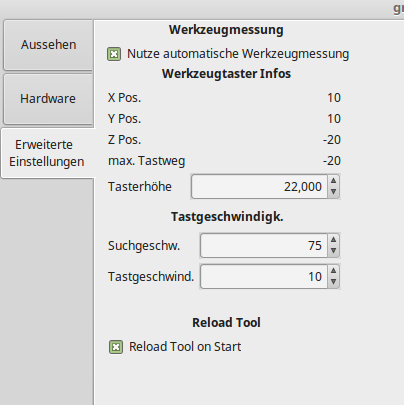
Post the settings page settings, as The related values are not included in your preference file, so it might be you did not enter them!
Norbert
Never do that, as you might be editing the wrong file!
Clear up your config, get rid of all unneeded files.
Post the settings page settings, as The related values are not included in your preference file, so it might be you did not enter them!
Norbert
Last edit: 7 years 4 days ago by newbynobi.
Please Log in or Create an account to join the conversation.
- Gaunt1969
- Offline
- Senior Member
-

Less
More
- Posts: 47
- Thank you received: 8
7 years 4 days ago - 7 years 4 days ago #148973
by Gaunt1969
Replied by Gaunt1969 on topic Tool change problem probe not detected
Thanks for looking into this Norbert
When I first started this I followed the wiki and this was pretty much what I had. it has done exactly the same thing since the start. It moves to the tool change position above the touch off plate, ask for the tool change, button is clicked and Z axis starts Down but it does not go to search Vel it just rapids at the set feed rate and never stops. The probe is working fine, if I jog any of the axis and with contact to the probe it stops the jog. The hal meter "probe-in" shows false with no contact and true when contact is made. I have included the screen shots in a folder inside the Zip with my othe files.
And thanks again for looking at this. I am sure I am probably missing the smallest of details.
When I first started this I followed the wiki and this was pretty much what I had. it has done exactly the same thing since the start. It moves to the tool change position above the touch off plate, ask for the tool change, button is clicked and Z axis starts Down but it does not go to search Vel it just rapids at the set feed rate and never stops. The probe is working fine, if I jog any of the axis and with contact to the probe it stops the jog. The hal meter "probe-in" shows false with no contact and true when contact is made. I have included the screen shots in a folder inside the Zip with my othe files.
And thanks again for looking at this. I am sure I am probably missing the smallest of details.
Last edit: 7 years 4 days ago by Gaunt1969.
Please Log in or Create an account to join the conversation.
- newbynobi
- Offline
- Moderator
-
Less
More
- Posts: 1931
- Thank you received: 394
7 years 2 days ago #149154
by newbynobi
Replied by newbynobi on topic Tool change problem probe not detected
OK, I think I know, why it does not work for you.
You have set your Z-Axis to be from 0 to -8 inch and you tool setter is placed on Z -8. So the upper surface of your tool setter is on min Z value!
Please change your INI File to be:
This way, the tool will go first to X47 Y 1, then to Z-4 and from that possition it will search for probe contact for max 8 inch.
Report back.
Norbert
You have set your Z-Axis to be from 0 to -8 inch and you tool setter is placed on Z -8. So the upper surface of your tool setter is on min Z value!
Please change your INI File to be:
Code:
[TOOLSENSOR]
X = 47
Y = 1
Z = -4
MAXPROBE = -8
This way, the tool will go first to X47 Y 1, then to Z-4 and from that possition it will search for probe contact for max 8 inch.
Report back.
Norbert
Please Log in or Create an account to join the conversation.
- Gaunt1969
- Offline
- Senior Member
-
Less
More
- Posts: 47
- Thank you received: 8
7 years 2 days ago - 7 years 1 day ago #149175
by Gaunt1969
Replied by Gaunt1969 on topic Tool change problem probe not detected
Hello Norbert
When I first set this up and reading all the info on it I could I thought that was the way it was supposed to work. It still did not switch to "Search Vel" that's what started an awful lot of head scratching and hours of more serching. I have changed them back to what you have showed and this is what happens.
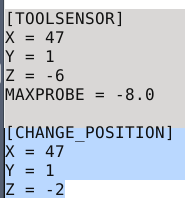
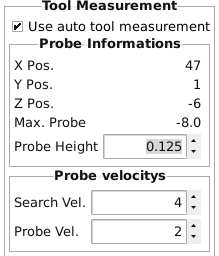

As you can see it only goes to X -6 and does not go to Search Vel it just stops with the error about Z being exceeded. its acts like it hit the X -8 but as you can see in the display it did stop at the -6. I would have thought if it did not encounter the probe it would at least continue to the X -8 position before it would have shown an error. This was in fact the exact setting that I originally configured it with. I have tried changing the search and probe velocities, probe locations, larger probe heights and every possible combination that even remotely made sense with no effect thinking they needed to be in range not listed in the wiki. Nothing has seemed to change or make a difference.
Again thanks for helping.
Also Norbert I am running 2.7.14 . Dont know if that matters. I have not figured out remapping so I cant really tell what it is doing there so I'm not much help on that info.
Craig
When I first set this up and reading all the info on it I could I thought that was the way it was supposed to work. It still did not switch to "Search Vel" that's what started an awful lot of head scratching and hours of more serching. I have changed them back to what you have showed and this is what happens.
As you can see it only goes to X -6 and does not go to Search Vel it just stops with the error about Z being exceeded. its acts like it hit the X -8 but as you can see in the display it did stop at the -6. I would have thought if it did not encounter the probe it would at least continue to the X -8 position before it would have shown an error. This was in fact the exact setting that I originally configured it with. I have tried changing the search and probe velocities, probe locations, larger probe heights and every possible combination that even remotely made sense with no effect thinking they needed to be in range not listed in the wiki. Nothing has seemed to change or make a difference.
Again thanks for helping.
Also Norbert I am running 2.7.14 . Dont know if that matters. I have not figured out remapping so I cant really tell what it is doing there so I'm not much help on that info.
Craig
Last edit: 7 years 1 day ago by Gaunt1969.
Please Log in or Create an account to join the conversation.
- Gaunt1969
- Offline
- Senior Member
-
Less
More
- Posts: 47
- Thank you received: 8
7 years 22 hours ago - 7 years 22 hours ago #149305
by Gaunt1969
Replied by Gaunt1969 on topic Tool change problem probe not detected
My suspicion is something is not correct in the remap. Could this be an issue in my post processor? What should the lines be for tool change, this is what Is in mine.
Last edit: 7 years 22 hours ago by Gaunt1969.
Please Log in or Create an account to join the conversation.
- newbynobi
- Offline
- Moderator
-
Less
More
- Posts: 1931
- Thank you received: 394
7 years 21 hours ago #149310
by newbynobi
Replied by newbynobi on topic Tool change problem probe not detected
Please try
[TOOLSENSOR]
X = 47
Y = 1
Z = -4
MAXPROBE = -3
And report.
Z pos plus maxprobe should not be greater than max z travel.
Norbert
[TOOLSENSOR]
X = 47
Y = 1
Z = -4
MAXPROBE = -3
And report.
Z pos plus maxprobe should not be greater than max z travel.
Norbert
The following user(s) said Thank You: Gaunt1969
Please Log in or Create an account to join the conversation.
Moderators: newbynobi, HansU
Time to create page: 0.153 seconds