Gmoccapy 3.5.0 - opinions needed

More
1 year 9 months ago #319131 by newbynobi
I vote for 4:12 min as time format or 1:36 h if time is over one hour

As for the progress bar, is it possible to put the elapsed Time or percentage within the bar?
I mean something like the number in the spindle feedback bar.

Norbert

Please Log in or Create an account to join the conversation.

More
1 year 9 months ago #319134 by besriworld
It looks great. I can't wait to try it out!

Please Log in or Create an account to join the conversation.

More
1 year 9 months ago - 1 year 9 months ago #319145 by HansU

As for the progress bar, is it possible to put the elapsed Time or percentage within the bar?
I mean something like the number in the spindle feedback bar.
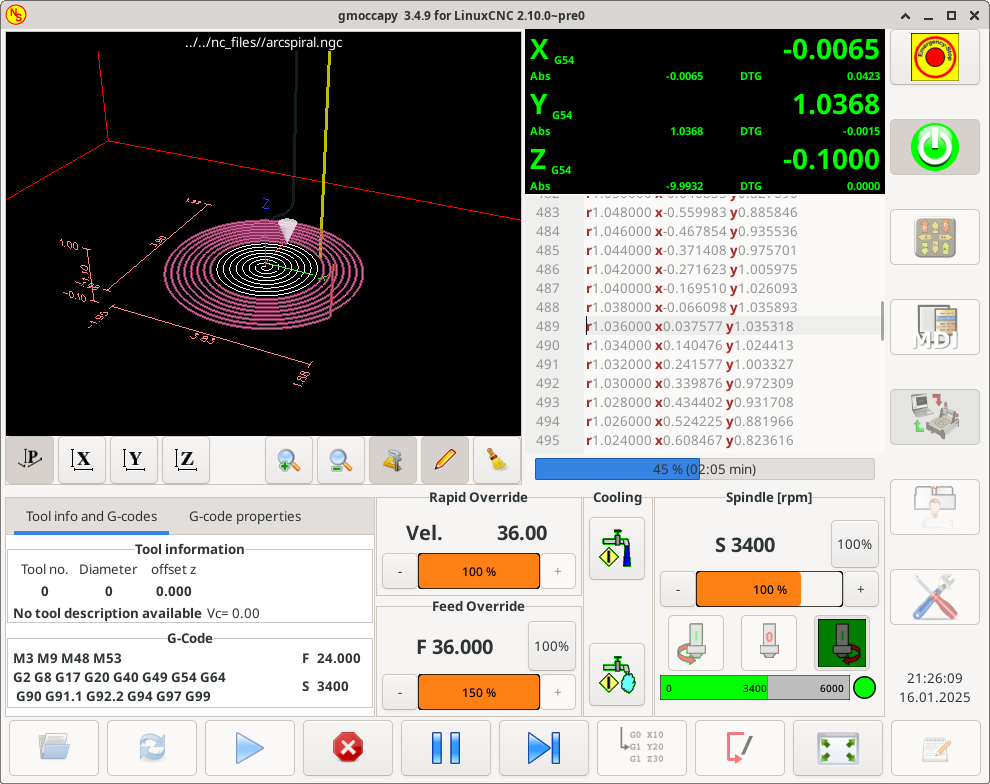
Hmm this is not natively supported by the GtkProgressbar, but could be done with a GtkOverlay:this


But automatic text coloring to increase the contrast is not possible like this i.sstatic.net/PJJqs.png

I liked the decent progressbar better and also the text was better readable. Furthermore there are now to many colors for the bars.
Last edit: 1 year 9 months ago by HansU.
The following user(s) said Thank You: Ritterchen

Please Log in or Create an account to join the conversation.

More
1 year 9 months ago #319931 by Ritterchen
Hi Hans,
the progress bar is a great idea to get a quick glance of how much is left!
Could be to only show elapsed time and predicted time (I did not get where this value comes from) instead of a progress number as you can already see how much the blue bar is filled.

I implemented a timer for the elapsed time myself to keep track of CAM-prediction vs. actual time as well as the spindle load which is super useful to get to know how hard you push your spindle. Not pretty but works^^

The G-Code Size I don't see much use for (if the program time is not there anymore), what I care about file size or lines of code? At least its hiding the currently used tool in the operating state. Imho more something for another layer like inside the file menu?

Agree with the different color of the spindle bar, it could be of the same color as the others. As the color is not representing any state by themself.

I run a machine with Gmocappy daily for work in my small startup. Has been great for the last 4 years :)

Please Log in or Create an account to join the conversation.

More
1 year 9 months ago #319932 by besriworld
There is an easy solution to match the panel color to the theme. See the last comment here:

forum.linuxcnc.org/gmoccapy/45856-spindl...capy?start=40#313291
The following user(s) said Thank You: Ritterchen

Please Log in or Create an account to join the conversation.

More
1 year 8 months ago #320399 by HansU

Could be to only show elapsed time and predicted time (I did not get where this value comes from) instead of a progress number as you can already see how much the blue bar is filled.

I implemented a timer for the elapsed time myself to keep track of CAM-prediction vs. actual time as well as the spindle load which is super useful to get to know how hard you push your spindle. Not pretty but works^^

The G-Code Size I don't see much use for (if the program time is not there anymore), what I care about file size or lines of code? At least its hiding the currently used tool in the operating state. Imho more something for another layer like inside the file menu?


The predicted time is available in the G-code settings, see (2) forum.linuxcnc.org/gmoccapy/55010-gmocca...eded?start=20#319096

The reason why I put the progress and the elapsed time there is that it does not need further explanation there and is more  intuitive (IMHO).

The G-code size is usually not of big interest, I agree,  but I let it there to be consistent with the G-code properties e.g. in Axis.
And it is not hiding anything, as it is an optional tab.

Please Log in or Create an account to join the conversation.

Moderators: newbynobi, HansU
Time to create page: 0.072 seconds
Powered by Kunena Forum
