Change Tool Offsets after editing the Tool Table

More
1 year 5 months ago #328048 by hermann1976
Current Release: 2.9.4

Thanks

Please Log in or Create an account to join the conversation.
More
1 year 5 months ago #328099 by zz912
You can easy change it.

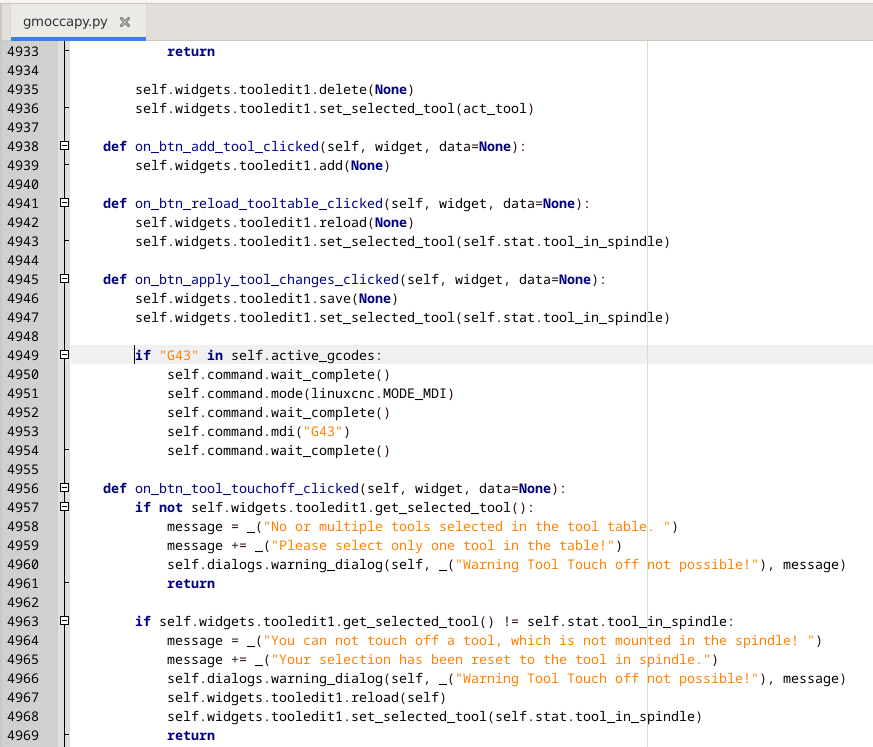
Add this code to gmoccapy.py file to "def on_btn_apply_tool_changes_clicked"
Code:
        if "G43" in self.active_gcodes:             self.command.wait_complete()             self.command.mode(linuxcnc.MODE_MDI)             self.command.wait_complete()             self.command.mdi("G43")             self.command.wait_complete()

like this:
 

1) G43 must be activated
2) after input new value in cell you MUST confirm it for example by key ENTER, then you can click on Apply
3) after click on Apply button you will see right correction value
 
The following user(s) said Thank You: Aciera

Please Log in or Create an account to join the conversation.
More
1 year 5 months ago #328121 by hermann1976
Thanks for your answer.
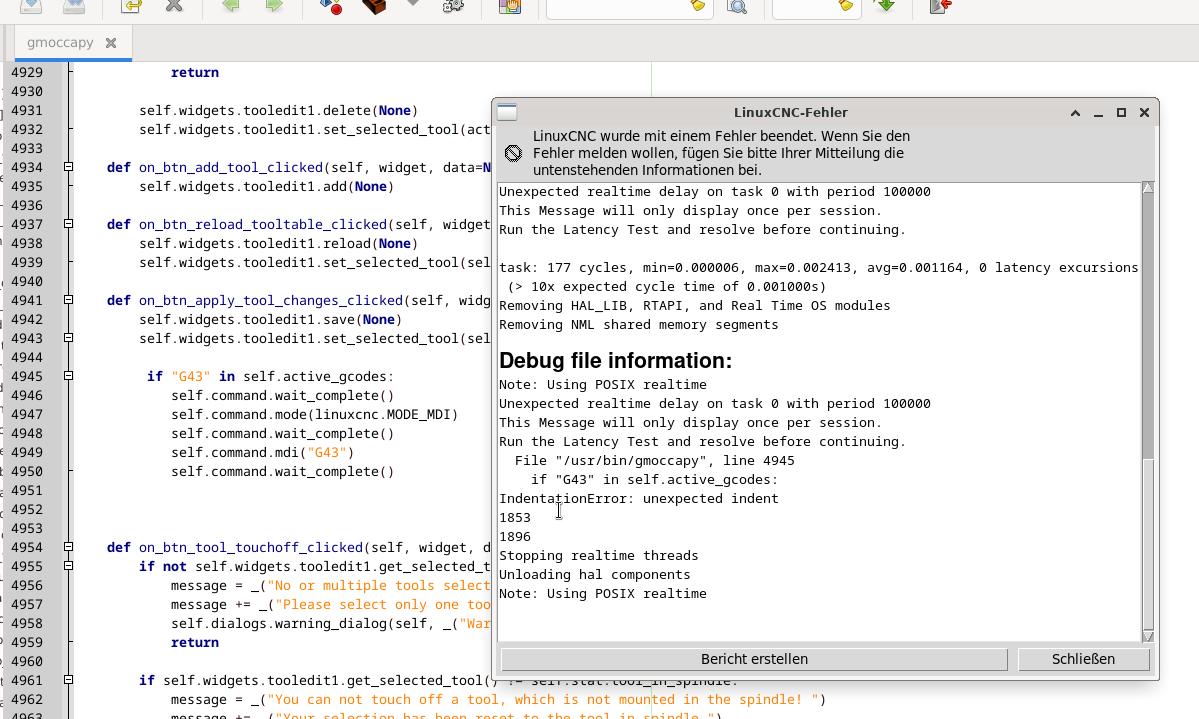
But Linuxcnc will coming up with an error:


Please Log in or Create an account to join the conversation.

More
1 year 5 months ago #328124 by zz912
You probably have tabs on that line instead of spaces.

Please Log in or Create an account to join the conversation.

More
1 year 5 months ago #328125 by zz912
It's a good idea to set this permanently in Geany:
stackoverflow.com/questions/5287849/how-...e-in-geany-on-ubuntu

I tested the code yesterday and found that it's a good idea to go back to MANUAL_MODE:
Code:
        if "G43" in self.active_gcodes:             self.command.wait_complete()             self.command.mode(linuxcnc.MODE_MDI)             self.command.wait_complete()             self.command.mdi("G43")             self.command.wait_complete()             self.command.mode(linuxcnc.MODE_MANUAL)             self.command.wait_complete()
The following user(s) said Thank You: Aciera

Please Log in or Create an account to join the conversation.

More
1 year 5 months ago #328142 by hermann1976
thank you for your answer,
so the code block is included like your post and i didn't get an error.
The change of the length in Z is working (with apply) but the diameter doesn't change still not.


Please Log in or Create an account to join the conversation.

Moderators: newbynobi, HansU
Time to create page: 0.110 seconds
Powered by Kunena Forum
