

- Posts: 189
- Thank you received: 9
NativeCAM is Features renamed
9 years 6 months ago - 9 years 6 months ago #92000
by gmouer
Replied by gmouer on topic NativeCAM is Features renamed
Hi Fern,
I have a project underway on the mill right now so won't be able to try it for a few days. (4th axis not installed right now)
Where do I install the file? Will it give me a icon to pick it as other features do? I am using NativeCam quite a lot now but am pretty unfamiliar with the underlying structure and code.
Your work is extremely appreciated!
George
I have a project underway on the mill right now so won't be able to try it for a few days. (4th axis not installed right now)
Where do I install the file? Will it give me a icon to pick it as other features do? I am using NativeCam quite a lot now but am pretty unfamiliar with the underlying structure and code.
Your work is extremely appreciated!
George
Last edit: 9 years 6 months ago by gmouer.
Please Log in or Create an account to join the conversation.
9 years 6 months ago #92008
by FernV
Next release will be a MAJOR update
Fern
Replied by FernV on topic NativeCAM is Features renamed
Then you should try it with axis_9axis.inigmouer wrote: 4th axis not installed right now
This is basically a demo. Simply open it as a project. A few things will not look right because your lib is not updated.gmouer wrote: Where do I install the file? Will it give me a icon to pick it as other features do?
Next release will be a MAJOR update
Fern
Please Log in or Create an account to join the conversation.
- cncnoob1979
- Offline
- Platinum Member
-

Less
More
- Posts: 403
- Thank you received: 75
9 years 6 months ago #92244
by cncnoob1979
Replied by cncnoob1979 on topic NativeCAM is Features renamed
I have been trying to solve this on my own all night.. no avail  I just installed NCam latest and configured it embedded.
I am getting this error no matter what I do.. I'm sure its something that I am doing or not setting correctly. I'm using the latest git pull from FernV github with linuxcnc 2.8~.
The error Im getting is "Named parameter #<_lead_out_fact> not defined"
I have:
a workpiece
a change tool
and a circle of .875
The tool Im using is .5 endmill.
Nothing odd about what I'm doing. I have tried a clean install of linuxcnc and NCam. This fails on either axis or gmoccapy.
I have checked and rechecked my setup. Can anyone point me in the right direction?
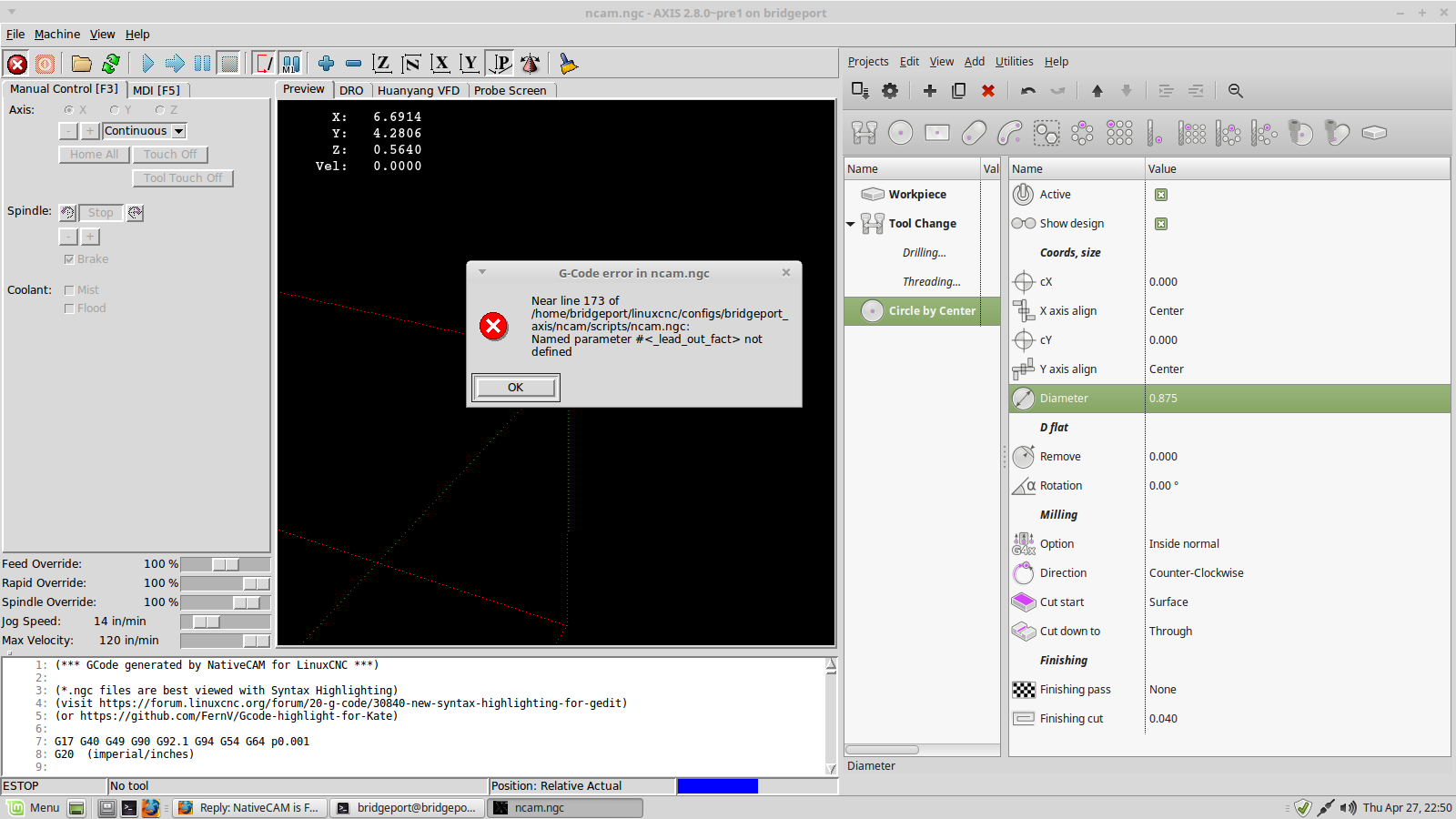
INI attached below;
I just installed NCam latest and configured it embedded.I am getting this error no matter what I do.. I'm sure its something that I am doing or not setting correctly. I'm using the latest git pull from FernV github with linuxcnc 2.8~.
The error Im getting is "Named parameter #<_lead_out_fact> not defined"
I have:
a workpiece
a change tool
and a circle of .875
The tool Im using is .5 endmill.
Nothing odd about what I'm doing. I have tried a clean install of linuxcnc and NCam. This fails on either axis or gmoccapy.
I have checked and rechecked my setup. Can anyone point me in the right direction?
INI attached below;
Warning: Spoiler!
#INCLUDE /home/bridgeport/linuxcnc/configs/bridgeport_axis/xhc-hb04/layout2.inc
[EMC]
# The version string for this INI file.
VERSION = 1.0
MACHINE = bridgeport
DEBUG = 0
[DISPLAY]
# required NativeCAM item :
NCAM_DIR = ncam
# required NativeCAM item :
PROGRAM_PREFIX = ncam/scripts/
# required NativeCAM item :
GLADEVCP = -U --catalog=mill /home/bridgeport/nativecam/ncam.ui
DISPLAY = axis
EMBED_TAB_NAME=Huanyang VFD
EMBED_TAB_COMMAND=halcmd loadusr -Wn vfd gladevcp -c vfd -x {XID} -u handler.py huanyang.glade
EMBED_TAB_NAME=Probe Screen
EMBED_TAB_COMMAND=halcmd loadusr -Wn probe_screen gladevcp -c probe_screen -u python/probe_screen.py -x {XID} probe_icons/probe_screen.glade
EDITOR = kate
POSITION_OFFSET = RELATIVE
POSITION_FEEDBACK = ACTUAL
MAX_FEED_OVERRIDE = 2.000000
MAX_SPINDLE_OVERRIDE = 1.20000
MIN_SPINDLE_OVERRIDE = 0.050000
INTRO_GRAPHIC = linuxcnc.gif
INTRO_TIME = 3
INCREMENTS = .1in .05in .01in .005in .001in .0005in .0001in
POSITION_FEEDBACK = ACTUAL
DEFAULT_LINEAR_VELOCITY = 0.250000
MAX_LINEAR_VELOCITY = 2.0
MIN_LINEAR_VELOCITY = 0.010000
DEFAULT_ANGULAR_VELOCITY = 0.250000
MAX_ANGULAR_VELOCITY = 1.000000
MIN_ANGULAR_VELOCITY = 0.010000
GEOMETRY = xyz
[FILTER]
PROGRAM_EXTENSION = .png,.gif,.jpg Greyscale Depth Image
PROGRAM_EXTENSION = .py Python Script
png = image-to-gcode
gif = image-to-gcode
jpg = image-to-gcode
py = python
[RS274NGC]
# required NativeCAM item :
SUBROUTINE_PATH = ncam/lib/mill:ncam/lib/utilities
FEATURES=30
PARAMETER_FILE = linuxcnc.var
[EMCMOT]
EMCMOT = motmod
COMM_TIMEOUT = 1.0
COMM_WAIT = 0.010
SERVO_PERIOD = 1000000
[TASK]
TASK = milltask
CYCLE_TIME = 0.010
[HAL]
HALUI = halui
HALFILE = bridgeport.hal
HALFILE = custom.hal
#***************HB04*****************
HALFILE = LIB:xhc-hb04.tcl
#************************************
POSTGUI_HALFILE = custom_postgui.hal
SHUTDOWN = shutdown.hal
[TRAJ]
AXES = 3
COORDINATES = X Y Z
LINEAR_UNITS = inch
ANGULAR_UNITS = degree
CYCLE_TIME = 0.010
DEFAULT_LINEAR_VELOCITY = 6.0
MAX_LINEAR_VELOCITY = 6.00
[EMCIO]
EMCIO = io
CYCLE_TIME = 0.100
TOOL_TABLE = tool.tbl
#********************
# Axis X
#********************
[KINS]
KINEMATICS = trivkins
JOINTS = 3
[AXIS_X]
MIN_LIMIT = -17.755
MAX_LIMIT = 0.04
MAX_VELOCITY = 3.10
MAX_ACCELERATION = 5.0
[JOINT_0]
TYPE = LINEAR
HOME = 0.0
FERROR = 1.003
MIN_FERROR = 1.003
MAX_VELOCITY = 3.10
MAX_ACCELERATION = 5.0
P = 150
I = 0
D = 0
FF0 = 0
FF1 = 2.74
FF2 = 0.003
BIAS = 0
DEADBAND = 0.00009
MAX_OUTPUT = 10
ENCODER_SCALE = -50800
OUTPUT_SCALE = 10
OUTPUT_MIN_LIMIT = -10
OUTPUT_MAX_LIMIT = 10
MIN_LIMIT = -17.755
MAX_LIMIT = 0.04
HOME_OFFSET = 0.0
HOME_SEARCH_VEL = 0.5
HOME_LATCH_VEL = 0.017
HOME_FINAL_VEL = 0.000000
HOME_USE_INDEX = NO
HOME_SEQUENCE = 1
#********************
# Axis Y
#********************
[AXIS_Y]
MIN_LIMIT = -11.373
MAX_LIMIT = 0.303
MAX_VELOCITY = 3.10
MAX_ACCELERATION = 5.0
[JOINT_1]
TYPE = LINEAR
HOME = 0.0
FERROR = 0.003
MIN_FERROR = 0.003
MAX_VELOCITY = 3.10
MAX_ACCELERATION = 5.0
P = 150
I = 0
D = 0
FF0 = 0
FF1 = 2.74
FF2 = 0.003
BIAS = 0
DEADBAND = 0.000059
MAX_OUTPUT = 10
ENCODER_SCALE = -50800
OUTPUT_SCALE = 10
OUTPUT_MIN_LIMIT = -10
OUTPUT_MAX_LIMIT = 10
MIN_LIMIT = -11.373
MAX_LIMIT = 0.303
HOME_OFFSET = 0.000000
HOME_SEARCH_VEL = 0.500000
HOME_LATCH_VEL = 0.016667
HOME_FINAL_VEL = 0.000000
HOME_USE_INDEX = NO
HOME_SEQUENCE = 2
#********************
# Axis Z
#********************
[AXIS_Z]
MIN_LIMIT = -4.465
MAX_LIMIT = 0.069
MAX_VELOCITY = 2.5
MAX_ACCELERATION = 5.0
[JOINT_2]
TYPE = LINEAR
HOME = 0.0
FERROR = 0.003
MIN_FERROR = 0.003
MAX_VELOCITY = 2.5
MAX_ACCELERATION = 5.0
P = 150
I = 0
D = 0
FF0 = 0
FF1 = 2.74
FF2 = 0.003
BIAS = 0
DEADBAND = 0.000059
MAX_OUTPUT = 10
ENCODER_SCALE = -50800
OUTPUT_SCALE = 10
OUTPUT_MIN_LIMIT = -10
OUTPUT_MAX_LIMIT = 10
MIN_LIMIT = -4.465
MAX_LIMIT = 0.069
HOME_OFFSET = 0.000000
HOME_SEARCH_VEL = 0.50000
HOME_LATCH_VEL = 0.016667
HOME_FINAL_VEL = 0.000000
HOME_USE_INDEX = NO
HOME_SEQUENCE = 0
#********************
# Spindle
#********************
[TOOLSENSOR]
# Control probe rapid feed (in machine units per minute)
RAPID_SPEED = 100
[HOSTMOT2]
# **** This is for info only ****
# DRIVER0=hm2_pci
# BOARD0=5i25
[SPINDLE_9]
P = 0
I = 0
D = 0
FF0 = 1
FF1 = 0
FF2 = 0
BIAS = 0
DEADBAND = 0
MAX_OUTPUT = 10
#********************
# Handwheel
#********************
[MPG]
HAND_WHEEL_SCALE = 0.00000016
Z_MINUS_LIMIT = 0.000008
[XHC_HB04_CONFIG]
# specify layout = n for LIB:xhc-hb04-layout{n}.cfg files
layout = 2
# coords: specify upto 4 letters from set {x y z a b c u v w}
# coords: switch labels are xyza but any unique 4 letters
# from the set {xyxabcuvw) can be used (if the coord exists)
coords = x y z
# lowpass settings:
# coef: slows rate of change of output, range: 0 < coef < 1
coefs = 1 1 1 1
# scale plus or minus, rotaries may require larger scale factor:
scales = 1 -1 1 1
# jogmode normal(default) or vnormal
jogmode = normal
# sequence 1: 0.001,0.010,0.100,1.000 (mm-based machine)
# sequence 2: 0.001,0.005,0.010,0.020 (inch-based machine)
# sequence 3: 0.001,0.010,0.100
# sequence 4: 0.001,0.005,0.010,0.020,0.050,0.100
# sequence 5: 0.001,0.010,0.050,0.100,1.000
sequence = 2
# require_pendant = yes|no: create xhc-hb04 hal pins when pendant not
# connected at startup
require_pendant = no
# inch_or_mm = in | mm
inch_or_mm = in
# mpg_accels: provision for reduced acceleration for manual mode jogging
mpg_accels = 2 2 1 600
[APPLICATIONS]
APP = xhc-hb04-accels
APP = monitor-xhc-hb04
[XHC_HB04_BUTTONS]
# use button names according to layout file LIB:xhc-hb04-layout{n}.cfg
# note: "start-pause" is connected for standard behavior
# controlling halui.pause/halui.resume/halui.run
# these are examples, edit as required:
goto-zero = halui.mdi-command-00
# synthesized per-axis buttons for goto-zero button:
goto-zero-x = ""
goto-zero-y = ""
goto-zero-z = ""
goto-zero-a = ""
start-pause = std_start_pause
#rewind = halui.program.step
# probe-input for simulating a probe:
#probe-z = motion.probe-input
macro-3 = halui.mdi-command-03
#half = halui.spindle.stop
# synthesized per-axis buttons for half button:
half-x = ""
half-y = ""
half-z = ""
half-a = ""
zero = ""
# synthesized per-axis buttons for zero button:
zero-x = halui.mdi-command-12
zero-y = halui.mdi-command-13
zero-z = halui.mdi-command-14
zero-a = halui.mdi-command-15
safe-z = halui.mdi-command-10
# in this sim, home-all only works first time, hold down till finished:
home = halui.home-all
macro-1 = halui.mdi-command-01
macro-2 = halui.mdi-command-02
spindle = halui.spindle.start
step = xhc-hb04.stepsize-up
mode = ""
macro-6 = halui.mdi-command-06
macro-7 = halui.mdi-command-07
stop = halui.program.stop
reset = halui.estop.activate
[HALUI]
# these are examples, edit as required:
# a halui hal pin is created for each MDI_COMMAND below
# halui.mdi-command-00, halui.mdi-command-01,... etc
MDI_COMMAND=G0 X0 Y0 Z0
MDI_COMMAND=(debug, example: mdi-01)
MDI_COMMAND=(debug, example: mdi-02)
#03 M110: clears notifications
MDI_COMMAND=M110
MDI_COMMAND=(debug, example: mdi-04)
MDI_COMMAND=(debug, example: mdi-05)
MDI_COMMAND=(debug, example: mdi-06)
#07 M101: example print to stdout
MDI_COMMAND=M101
MDI_COMMAND=(debug, example: mdi-08)
MDI_COMMAND=(debug, example: mdi-09)
MDI_COMMAND=(debug, example: mdi-10)
MDI_COMMAND=(debug, example: mdi-11)
#12
MDI_COMMAND= G10 L20 P0 X0
#13
MDI_COMMAND= G10 L20 P0 Y0
#14
MDI_COMMAND= G10 L20 P0 Z0
#15
MDI_COMMAND= G10 L20 P0 C0
[EMC]
# The version string for this INI file.
VERSION = 1.0
MACHINE = bridgeport
DEBUG = 0
[DISPLAY]
# required NativeCAM item :
NCAM_DIR = ncam
# required NativeCAM item :
PROGRAM_PREFIX = ncam/scripts/
# required NativeCAM item :
GLADEVCP = -U --catalog=mill /home/bridgeport/nativecam/ncam.ui
DISPLAY = axis
EMBED_TAB_NAME=Huanyang VFD
EMBED_TAB_COMMAND=halcmd loadusr -Wn vfd gladevcp -c vfd -x {XID} -u handler.py huanyang.glade
EMBED_TAB_NAME=Probe Screen
EMBED_TAB_COMMAND=halcmd loadusr -Wn probe_screen gladevcp -c probe_screen -u python/probe_screen.py -x {XID} probe_icons/probe_screen.glade
EDITOR = kate
POSITION_OFFSET = RELATIVE
POSITION_FEEDBACK = ACTUAL
MAX_FEED_OVERRIDE = 2.000000
MAX_SPINDLE_OVERRIDE = 1.20000
MIN_SPINDLE_OVERRIDE = 0.050000
INTRO_GRAPHIC = linuxcnc.gif
INTRO_TIME = 3
INCREMENTS = .1in .05in .01in .005in .001in .0005in .0001in
POSITION_FEEDBACK = ACTUAL
DEFAULT_LINEAR_VELOCITY = 0.250000
MAX_LINEAR_VELOCITY = 2.0
MIN_LINEAR_VELOCITY = 0.010000
DEFAULT_ANGULAR_VELOCITY = 0.250000
MAX_ANGULAR_VELOCITY = 1.000000
MIN_ANGULAR_VELOCITY = 0.010000
GEOMETRY = xyz
[FILTER]
PROGRAM_EXTENSION = .png,.gif,.jpg Greyscale Depth Image
PROGRAM_EXTENSION = .py Python Script
png = image-to-gcode
gif = image-to-gcode
jpg = image-to-gcode
py = python
[RS274NGC]
# required NativeCAM item :
SUBROUTINE_PATH = ncam/lib/mill:ncam/lib/utilities
FEATURES=30
PARAMETER_FILE = linuxcnc.var
[EMCMOT]
EMCMOT = motmod
COMM_TIMEOUT = 1.0
COMM_WAIT = 0.010
SERVO_PERIOD = 1000000
[TASK]
TASK = milltask
CYCLE_TIME = 0.010
[HAL]
HALUI = halui
HALFILE = bridgeport.hal
HALFILE = custom.hal
#***************HB04*****************
HALFILE = LIB:xhc-hb04.tcl
#************************************
POSTGUI_HALFILE = custom_postgui.hal
SHUTDOWN = shutdown.hal
[TRAJ]
AXES = 3
COORDINATES = X Y Z
LINEAR_UNITS = inch
ANGULAR_UNITS = degree
CYCLE_TIME = 0.010
DEFAULT_LINEAR_VELOCITY = 6.0
MAX_LINEAR_VELOCITY = 6.00
[EMCIO]
EMCIO = io
CYCLE_TIME = 0.100
TOOL_TABLE = tool.tbl
#********************
# Axis X
#********************
[KINS]
KINEMATICS = trivkins
JOINTS = 3
[AXIS_X]
MIN_LIMIT = -17.755
MAX_LIMIT = 0.04
MAX_VELOCITY = 3.10
MAX_ACCELERATION = 5.0
[JOINT_0]
TYPE = LINEAR
HOME = 0.0
FERROR = 1.003
MIN_FERROR = 1.003
MAX_VELOCITY = 3.10
MAX_ACCELERATION = 5.0
P = 150
I = 0
D = 0
FF0 = 0
FF1 = 2.74
FF2 = 0.003
BIAS = 0
DEADBAND = 0.00009
MAX_OUTPUT = 10
ENCODER_SCALE = -50800
OUTPUT_SCALE = 10
OUTPUT_MIN_LIMIT = -10
OUTPUT_MAX_LIMIT = 10
MIN_LIMIT = -17.755
MAX_LIMIT = 0.04
HOME_OFFSET = 0.0
HOME_SEARCH_VEL = 0.5
HOME_LATCH_VEL = 0.017
HOME_FINAL_VEL = 0.000000
HOME_USE_INDEX = NO
HOME_SEQUENCE = 1
#********************
# Axis Y
#********************
[AXIS_Y]
MIN_LIMIT = -11.373
MAX_LIMIT = 0.303
MAX_VELOCITY = 3.10
MAX_ACCELERATION = 5.0
[JOINT_1]
TYPE = LINEAR
HOME = 0.0
FERROR = 0.003
MIN_FERROR = 0.003
MAX_VELOCITY = 3.10
MAX_ACCELERATION = 5.0
P = 150
I = 0
D = 0
FF0 = 0
FF1 = 2.74
FF2 = 0.003
BIAS = 0
DEADBAND = 0.000059
MAX_OUTPUT = 10
ENCODER_SCALE = -50800
OUTPUT_SCALE = 10
OUTPUT_MIN_LIMIT = -10
OUTPUT_MAX_LIMIT = 10
MIN_LIMIT = -11.373
MAX_LIMIT = 0.303
HOME_OFFSET = 0.000000
HOME_SEARCH_VEL = 0.500000
HOME_LATCH_VEL = 0.016667
HOME_FINAL_VEL = 0.000000
HOME_USE_INDEX = NO
HOME_SEQUENCE = 2
#********************
# Axis Z
#********************
[AXIS_Z]
MIN_LIMIT = -4.465
MAX_LIMIT = 0.069
MAX_VELOCITY = 2.5
MAX_ACCELERATION = 5.0
[JOINT_2]
TYPE = LINEAR
HOME = 0.0
FERROR = 0.003
MIN_FERROR = 0.003
MAX_VELOCITY = 2.5
MAX_ACCELERATION = 5.0
P = 150
I = 0
D = 0
FF0 = 0
FF1 = 2.74
FF2 = 0.003
BIAS = 0
DEADBAND = 0.000059
MAX_OUTPUT = 10
ENCODER_SCALE = -50800
OUTPUT_SCALE = 10
OUTPUT_MIN_LIMIT = -10
OUTPUT_MAX_LIMIT = 10
MIN_LIMIT = -4.465
MAX_LIMIT = 0.069
HOME_OFFSET = 0.000000
HOME_SEARCH_VEL = 0.50000
HOME_LATCH_VEL = 0.016667
HOME_FINAL_VEL = 0.000000
HOME_USE_INDEX = NO
HOME_SEQUENCE = 0
#********************
# Spindle
#********************
[TOOLSENSOR]
# Control probe rapid feed (in machine units per minute)
RAPID_SPEED = 100
[HOSTMOT2]
# **** This is for info only ****
# DRIVER0=hm2_pci
# BOARD0=5i25
[SPINDLE_9]
P = 0
I = 0
D = 0
FF0 = 1
FF1 = 0
FF2 = 0
BIAS = 0
DEADBAND = 0
MAX_OUTPUT = 10
#********************
# Handwheel
#********************
[MPG]
HAND_WHEEL_SCALE = 0.00000016
Z_MINUS_LIMIT = 0.000008
[XHC_HB04_CONFIG]
# specify layout = n for LIB:xhc-hb04-layout{n}.cfg files
layout = 2
# coords: specify upto 4 letters from set {x y z a b c u v w}
# coords: switch labels are xyza but any unique 4 letters
# from the set {xyxabcuvw) can be used (if the coord exists)
coords = x y z
# lowpass settings:
# coef: slows rate of change of output, range: 0 < coef < 1
coefs = 1 1 1 1
# scale plus or minus, rotaries may require larger scale factor:
scales = 1 -1 1 1
# jogmode normal(default) or vnormal
jogmode = normal
# sequence 1: 0.001,0.010,0.100,1.000 (mm-based machine)
# sequence 2: 0.001,0.005,0.010,0.020 (inch-based machine)
# sequence 3: 0.001,0.010,0.100
# sequence 4: 0.001,0.005,0.010,0.020,0.050,0.100
# sequence 5: 0.001,0.010,0.050,0.100,1.000
sequence = 2
# require_pendant = yes|no: create xhc-hb04 hal pins when pendant not
# connected at startup
require_pendant = no
# inch_or_mm = in | mm
inch_or_mm = in
# mpg_accels: provision for reduced acceleration for manual mode jogging
mpg_accels = 2 2 1 600
[APPLICATIONS]
APP = xhc-hb04-accels
APP = monitor-xhc-hb04
[XHC_HB04_BUTTONS]
# use button names according to layout file LIB:xhc-hb04-layout{n}.cfg
# note: "start-pause" is connected for standard behavior
# controlling halui.pause/halui.resume/halui.run
# these are examples, edit as required:
goto-zero = halui.mdi-command-00
# synthesized per-axis buttons for goto-zero button:
goto-zero-x = ""
goto-zero-y = ""
goto-zero-z = ""
goto-zero-a = ""
start-pause = std_start_pause
#rewind = halui.program.step
# probe-input for simulating a probe:
#probe-z = motion.probe-input
macro-3 = halui.mdi-command-03
#half = halui.spindle.stop
# synthesized per-axis buttons for half button:
half-x = ""
half-y = ""
half-z = ""
half-a = ""
zero = ""
# synthesized per-axis buttons for zero button:
zero-x = halui.mdi-command-12
zero-y = halui.mdi-command-13
zero-z = halui.mdi-command-14
zero-a = halui.mdi-command-15
safe-z = halui.mdi-command-10
# in this sim, home-all only works first time, hold down till finished:
home = halui.home-all
macro-1 = halui.mdi-command-01
macro-2 = halui.mdi-command-02
spindle = halui.spindle.start
step = xhc-hb04.stepsize-up
mode = ""
macro-6 = halui.mdi-command-06
macro-7 = halui.mdi-command-07
stop = halui.program.stop
reset = halui.estop.activate
[HALUI]
# these are examples, edit as required:
# a halui hal pin is created for each MDI_COMMAND below
# halui.mdi-command-00, halui.mdi-command-01,... etc
MDI_COMMAND=G0 X0 Y0 Z0
MDI_COMMAND=(debug, example: mdi-01)
MDI_COMMAND=(debug, example: mdi-02)
#03 M110: clears notifications
MDI_COMMAND=M110
MDI_COMMAND=(debug, example: mdi-04)
MDI_COMMAND=(debug, example: mdi-05)
MDI_COMMAND=(debug, example: mdi-06)
#07 M101: example print to stdout
MDI_COMMAND=M101
MDI_COMMAND=(debug, example: mdi-08)
MDI_COMMAND=(debug, example: mdi-09)
MDI_COMMAND=(debug, example: mdi-10)
MDI_COMMAND=(debug, example: mdi-11)
#12
MDI_COMMAND= G10 L20 P0 X0
#13
MDI_COMMAND= G10 L20 P0 Y0
#14
MDI_COMMAND= G10 L20 P0 Z0
#15
MDI_COMMAND= G10 L20 P0 C0
Please Log in or Create an account to join the conversation.

9 years 6 months ago #92246
by absolut15
Replied by absolut15 on topic NativeCAM is Features renamed
hi cncnoob
i have the same error with my machine.
i fixed it with "adding a g-code "
line 1 = #<_lead_out_fact> = 0 (you must try what is the best lead out mode for the thing you milling at the moment)
you can see the different modes in the dro.
hope i can help a bit
i have the same error with my machine.
i fixed it with "adding a g-code "
line 1 = #<_lead_out_fact> = 0 (you must try what is the best lead out mode for the thing you milling at the moment)
you can see the different modes in the dro.
hope i can help a bit
The following user(s) said Thank You: cncnoob1979
Please Log in or Create an account to join the conversation.
- tommylight
-

- Offline
- Moderator
-

9 years 6 months ago #92251
by tommylight
Replied by tommylight on topic NativeCAM is Features renamed
I have the similar problem on the LATHE part, it does not have an xml template so i just copied one that was close enough.
Basicaly that means that the named parameter is missing on the template.
Anyone got a working lathe template?
Mill and plasma work perfectly for me.
Basicaly that means that the named parameter is missing on the template.
Anyone got a working lathe template?
Mill and plasma work perfectly for me.
Please Log in or Create an account to join the conversation.
9 years 6 months ago #92271
by FernV
Sorry about this, I removed this parameter because it did not show very usefull but it seems the clean-up was not complete.
Use what was proposed by absolut15 for a quick fix :
Add gcode, line 1 = #<_lead_out_fact> = 0.5 (change the value at will)
GCode must be before your Circle
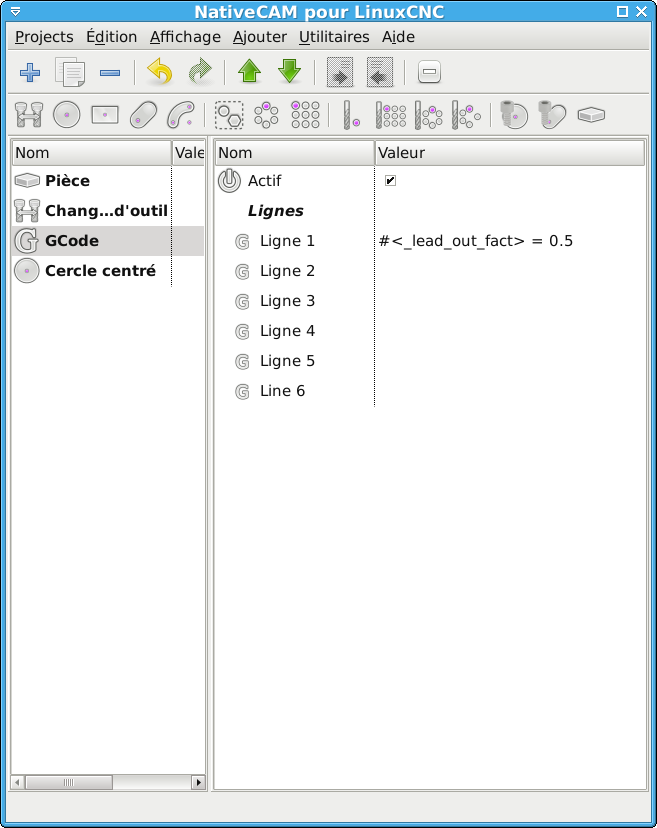
It is just a matter of a few days for a new major update, maybe this week-end
Fern
Replied by FernV on topic NativeCAM is Features renamed
cncnoob1979 wrote: The error Im getting is "Named parameter #<_lead_out_fact> not defined"
Sorry about this, I removed this parameter because it did not show very usefull but it seems the clean-up was not complete.
Use what was proposed by absolut15 for a quick fix :
Add gcode, line 1 = #<_lead_out_fact> = 0.5 (change the value at will)
GCode must be before your Circle
It is just a matter of a few days for a new major update, maybe this week-end
Fern
The following user(s) said Thank You: tommylight, cncnoob1979
Please Log in or Create an account to join the conversation.
Time to create page: 0.191 seconds