NativeCAM is Features renamed

More
9 years 6 months ago - 9 years 6 months ago #92273 by cncnoob1979
Great! Thanks FernV,

I love using this software. Thank you for creating it and the time it takes to develop and support us!
Last edit: 9 years 6 months ago by cncnoob1979.

Please Log in or Create an account to join the conversation.
More
9 years 6 months ago #92274 by gmouer

FernV wrote:

gmouer wrote: I am loving NativeCam. I know it was mentioned that new additions are in the works. I have a request, could 4th rotary axis indexing be added? I am speaking of indexing only, not live 4th axis 3d cutting. I suppose it would need a preference to define if the rotary axis was A, C etc.


Hi George,

If you mill setup has A axis configured would you try this demo and tell me if it looks right ? The tool rotates but the path looks strange. Is it normal ?

File Attachment:

File Name: a-indexing.xml
File Size:26.91 KB

You could also try with axis_9axis.ini

Fern


Hi Fern,
I did not have much luck getting the demo to run. Truth is that I have no experience yet with actually using a 4th axis with linuxcnc. The toolpath displays for 4th axis work are not something I have gotten a grasp of yet. I wish I could be of more help.

Andy Pugh has a 4th axis he has shown and also is far more experienced, maybe he could proof the NativeCam 4th axis operation.

Please Log in or Create an account to join the conversation.

More
9 years 5 months ago #92612 by FernV
Replied by FernV on topic NativeCAM is Features renamed
Hi,
I just updated NativeCAM and here are some of the changes :

directory changes uses links instead of copies
user dir my-stuff
add gcode and fontname data type
add hiding of fields
add support for autosave current work
change from float or int to gcode type and revert back
improve popup menus
customizable toolbar and menu
custom defaults for values and display settings for ALL subroutines
support for testing new translation
better support for keyboard navigation
treeview2 rows expandable
setup prevent setup of nondeb if a deb is installed
nondeb_setup create links to language file
catalogs use a new format
cfg files :
add indexing 4th axis
add lead-out option
add gcode option in combo-user
add center position for Z axis in material
add appropriate icons
default_template when not defined
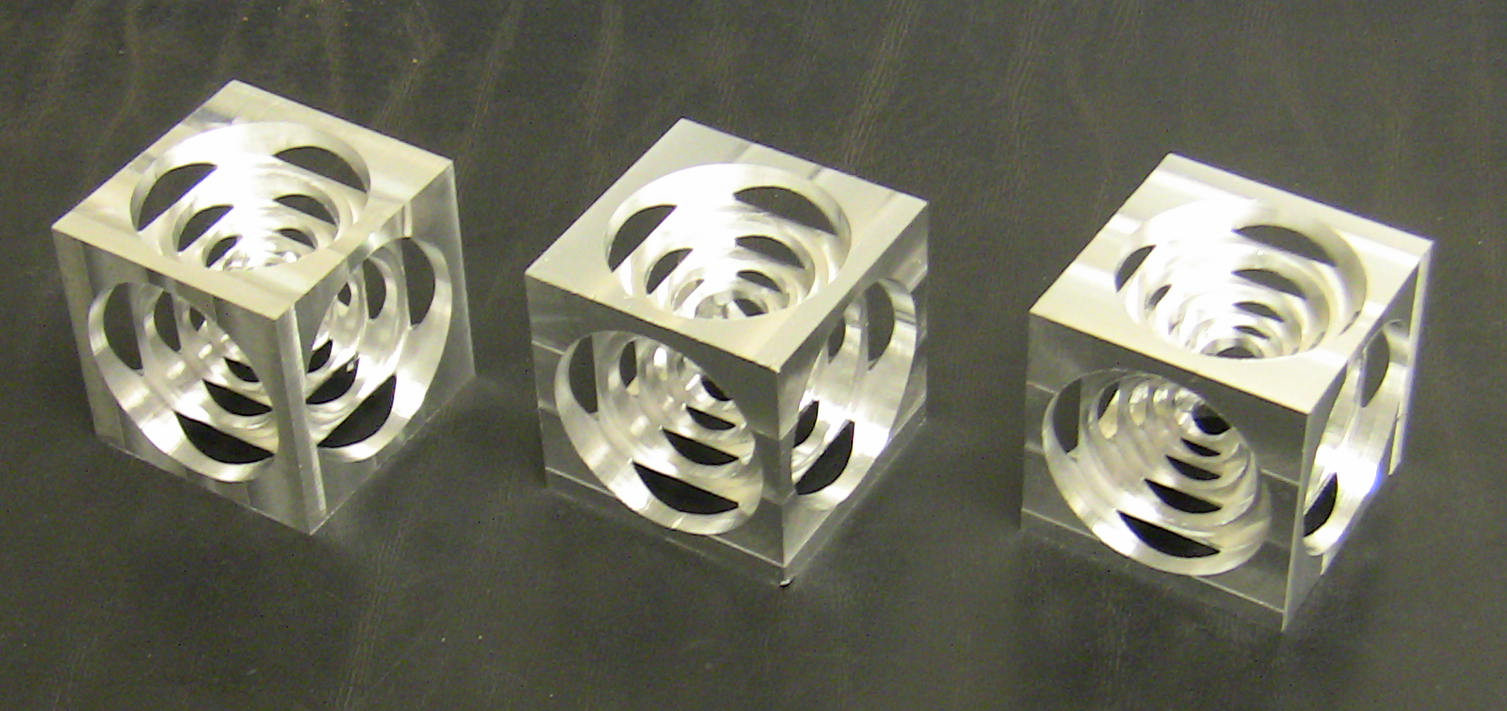
add mill examples : 4th axis and turnercube(2)
ngc files
improve Z-step calculation
improve lead-in and lead-out calc
support for full depth finishing pass
improve milling performance
update language files
numerous minor improvements and fixes

These are cubes I milled with the examples supplied :


Watch these videos :


Fern
The following user(s) said Thank You: bjames28, tommylight, Arpad, cncnoob1979

Please Log in or Create an account to join the conversation.

More
9 years 5 months ago #92762 by bogie6040
Hi Fern,

It has been awhile since I used NativeCAM so I finally got around to installing it, when I ran into some problems...

First (while not really a problem maybe it will help someone else):
I cloned your GIT Repository here: github.com/FernV/NativeCAM

Which to do so you need to create an account on github.com and then navigate to the folder you would like to clone it into with your file browser (thunar if your running wheezy) then right click and select open terminal here.
Then copy this code into the terminal window: git clone github.com/FernV/NativeCAM.git
You may be asked for your github username / password (BTW: this will create a folder named NativeCAM in whatever directory you run it from.)

Second:
The README.md no longer makes mention of the python-lxml prerequisite or the terminal command to install it, for those playing along at home it's: sudo apt-get install python-lxml

Third:
When I tried to run the command: linuxcnc inifilename per the README.md instructions linuxcnc opened up but there was no NativeCAM window on the right side of Axis and I got the following on the terminal after closing it:
Code:
Machine configuration file is 'BRIDGEPORT_7I76.ini' Starting LinuxCNC... . Found file(REL): ./BRIDGEPORT_7I76.hal Found file(REL): ./custom.hal NativeCAM info: inifile = /home/bogie6040/linuxcnc/configs/BRIDGEPORT_7I76/BRIDGEPORT_7I76.ini NCAM_DIR = /home/bogie6040/linuxcnc/configs/BRIDGEPORT_7I76/ncam SYS_DIR = /home/bogie6040/linuxcnc/configs/NativeCAM program = /usr/lib/pymodules/python2.7/gladevcp/ncam.py Traceback (most recent call last): File "/usr/lib/pymodules/python2.7/gladevcp/ncam.py", line 2033, in __init__ self.update_user_tree(fromdirs, NCAM_DIR) File "/usr/lib/pymodules/python2.7/gladevcp/ncam.py", line 2192, in update_user_tree for f in os.listdir(srcdir) : OSError: [Errno 2] No such file or directory: '/home/bogie6040/linuxcnc/configs/NativeCAM/defaults/lathe' Xlib.protocol.request.QueryExtension Xlib.protocol.request.QueryExtension /usr/bin/gladevcp:295: GtkWarning: GdkWindow 0x3c00003 unexpectedly destroyed gtk.main() Shutting down and cleaning up LinuxCNC... **** GLADE VCP ERROR: X Protocol Error: 3 Running HAL shutdown script task: 1658 cycles, min=0.000046, max=0.029275, avg=0.010903, 0 latency excursions (> 10x expected cycle time of 0.010000s)

So I went and looked in the NativeCAM/defaults folder and sure enough there was no lathe folder so I added it re-ran the command and then NativeCAM showed up. I checked the zip file on the github page, it also doesn't have that folder in it.
But then after subsequent runs it stopped showing up and I get this:
Code:
bogie6040@LinuxCNC:~/linuxcnc/configs/BRIDGEPORT_7I76$ linuxcnc BRIDGEPORT_7I76.ini LINUXCNC - 2.7.8 Machine configuration directory is '/home/bogie6040/linuxcnc/configs/BRIDGEPORT_7I76' Machine configuration file is 'BRIDGEPORT_7I76.ini' Starting LinuxCNC... . Found file(REL): ./BRIDGEPORT_7I76.hal Found file(REL): ./custom.hal NativeCAM info: inifile = /home/bogie6040/linuxcnc/configs/BRIDGEPORT_7I76/BRIDGEPORT_7I76.ini NCAM_DIR = /home/bogie6040/linuxcnc/configs/BRIDGEPORT_7I76/ncam SYS_DIR = /home/bogie6040/linuxcnc/configs/NativeCAM program = /usr/lib/pymodules/python2.7/gladevcp/ncam.py Traceback (most recent call last): File "/usr/lib/pymodules/python2.7/gladevcp/ncam.py", line 2033, in __init__ self.update_user_tree(fromdirs, NCAM_DIR) File "/usr/lib/pymodules/python2.7/gladevcp/ncam.py", line 2203, in update_user_tree os.symlink(srcdir, dst) OSError: [Errno 17] File exists Xlib.protocol.request.QueryExtension Xlib.protocol.request.QueryExtension /usr/bin/gladevcp:295: GtkWarning: GdkWindow 0x3a00003 unexpectedly destroyed gtk.main() Shutting down and cleaning up LinuxCNC... **** GLADE VCP ERROR: X Protocol Error: 3 Running HAL shutdown script task: 1007 cycles, min=0.000046, max=0.023369, avg=0.010835, 0 latency excursions (> 10x expected cycle time of 0.010000s)
Any ideas what I did wrong?

Thanks,
Bogie

Please Log in or Create an account to join the conversation.

More
9 years 5 months ago #92763 by FernV
Replied by FernV on topic NativeCAM is Features renamed

bogie6040 wrote: I cloned your GIT Repository...
Which to do so you need to create an account on github.com

Do you really have to create an account just to clone ? Absolutely if you want to push data ...


bogie6040 wrote: The README.md no longer makes mention of the python-lxml prerequisite or the terminal command to install it, for those playing along at home it's: sudo apt-get install python-lxml

Right, it is not mentionned but nondeb_setup.py will test if it is installed and mention in the terminal how to get it. However, I admit standalone will not run until done. Sorry for the inconvenience.


bogie6040 wrote: When I tried to run the command: linuxcnc inifilename per the README.md instructions linuxcnc opened up but there was no NativeCAM window on the right side of Axis and I got the following on the terminal after closing it:
.
.
.
OSError: [Errno 2] No such file or directory: '/home/bogie6040/linuxcnc/configs/NativeCAM/defaults/lathe'

So I went and looked in the NativeCAM/defaults folder and sure enough there was no lathe folder so I added it re-ran the command and then NativeCAM showed up.

Though I have the sub-directory in my 'defaults' dir, it is still an empty directory and as such was not copied when I pushed to github.
I will add a simple readme file to it until I have something else to place in it. ncam.py is programmed to copy all the required files but the directory is not there and the error you got. Creating a 'lathe' dir was the thing to do


bogie6040 wrote: ...after subsequent runs it stopped showing up and I get this:

File "/usr/lib/pymodules/python2.7/gladevcp/ncam.py", line 2033, in __init__
self.update_user_tree(fromdirs, NCAM_DIR)
File "/usr/lib/pymodules/python2.7/gladevcp/ncam.py", line 2203, in update_user_tree
os.symlink(srcdir, dst)
OSError: [Errno 17] File exists

Every time ncam starts it checks that files are up to date and it is trying to create a link that allready exists or a file with the same name. This part of the code create links to examples.

I suggest you copy or create a short file in NativeCAM/defaults,
Delete '/home/bogie6040/linuxcnc/configs/BRIDGEPORT_7I76/ncam'
and restart

Keep me informed
Fern

P.S. I will correct problems mentionned when I push new files maybe tomorrow

Please Log in or Create an account to join the conversation.

More
9 years 5 months ago #92774 by FernV
Replied by FernV on topic NativeCAM is Features renamed
Hi Bogie

I just pushed updates that should correct the error and report clearly if an error happens when copying or creating link

Regards
Fern

Please Log in or Create an account to join the conversation.

Time to create page: 0.082 seconds
Powered by Kunena Forum
