Useful Plasma Thread

More
8 years 2 months ago #116016 by scubawarm
Replied by scubawarm on topic WOW Guys!
I've just finished reading all this... and... I'm your biggest fan.

Do believe you are on to something here. Thank you so much for your time and efforts!

Please Log in or Create an account to join the conversation.

More
8 years 2 months ago - 8 years 2 months ago #116090 by Grotius
Replied by Grotius on topic WOW Guys!
Hi,

I have made some progress the last day's with up's and down's in C code.
Thanks, Rod, for your e-mail examples.

For example, i made 2 brand clean configurations. Started with zero code, just to be sure.
One without external offsets. This was hard to program. It's just not made
for thc function's. After spending a lot of time in that, i switched to external offset's. This was much easyer to write C code for.
The difficulty in the standard linuxcnc distibution is that making offset's and stay them in line is a little bit of hard to do with a few lines of code for a new C programmer. Maybe over a few years i will say, yes i missed something in that time, now it's easy. :laugh:

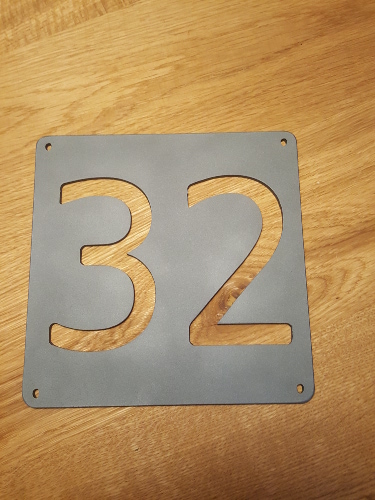
Today cutted a sample for my wife with the new C code. After tuning a few gui parameters, it cut's better then Mach3 windows.
But it's a long way to the top. At the picture my nozzle was damaged, so i am not satisfied about the holes.

I would like to make contact coming time with the Russian cnc forum that has made the Inkscape plugin.
My investegation is import a dxf right into the gremlin screen as g-code with inkscape only loaded as blockchain.

My C code language is improved a little bit, With compiling i get less errors, because you know how to use the language.
Here a example code that i used with succes, it's still basic in the eye of the C-coder,

The code is only related to the probe function :
Code:
component THC2 "Torch Height Control for stepper and servo machines, compatible with external offset branche"; description """ Todo """; author "Grotius CNC Machines"; license "GPLv2 or greater"; option singleton yes; // Input Pins pin in bit Enable "Enable component"; pin out bit Reset_offsets "Reset offsets to orginal condition when component is not enable"; pin in float Zpos_in ""; pin out float Zpos_out ""; pin in float Travelheight "Z axis travelheigt in"; pin in float Cutheight "Z axis cut height in"; pin out float Maxspeed "Z axis speed out 0 to 100, for info only"; pin out float ProbeSpeed "Z axis probing speed"; pin out float Speed "Z axis current speed, for info only"; pin in float Piercespeed "Z axis pierce speed in 0 to 100."; pin in float Piercedelay "Z axis pierce delay time in seconds"; pin out bit Piercetime_reached "Piercetime reached"; pin in float Up_down_resolution "When Torch up, then correction 0.1mm or 1mm resolution"; pin in float Axis_z_eoffset "Connectod to external offsets z real time current z axis position input"; pin in float Pierceheight "the pierce height value in mm"; pin out float Offset "Z axis Offset command to external offsets, the z axis is moving to this offset when set, even in pause"; pin in bit Torch_on_in "Connected to spindle-cw"; pin in bit Probe_enable "Connected to user interface button"; pin out bit Probe_trigger "If probe is triggered this pin becomes high"; pin out bit Cutting_trigger "At cutheight and cutting"; pin in float Probe_search_limit "Connected to user interface input, z axis probe end limit. For example Z -10 = probing to max Z-10."; pin in float Probe_switch_offset "Probe sensor switch correction value, positive z-value"; pin out float Zpos_probe "Z value when probe was triggered"; pin in bit Arc_ok_in "Parport connections in 12"; pin in bit Torch_up "Parport connections in 13"; pin in bit Torch_down "Parport connections in 11"; pin in bit Probe_in "Parport connections in 15"; pin out bit Torch_on_out "Parport connections out 17"; pin out bit Pause_machine "Connect to motion.feed-hold-inhibited"; pin out float Zpos_cmd_out ; variable double time; function _; ;; #include "rtapi_math.h" #include "stdlib.h" #include "stdio.h" FUNCTION(_) { Zpos_out = Zpos_in; if(!Enable){ Reset_offsets = 1; Offset = 0; Probe_trigger = 0; Torch_on_out = 0; Piercetime_reached = 0; time = 0; Pause_machine = 0; } if(Enable){ if(!Torch_on_in){ Torch_on_out = 0; Offset = Travelheight; Cutting_trigger = 0; } if(Torch_on_out){time += fperiod;} if(time >= Piercedelay){ Piercetime_reached = 1;} if(!Torch_on_in){time = 0; Piercetime_reached = 0;} Reset_offsets = 0; if(Probe_enable){ if(!Torch_on_in){ Probe_trigger = 0; Pause_machine = 0; Piercetime_reached = 0; Cutting_trigger = 0; Offset = Travelheight; } if(Torch_on_in && !Probe_in && !Probe_trigger){ Offset = Probe_search_limit; Pause_machine = 1; } if(Torch_on_in && Probe_in){ Zpos_probe = Axis_z_eoffset; Probe_trigger = 1; Pause_machine = 1; } if(Torch_on_in && Probe_trigger){ Offset = Zpos_probe + Pierceheight + Probe_switch_offset; Pause_machine = 1; } if(Torch_on_in && Probe_trigger && ((int)Offset == (int)Axis_z_eoffset) ){ // moving to pierceheight, if at height, ok. Torch_on_out = 1; Pause_machine = 1; } if(Torch_on_out && Piercetime_reached){ Offset = Zpos_probe + Cutheight + Probe_switch_offset; Pause_machine = 1; } if(Torch_on_in && Piercetime_reached && ((int)Offset == (int)Axis_z_eoffset) ){ // add arc ok signal. Cutting_trigger = 1; Pause_machine = 0; } if(Torch_up && Torch_on_out && Cutting_trigger && (Axis_z_eoffset <= Travelheight) ){ Offset = Axis_z_eoffset + Up_down_resolution ; Pause_machine = 0; } if(Torch_down && Torch_on_out && Cutting_trigger && (Axis_z_eoffset >= Probe_search_limit) ){ Offset = Axis_z_eoffset - Up_down_resolution ; Pause_machine = 0; } if(!Torch_down && !Torch_up && Torch_on_out && Cutting_trigger){ Offset = Axis_z_eoffset; Pause_machine = 0; } } } } // Code Example Library : // if(Simulate_arc_ok_in){Arc_ok_led = 1;} else {Arc_ok_led = 0;} // //time += fperiod; //if(Torch_on_in){time += fperiod;} //if(time >= Piercedelay){ Piercetime_reached = 1;} //if(!Torch_on_in){time = 0; Piercetime_reached = 0;}


The C code example is only for using the Probe function. This was the most difficult function to make. So i started with a
working probe function in C. The normal code without probe i made and is much easer to write.

So we are at the good way. I need to save the linux screen parameters automaticly. Maybe someone has an idea?

Yes, A difficult item when coding:
Code:
(int)Offset == (int)Axis_z_eoffset)

If you want to go to zero, check zero, and current z axis height value is : 0.0025
You have a big problem if you are using float variables.

So at the moment i map the z axis value at zero or a certain point. I used an integer value wich is : 0 or 1 or 2.
This solves many issues. For example. Are we on pierce height? Are we on cutheight? If we almost get there the integer will say
okey it's true. But solving little axis feedback and command values differences are in C coded hard to make straight.
Last edit: 8 years 2 months ago by Grotius.

Please Log in or Create an account to join the conversation.

More
8 years 2 months ago #116097 by rodw
Replied by rodw on topic Useful Plasma Thread
Welcome to the world of floats! You can never depend on the equality operator, you have to see how close they are to each other and if within a small range, treat them as equal.

Borrowing from the near component
github.com/LinuxCNC/linuxcnc/blob/master...components/near.comp

You could write a procedure like this
Code:
int near(double in1, double in2, double range) { if(in1 < 0) { in1 = -in1; in2 = -in2; } if(fabs(in1-in2)<= range) return 1; else return 0; }
Note the first if() statement is there to make sure that in1 values is positive if they are negative so the subtraction will work properly

and then you could replace
Code:
(int)Offset == (int)Axis_z_eoffset)
with:
Code:
if(near(Offset ,Axis_z_eoffset,0.0001)){ // do something }

As far as saving screen values, there is an example in plasma.py in this gmoccappy sim
github.com/LinuxCNC/linuxcnc/blob/master...apy_plasma/plasma.py

But here is a Python example that reads and writes to an .INI file from an application I've written to connect with a web based application and print to a label printer. Python is a bit different from C and requires that global variables are defined in the procedure that accesses them.
Code:
import ConfigParser from ConfigParser import ConfigParser def readConfig(): global g_zpl global g_filename global g_printer global g_apiurl global g_apikey global g_csvname global g_uselpr global g_lpripaddr global g_lprport global config try: config = ConfigParser() config.readfp(open('zebra1.ini')) config.sections() g_printer = config.get('PRINTER', 'queue') g_filename = config.get('PRINTER', 'label') g_csvname = config.get('PRINTER', 'lastcsv') g_apiurl = config.get('API', 'URL') g_apikey = config.get('API', 'KEY') g_lpripaddr = config.get('LPR', 'ipaddr') g_lprport = config.get('LPR', 'port') g_uselpr = config.get('LPR', 'uselpr') except: tkMessageBox.showwarning("Warning","Cannot Open INI file, check settings before printing") def writeConfig(): global g_zpl global g_filename global g_printer global g_apiurl global g_apikey global g_csvname global config global g_uselpr global g_lpripaddr global g_lprport config.set('API', 'key', g_apikey) config.set('API', 'url', g_apiurl) config.set('PRINTER', 'lastcsv', g_csvname) config.set('PRINTER', 'label', g_filename) config.set('PRINTER', 'queue', g_printer) config.set('LPR', 'ipaddr', g_lpripaddr) config.set('LPR', 'port', g_lprport) config.set('LPR', 'uselpr', g_uselpr) try: with open('zebra1.ini', 'wb') as configfile: config.write(configfile) except: tkMessageBox.showwarning("Warning","Cannot write to INI file")

and the ini file
Code:
[PRINTER] queue = Zebra S4M (203 dpi) - ZPL label = C:/Users/Rod/Documents/Python/102x36prod.zpl lastcsv = C:/Users/Rod/Documents/Python/labelCR1.csv [API] url = https://www.yourdomain.com/do/WS/NetoAPI key = xxxxxxxxxxxxxxxxxxxxxxxxxxxxx [LPR] ipaddr = 192.168.1.34 port = 9100 uselpr = 1

Its great to see you are cutting! Like anything the more you use it the easier it becomes C is no different so you can only improve!
The following user(s) said Thank You: Grotius

Please Log in or Create an account to join the conversation.

More
8 years 2 months ago - 8 years 2 months ago #116185 by Grotius
Replied by Grotius on topic Useful Plasma Thread
Hi Rod,

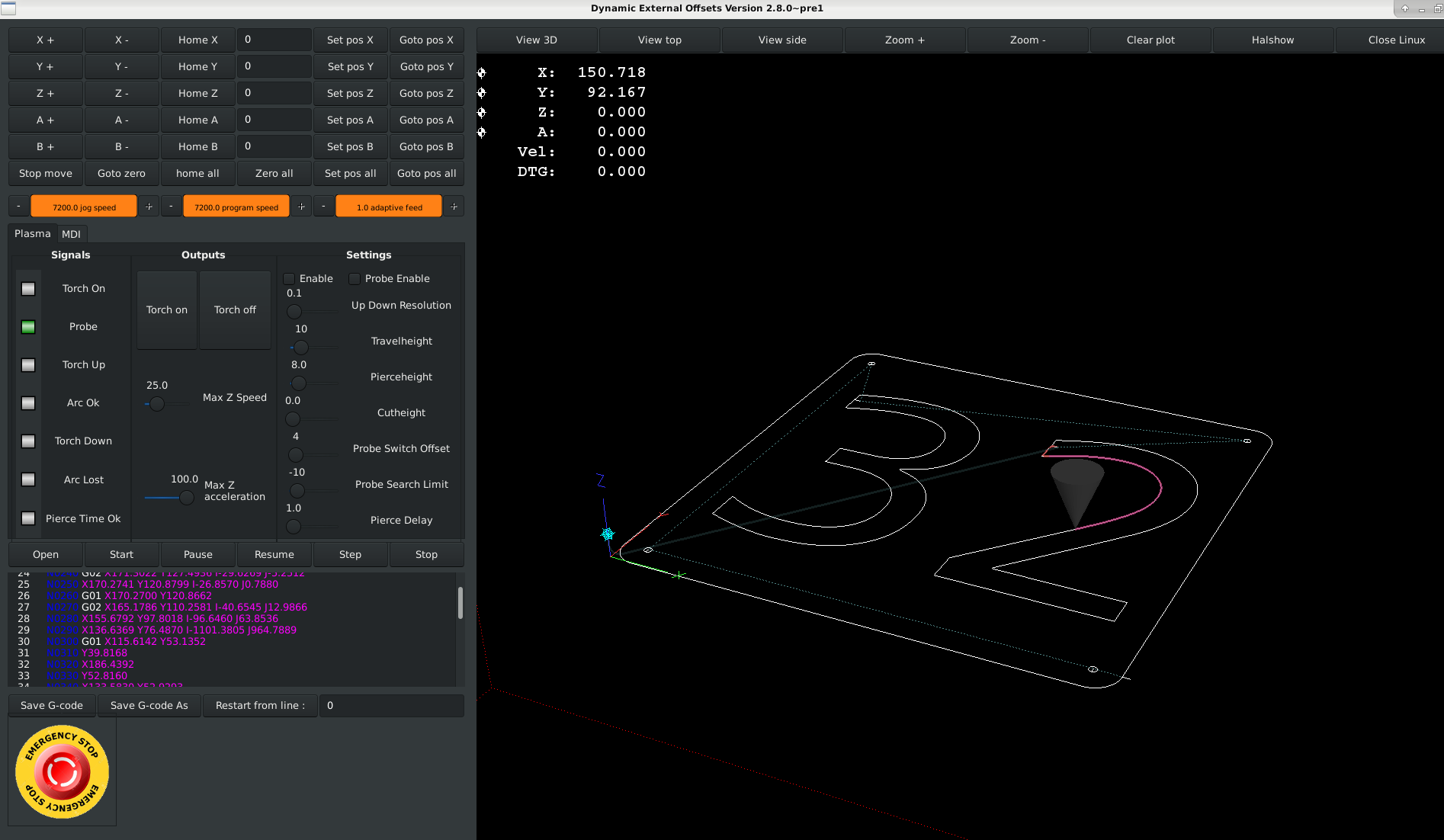
This evening i had something strange going on.
The section normal in the end of the code is not working. Is there a limitation in code or if sub statements?
Hmm.

The program is not going to execute this paragrapf :
if(Normal){ // normal plasma cutting, without probe function.

The enable and probe functions are working good, so i don't understand how this can happen?
Its a short sample code, so i can trigger if its works...
Code:
component THC2 "Torch Height Control for stepper and servo machines, compatible with external offset branche"; description """ //Must add probe distance function. """; author "Grotius CNC Machines"; license "GPLv2 or greater"; option singleton yes; // Input Pins pin in bit Enable "Enable component"; pin out bit Reset_offsets "Reset offsets to orginal condition when component is not enable"; pin in float Zpos_in ""; pin out float Zpos_out ""; pin in float Travelheight "Z axis travelheigt in"; pin in float Cutheight "Z axis cut height in"; pin out float Maxspeed "Z axis speed out 0 to 100, for info only"; pin out float ProbeSpeed "Z axis probing speed"; pin out float Speed "Z axis current speed, for info only"; pin in float Piercespeed "Z axis pierce speed in 0 to 100."; pin in float Piercedelay "Z axis pierce delay time in seconds"; pin out bit Piercetime_reached "Piercetime reached"; pin in float Up_down_resolution "When Torch up, then correction 0.1mm or 1mm resolution"; pin in float Axis_z_eoffset "Connectod to external offsets z real time current z axis position input"; pin in float Pierceheight "the pierce height value in mm"; pin out float Offset "Z axis Offset command to external offsets, the z axis is moving to this offset when set, even in pause"; pin in bit Torch_on_in "Connected to spindle-cw"; pin in bit Probe_enable "Connected to user interface button"; pin in bit Normal "Test pin"; pin out bit Probe_trigger "If probe is triggered this pin becomes high"; pin out bit Cutting_trigger "At cutheight and cutting"; pin in float Probe_search_limit "Connected to user interface input, z axis probe end limit. For example Z -10 = probing to max Z-10."; pin in float Probe_switch_offset "Probe sensor switch correction value, positive z-value"; pin out float Zpos_probe "Z value when probe was triggered"; pin in float Restart_attemps "3 for example"; pin in bit Arc_ok_in "Parport connections in 12"; pin in bit Torch_up "Parport connections in 13"; pin in bit Torch_down "Parport connections in 11"; pin in bit Probe_in "Parport connections in 15"; pin out bit Torch_on_out "Parport connections out 17"; pin out bit Pause_machine "Connect to motion.feed-hold-inhibited"; //pin out float Zpos_cmd_out ; variable double time; variable float Count; function _; ;; #include "rtapi_math.h" #include "stdlib.h" #include "stdio.h" FUNCTION(_) { Zpos_out = Zpos_in; if(!Enable){ Reset_offsets = 1; Offset = 0; Probe_trigger = 0; Torch_on_out = 0; Piercetime_reached = 0; time = 0; Pause_machine = 0; } if(Enable){ if(!Torch_on_in){ Torch_on_out = 0; Offset = Travelheight; Cutting_trigger = 0; Count = 0; } if(Torch_on_out){time += fperiod;} if(time >= Piercedelay){ Piercetime_reached = 1;} if(!Torch_on_in){time = 0; Piercetime_reached = 0;} Reset_offsets = 0; } if(Probe_enable){ if(!Torch_on_in){ Probe_trigger = 0; Piercetime_reached = 0; Cutting_trigger = 0; Offset = Travelheight; //goto travelheight... } if(!Torch_on_in && ((int)Offset == (int)Travelheight) ){ Pause_machine = 0; } if(!Torch_on_in && !((int)Offset == (int)Travelheight) ){ //if m5 do not move xy, until at travelheight Pause_machine = 1; } if(Torch_on_in && !Probe_in && !Probe_trigger){ Offset = Probe_search_limit; Pause_machine = 1; } if(Torch_on_in && Probe_in){ Zpos_probe = Axis_z_eoffset; Probe_trigger = 1; Pause_machine = 1; } if(Torch_on_in && Probe_trigger){ Offset = Zpos_probe + Pierceheight + Probe_switch_offset; Pause_machine = 1; } if(Torch_on_in && Probe_trigger && ((int)Offset == (int)Axis_z_eoffset) ){ // moving to pierceheight, if at height, ok Torch_on_out = 1; Pause_machine = 1; } if(Torch_on_out && Piercetime_reached){ Offset = Zpos_probe + Cutheight + Probe_switch_offset; // moving to cutheight Pause_machine = 1; } if(Torch_on_in && Piercetime_reached && ((int)Offset == (int)Axis_z_eoffset) ){ // if at cutheight, move Cutting_trigger = 1; Pause_machine = 0; } if(Torch_up && Torch_on_out && Cutting_trigger && (Axis_z_eoffset <= Travelheight) ){ // torch up and limited to travelheight Offset = Axis_z_eoffset + Up_down_resolution ; Pause_machine = 0; } if(Torch_down && Torch_on_out && Cutting_trigger && (Axis_z_eoffset >= Probe_search_limit) ){ // torch down and limited to probe search limit Offset = Axis_z_eoffset - Up_down_resolution ; Pause_machine = 0; } if(!Torch_down && !Torch_up && Torch_on_out && Cutting_trigger){ // if no torch up or down, stay at current height Offset = Axis_z_eoffset; Pause_machine = 0; } if(Torch_on_in && Piercetime_reached && Cutting_trigger && Arc_ok_in){ // if arc oke, move Pause_machine = 0; } if(Torch_on_in && Piercetime_reached && Cutting_trigger && !Arc_ok_in){ // if lost arc oke, halt turn of torch and restart 1 time Pause_machine = 1; // if(Count <= Restart_attemps){ // restart // Torch_on_out = 0; // Torch_on_out = 1; // Count = Count + 1; // } } } if(Normal){ // normal plasma cutting, without probe function. if(!Torch_on_in){ Offset = Travelheight; Cutting_trigger = 0; Pause_machine = 0; } if(Torch_on_in && !Cutting_trigger){ Offset = Pierceheight; Pause_machine = 1; } if(Torch_on_in && ((int)Axis_z_eoffset == (int)Pierceheight) ){ Pause_machine = 1; Torch_on_out = 1; Offset = 0; // it wil not go to zero.... } } }
Last edit: 8 years 2 months ago by Grotius.

Please Log in or Create an account to join the conversation.

More
8 years 2 months ago #116187 by rodw
Replied by rodw on topic Useful Plasma Thread
You have not actually done anything to change the state of normal after its defined. When a variable is defined, its usually undefined or zero filled by the compiler so its currently always not normal (!normal)

Please Log in or Create an account to join the conversation.

More
8 years 2 months ago #116188 by rodw
Replied by rodw on topic Useful Plasma Thread
sorry, I just looked in the code at my last post and forgot to look for a pin.
So is the Normal pin connected?
Can you see it change state in Halshow?
What is it connected to?

Please Log in or Create an account to join the conversation.

Moderators: snowgoer540
Time to create page: 0.213 seconds
Powered by Kunena Forum
