
Add Buttons in Probe Basic
- Lcvette
-

- Offline
- Moderator
-

Less
More
- Posts: 1681
- Thank you received: 783
28 Feb 2026 13:56 #343652
by Lcvette
Replied by Lcvette on topic Add Buttons in Probe Basic
correct, from within the opened running fully loaded qtdesigner you open your templates for editing.
The following user(s) said Thank You: DerKlotz
Please Log in or Create an account to join the conversation.
- DerKlotz
- Offline
- Premium Member
-

Less
More
- Posts: 104
- Thank you received: 7
28 Feb 2026 16:29 #343657
by DerKlotz
Replied by DerKlotz on topic Add Buttons in Probe Basic
Big Thanks
Please Log in or Create an account to join the conversation.
- DerKlotz
- Offline
- Premium Member
-
Less
More
- Posts: 104
- Thank you received: 7
04 Mar 2026 09:03 - 04 Mar 2026 10:52 #343827
by DerKlotz
Replied by DerKlotz on topic Add Buttons in Probe Basic
After some days of trial and error i don´t know further
I created a button "Licht" in QtPyVCP. This light button should switch on my hm2_7i76e.0.7i76.0.0.output-02 from my Mesa 7i76e. In my probe_basic_postgui.hal and tried to implement this function with no success. See postgui Liine 28 and 29.
In addition it would be nice when the "Licht" button is read when off and turns into green when on. The Power on button in the basic GUI turns into green when on.
[/code][/code]
I created a button "Licht" in QtPyVCP. This light button should switch on my hm2_7i76e.0.7i76.0.0.output-02 from my Mesa 7i76e. In my probe_basic_postgui.hal and tried to implement this function with no success. See postgui Liine 28 and 29.
In addition it would be nice when the "Licht" button is read when off and turns into green when on. The Power on button in the basic GUI turns into green when on.
[code]Debug file information:
....
/home/cnc/linuxcnc/configs/Fräse_Probe/probe_basic_postgui.hal:28: Pin 'qtpyvcp.licht.out' does not exist
Failed to load POSTGUI_HALFILE with error: 1
....


[code] 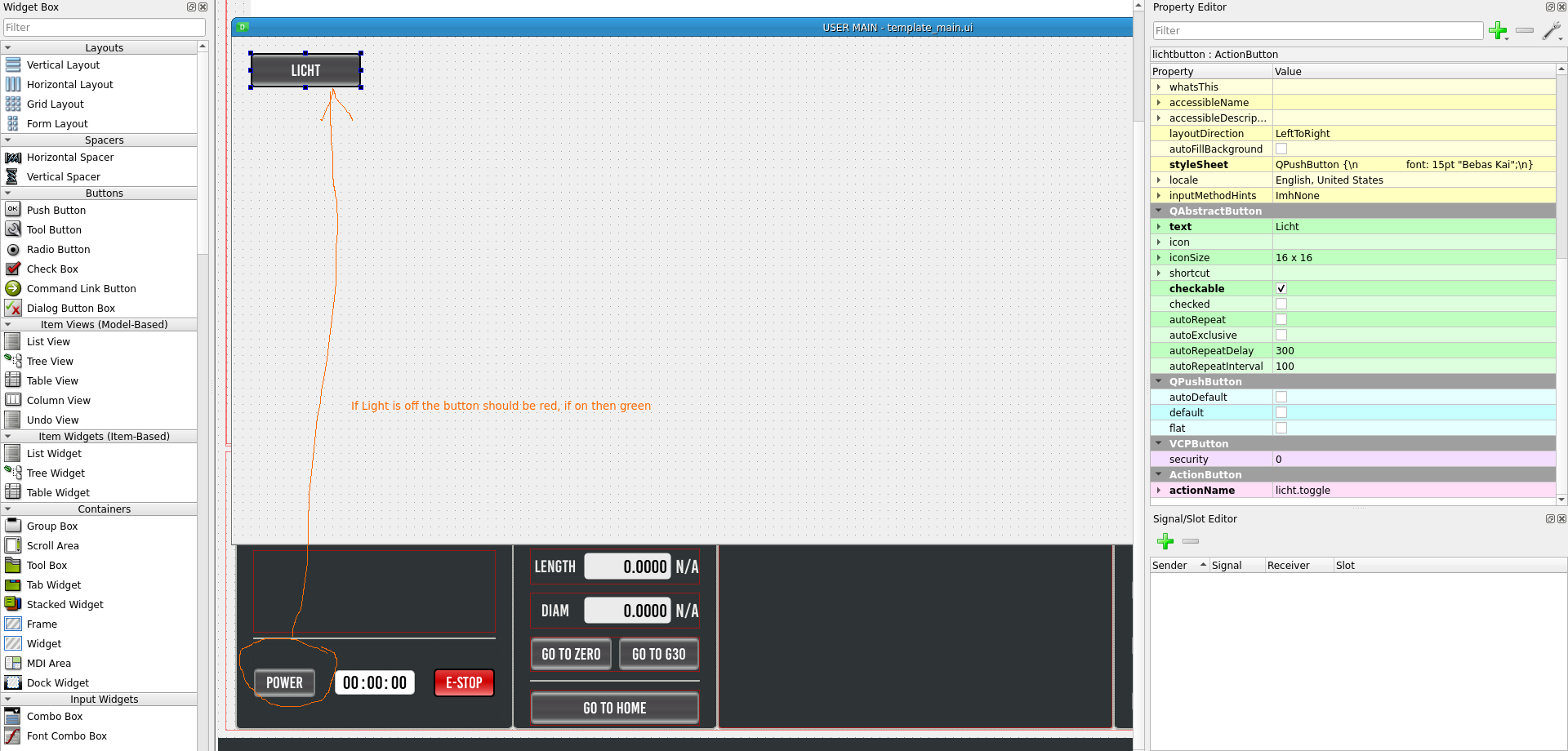
Last edit: 04 Mar 2026 10:52 by DerKlotz.
Please Log in or Create an account to join the conversation.
- Lcvette
-
- Offline
- Moderator
-
Less
More
- Posts: 1681
- Thank you received: 783
04 Mar 2026 15:45 #343844
by Lcvette
Replied by Lcvette on topic Add Buttons in Probe Basic
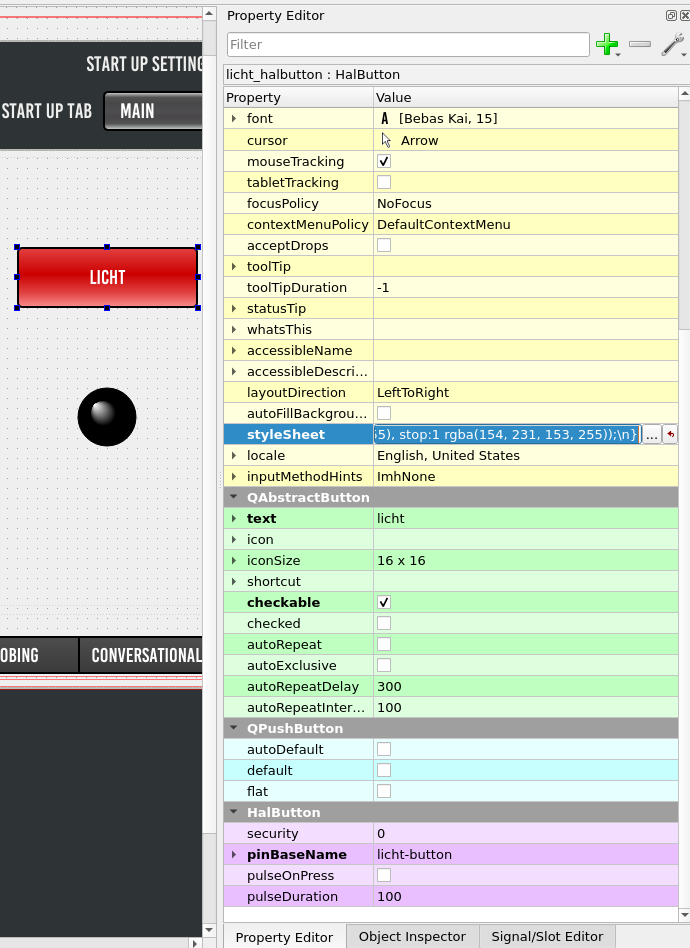
You are trying to control a hal pin, so you will want to use a HalButton from the custom widgets tree. the halpin will have the pinBaseName property you need to set for the button's connection to your licht net. see image below for references:
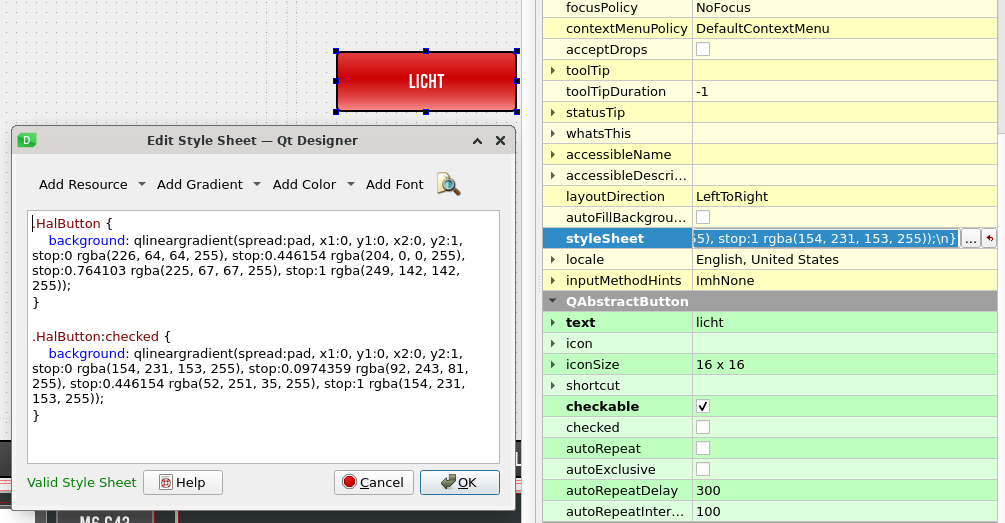
the button color can be style in the stylesheet (see image below) using the following color connections:
The button probe_basic_postgui.hal file connection code is as follows:
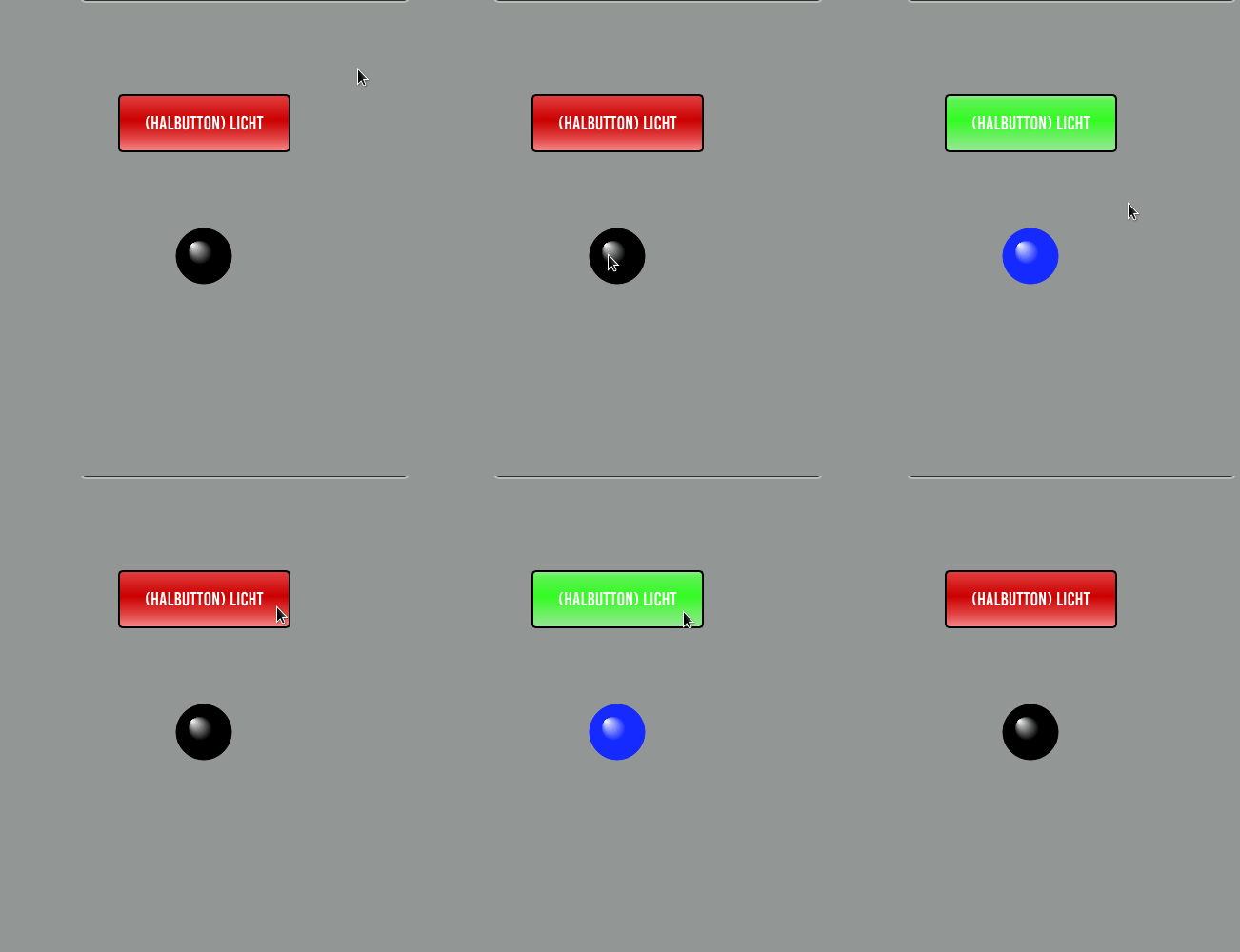
once done you should have something that works like this gif below, but for your physical light:
the button color can be style in the stylesheet (see image below) using the following color connections:
.HalButton {
background: qlineargradient(spread:pad, x1:0, y1:0, x2:0, y2:1, stop:0 rgba(226, 64, 64, 255), stop:0.446154 rgba(204, 0, 0, 255), stop:0.764103 rgba(225, 67, 67, 255), stop:1 rgba(249, 142, 142, 255));
}
.HalButton:checked {
background: qlineargradient(spread:pad, x1:0, y1:0, x2:0, y2:1, stop:0 rgba(154, 231, 153, 255), stop:0.0974359 rgba(92, 243, 81, 255), stop:0.446154 rgba(52, 251, 35, 255), stop:1 rgba(154, 231, 153, 255));
}
The button probe_basic_postgui.hal file connection code is as follows:
loadrt time
loadrt not

addf time.0 servo-thread
addf not.0 servo-thread

# *** Time items required for Probe Basic to run ***
net prog-running not.0.in <= halui.program.is-idle
net prog-paused halui.program.is-paused => time.0.pause
net cycle-timer time.0.start <= not.0.out
net cycle-seconds qtpyvcp.timerseconds.in <= time.0.seconds
net cycle-minutes qtpyvcp.timerminutes.in <= time.0.minutes
net cycle-hours qtpyvcp.timerhours.in <= time.0.hours

#  ---manual tool change signals---
net tool-change-request     =>  qtpyvcp_manualtoolchange.change
net tool-change-confirmed   <=  qtpyvcp_manualtoolchange.changed
net tool-number             =>  qtpyvcp_manualtoolchange.number

# *** Probe graphic simulation trigger push probe tip ***
net probe-in  =>  qtpyvcp.probe-in.out
net probe-in  <=  qtpyvcp.probe-led.on

# *** Set line below for actual spindle readout from your hal file ***
net spindle-rpm-filtered scale_to_rpm.out  =>  qtpyvcp.spindle-encoder-rpm.in

# *** custom gui hal widget connections ***
net licht  <=  qtpyvcp.licht-button.checked
net licht  =>  hm2_7i76e.0.7i76.0.0.output-02
once done you should have something that works like this gif below, but for your physical light:
Attachments:
The following user(s) said Thank You: DerKlotz
Please Log in or Create an account to join the conversation.
- DerKlotz
- Offline
- Premium Member
-
Less
More
- Posts: 104
- Thank you received: 7
05 Mar 2026 09:13 #343883
by DerKlotz
Replied by DerKlotz on topic Add Buttons in Probe Basic
Wow, wow and wow! Great job. Thank you so much

The following user(s) said Thank You: Lcvette
Please Log in or Create an account to join the conversation.
- Lcvette
-
- Offline
- Moderator
-
Less
More
- Posts: 1681
- Thank you received: 783
05 Mar 2026 13:39 #343893
by Lcvette
Replied by Lcvette on topic Add Buttons in Probe Basic
were you able to get it set up and working? 
Please Log in or Create an account to join the conversation.
- DerKlotz
- Offline
- Premium Member
-
Less
More
- Posts: 104
- Thank you received: 7
05 Mar 2026 16:40 #343899
by DerKlotz
Replied by DerKlotz on topic Add Buttons in Probe Basic
So far so good. Next big thing is the wireless jog wheel.
Please Log in or Create an account to join the conversation.
- Lcvette
-
- Offline
- Moderator
-
Less
More
- Posts: 1681
- Thank you received: 783
12 Mar 2026 16:03 #344174
by Lcvette
Replied by Lcvette on topic Add Buttons in Probe Basic
that's one you will have to sort from others as i have not used one of those usb type if that is what you are referring too. but i think some others have on here so may be some solutions to any issues further down the topics list! good luck and post any issues or solutions you find for others please!
Please Log in or Create an account to join the conversation.
- DerKlotz
- Offline
- Premium Member
-
Less
More
- Posts: 104
- Thank you received: 7
16 Mar 2026 14:51 #344356
by DerKlotz
Replied by DerKlotz on topic Add Buttons in Probe Basic
You were a great help! I was already pretty far with the handwheel solution.
The following user(s) said Thank You: Lcvette
Please Log in or Create an account to join the conversation.
- Lcvette
-
- Offline
- Moderator
-
Less
More
- Posts: 1681
- Thank you received: 783
05 Apr 2026 23:15 #345216
by Lcvette
Replied by Lcvette on topic Add Buttons in Probe Basic
Happy to help, glad you got it sorted!!
Please Log in or Create an account to join the conversation.
Moderators: KCJ, Lcvette
Time to create page: 0.358 seconds