
(Solved) Probe Basic - HAL pins not being created
- spumco
- Offline
- Platinum Member
-

Less
More
- Posts: 2180
- Thank you received: 905
03 Sep 2026 21:43 #349298
by spumco
Replied by spumco on topic (Solved) Probe Basic - HAL pins not being created
Ok, that icon means 'no layout' - makes sense for an indeterminate user layout.
But, sadly, no longer suspicious
Back to stumped.
But, sadly, no longer suspicious
Back to stumped.
The following user(s) said Thank You: tommylight
Please Log in or Create an account to join the conversation.
- spumco
- Offline
- Platinum Member
-
Less
More
- Posts: 2180
- Thank you received: 905
05 Sep 2026 01:17 #349335
by spumco
Replied by spumco on topic (Solved) Probe Basic - HAL pins not being created
UPDATE
It wasn't me.
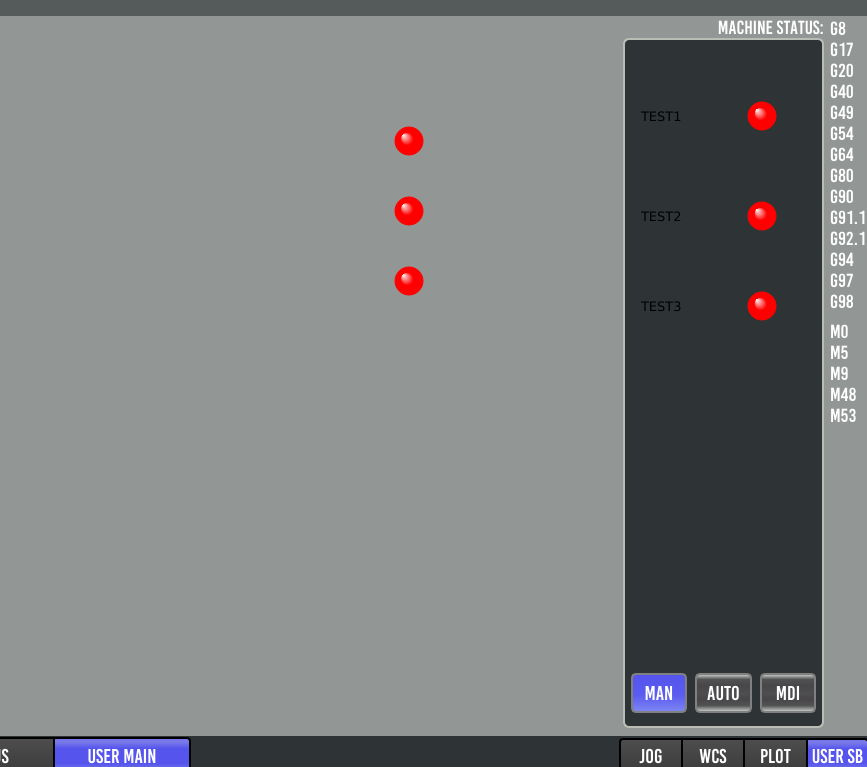
I ran the issue through Claude and the overlord reported back that the sidebar tab .py file had (I think) an indeterminate layout which was conflicting with the main UI file. No error messages, but wasn't loading.
I've attached a Claude-generated document describing the issue and the suggested fix. I've tested the fixed .py file and it's working fine.
Lcvette - might want to have a look and see if you're interested in editing PB as suggested.
It wasn't me.
I ran the issue through Claude and the overlord reported back that the sidebar tab .py file had (I think) an indeterminate layout which was conflicting with the main UI file. No error messages, but wasn't loading.
I've attached a Claude-generated document describing the issue and the suggested fix. I've tested the fixed .py file and it's working fine.
Lcvette - might want to have a look and see if you're interested in editing PB as suggested.
The following user(s) said Thank You: tommylight
Please Log in or Create an account to join the conversation.
- Lcvette
-

- Offline
- Moderator
-

Less
More
- Posts: 1682
- Thank you received: 784
07 Sep 2026 20:33 #349437
by Lcvette
Replied by Lcvette on topic (Solved) Probe Basic - HAL pins not being created
easy fix, you have not formatted the sidebar by adding a widget container or telling the current widget container to format vertically or horizontally so the widgets are there but out of view. need to add a layout format type by right clicking and selecting from the bottom options in the right click dialog.
The following user(s) said Thank You: spumco
Please Log in or Create an account to join the conversation.
- spumco
- Offline
- Platinum Member
-
Less
More
- Posts: 2180
- Thank you received: 905
08 Sep 2026 00:11 #349440
by spumco
Replied by spumco on topic (Solved) Probe Basic - HAL pins not being created
@Lcvette - thanks, took me and the AI overlord a while to figure out why the pins were showing up in halshow but not being displayed.
MODS - please mark [SOLVED]
MODS - please mark [SOLVED]
Please Log in or Create an account to join the conversation.
- Lcvette
-
- Offline
- Moderator
-
Less
More
- Posts: 1682
- Thank you received: 784
08 Sep 2026 00:48 #349441
by Lcvette
Replied by Lcvette on topic (Solved) Probe Basic - HAL pins not being created
You need to stop editing the py files, they are generated from ui file and your going to break things doing what you are doing. All edits must be performed in the ui in qt designer as things are designed. I'm going to go out on a limb and say your other issues come from allowing ai to edit files directly. A warning, ai sucks at xml and ui editing because it rarely has our understands the complete context. And if you don't know when it's hallucinating to guide it back to reality it's going to continue down the wrong rabbit hole. Just do your edits/work in designer where it builds the file correctly on start up and correctly uses all necessary code to initiate the used widgets. Your ai generated posts are mostly hallucinations where it may seem confident in it's conclusion but it's completely out in left field and no where near what's actually happening.
Ai seems wonderful until you realize it's extremely fallible.
Ai seems wonderful until you realize it's extremely fallible.
The following user(s) said Thank You: spumco
Please Log in or Create an account to join the conversation.
- tommylight
-
- Offline
- Moderator
-
Less
More
- Posts: 22004
- Thank you received: 7489
08 Sep 2026 01:21 #349442
by tommylight
Replied by tommylight on topic (Solved) Probe Basic - HAL pins not being created
Done, thank you.MODS - please mark [SOLVED]
Please Log in or Create an account to join the conversation.
- spumco
- Offline
- Platinum Member
-
Less
More
- Posts: 2180
- Thank you received: 905
08 Sep 2026 01:57 #349448
by spumco
I've not touched any of the probe_basic py files, qss files, or anything outside of the config/user_nnn/ folders.
Unfortunately, I am not able to diagnose the various issues without assistance when I can't accomplish what I want in qtpyvcp/qt/PB. And I would prefer not to pester you or other skilled folks unless absolutely necessary.
I have zero coding skills, period. I can work out HAL logic no problem, but figuring out how to create a widget rule, stylesheet, or other text/terminal-based edits is a no-go without some sort of assistance.
I tried to add some hal leds. Didn't work until AI helped me discover it was the layout (as you pointed out).
Once there, I tried to create a widget rule for the hal pins. Didn't work. Still doesn't, but without AI I wouldn't have discovered there's no widget rule channel for HAL items. I would have either given up, or I would have fiddled with everything I could until I broke it and had a tantrum.
With AI help, I now have user-button panel & sidebar indicators that work exactly as I want, and a DRO that's as close to what I want as is reasonable. Getting to this point would have been impossible without AI assistance, or at best would have taken weeks of back-and-forth over the forum.
I'm sorry if I'm coming off as a clown who's spamming you or muddying the waters with AI slop. I genuinely hesitated to post anything, including the current GH issue I've got open, but I thought it might be helpful. Even the "easy fix, you haven't formatted the sidebar..." was a non-obvious problem to me.
And thank you for all the work you've done. Seriously.
Replied by spumco on topic (Solved) Probe Basic - HAL pins not being created
Appreciate your take on it.You need to stop editing the py files, they are generated from ui file and your going to break things doing what you are doing. All edits must be performed in the ui in qt designer as things are designed. I'm going to go out on a limb and say your other issues come from allowing ai to edit files directly. A warning, ai sucks at xml and ui editing because it rarely has our understands the complete context. And if you don't know when it's hallucinating to guide it back to reality it's going to continue down the wrong rabbit hole. Just do your edits/work in designer where it builds the file correctly on start up and correctly uses all necessary code to initiate the used widgets. Your ai generated posts are mostly hallucinations where it may seem confident in it's conclusion but it's completely out in left field and no where near what's actually happening.
Ai seems wonderful until you realize it's extremely fallible.
I've not touched any of the probe_basic py files, qss files, or anything outside of the config/user_nnn/ folders.
Unfortunately, I am not able to diagnose the various issues without assistance when I can't accomplish what I want in qtpyvcp/qt/PB. And I would prefer not to pester you or other skilled folks unless absolutely necessary.
I have zero coding skills, period. I can work out HAL logic no problem, but figuring out how to create a widget rule, stylesheet, or other text/terminal-based edits is a no-go without some sort of assistance.
I tried to add some hal leds. Didn't work until AI helped me discover it was the layout (as you pointed out).
Once there, I tried to create a widget rule for the hal pins. Didn't work. Still doesn't, but without AI I wouldn't have discovered there's no widget rule channel for HAL items. I would have either given up, or I would have fiddled with everything I could until I broke it and had a tantrum.
With AI help, I now have user-button panel & sidebar indicators that work exactly as I want, and a DRO that's as close to what I want as is reasonable. Getting to this point would have been impossible without AI assistance, or at best would have taken weeks of back-and-forth over the forum.
I'm sorry if I'm coming off as a clown who's spamming you or muddying the waters with AI slop. I genuinely hesitated to post anything, including the current GH issue I've got open, but I thought it might be helpful. Even the "easy fix, you haven't formatted the sidebar..." was a non-obvious problem to me.
And thank you for all the work you've done. Seriously.
Please Log in or Create an account to join the conversation.
- Lcvette
-
- Offline
- Moderator
-
Less
More
- Posts: 1682
- Thank you received: 784
08 Sep 2026 02:46 #349450
by Lcvette
Replied by Lcvette on topic (Solved) Probe Basic - HAL pins not being created
No not at all I'm telling you from my experience in finding what I said above. It got me in a bunch of trouble.
The py files in the config are created, but the backend code, NOT by a user or me. So when you edit them directly you're changing how they work when loaded. This breaks things that you're likely unaware of and then you ask ai to solve again and it says hey I'll keep going until it works and it's breaking it further...
Hence why I'm saying only edit in the ui in qt designer. When that ui compiles, it updates the py files correctly using all the required init.
Widget rules are built inside designer, formatting can be done in designer under the style sheet. It's ok to ask ai for code to put in designer but not edit the py file or things get out of synch in how they are loaded.
So again never edit anything outside of designer or you are guaranteed to break something that pops up (such as your hal issue and not loading in the correct order or at the correct time).
Two developers tried to create your issue and neither of us could. But we also build correctly in designer only. So finding an issue is all but impossible when the rules get bypasssed from an edit made outside the working system.
That's not too say ai cannot be helpful but how you use it matters. You can't say Claude do this for me unless you specifically give Claude rules to abide by and remain faithful to the existing code architecture. Not knowing how that works means Claude will just find the quickest way to make problem A go away regardless of creating problem B and C. It will even create tests and if they fail it will change the test until it gives a successful result even if that means cheating the test to give that result. And then with bold confidence it will tell you it's fixed the problem with it's own "proof" of the solution
To use Claude correctly you really need to install a dev install with a local pip been where you can give Claude access to the full qtpyvcp repo and probe basic two and linuxcnc repo and open that in a dev folder in vscode where Claude can work through the existing architecture. This will give you better results, but you still need to perform all your machine use config ui work direct in qtdesiger. Using output explanations from the Claude chat.
The very first probably to Claude would be too create a working knowledge base of the 3 softwares and how they interact. And that will take several prompts alone to fill in the gaps.
The py files in the config are created, but the backend code, NOT by a user or me. So when you edit them directly you're changing how they work when loaded. This breaks things that you're likely unaware of and then you ask ai to solve again and it says hey I'll keep going until it works and it's breaking it further...
Hence why I'm saying only edit in the ui in qt designer. When that ui compiles, it updates the py files correctly using all the required init.
Widget rules are built inside designer, formatting can be done in designer under the style sheet. It's ok to ask ai for code to put in designer but not edit the py file or things get out of synch in how they are loaded.
So again never edit anything outside of designer or you are guaranteed to break something that pops up (such as your hal issue and not loading in the correct order or at the correct time).
Two developers tried to create your issue and neither of us could. But we also build correctly in designer only. So finding an issue is all but impossible when the rules get bypasssed from an edit made outside the working system.
That's not too say ai cannot be helpful but how you use it matters. You can't say Claude do this for me unless you specifically give Claude rules to abide by and remain faithful to the existing code architecture. Not knowing how that works means Claude will just find the quickest way to make problem A go away regardless of creating problem B and C. It will even create tests and if they fail it will change the test until it gives a successful result even if that means cheating the test to give that result. And then with bold confidence it will tell you it's fixed the problem with it's own "proof" of the solution
To use Claude correctly you really need to install a dev install with a local pip been where you can give Claude access to the full qtpyvcp repo and probe basic two and linuxcnc repo and open that in a dev folder in vscode where Claude can work through the existing architecture. This will give you better results, but you still need to perform all your machine use config ui work direct in qtdesiger. Using output explanations from the Claude chat.
The very first probably to Claude would be too create a working knowledge base of the 3 softwares and how they interact. And that will take several prompts alone to fill in the gaps.
The following user(s) said Thank You: spumco
Please Log in or Create an account to join the conversation.
- spumco
- Offline
- Platinum Member
-
Less
More
- Posts: 2180
- Thank you received: 905
08 Sep 2026 03:42 #349452
by spumco
Replied by spumco on topic (Solved) Probe Basic - HAL pins not being created
When that ui compiles, it updates the py files correctly using all the required init.
Now THAT makes sense.
Ok, I'll start over without the py file edits and stop at editing the UI files only. Fingers crossed.
Thanks again.
Now THAT makes sense.
Ok, I'll start over without the py file edits and stop at editing the UI files only. Fingers crossed.
Thanks again.
The following user(s) said Thank You: Lcvette
Please Log in or Create an account to join the conversation.
- Lcvette
-
- Offline
- Moderator
-
Less
More
- Posts: 1682
- Thank you received: 784
09 Sep 2026 12:55 #349493
by Lcvette
Replied by Lcvette on topic (Solved) Probe Basic - HAL pins not being created
hows it coming?
Please Log in or Create an account to join the conversation.
Moderators: KCJ, Lcvette
Time to create page: 0.122 seconds