
(Solved) Probe Basic - HAL pins not being created
- Lcvette
-

- Offline
- Moderator
-

Less
More
- Posts: 1682
- Thank you received: 784
11 Sep 2026 16:42 #349580
by Lcvette
Replied by Lcvette on topic (Solved) Probe Basic - HAL pins not being created
there is not but i can add one, thats a good idea since there is already one for the main tabs
Please Log in or Create an account to join the conversation.
- Lcvette
-
- Offline
- Moderator
-
Less
More
- Posts: 1682
- Thank you received: 784
11 Sep 2026 17:15 #349582
by Lcvette
Replied by Lcvette on topic (Solved) Probe Basic - HAL pins not being created
Ok i added a combo box to select sidebar tab default for startup, i just pushed so give it about 20 minutes to build and upload and be available in apt update should be ready about 1:40pm EST
The following user(s) said Thank You: tommylight, spumco
Please Log in or Create an account to join the conversation.
- spumco
- Offline
- Platinum Member
-

Less
More
- Posts: 2180
- Thank you received: 905
11 Sep 2026 18:52 - 11 Sep 2026 18:56 #349583
by spumco
Replied by spumco on topic (Solved) Probe Basic - HAL pins not being created
Updated and startup sidebar selector works great, thanks very much.
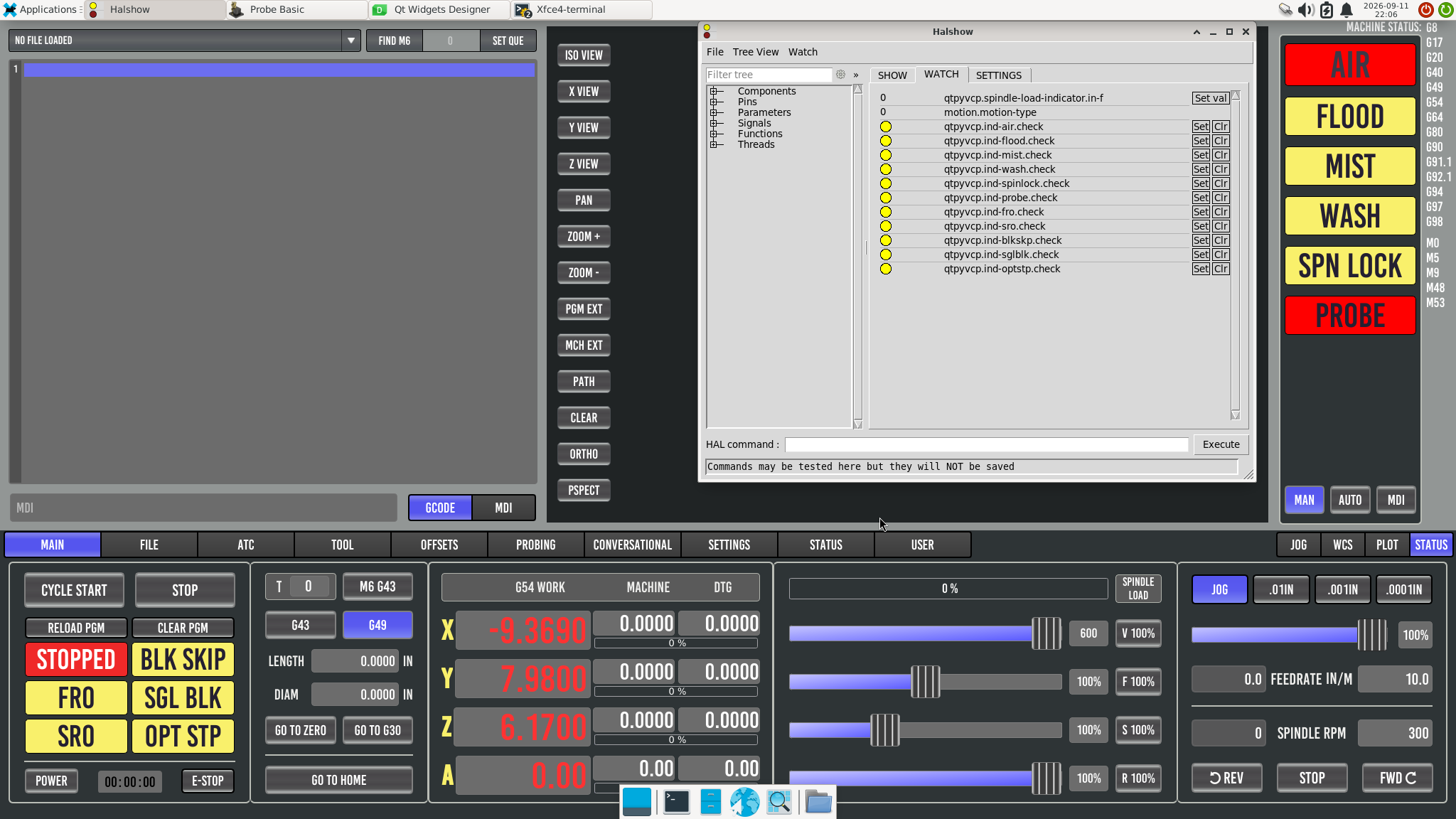
Problem... something odd with the indicators. The non-flashing indicators are no longer changing color when checked, either in Qt or the sim when I toggle the halpin. But the flashing indicators still work perfectly.
Same thing in the user_button ui - flashing works, static color change does not.
I didn't change anything in the sidebar ui file before/after the update.
Problem... something odd with the indicators. The non-flashing indicators are no longer changing color when checked, either in Qt or the sim when I toggle the halpin. But the flashing indicators still work perfectly.
Same thing in the user_button ui - flashing works, static color change does not.
I didn't change anything in the sidebar ui file before/after the update.
Last edit: 11 Sep 2026 18:56 by spumco. Reason: add files
Please Log in or Create an account to join the conversation.
- spumco
- Offline
- Platinum Member
-
Less
More
- Posts: 2180
- Thank you received: 905
12 Sep 2026 02:11 #349587
by spumco
Replied by spumco on topic (Solved) Probe Basic - HAL pins not being created
I couldnt figure out what was interfering with the non-flash 'checked' state, but I figured out a workaround: set the flashState="false" to the same color as "true" and the indicator appears solid when on.
Time to merge in to my live machine HAL and see if the hang problem I reported on GH have been resolved.
Time to merge in to my live machine HAL and see if the hang problem I reported on GH have been resolved.
Please Log in or Create an account to join the conversation.
- Lcvette
-
- Offline
- Moderator
-
Less
More
- Posts: 1682
- Thank you received: 784
16 Sep 2026 18:19 #349681
by Lcvette
Replied by Lcvette on topic (Solved) Probe Basic - HAL pins not being created
did you change the style sheet for non flashing?
Please Log in or Create an account to join the conversation.
- spumco
- Offline
- Platinum Member
-
Less
More
- Posts: 2180
- Thank you received: 905
16 Sep 2026 19:06 #349683
by spumco
Replied by spumco on topic (Solved) Probe Basic - HAL pins not being created
Yes, the style sheet was appropriate for non-flashing.
But I ran in the the same problem(s) I reported on github after this round of edits... intermittent hang during PB startup.
As before, everything works fine in sim but about 75% of attempts on real machine hang up during start. This time I followed your instructions, started from a clean update, and didn't touch anything other than the user ui files. All editing was done with probe_basic.ui open via editvcp.
Testing on the real machine:
No other GUI demos hang, and I have a minimal but working Axis config that starts no problem 100%.
As I mentioned on github I don't have different (non-ethercat) hardware to test on. And no clue if this is ethercat related, but the hangs always happen towards what should be the end of the qtpyvcp/probe basic startup sequence.
But I ran in the the same problem(s) I reported on github after this round of edits... intermittent hang during PB startup.
As before, everything works fine in sim but about 75% of attempts on real machine hang up during start. This time I followed your instructions, started from a clean update, and didn't touch anything other than the user ui files. All editing was done with probe_basic.ui open via editvcp.
Testing on the real machine:
- Demo configs start fine
- Turning on/off the various user features (button panel, main/side tabs, atc btns, dro) didn't appear to make any difference.
No other GUI demos hang, and I have a minimal but working Axis config that starts no problem 100%.
As I mentioned on github I don't have different (non-ethercat) hardware to test on. And no clue if this is ethercat related, but the hangs always happen towards what should be the end of the qtpyvcp/probe basic startup sequence.
Please Log in or Create an account to join the conversation.
- Lcvette
-
- Offline
- Moderator
-
Less
More
- Posts: 1682
- Thank you received: 784
16 Sep 2026 20:21 #349686
by Lcvette
Replied by Lcvette on topic (Solved) Probe Basic - HAL pins not being created
does the log show anything?
Please Log in or Create an account to join the conversation.
- Lcvette
-
- Offline
- Moderator
-
Less
More
- Posts: 1682
- Thank you received: 784
16 Sep 2026 20:32 - 16 Sep 2026 20:35 #349687
by Lcvette
Replied by Lcvette on topic (Solved) Probe Basic - HAL pins not being created
if the sims don't hang, it is almost 100% in your configuration somewhere. may be missing an ini setting somewhere.. i would recommend going through your ini line my line and checking against the docs for configuration to see if something may be missing. then i would go over your post gui hal file and make sure nothing is wonky there, then check your main hal file and make sure everything is correctly spelled, i have had a typo plague me before and it took me weeks before i finally found the issue.
having a working axis config and a working probe basic config with all the extras is pretty different. probe basics functionality is vastly larger and requires more things be in place at startup. using axis as a base test is a good start but it is not a definitive proof the issue lies elsewhere than the config.
the sims use pretty much a complete running simulation of everything needed including atc and probing, so if the sims work consistently you know the software and your install are good. that is proven so the changes between the axis config and the probe basic config is where to focus your attention.
having a working axis config and a working probe basic config with all the extras is pretty different. probe basics functionality is vastly larger and requires more things be in place at startup. using axis as a base test is a good start but it is not a definitive proof the issue lies elsewhere than the config.
the sims use pretty much a complete running simulation of everything needed including atc and probing, so if the sims work consistently you know the software and your install are good. that is proven so the changes between the axis config and the probe basic config is where to focus your attention.
Last edit: 16 Sep 2026 20:35 by Lcvette.
The following user(s) said Thank You: spumco
Please Log in or Create an account to join the conversation.
- spumco
- Offline
- Platinum Member
-
Less
More
- Posts: 2180
- Thank you received: 905
16 Sep 2026 21:27 #349688
by spumco
Replied by spumco on topic (Solved) Probe Basic - HAL pins not being created
does the log show anything?
Yes, but since the hang doesn't happen at exactly the same point each time it's a bit murky.
After the first few tries the startup attempts have been with the postgui.hal commented out of INI completely. I tried starting with every non-mandatory feature/setting commented out - no dice.
And the Axis good start-up is the same config. Just switch [DISPLAY]DISPLAY = probe_basic to [DISPLAY]DISPLAY = axis. No hal-related issues for the same exact LCNC connections.
As for the other probe basic INI stuff, I copy-pasted from the machine_setup_files INI. You're welcome to have a look at my INI to see if I fat-fingered something.
Yes, but since the hang doesn't happen at exactly the same point each time it's a bit murky.
After the first few tries the startup attempts have been with the postgui.hal commented out of INI completely. I tried starting with every non-mandatory feature/setting commented out - no dice.
And the Axis good start-up is the same config. Just switch [DISPLAY]DISPLAY = probe_basic to [DISPLAY]DISPLAY = axis. No hal-related issues for the same exact LCNC connections.
As for the other probe basic INI stuff, I copy-pasted from the machine_setup_files INI. You're welcome to have a look at my INI to see if I fat-fingered something.
Please Log in or Create an account to join the conversation.
- Lcvette
-
- Offline
- Moderator
-
Less
More
- Posts: 1682
- Thank you received: 784
17 Sep 2026 15:48 #349697
by Lcvette
Replied by Lcvette on topic (Solved) Probe Basic - HAL pins not being created
don't rely solely on the machine setup files, also look over the docs config section that is more kept updated and relevant, the machine setup files are a very very basic setup and may actually be out of date, i need to look at that when i have a moment to sit down at dev next.
use the docs those have been recently updated and contain the more current necessary items you may be missing.
probe basic itself has requirements beyond axis so again only rely on axis as a starting point, simply changing display is not going to work without the remaining items being present.
the post gui hal file CANNOT be removed the base items in the supplied postgui are requirements not optional if you do not use the stock items in the probe_basic_postgui.hal file, it will 100% have issues.
use the docs those have been recently updated and contain the more current necessary items you may be missing.
probe basic itself has requirements beyond axis so again only rely on axis as a starting point, simply changing display is not going to work without the remaining items being present.
the post gui hal file CANNOT be removed the base items in the supplied postgui are requirements not optional if you do not use the stock items in the probe_basic_postgui.hal file, it will 100% have issues.
Please Log in or Create an account to join the conversation.
Moderators: KCJ, Lcvette
Time to create page: 0.405 seconds