(Solved) Probe Basic - HAL pins not being created

More
1 month 3 weeks ago #349515 by spumco

ok so blinking led is possible when active that functionality is already there. you can use signals and slots to connect widgets, not everything has to be done with rules, ie if you have a button you can run a signal and slot to an led to have it turn on and off, flash, stop in on state or stop in off state. perhaps this is what your looking for?

Not what I'm looking for, but the connection feature is interesting and I wasn't aware of it.

The LED was just a first stab at some sort of screen indicator.  After fiddling and thinking about it I realized a Qlabel can be better - an LED takes up more screen space because you also need a label for the LED.  Why not just make the label behave like the LED would?

To be specific, I have an air pressure sensor that interlocks the machine - can't start the machine without it.  Plenty of times I've tried to start the machine with the main air valve off ('cause leaks), couldn't start the machine and it took a minute to figure out the problem.

So I want an indicator that flashes red at me when the air sensor hal input is low, and I want it green when the hal pin is high.  If the label changes from AIR LOW to AIR OK, that's a bonus but unnecessary.

No screen button required or desired - just an indicator showing the two states of a hal pin.  I could have two labels or two leds, but that takes up room and looks hacky.

Please Log in or Create an account to join the conversation.
More
1 month 3 weeks ago #349519 by Lcvette
Ok so you just need it active when the pin flips? What the issue then I'm confused

Please Log in or Create an account to join the conversation.
More
1 month 3 weeks ago #349520 by spumco
Because I don't know how to make a hallabel change how it is displayed based on pin state without using the widget rules.

And I don't know how to make a non-hal Qlabel change based on a hal input state.

In the example  - thank you for that - you showed a screen button that changed display based on clicked (or not).  And an LED that changed from off to blinking when the button was clicked (the connection feature).  But the example wasn't tied to a hal pin - at least I didn't see that it was.

So how do I get a label - hal or not - to change state based on a hal pin state change?

Please Log in or Create an account to join the conversation.
More
1 month 3 weeks ago #349521 by Lcvette
you want the label now and not the led? the led you simply set the pin base name and then point to it in hal in the post gui hal file and when the net is active it will light up the led.

halLabels are for numerical values, not strings. there is not a really clean method to access the hal io layer digitally with strings. this is just a linuxcnc shortcoming, they expose certain things through python and they are determined through the linuxcnc repo and not qtpyvcp/probe basic. so if you need a status or setting that is in that python channel its easy if its a customized halpin not so much unless its something very basic like toggling a switch for an led or outputting an actual numerical value since that coding is present in the linuxcnc codebase.

you can get around this a few ways, the first being to make a hallabel that would display a value and make your other changable label display certain text based on that hallabel's current value: for example,

1 = air pressure LOW
2 = air pressure OK

its a bit hacky so you will need to determine if the hackiness is ok to achieve your goal, or maybe just use the led.

I can look at giving the user a default state color style for the halledindicator which could give you the ability to make it green default and red active.

Please Log in or Create an account to join the conversation.

More
1 month 3 weeks ago #349522 by Lcvette
for reference here are the already linuxcnc exposed status items:

linuxcnc.org/docs/html/config/python-interface.html

Please Log in or Create an account to join the conversation.

More
1 month 3 weeks ago #349524 by spumco
As I said earlier, the LED was just a first attempt.  When that didn't work out, I realized a label that acted like an LED could do double-duty and save screen space.

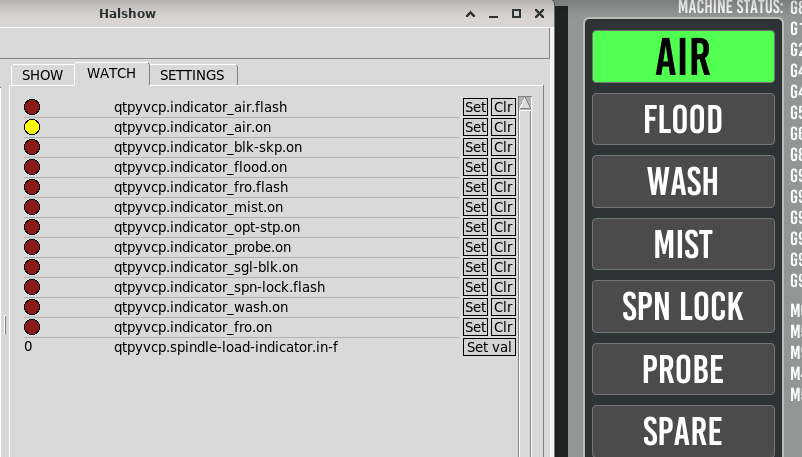
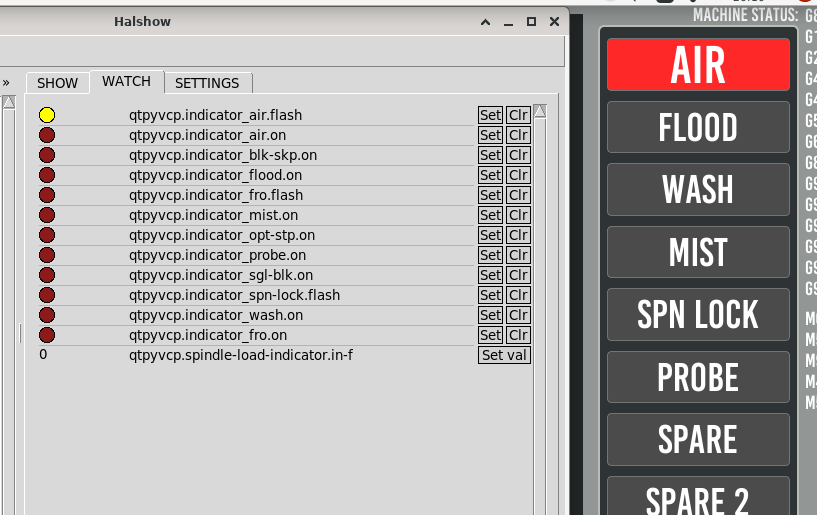
Just so we're on the same page, here are two screenshots of what I've got after Claude created new .py and .qss files


The red one is actually blinking, but you get the idea.

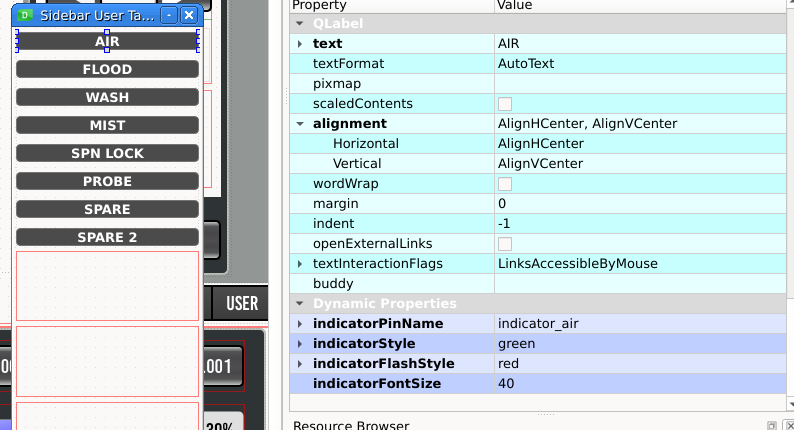
I'm not completely sure about the architecture, but it looks like that python file creates two hal pins per Qlabel instance.  And links the label to a .qss setting via the standard Qt Qlabel's dynamic settings.  Screenshot of the dynamic properties:


The rest of the indicators follow the same process.  Two hal pins are created per label, I link one of the pins in post-gui, set the dynamic properties to a color, and they all work.

I've attached the files in case you're interested in what's backstage.  And I think the status_tab.py was also modified - and is what I'm not supposed to touch (auto-updated when probe_basic.ui is open).

The above is what I was trying to do with HalLabel widget rules, but couldn't.

Please Log in or Create an account to join the conversation.

Moderators: KCJ, Lcvette
Time to create page: 0.180 seconds
Powered by Kunena Forum
