
- Posts: 425
- Thank you received: 81
qtvcp issues
- auto-mation-assist
- Offline
- Platinum Member
-

Less
More
8 years 1 week ago - 8 years 1 week ago #119133
by auto-mation-assist
Replied by auto-mation-assist on topic qtvcp issues
In my recent post,
"[QTvcp][INFO] postgui filename: x1Mill_postgui.hal (qtvcp:349)
/home/cnc/qt5vcp_py2/scripts/linuxcnc: line 880: 30737 Segmentation fault (core dumped) $EMCDISPLAY -ini "$INIFILE" $EMCDISPLAYARGS $EXTRA_ARGS".
I wonder if this is associated with naming of the slot.
I had just left it to the default. After reading more I see that I need to edit the default but I cannot get a ground symbol after clicking on the + in the signal/slot editor. All I get is a pointer. I do get a ground symbol if I edit the supplied qt_cnc_800x600.ui. In that one the receiver is listed as MainWindow. Could that be associated with not getting the ground symbol?
"[QTvcp][INFO] postgui filename: x1Mill_postgui.hal (qtvcp:349)
/home/cnc/qt5vcp_py2/scripts/linuxcnc: line 880: 30737 Segmentation fault (core dumped) $EMCDISPLAY -ini "$INIFILE" $EMCDISPLAYARGS $EXTRA_ARGS".
I wonder if this is associated with naming of the slot.
I had just left it to the default. After reading more I see that I need to edit the default but I cannot get a ground symbol after clicking on the + in the signal/slot editor. All I get is a pointer. I do get a ground symbol if I edit the supplied qt_cnc_800x600.ui. In that one the receiver is listed as MainWindow. Could that be associated with not getting the ground symbol?
Last edit: 8 years 1 week ago by auto-mation-assist.
Please Log in or Create an account to join the conversation.
- auto-mation-assist
- Offline
- Platinum Member
-
Less
More
- Posts: 425
- Thank you received: 81
8 years 1 week ago - 8 years 1 week ago #119140
by auto-mation-assist
Replied by auto-mation-assist on topic qtvcp issues
The issue I mentioned in not being able to get the ground symbol looks like its being caused by not having any gaps between neighbouring and under laying frames. My gui right now has no spaces. It require a spacing of at least one before the ground symbol can show when moving the mouse pointer. On layered frames the mouse pointer will need to move outside the largest underlying frame.
It is likely best to just move items where there are no underlying items and in a clear area of the screen and then assign signals and slots and place then where desired later. I was not aware of this requirement.
It is likely best to just move items where there are no underlying items and in a clear area of the screen and then assign signals and slots and place then where desired later. I was not aware of this requirement.
Last edit: 8 years 1 week ago by auto-mation-assist.
Please Log in or Create an account to join the conversation.
- cmorley
- Offline
- Moderator
-

Less
More
- Posts: 7368
- Thank you received: 2181
8 years 1 week ago #119149
by cmorley
Replied by cmorley on topic qtvcp issues
There is also a signal/slot editor panel that you can use.
You may need to set it to show -' View' on the top of designer then select 'signal/slot editor'
then on the right will show the signal editor (tabed with properties/object)
If your screen is full or you have a slot of signals this can be easier.
Chris M
You may need to set it to show -' View' on the top of designer then select 'signal/slot editor'
then on the right will show the signal editor (tabed with properties/object)
If your screen is full or you have a slot of signals this can be easier.
Chris M
The following user(s) said Thank You: auto-mation-assist
Please Log in or Create an account to join the conversation.
- auto-mation-assist
- Offline
- Platinum Member
-
Less
More
- Posts: 425
- Thank you received: 81
8 years 1 week ago #119185
by auto-mation-assist
Replied by auto-mation-assist on topic qtvcp issues
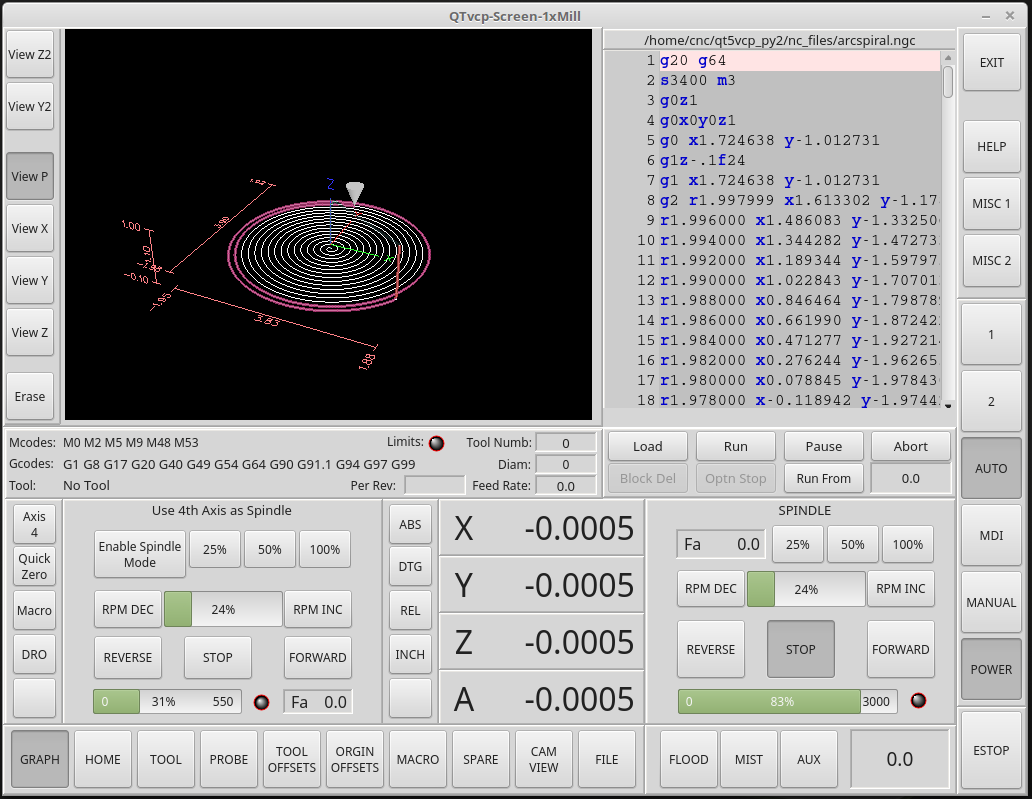
Im making good progress now that I have been able to program a good number of signals/slots. I still need to get more of its pages completed and work on a number of smaller things like getting the time and date in the small label to work and have the onboard virtual keyboard show up in its designated page. I have one page that that I need to hide when it is not in use since it has overlaps with another as can bee seen in the pictures. I'm sure there will be quite a bit more, but its talking to my machine now. I will work toward making it available as a QTvcp demo later.

The following user(s) said Thank You: tommylight
Please Log in or Create an account to join the conversation.
- cmorley
- Offline
- Moderator
-
Less
More
- Posts: 7368
- Thank you received: 2181
8 years 1 week ago #119187
by cmorley
Replied by cmorley on topic qtvcp issues
It's looking very good!
I would love to add it as a sample screen when you are done if you are willing.
Chris M
I would love to add it as a sample screen when you are done if you are willing.
Chris M
Please Log in or Create an account to join the conversation.
- tommylight
- Offline
- Moderator
-
Less
More
- Posts: 22011
- Thank you received: 7491
8 years 1 week ago #119192
by tommylight
Looks very neat and tidy !
Replied by tommylight on topic qtvcp issues
+1cmorley wrote: It's looking very good!
I would love to add it as a sample screen when you are done if you are willing.
Chris M
Looks very neat and tidy !
Please Log in or Create an account to join the conversation.
Moderators: cmorley
Time to create page: 1.547 seconds