
- Posts: 425
- Thank you received: 81
qtvcp issues
- auto-mation-assist
- Offline
- Platinum Member
-

Less
More
8 years 4 days ago #119525
by auto-mation-assist
Replied by auto-mation-assist on topic qtvcp issues
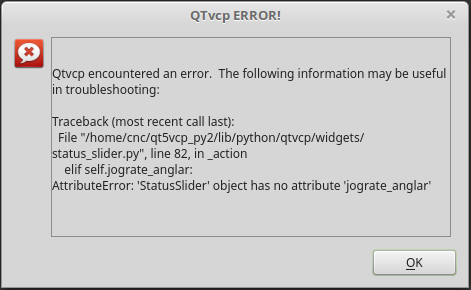
Here is a error I ran into that is likely just a spelling error. I think it should be: angular.
Please Log in or Create an account to join the conversation.
- cmorley
- Offline
- Moderator
-

Less
More
- Posts: 7368
- Thank you received: 2181
8 years 4 days ago #119527
by cmorley
Replied by cmorley on topic qtvcp issues
yes -i'll push the fix soon
Chris M
Chris M
Please Log in or Create an account to join the conversation.
- cmorley
- Offline
- Moderator
-
Less
More
- Posts: 7368
- Thank you received: 2181
8 years 4 days ago #119528
by cmorley
Replied by cmorley on topic qtvcp issues
Ok pushed fix.
also added geometry memory for the ToolOffsetsDialog widget.
See if that is a step in the right direction.
Chris M
also added geometry memory for the ToolOffsetsDialog widget.
See if that is a step in the right direction.
Chris M
Please Log in or Create an account to join the conversation.
- cmorley
- Offline
- Moderator
-
Less
More
- Posts: 7368
- Thank you received: 2181
8 years 4 days ago #119532
by cmorley
Replied by cmorley on topic qtvcp issues
So after a little experimental work I can make them honour the designer placement.
I'll see about making that work for you soon.
Chris M
I'll see about making that work for you soon.
Chris M
Please Log in or Create an account to join the conversation.
- auto-mation-assist
- Offline
- Platinum Member
-
Less
More
- Posts: 425
- Thank you received: 81
8 years 4 days ago - 8 years 4 days ago #119535
by auto-mation-assist
Replied by auto-mation-assist on topic qtvcp issues
The spelling error is fixed.
I put ToolOffsetsDialog in my frame at x0 y0 and it came back at x2150 y321 the first time and x2280 y307 the second time. My requested size came back ok when I used min/max size entries (600x400).
I put ToolOffsetsDialog in my frame at x0 y0 and it came back at x2150 y321 the first time and x2280 y307 the second time. My requested size came back ok when I used min/max size entries (600x400).
Last edit: 8 years 4 days ago by auto-mation-assist.
Please Log in or Create an account to join the conversation.
- cmorley
- Offline
- Moderator
-
Less
More
- Posts: 7368
- Thank you received: 2181
8 years 4 days ago #119536
by cmorley
Replied by cmorley on topic qtvcp issues
Ok I hadn't commit the honour-designer-positions yet.
I just did so:
In general the idea is:
With a clean preference file the dialogs will show where you put them in designer.
If a user moves them it will remember this and next time show them there.
If a user wants them to always start in a specific position (even if he moves them) then he can change the entry in the preference file.
The are some commands: default,center,bottomleft
so if in your preference file you had (the x,y, width,height):
CamViewDialog-geometry = 562 201 758 602
if you changed that to
CamViewDialog-geometry = center
Then it will always start in the middle, it will use it's designer defined with and height
If you want to make the screen ignore the preference file altogether then you can do that in the handler file like so:
under the 'Special Functions called from QTVCP' hearder
find the function: def initialized__(self):
add something like this:
self.w.tooloffsetdialog._geometry_string='100 100 800 200 h'
(note the letter here doesn't matter and non digit will do)
or
self.w.tooloffsetdialog._geometry_string='center'
or
self.w.tooloffsetdialog._geometry_string='default''
etc.
The shutdown dialog (or any that use the generic LcncDialog widget) still only shows in the center.
Try it out see what you think - it may need more work yet.
Chris M
I just did so:
In general the idea is:
With a clean preference file the dialogs will show where you put them in designer.
If a user moves them it will remember this and next time show them there.
If a user wants them to always start in a specific position (even if he moves them) then he can change the entry in the preference file.
The are some commands: default,center,bottomleft
so if in your preference file you had (the x,y, width,height):
CamViewDialog-geometry = 562 201 758 602
if you changed that to
CamViewDialog-geometry = center
Then it will always start in the middle, it will use it's designer defined with and height
If you want to make the screen ignore the preference file altogether then you can do that in the handler file like so:
under the 'Special Functions called from QTVCP' hearder
find the function: def initialized__(self):
add something like this:
self.w.tooloffsetdialog._geometry_string='100 100 800 200 h'
(note the letter here doesn't matter and non digit will do)
or
self.w.tooloffsetdialog._geometry_string='center'
or
self.w.tooloffsetdialog._geometry_string='default''
etc.
The shutdown dialog (or any that use the generic LcncDialog widget) still only shows in the center.
Try it out see what you think - it may need more work yet.
Chris M
Please Log in or Create an account to join the conversation.
Moderators: cmorley
Time to create page: 0.218 seconds