
- Posts: 7368
- Thank you received: 2181
qtvcp issues
- cmorley
- Offline
- Moderator
-

Less
More
7 years 11 months ago #119791
by cmorley
Replied by cmorley on topic qtvcp issues
Ok I pushed a fix for the button labels. I didn't realize it was HAL buttons rather then action buttons.
Having buttons change color when in different states is best done with stylsheets.
Now like every thing else it can be done in multiple ways:
You can add a separate stylesheet file - this would be best if you plan to restyle alot of the screen or like the style code separate from the screen code. It's also easier for other to customize the look of the screen as all the style code is in one place.
You can use designer to add style sheets specs to certain widgets - it's convenient when doing a few buttons and you can see the result right away.
You can add python code to change the stylesheet - this gives you the most control or how and when it will change.
and of course you can do all three - there is a hierarchy of course.
Chris M
Having buttons change color when in different states is best done with stylsheets.
Now like every thing else it can be done in multiple ways:
You can add a separate stylesheet file - this would be best if you plan to restyle alot of the screen or like the style code separate from the screen code. It's also easier for other to customize the look of the screen as all the style code is in one place.
You can use designer to add style sheets specs to certain widgets - it's convenient when doing a few buttons and you can see the result right away.
You can add python code to change the stylesheet - this gives you the most control or how and when it will change.
and of course you can do all three - there is a hierarchy of course.
Chris M
Please Log in or Create an account to join the conversation.
- cmorley
- Offline
- Moderator
-
Less
More
- Posts: 7368
- Thank you received: 2181
7 years 11 months ago #119793
by cmorley
Replied by cmorley on topic qtvcp issues
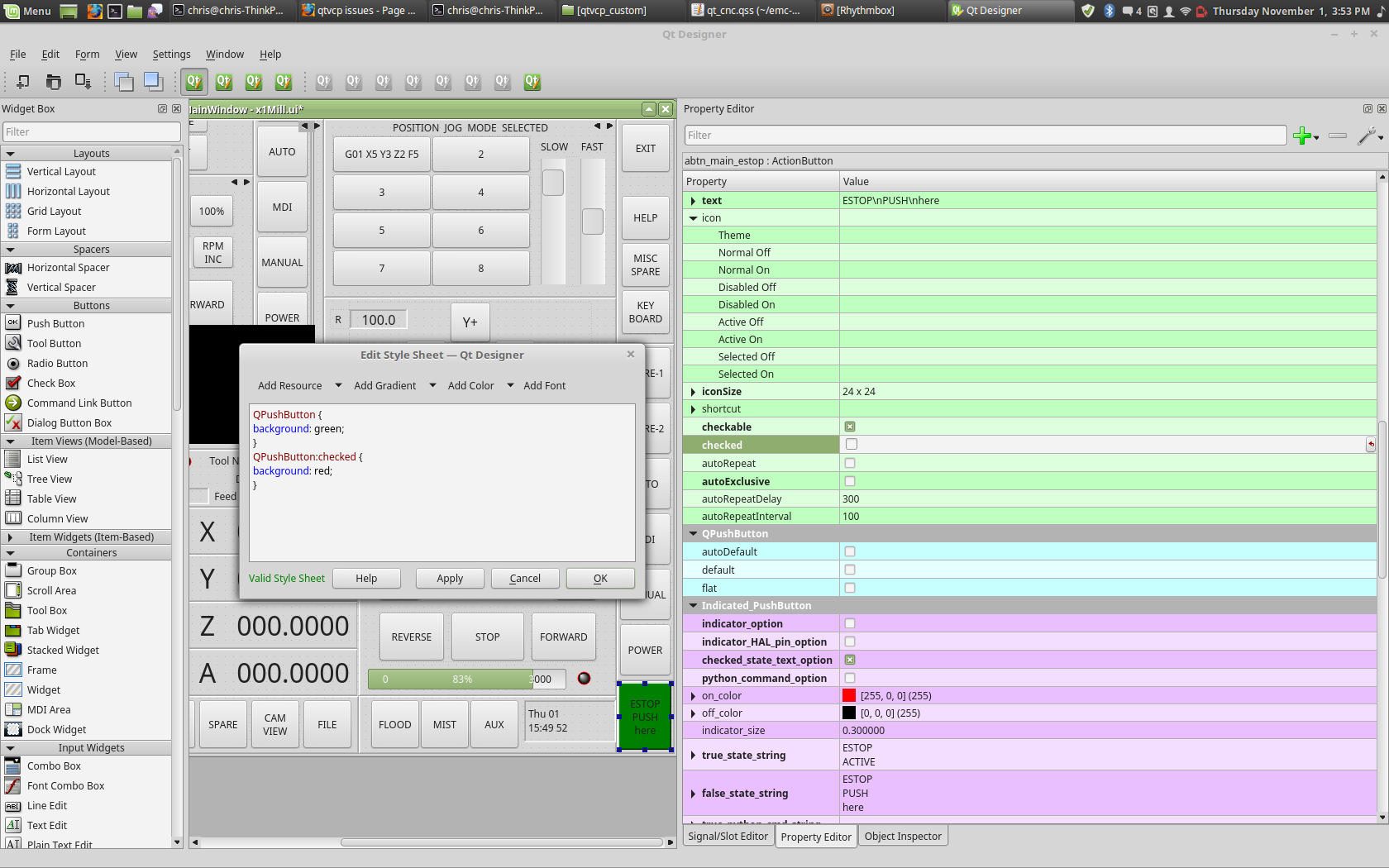
Here is a picture of change the backbround of a pushbutton using designer.
First you right click the button and choose 'set stylesheets'
This is just a very basic example.
Stylesheets use a cut down version of CSS and is a subject all on it's own
Chris M
First you right click the button and choose 'set stylesheets'
This is just a very basic example.
Stylesheets use a cut down version of CSS and is a subject all on it's own
Chris M
The following user(s) said Thank You: tommylight, auto-mation-assist
Please Log in or Create an account to join the conversation.
- auto-mation-assist
- Offline
- Platinum Member
-

Less
More
- Posts: 425
- Thank you received: 81
7 years 11 months ago #119801
by auto-mation-assist
Replied by auto-mation-assist on topic qtvcp issues
Chris,
While were talking about buttons I miss the ability to set the default state, like a check box making the current state the default state (True or False). I used this feature in Labview quite often. It bothers me that buttons seen to like to come up in that False state when bringing up my gui which does not reflect the actual state of what panels are actively shown at start up.
Same problem with the jog slow and fast buttons, one of those should always be true on start up.
I can set the panels shown at start up in the handlers .ini section but I have not found or can not recall the correct command to set the state of a button there.
While were talking about buttons I miss the ability to set the default state, like a check box making the current state the default state (True or False). I used this feature in Labview quite often. It bothers me that buttons seen to like to come up in that False state when bringing up my gui which does not reflect the actual state of what panels are actively shown at start up.
Same problem with the jog slow and fast buttons, one of those should always be true on start up.
I can set the panels shown at start up in the handlers .ini section but I have not found or can not recall the correct command to set the state of a button there.
Please Log in or Create an account to join the conversation.
- cmorley
- Offline
- Moderator
-
Less
More
- Posts: 7368
- Thank you received: 2181
7 years 11 months ago - 7 years 11 months ago #119803
by cmorley
Replied by cmorley on topic qtvcp issues
In designer under 'abstract button' you will see a property 'checked' (just under 'checkable') this will set the state of the button on startup - unless it is controlled by linuxcnc - then it will display the linuxcnc startup default.
For instance if you use the estop action, the button will reflect the state of linuxcnc no matter what.
If you want to set button state in the handler file (again as long as it isn't controlled by linuxcnc):
self.w.[SOME_BUTTON].setChecked(True)
If you want to set an action button that is controlled by linuxcnc, then you must set linuxcnc's state. This should remove Estop on start up, and the button should follow.
ACTION.SET_ESTOP_STATE(False)
These should be put in the initilized__ function (under the heading 'Special Functions called from QTVCP')
Chris M
For instance if you use the estop action, the button will reflect the state of linuxcnc no matter what.
If you want to set button state in the handler file (again as long as it isn't controlled by linuxcnc):
self.w.[SOME_BUTTON].setChecked(True)
If you want to set an action button that is controlled by linuxcnc, then you must set linuxcnc's state. This should remove Estop on start up, and the button should follow.
ACTION.SET_ESTOP_STATE(False)
These should be put in the initilized__ function (under the heading 'Special Functions called from QTVCP')
Chris M
Last edit: 7 years 11 months ago by cmorley.
Please Log in or Create an account to join the conversation.
- cmorley
- Offline
- Moderator
-
Less
More
- Posts: 7368
- Thank you received: 2181
7 years 11 months ago #119837
by cmorley
Replied by cmorley on topic qtvcp issues
Ok I pushed work on dialog placement.
Now if 'onwindow' is in the geometry string the positions are relative to the main window.
eg in the handler file:
self.w.tooloffsetdialog._geometry_string='0 0 600 400 onwindow'
Or you could change the preference file entry for that dialog to the same text.
Chris M
Now if 'onwindow' is in the geometry string the positions are relative to the main window.
eg in the handler file:
self.w.tooloffsetdialog._geometry_string='0 0 600 400 onwindow'
Or you could change the preference file entry for that dialog to the same text.
Chris M
Please Log in or Create an account to join the conversation.
- auto-mation-assist
- Offline
- Platinum Member
-
Less
More
- Posts: 425
- Thank you received: 81
7 years 11 months ago - 7 years 11 months ago #119870
by auto-mation-assist
Replied by auto-mation-assist on topic qtvcp issues
I’m still working on my jogging functions to get these to link into linuxcnc.
Step size with global: "self.jog_step"
Jog rate with global: "self.jog_rate_selected_out"
Continuous or step mode selection with: "def pbtn_jog_method_toggled(self,pressed):"
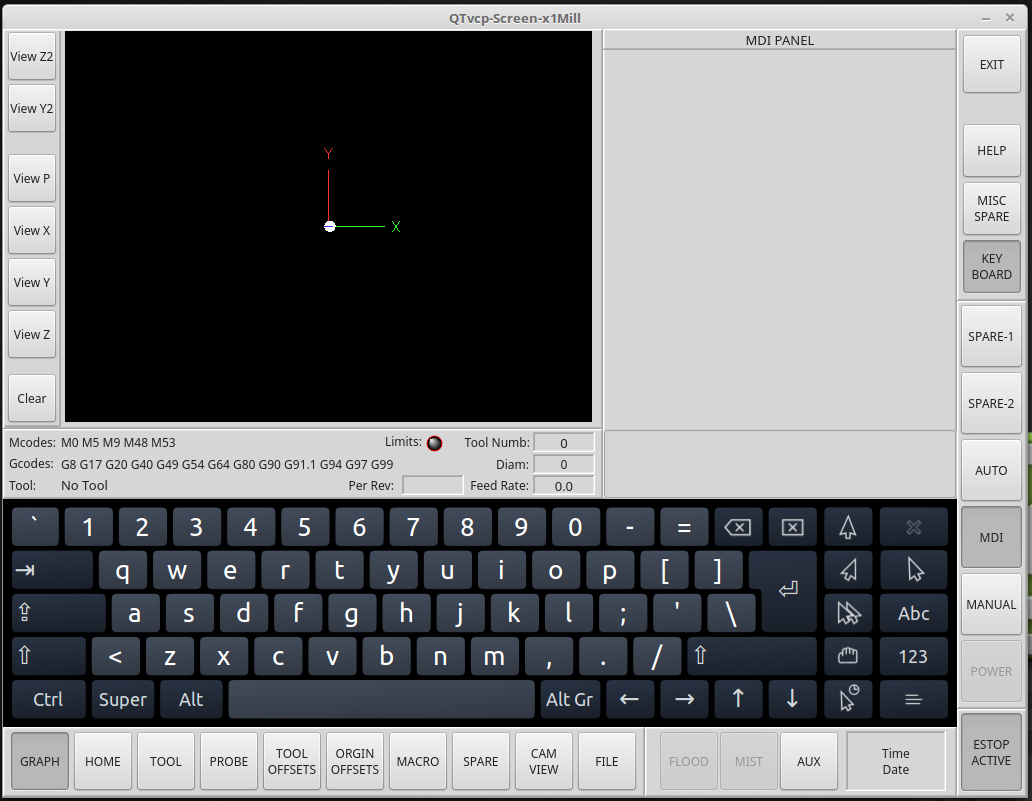
I have the keyboard embedded and real happy with with he way it fits in.
The upper area of the mdi panel is reserved for midi history and the lower is for the mdi input line. The mdi input line is not showing because its position has not been correctly set yet and is hidden.
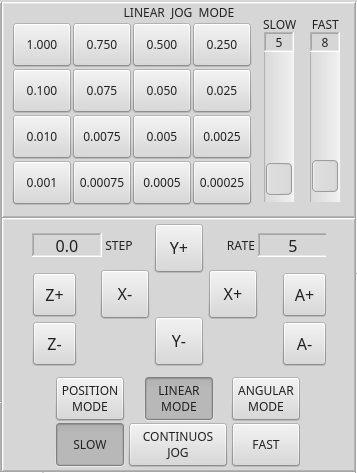
There are some pictures of the manual mode linear jogging buttons and the keyboard.
Step size with global: "self.jog_step"
Jog rate with global: "self.jog_rate_selected_out"
Continuous or step mode selection with: "def pbtn_jog_method_toggled(self,pressed):"
I have the keyboard embedded and real happy with with he way it fits in.
The upper area of the mdi panel is reserved for midi history and the lower is for the mdi input line. The mdi input line is not showing because its position has not been correctly set yet and is hidden.
There are some pictures of the manual mode linear jogging buttons and the keyboard.
Last edit: 7 years 11 months ago by auto-mation-assist. Reason: Added notes on midi panel
Please Log in or Create an account to join the conversation.
Moderators: cmorley
Time to create page: 0.322 seconds