
- Posts: 425
- Thank you received: 81
qtvcp issues
- auto-mation-assist
- Offline
- Platinum Member
-

Less
More
7 years 11 months ago #119945
by auto-mation-assist
Replied by auto-mation-assist on topic qtvcp issues
I still need to figure out how to link the keyboard to the MDI text input area. I'm using Mint 18.3 but I know that I could position the the gui screen before but now its always in the center and wont move to 0x0 any more.
I’m having difficulty with git hub. I think that perhaps it tries to but the files into linuxcnc proper and not the qtvcp branch. It gives a denied and 403 error. I used this command to get the branch:
git clone -b qt5vcp_py2 github.com/LinuxCNC/linuxcnc.git qt5vcp_py2
I have gitk and git gui installed and working on resolving the git problem.
I’m having difficulty with git hub. I think that perhaps it tries to but the files into linuxcnc proper and not the qtvcp branch. It gives a denied and 403 error. I used this command to get the branch:
git clone -b qt5vcp_py2 github.com/LinuxCNC/linuxcnc.git qt5vcp_py2
I have gitk and git gui installed and working on resolving the git problem.
Please Log in or Create an account to join the conversation.
- cmorley
- Offline
- Moderator
-

Less
More
- Posts: 7368
- Thank you received: 2181
7 years 11 months ago #119965
by cmorley
Replied by cmorley on topic qtvcp issues
Ok I don't use my github much (I use linuxcnc's) but I did some test work to see if I could (I am no git/github master)
add my repo to my computer:
in my current git project issue:
git remote add MY_REMOTE_NICKNAME GIT_HUB_URL_OF_PROJECT
if that worked, this should show the new remote in the list:
git remote
ok checkout a branch now:
git checkout -b MY_REMOTE_NICKNAME/BRANCH
The pull the changes
git pull MY_REMOTE_NICKNAME
Now see if we have what we think. This should show the remote and branch:
gitk
All good? yes -ok free to edit and commit now.
ready to push the work - lets check where it's going:
git push MY_REMOTE_NICKNAME --dry-run
ALL Good? then lets push for real:
git push MY_REMOTE_NICKNAME
so some real commands I used:
git remote add morleyhub git@github.com:c-morley/Linuxcnc.git
git remote
git checkout -b morleyhub/stepconf-help
git pull morleyhub
gitk
[commit/commit/commit]
git push morleyhub --dry-run
hope that helps.
If there are better ways maybe someone else will chime in:
Chris M
add my repo to my computer:
in my current git project issue:
git remote add MY_REMOTE_NICKNAME GIT_HUB_URL_OF_PROJECT
if that worked, this should show the new remote in the list:
git remote
ok checkout a branch now:
git checkout -b MY_REMOTE_NICKNAME/BRANCH
The pull the changes
git pull MY_REMOTE_NICKNAME
Now see if we have what we think. This should show the remote and branch:
gitk
All good? yes -ok free to edit and commit now.
ready to push the work - lets check where it's going:
git push MY_REMOTE_NICKNAME --dry-run
ALL Good? then lets push for real:
git push MY_REMOTE_NICKNAME
so some real commands I used:
git remote add morleyhub git@github.com:c-morley/Linuxcnc.git
git remote
git checkout -b morleyhub/stepconf-help
git pull morleyhub
gitk
[commit/commit/commit]
git push morleyhub --dry-run
hope that helps.
If there are better ways maybe someone else will chime in:
Chris M
Please Log in or Create an account to join the conversation.
- auto-mation-assist
- Offline
- Platinum Member
-
Less
More
- Posts: 425
- Thank you received: 81
7 years 11 months ago #119966
by auto-mation-assist
Replied by auto-mation-assist on topic qtvcp issues
I have been trying all day with no luck. Its almost like the routing is not correct.
I will try to use the format in you listed.
I have received at least a hundred of these:
Username for ' github.com ': auto-mation-assist
Password for ' auto-mation-assist@github.com ':
remote: Permission to LinuxCNC/linuxcnc.git denied to auto-mation-assist.
fatal: unable to access ' github.com/LinuxCNC/linuxcnc.git/ ': The requested URL returned error: 403
I will try to use the format in you listed.
I have received at least a hundred of these:
Username for ' github.com ': auto-mation-assist
Password for ' auto-mation-assist@github.com ':
remote: Permission to LinuxCNC/linuxcnc.git denied to auto-mation-assist.
fatal: unable to access ' github.com/LinuxCNC/linuxcnc.git/ ': The requested URL returned error: 403
Please Log in or Create an account to join the conversation.
- auto-mation-assist
- Offline
- Platinum Member
-
Less
More
- Posts: 425
- Thank you received: 81
7 years 11 months ago - 7 years 11 months ago #119972
by auto-mation-assist
Replied by auto-mation-assist on topic qtvcp issues
I have success in posting the 1xMill gui on get hub, perhaps not in its final place but it is there for everyone to have a look at and can be cloned and complied as usual and run as a rip configuration.
The present development location is:
$ git clone github.com/auto-mation-assist/x1Mill_branch.git
During cloning After cloning it a folder named It will make a folder in your home directory called: x1Mill_branch
All the commands below are started in sequence from the folders root directory after the clone process has completed.
The x1Mill gui will run as a simulation. It is still in the process of being developed.
$ cd src
$ ./autogen.sh
$ ./configure --with-realtime=uspace --enable-non-distributable=yes
$ make
$ sudo make setuid
$ cd ..
$ . ./scripts/rip-environment
$ linuxcnc
The below is a picture of the simulation tree to show were it can be selected and run from, along with a picture of what you should see. Anyone who wishes to aid in getting the gui fully functional is welcome to join the development group.
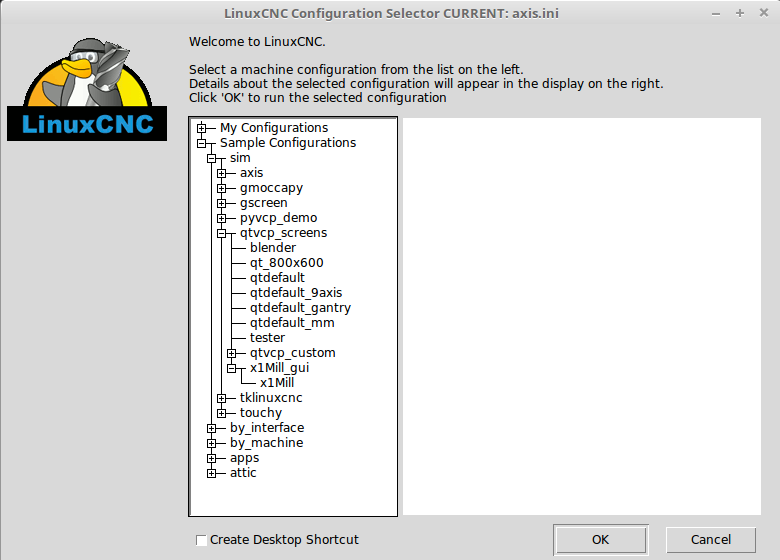
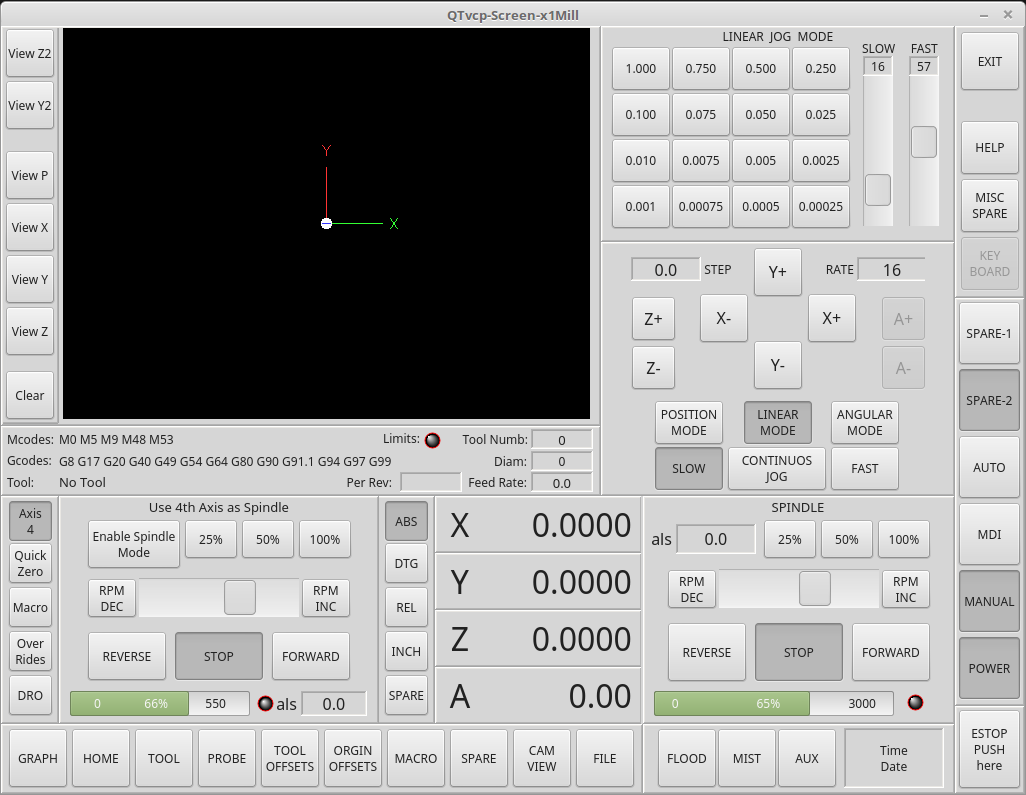
The present development location is:
$ git clone github.com/auto-mation-assist/x1Mill_branch.git
During cloning After cloning it a folder named It will make a folder in your home directory called: x1Mill_branch
All the commands below are started in sequence from the folders root directory after the clone process has completed.
The x1Mill gui will run as a simulation. It is still in the process of being developed.
$ cd src
$ ./autogen.sh
$ ./configure --with-realtime=uspace --enable-non-distributable=yes
$ make
$ sudo make setuid
$ cd ..
$ . ./scripts/rip-environment
$ linuxcnc
The below is a picture of the simulation tree to show were it can be selected and run from, along with a picture of what you should see. Anyone who wishes to aid in getting the gui fully functional is welcome to join the development group.
Last edit: 7 years 11 months ago by auto-mation-assist.
Please Log in or Create an account to join the conversation.
- cmorley
- Offline
- Moderator
-
Less
More
- Posts: 7368
- Thank you received: 2181
7 years 11 months ago #119973
by cmorley
Replied by cmorley on topic qtvcp issues
looks like you are trying to push to linuxcnc's remote rather then yours.
linuxcnc/linuxcnc.git is linuxcnc project remote.
I get an error like this pushing to your remote:
fatal: Authentication failed for ' github.com/auto-mation-assist/1xMillGui.git/ '
what are the names of your remotes?
what command are you using to push ?
Chris M
linuxcnc/linuxcnc.git is linuxcnc project remote.
I get an error like this pushing to your remote:
fatal: Authentication failed for ' github.com/auto-mation-assist/1xMillGui.git/ '
what are the names of your remotes?
what command are you using to push ?
Chris M
Please Log in or Create an account to join the conversation.
- cmorley
- Offline
- Moderator
-
Less
More
- Posts: 7368
- Thank you received: 2181
7 years 11 months ago #119974
by cmorley
Replied by cmorley on topic qtvcp issues
a couple minutes too late... ok I'll see if I can down load it...
Please Log in or Create an account to join the conversation.
Moderators: cmorley
Time to create page: 0.937 seconds