
- Posts: 959
- Thank you received: 489
qtvcp issues
- scotta
- Offline
- Platinum Member
-

Less
More
7 years 11 months ago #120070
by scotta
Replied by scotta on topic qtvcp issues
Ok, after some more investigation it does not appear to be a driver issue. PyOpenGL gears.py demo runs at 60 fps and super smooth.
How to debug this one?
Thanks
Scott A
How to debug this one?
Thanks
Scott A
Please Log in or Create an account to join the conversation.
- scotta
- Offline
- Platinum Member
-
Less
More
- Posts: 959
- Thank you received: 489
7 years 11 months ago #120072
by scotta
Replied by scotta on topic qtvcp issues
I'm a total python noob but mr google says:
"You MUST create a valid OpenGL rendering context before any OpenGL command will work. And don't forget to call wglMakeCurrent.
Placing OpenGL commands in a constructor is just as good as anywhere else."
How to check this for the GCodeGraphics widget?
Thanks
Scotta
"You MUST create a valid OpenGL rendering context before any OpenGL command will work. And don't forget to call wglMakeCurrent.
Placing OpenGL commands in a constructor is just as good as anywhere else."
How to check this for the GCodeGraphics widget?
Thanks
Scotta
Please Log in or Create an account to join the conversation.
- auto-mation-assist
- Offline
- Platinum Member
-
Less
More
- Posts: 425
- Thank you received: 81
7 years 11 months ago #120081
by auto-mation-assist
Replied by auto-mation-assist on topic qtvcp issues
Chris,
In ref to the 1xMill gui,
I have been looking for a reason why the dialogs are not showing up today. I was looking and some of the code in tool_offsetview.py and think I may have found the problem. I was thinking that these are being hidden and I can see this happening even with the qt designer when using its run feature.
I think that these dialogs are designed coded to float on top of a gui and be hidden under user controlled conditions and also perhaps under not homed and estop conditions. If this is correct then that presents a problem with gui's that have the dialogs layered in like the 1xMill gui with no need for the to be to be hidden at all. I’m not able to generate homing signals yet for testing.
Also while I was looking at the dialog_widget.py I have never seen it enter the: def geometry_parsing(widget, prefname): near the bottom of that file.
Here are some pictures from qt designer showing the tool_offset dialog partially showing in the lower rignt and when run mode is entered it is hidden. Perhasps that is the reason they are not looking at "onwindow".

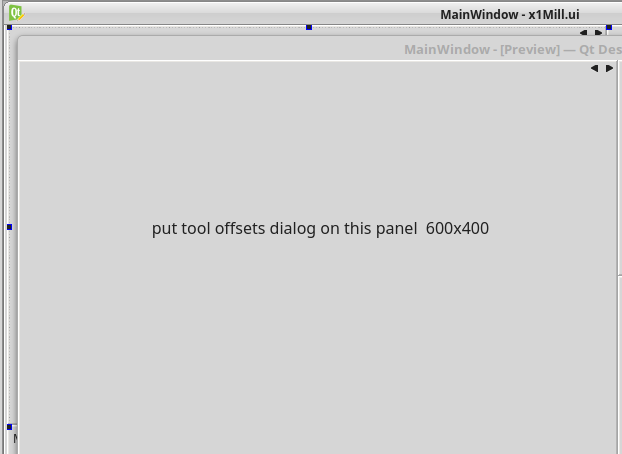
In ref to the 1xMill gui,
I have been looking for a reason why the dialogs are not showing up today. I was looking and some of the code in tool_offsetview.py and think I may have found the problem. I was thinking that these are being hidden and I can see this happening even with the qt designer when using its run feature.
I think that these dialogs are designed coded to float on top of a gui and be hidden under user controlled conditions and also perhaps under not homed and estop conditions. If this is correct then that presents a problem with gui's that have the dialogs layered in like the 1xMill gui with no need for the to be to be hidden at all. I’m not able to generate homing signals yet for testing.
Also while I was looking at the dialog_widget.py I have never seen it enter the: def geometry_parsing(widget, prefname): near the bottom of that file.
Here are some pictures from qt designer showing the tool_offset dialog partially showing in the lower rignt and when run mode is entered it is hidden. Perhasps that is the reason they are not looking at "onwindow".
Please Log in or Create an account to join the conversation.
- cmorley
- Offline
- Moderator
-

Less
More
- Posts: 7368
- Thank you received: 2181
7 years 11 months ago #120083
by cmorley
Sorry Scotta, I'm no OpenGL expert - I just ported code from GTK version of gremlin to QT (which was in fact code ported to GTK)
and have never used a Pi. It's been mentioned that the OpenGL code used is a very old API.
Chris M
Replied by cmorley on topic qtvcp issues
scotta wrote: I'm a total python noob but mr google says:
"You MUST create a valid OpenGL rendering context before any OpenGL command will work. And don't forget to call wglMakeCurrent.
Placing OpenGL commands in a constructor is just as good as anywhere else."
How to check this for the GCodeGraphics widget?
Thanks
Scotta
Sorry Scotta, I'm no OpenGL expert - I just ported code from GTK version of gremlin to QT (which was in fact code ported to GTK)
and have never used a Pi. It's been mentioned that the OpenGL code used is a very old API.
Chris M
Please Log in or Create an account to join the conversation.
- cmorley
- Offline
- Moderator
-
Less
More
- Posts: 7368
- Thank you received: 2181
7 years 11 months ago #120085
by cmorley
So lets talk Dialogs -
Dialogs are meant to be hidden when not being used and pop up if need with relatively small amounts of give-me-attention-now information. They are detached from the main window.
The idiom i envisioned was dialogs working with a focus (screen darken) widget to grab your attention.
It seems you want them as permanent widgets, embedded in your stacked widget. - which is fine but then you don't want dialogs.
I think I mentioned earlier that if you want regular widget versions i can add more (there some already) except for the file dialog, but i have that one figure out too.
But none of that has anything to do with the dialog not going where you want it (unless you mean you want it _in_ the stacked widget).
I'ved added a dialog that always is placed in position relative to the screen as a sample config -qtdefault.
press function key 6 - it will always opens (but hovered) on the top left of the screen. Does that work for you ?
yes the generalized dialog widget always open in the center of the screen - I really wanted this one to stay in center by default, but am having trouble deciding how to facilitate that. (right now it goes to designer placement by default).
I'll see about getting a file managing widget made soon.
Chris M
Replied by cmorley on topic qtvcp issues
auto-mation-assist wrote: Chris,
In ref to the 1xMill gui,
I have been looking for a reason why the dialogs are not showing up today. I was looking and some of the code in tool_offsetview.py and think I may have found the problem. I was thinking that these are being hidden and I can see this happening even with the qt designer when using its run feature.
I think that these dialogs are designed coded to float on top of a gui and be hidden under user controlled conditions and also perhaps under not homed and estop conditions. If this is correct then that presents a problem with gui's that have the dialogs layered in like the 1xMill gui with no need for the to be to be hidden at all. I’m not able to generate homing signals yet for testing.
Also while I was looking at the dialog_widget.py I have never seen it enter the: def geometry_parsing(widget, prefname): near the bottom of that file.
Here are some pictures from qt designer showing the tool_offset dialog partially showing in the lower rignt and when run mode is entered it is hidden. Perhasps that is the reason they are not looking at "onwindow".
So lets talk Dialogs -
Dialogs are meant to be hidden when not being used and pop up if need with relatively small amounts of give-me-attention-now information. They are detached from the main window.
The idiom i envisioned was dialogs working with a focus (screen darken) widget to grab your attention.
It seems you want them as permanent widgets, embedded in your stacked widget. - which is fine but then you don't want dialogs.
I think I mentioned earlier that if you want regular widget versions i can add more (there some already) except for the file dialog, but i have that one figure out too.
But none of that has anything to do with the dialog not going where you want it (unless you mean you want it _in_ the stacked widget).
I'ved added a dialog that always is placed in position relative to the screen as a sample config -qtdefault.
press function key 6 - it will always opens (but hovered) on the top left of the screen. Does that work for you ?
yes the generalized dialog widget always open in the center of the screen - I really wanted this one to stay in center by default, but am having trouble deciding how to facilitate that. (right now it goes to designer placement by default).
I'll see about getting a file managing widget made soon.
Chris M
Please Log in or Create an account to join the conversation.
- cmorley
- Offline
- Moderator
-
Less
More
- Posts: 7368
- Thank you received: 2181
7 years 11 months ago #120086
by cmorley
I meant that all the other dialogs are placed by default in the designer designated spot. the dialog_widget is always placed in center.
Chris M
Replied by cmorley on topic qtvcp issues
What I mean by this is does the functionality work (not, is that what you want)cmorley wrote:
press function key 6 - it will always opens (but hovered) on the top left of the screen. Does that work for you ?
cmorley wrote: yes the generalized dialog widget always open in the center of the screen - I really wanted this one to stay in center by default, but am having trouble deciding how to facilitate that. (right now it goes to designer placement by default).
I meant that all the other dialogs are placed by default in the designer designated spot. the dialog_widget is always placed in center.
Chris M
Please Log in or Create an account to join the conversation.
Moderators: cmorley
Time to create page: 1.034 seconds