
- Posts: 7368
- Thank you received: 2181
qtvcp issues
- cmorley
- Offline
- Moderator
-

Less
More
8 years 3 months ago #114086
by cmorley
Replied by cmorley on topic qtvcp issues
it would help to know what linux distribution you are using -
I'll assume debian stretch but there are only little differences.
When you have loaded your screen into designer add a plain button to the screen.
You could change the name of the button to something interesting like 'test_button'
There are two ways to edit connections - I will show the 'graphical' way
There is a button on the top for editing signals.
After pushing it, if you click-and-hold on the button it will show a arrow (looks like a ground signal from electrical schematic)
Slide this arrow to a part of the main window that does not have widgets on it.
A 'Configure Connections' dialog will pop up.
The list on the left are the available signals from the widget.
The list on the right is the available slots on the main window and you can add to it.
Pick a signal, say 'clicked()' - this makes the slots side available.
click 'edit' on the slots list.
A 'Slots/Signals of MainWindow' dialog will pop up.
On the slots list at the top there is a plus icon - click it.
you can now edit a new slot name.
Erase the default name 'slot()' and change it to say test_button()
press the ok button.
You'll be back to the 'Configure Connections' dialog.
now you can select your new slot in the slot list.
then press ok and save the file.
Now you must add the function to the handler file.
The function signature is 'def slotname(self):'
We will add some code to print the widget name.
So from our example:
in you handler file (if you copied it) there is a section named:
In fact it doesn't matter where you put the commands but by convention this is where to put it.
add the code and save it.
If all went well, after you run your screen now, when you push your new button it will print the button name in the terminal.
Chris M
I'll assume debian stretch but there are only little differences.
When you have loaded your screen into designer add a plain button to the screen.
You could change the name of the button to something interesting like 'test_button'
There are two ways to edit connections - I will show the 'graphical' way
There is a button on the top for editing signals.
After pushing it, if you click-and-hold on the button it will show a arrow (looks like a ground signal from electrical schematic)
Slide this arrow to a part of the main window that does not have widgets on it.
A 'Configure Connections' dialog will pop up.
The list on the left are the available signals from the widget.
The list on the right is the available slots on the main window and you can add to it.
Pick a signal, say 'clicked()' - this makes the slots side available.
click 'edit' on the slots list.
A 'Slots/Signals of MainWindow' dialog will pop up.
On the slots list at the top there is a plus icon - click it.
you can now edit a new slot name.
Erase the default name 'slot()' and change it to say test_button()
press the ok button.
You'll be back to the 'Configure Connections' dialog.
now you can select your new slot in the slot list.
then press ok and save the file.
Now you must add the function to the handler file.
The function signature is 'def slotname(self):'
We will add some code to print the widget name.
So from our example:
Code:
def test_button(self):
name = self.w.sender().text()
print name
in you handler file (if you copied it) there is a section named:
Code:
#######################
# callbacks from form #
#######################
In fact it doesn't matter where you put the commands but by convention this is where to put it.
add the code and save it.
If all went well, after you run your screen now, when you push your new button it will print the button name in the terminal.
Chris M
The following user(s) said Thank You: Ilya
Please Log in or Create an account to join the conversation.
- cmorley
- Offline
- Moderator
-
Less
More
- Posts: 7368
- Thank you received: 2181
8 years 3 months ago #114354
by cmorley
Replied by cmorley on topic qtvcp issues
Have you had success?
Any feedback on the project?
Thanks
Chris M
Any feedback on the project?
Thanks
Chris M
Please Log in or Create an account to join the conversation.
- Ilya
- Offline
- Junior Member
-

Less
More
- Posts: 23
- Thank you received: 1
8 years 3 months ago - 8 years 3 months ago #114367
by Ilya
Replied by Ilya on topic qtvcp issues
I was temporarily going back to using Axis, to adjust the angular axes.
Your tutorial on signals and slots helped me. Thank you!
I need three buttons for fixed moves: the First to move X and Y to zero. The second to move Z to"N". The third is to move X to" N", Y to" N "and Z to"N".
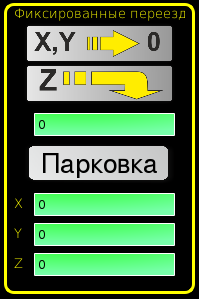
The sketch
I'm not happy with my implementation yet, but it's working. Maybe it could have been done in a more correct way
I took your header file as a basis - tester_handler.py
Thanks,
Ilya
* The text on the button "Парковка"[Parkovka] - translated as Parking
Your tutorial on signals and slots helped me. Thank you!
I need three buttons for fixed moves: the First to move X and Y to zero. The second to move Z to"N". The third is to move X to" N", Y to" N "and Z to"N".
The sketch
I'm not happy with my implementation yet, but it's working. Maybe it could have been done in a more correct way
I took your header file as a basis - tester_handler.py
Code:
........
###########################################
# **** instantiate functions section **** #
###########################################
X = Y = Z = Z_only = 0
def validation_qle(define): #delete invalid chars
b = 0
edited_text = ''
chars = ['1','2','3','4','5','6','7','8','9','0','.']
text = define.w.sender().text()
if text != '':
if text[0] == '.':
text = '0.'
define.w.sender().setText(text)
for i in text:
if i == '.':
b += 1
if i == '.' and b > 1:
print 'more than one dot'
elif i not in chars:
print 'invalid simbol'
else:
edited_text += i
define.w.sender().setText(edited_text)
def validation_qle_finished(define): #put zero in an empty line
axis = define.w.sender().text()
if axis == '':
define.w.sender().setText('0')
axis = 0
axis = float(axis)
return axis
def ok_for_mdi(define):
define.stat.poll()
return not define.stat.estop and define.stat.enabled and define.stat.homed and (define.stat.interp_state == linuxcnc.INTERP_IDLE)
###################################
# **** HANDLER CLASS SECTION **** #
###################################
class HandlerClass:
########################
# **** INITIALIZE **** #
########################
# widgets allows access to widgets from the qtvcp files
# at this point the widgets and hal pins are not instantiated
def __init__(self, halcomp,widgets,paths):
self.hal = halcomp
self.lineEdit = QtWidgets.QLineEdit()
self.w = widgets
self.stat = linuxcnc.stat()
self.cmnd = linuxcnc.command()
self.error = linuxcnc.error_channel()
self.PATH = paths.CONFIGPATH
self.IMAGE_PATH = paths.IMAGEDIR
self.STYLE = Styles(widgets, paths)
##########################################
# Special Functions called from QTSCREEN
##########################################
# at this point:
# the widgets are instantiated.
# the HAL pins are built but HAL is not set ready
def initialized__(self):
# Give notify library a reference to the statusbar
STATUS.forced_update()
# set custom theme
#self.STYLE.dark_style()
#self.STYLE.bright_style()
self.STYLE.gorelovskiy_style()
KEYBIND.add_call('Key_F3','on_keycall_F3')
KEYBIND.add_call('Key_F4','on_keycall_F4')
KEYBIND.add_call('Key_F5','on_keycall_F5')
def processed_key_event__(self,receiver,event,is_pressed,key,code,shift,cntrl):
# when typing in MDI, we don't want keybinding to call functions
# so we catch and process the events directly.
# We do want ESC, F1 and F2 to call keybinding functions though
if code not in(QtCore.Qt.Key_Escape,QtCore.Qt.Key_F1 ,QtCore.Qt.Key_F2,
QtCore.Qt.Key_F3,QtCore.Qt.Key_F5,QtCore.Qt.Key_F5):
if isinstance(receiver, OFFVIEW_WIDGET) or isinstance(receiver, MDI_WIDGET):
if is_pressed:
receiver.keyPressEvent(event)
event.accept()
return True
if isinstance(receiver,QtWidgets.QDialog):
print 'dialog'
return True
try:
KEYBIND.call(self,event,is_pressed,shift,cntrl)
return True
except Exception as e:
#log.debug('Exception loading Macros:', exc_info=e)
print 'Error in, or no function for: %s in handler file for-%s'%(KEYBIND.convert(event),key)
if e:
print e
#print 'from %s'% receiver
return False
########################
# callbacks from STATUS #
########################
#######################
# callbacks from form #
#######################
def edited_z_only(self):
validation_qle(self)
def edited_x(self):
validation_qle(self)
def edited_y(self):
validation_qle(self)
def edited_z(self):
validation_qle(self)
def editingFinished_Z_only(self):
global Z_only
Z_only = validation_qle_finished(self)
def editingFinished_X(self):
global X
X = validation_qle_finished(self)
def editingFinished_Y(self):
global Y
Y = validation_qle_finished(self)
def editingFinished_Z(self):
global Z
Z = validation_qle_finished(self)
def mdi_parking(self):
if ok_for_mdi(self):
self.cmnd.mode(linuxcnc.MODE_MDI)
self.cmnd.wait_complete() # wait until mode switch executed
self.cmnd.mdi("G0 Z%f" % Z)
self.cmnd.mdi("G0 X%f Y%f" % (X, Y))
def parking_Z_Button(self):
if ok_for_mdi(self):
self.cmnd.mode(linuxcnc.MODE_MDI)
self.cmnd.wait_complete() # wait until mode switch executed
self.cmnd.mdi("G0 Z%f" % Z_only)
.........
Thanks,
Ilya
* The text on the button "Парковка"[Parkovka] - translated as Parking
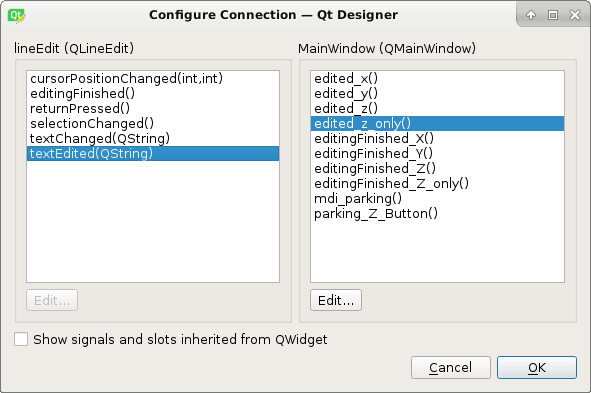
Last edit: 8 years 3 months ago by Ilya.
Please Log in or Create an account to join the conversation.
- Ilya
- Offline
- Junior Member
-
Less
More
- Posts: 23
- Thank you received: 1
8 years 3 months ago - 8 years 3 months ago #114376
by Ilya
Replied by Ilya on topic qtvcp issues
Now I have a problem with the jogincrements widget.
First, if i specify 1mm in the INI file, the axis shifts by 0.001 mm.
The axis is shifted by 1 mm only if the ini file specifies just 1 (without mm).
for example: "INCREMENTS = 1 2 5" or "INCREMENTS = 1mm 2mm 5mm"
Secondly, to go all the way to hold the button on the keyboard until the axis will pass the desired distance.
If you release the button, the axis stops before the specified distance passes.
And also, the manual movements themselves are very slow compared to the Axis interface
I hope I wrote understandably..
Thanks,
Ilya
First, if i specify 1mm in the INI file, the axis shifts by 0.001 mm.
The axis is shifted by 1 mm only if the ini file specifies just 1 (without mm).
for example: "INCREMENTS = 1 2 5" or "INCREMENTS = 1mm 2mm 5mm"
Secondly, to go all the way to hold the button on the keyboard until the axis will pass the desired distance.
If you release the button, the axis stops before the specified distance passes.
And also, the manual movements themselves are very slow compared to the Axis interface
I hope I wrote understandably..
Thanks,
Ilya
Last edit: 8 years 3 months ago by Ilya.
Please Log in or Create an account to join the conversation.
- cmorley
- Offline
- Moderator
-
Less
More
- Posts: 7368
- Thank you received: 2181
8 years 3 months ago #114431
by cmorley
Replied by cmorley on topic qtvcp issues
Is your config metric based? i haven't tested metric configs - i'll have to do that.
I'll look into the metric increments problem, it's probably related to your continuous jogging problem.
If the jog speed is slow try setting the jog rate higher.
widgets StatusSlider and statusAdjustmentBar can set the jog rate or you can set it in your handlerfile directly: STATUS.set_jog_rate(<some rate>) should do it.
As for your button for gcode commands. - Action buttons can be used to run commands set from the INI file - (makes it easier to make quick changes) or you can set the MDI command directly in Designer (must be a command that doesn't need input - such as zeroing all axes).
Your buttons that set an axis to a selectable number must use slots to the form as yo have done.
Using the qtvcp.Action library might be cleaner programing:
ACTION.CALL_MDI(<some code>)
Will ensure linuxcnc is in the proper mode and then run the MDI command.
Of course you must import the library and instaniate it as ACTION.
I don't see any library imports in your handler file but assume they are there.
Chris M
I'll look into the metric increments problem, it's probably related to your continuous jogging problem.
If the jog speed is slow try setting the jog rate higher.
widgets StatusSlider and statusAdjustmentBar can set the jog rate or you can set it in your handlerfile directly: STATUS.set_jog_rate(<some rate>) should do it.
As for your button for gcode commands. - Action buttons can be used to run commands set from the INI file - (makes it easier to make quick changes) or you can set the MDI command directly in Designer (must be a command that doesn't need input - such as zeroing all axes).
Your buttons that set an axis to a selectable number must use slots to the form as yo have done.
Using the qtvcp.Action library might be cleaner programing:
ACTION.CALL_MDI(<some code>)
Will ensure linuxcnc is in the proper mode and then run the MDI command.
Of course you must import the library and instaniate it as ACTION.
I don't see any library imports in your handler file but assume they are there.
Chris M
The following user(s) said Thank You: Ilya
Please Log in or Create an account to join the conversation.
- cmorley
- Offline
- Moderator
-
Less
More
- Posts: 7368
- Thank you received: 2181
8 years 3 months ago #114432
by cmorley
Replied by cmorley on topic qtvcp issues
I confirm the jog increments issue with a metric config.
Will work on this tonight - thanks.
Chris M
Will work on this tonight - thanks.
Chris M
The following user(s) said Thank You: andypugh, Ilya
Please Log in or Create an account to join the conversation.
Moderators: cmorley
Time to create page: 1.087 seconds