
- Posts: 319
- Thank you received: 90
Error in tool_offsetview.py
- MarkoPolo
- Offline
- Elite Member
-

Less
More
4 years 9 months ago #231614
by MarkoPolo
Replied by MarkoPolo on topic Error in tool_offsetview.py
A few more bugs to fix.
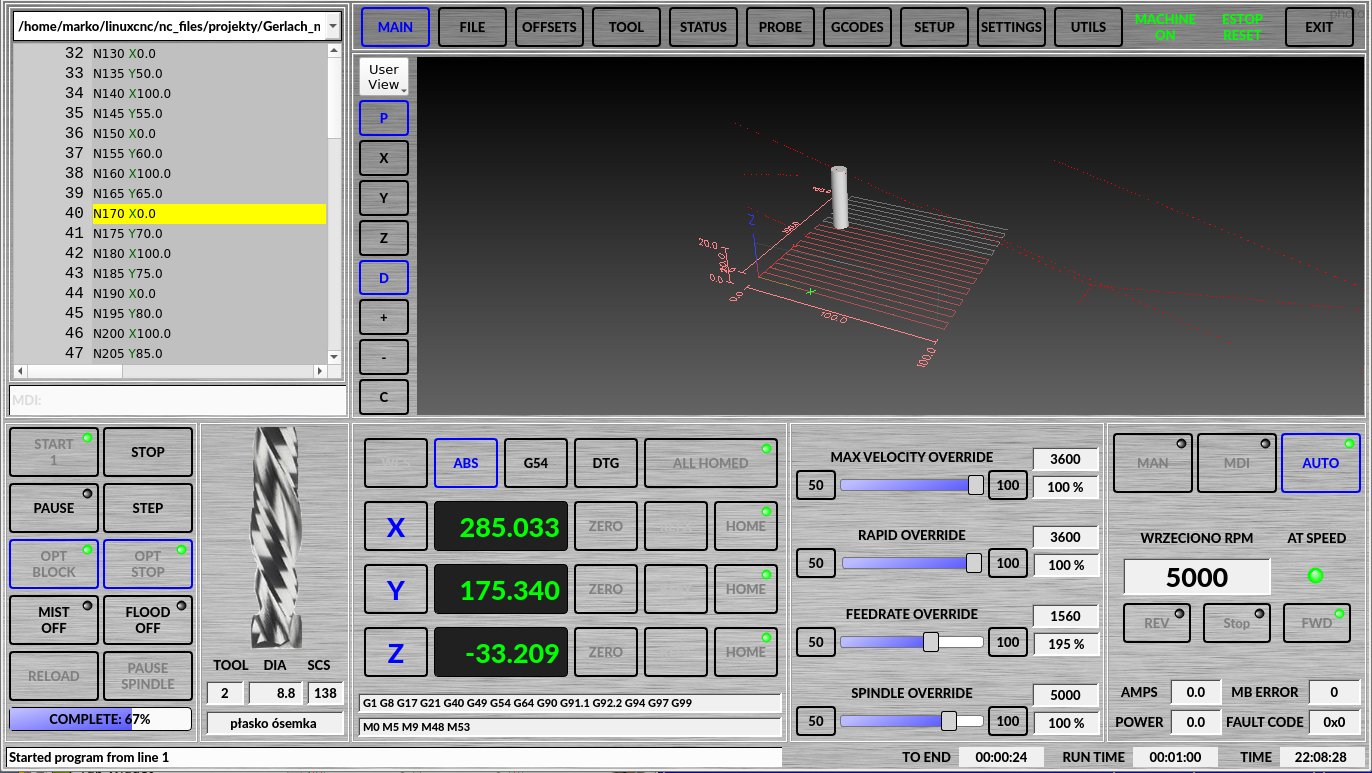
During auto mode and code execution:
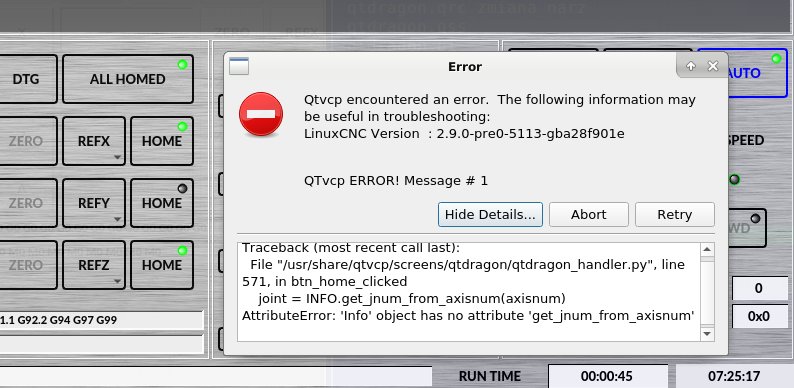
1. When you press the home button, the panel crashes.
2. Press "start" again, the status lamp goes out
3. The "MAN" and "MDI" buttons should also not illuminate as if they were toggling.
4. "reload" probably shouldn't perform its function either
In my file I made a list of buttons to be turned off and on when exiting code execution.
I do not know if this is a good way but it eliminates the above problems and
no pop-up messages are displayed unnecessarily.
During auto mode and code execution:
1. When you press the home button, the panel crashes.
2. Press "start" again, the status lamp goes out
3. The "MAN" and "MDI" buttons should also not illuminate as if they were toggling.
4. "reload" probably shouldn't perform its function either
In my file I made a list of buttons to be turned off and on when exiting code execution.
I do not know if this is a good way but it eliminates the above problems and
no pop-up messages are displayed unnecessarily.
- hottabich
- Offline
- Platinum Member
-

Less
More
- Posts: 574
- Thank you received: 96
4 years 9 months ago #231656
by hottabich
Replied by hottabich on topic Error in tool_offsetview.py
Please share your file. If possible. Thanks!
- cmorley
- Offline
- Moderator
-

Less
More
- Posts: 7368
- Thank you received: 2181
4 years 9 months ago #231662
by cmorley
Replied by cmorley on topic Error in tool_offsetview.py
What kind of crash? Pressing home doesn't crash the screen in sim - but puts up an error message. ) agree it should be disabled. I can fix that.
The following user(s) said Thank You: tommylight
- MarkoPolo
- Offline
- Elite Member
-
Less
More
- Posts: 319
- Thank you received: 90
4 years 9 months ago #231701
by MarkoPolo
Replied by MarkoPolo on topic Error in tool_offsetview.py
For me, pressing "home" causes what you can see in the screenshot. With the original qtdragin.ui and qtdragon_handler.py.
I am sending the original qtdragon_handler.py with changes to hiding buttons only.
Everything works fine but after pressing "step" or "resume" the "zero" buttons turn on, I don't know how to prevent them from turning on. I think this is a built-in property of these buttons.
If the code is ok, you can use it.
I am sending the original qtdragon_handler.py with changes to hiding buttons only.
Everything works fine but after pressing "step" or "resume" the "zero" buttons turn on, I don't know how to prevent them from turning on. I think this is a built-in property of these buttons.
If the code is ok, you can use it.
The following user(s) said Thank You: hottabich
- cmorley
- Offline
- Moderator
-
Less
More
- Posts: 7368
- Thank you received: 2181
4 years 9 months ago #231728
by cmorley
Replied by cmorley on topic Error in tool_offsetview.py
Seems your handler file is newer then the other files. That's why you are getting the error message. That function was added Dec 11
- MarkoPolo
- Offline
- Elite Member
-
Less
More
- Posts: 319
- Thank you received: 90
4 years 9 months ago #231884
by MarkoPolo
Replied by MarkoPolo on topic Error in tool_offsetview.py
I've updated all files to the newest and it's like you say, only the message shows up.
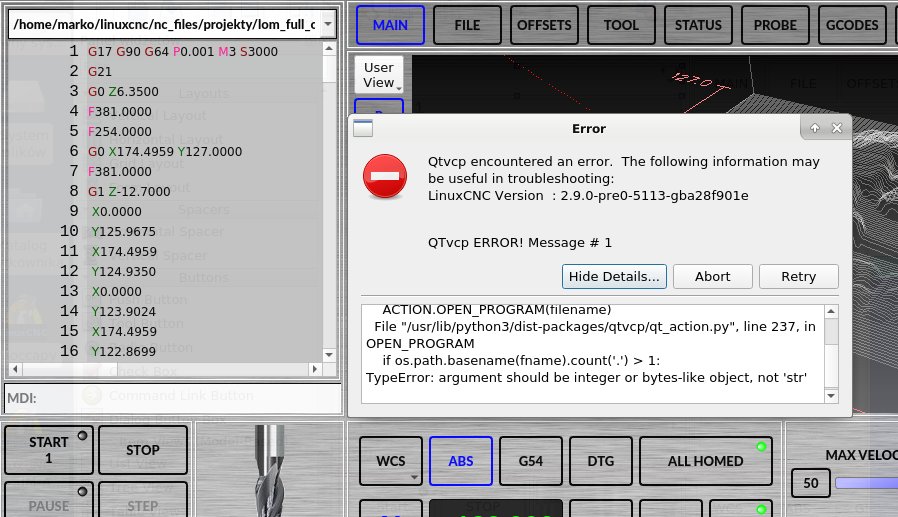
I found another bug in man and mdi mode:
If you press the field with the history of files on the code and again press on
file path then i get an error. I think it's a python2 leftover.
The "fname" variable looks like this b '/home/marko .... gile.ngc' , but I don't know where to change it to make it good'
I found another bug in man and mdi mode:
If you press the field with the history of files on the code and again press on
file path then i get an error. I think it's a python2 leftover.
The "fname" variable looks like this b '/home/marko .... gile.ngc' , but I don't know where to change it to make it good'
Moderators: cmorley
Time to create page: 0.917 seconds