Inconsistent values from Versaprobe

More
2 years 1 week ago #313033 by cmorley
I have not forgotten you, but have been too busy to test on my machine.

line 231 returns the tool to the start position, but with the new tool length.

52 #<local_start_z> = #<_z>
<snip>
probe
set tool table offset
return to Z location:
231 G0 Z[#<local_start_z>]

If the new tool is longer then the original, and the machine cannot go up anymore to get to that position, you would get that error.

you could add this just above line 231 so we can see where it is trying to go:
(DEBUG, moving to Z: %f#<local_start_z>)
The following user(s) said Thank You: gardenweazel

Please Log in or Create an account to join the conversation.

More
2 years 1 week ago #313105 by gardenweazel
Thanks Chris for your response.

The 3d probe is almost always going to be shorter than the tool length.

Here's what I have added:

225 ; return to original tool-tip position, but using new z-offset
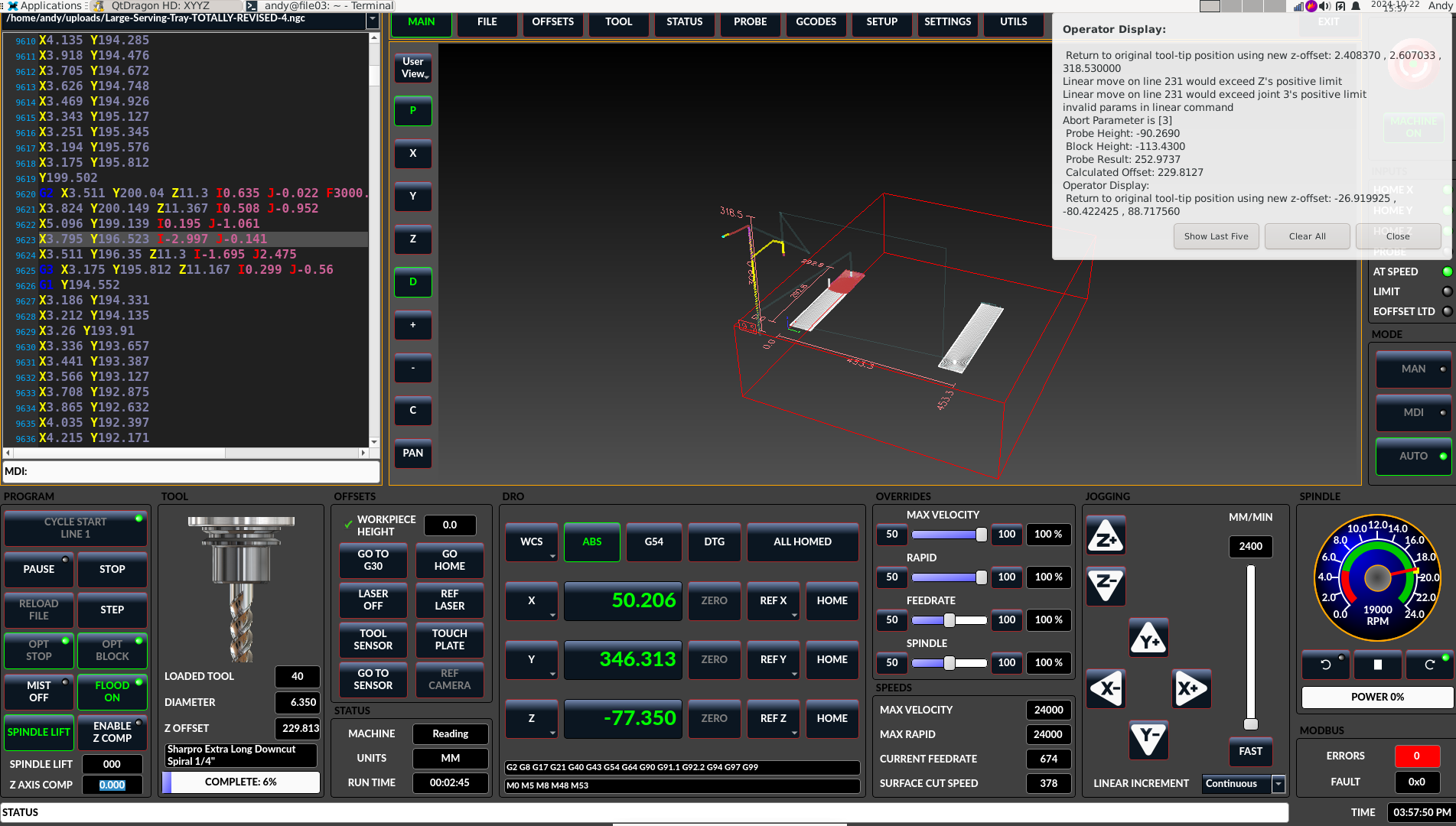
 226 (DEBUG, Return to original tool-tip position using new z-offset: #<local_start_x> , #<local_start_y> , #<local_start_z>)
 227 G53 G0 Z[#<_ini[VERSA_TOOLSETTER]Z_MAX_CLEAR>]
 228 ; now use original (modal)coord system to go over to xy
 229 G0 X[#<local_start_x>] Y[#<local_start_y>]
 230 ; and finally down to the (already offset) z coord
 231 G0 Z[#<local_start_z>]

In the attached/inline image you can see the values of local_start_z of 318.53 which fails. At the end the local_start_z  it is set to 88.717560 and the program then moves forward.


I believe that the msg "invalid params in linear command" I believe is actually coming from this line:
 203 G10 L1 P#<tool> Z[#<calculated_offset>]
and there after a G43.

There is mention of another forum post by @sou528 here that mentions the same however there's no follow up to that post .
He does refer to the documentation that indicates an example zworkoffset . If you scan the github repository for the word zworkoffset you will see mention to this.


I'd really like to get this one behind me if at all possible.
 

Please Log in or Create an account to join the conversation.

More
2 years 2 days ago #313510 by gardenweazel
Here's another similar post:    forum.linuxcnc.org/qtvcp/40992-qtdragon-...tion?start=10#212164

I don't understand how or why var #5223 is being set to -321.00 in my VAR file. Makes no sense since my entire travel along Z is much less.

Still searching for a fix on this issue.

Please Log in or Create an account to join the conversation.

More
1 year 11 months ago #313662 by seebaer1976
I'll join in because I have the same problem.
When I touch the probe, the g54 z values ​​are correct.
When I start the program, insert the new tool and it then measures it, the numbers for g54 z are over 200. And the program stops because the z axis is exceeded.
But the strange thing is that in the linuxcnc.var, the correct value is under #5223 (e.g. -98.816)
The following user(s) said Thank You: gardenweazel

Please Log in or Create an account to join the conversation.

More
1 year 11 months ago #313664 by gardenweazel
Yes, this is what I noticed as well. I believe that the linuxcnc.var file is incorrect and the later gets written to
with an acceptable value within range.

I followed the code during this time to confirm. I'm just not sure where the initial value is being set?

Thanks for chiming in, hopefully this can get remediated sooner rather than later.

Please Log in or Create an account to join the conversation.

More
1 year 11 months ago - 1 year 11 months ago #314874 by gardenweazel
Posting some additional debug details in anticipation of getting some resolution.
This is from a single job that I ran yesterday. Exact same job run 3 times, as you can see there were 2 failures
and finally on the third try I was successful.

The second FAIL and the PASS are nearly identical.

Please chime in if you have any clues. I am using the subroutine from qt_auto_probe_tool.ngc

  
Last edit: 1 year 11 months ago by gardenweazel. Reason: added inline attachment

Please Log in or Create an account to join the conversation.

Moderators: cmorley
Time to create page: 0.104 seconds
Powered by Kunena Forum