Search Results (Searched for: 7i76e)

09 Sep 2026 08:49
I would suggest qtdragon-hd with a 1080p touch screen. Several probing methodologies are included.
Linuxcnc includes a  (large?) number of Sims.
There is an extensive thread about Ethercat jitter which you will see died out once issues were resolved.
forum.linuxcnc.org/ethercat/58103-ethercat-random-jitter-fix
Part of the solution  is tuning the system for RT performance and it was comforting for me to see it acknowledged that my tuning  methods were needed. I might add, the same applies for mesa network cards.

The fundamental difference between mesa and Ethercat is that mesa requires a dedicated point to point railway track. Packets hop on the train and get off at the end. Then packets get on the train and go back to the PC.

Ethercat is more like a streamlined bullet train which goes past a number of stations (slaves). Packets get on and off at each station (slave) without the train stopping. Hence why I say its more efficient.

The other difference is that mesa has pncconf to build your config and ethercat need you to build your config from a template just like I had to do on my first machine that used a Mesa 7i76e that was not supported by LinuxCNC at the time.  Having a similar Ethercat dsonfig tool is unlikely. It hard enough to do for the family if mesa cards, imagine how hard it would be with thousands of devlces, some of which are rarely found on a CNC machine. Then ask a machine to home itself without LinuxCNC's knowledge or control....
06 Sep 2026 21:37

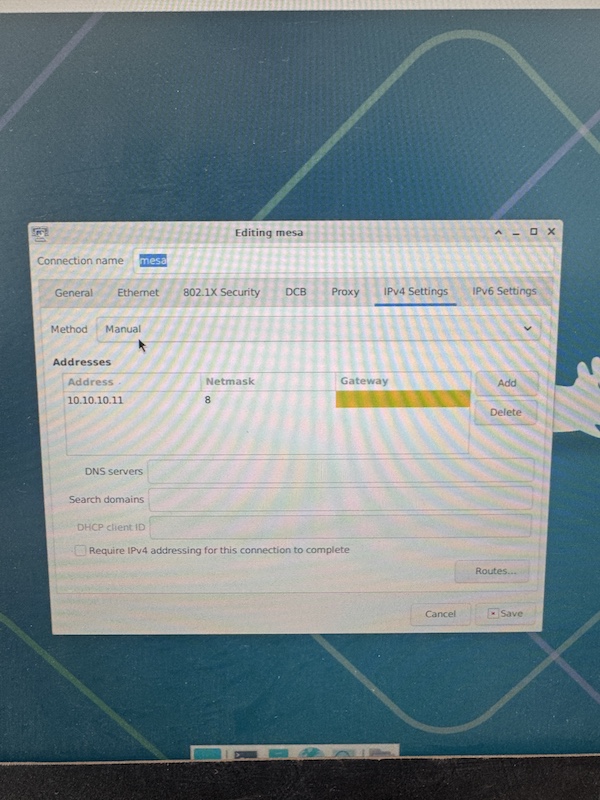
All I had to do was switch this setting from automatic to manual in the network settings and boom works now!
If you used this:
forum.linuxcnc.org/27-driver-boards/3559...ethernet-mesa-boards
It clearly states to change that to manual.
06 Sep 2026 20:10
I found the solution to my problem now all my computers work with no interruptions for at least 20 minutes. 
All I had to do was switch this setting from automatic to manual in the network settings and boom works now!
06 Sep 2026 13:37
Afternoon internet.
I have just bought this and now have the fun task of retrofitting. I'm wondering what hardware you guys would use. obviously due to the 3 phase steppers ill be using most of the original gear.
Main issue is I'm in UK and don't want to wait for a mesa card from America nor pay £300 quid for one. unless its worth it.
I see a few control board options

Option 1 EC500 remora about £100pros 24V card logic I/O easy. Cons pure china lottery
option 2 MESA 7I76EU about £300 Pro; proven card, known to work, can copy what people have done before. cons price / waiting time.
option 3 Parallel port Pro, cheap crappy board will get going quickest, cons bulky tower pc, will never be happy.

Control computer
Pi 5, from what I've read with ethernet connections theses are good. Pro small, Con dunno if still buggy
any core i5 pc Pro already have, can slice on fusion on same machine, could even set laptop up if it worked (power management fun). con bulky 

 Just wondering if I have missed anything or forgot, I did have a look for a guide to begin with but most just say MESA card

05 Sep 2026 05:52
Thanks Peter for your help and quick responce.
04 Sep 2026 18:39
 

File Attachment:

File Name: 7i76e_7i76...i89d.zip
File Size:159.65 KB

 
04 Sep 2026 17:19
Hi Peter / Mesa Support,
I am setting up a machine using a 7i76e and I need a custom bitfile for my expansion board configuration.
My hardware layout is as follows:
  • Motherboard: 7i76e
  • Expansion Port P1: 7i78 (Step/Dir expansion)
  • Expansion Port P2: 7i89 (Multi-channel encoder board)
Could you please generate a pre-built
Code:
.bit
file (and corresponding
Code:
.pin
file) for this specific configuration?
Thank you for your help!
03 Sep 2026 05:07
Dear PCW,
Again many thanks for helping out. This morning (before work...) I quickly cross checked the label and you are right: I unintentionally bought/received a 7i85S rather than a "normal" 7i85.... image missing /media/kunena/emoticons/dizzy.png. This evening I will order a correct 7i85 replacement. My excuses for bothering the forum with such a beginners mistake, yet I am very glad I received this hint as it would probably had cost me many more days (in frustration) to find it out by myself.
Cheers,
Henk
02 Sep 2026 20:45 - 02 Sep 2026 20:46
Here is fixed firmware fro the 7I76EU/7I76U that fixes the MPG encmode
parameter direction issue. This is the full image that needs a PIC programmer
to install. Will have a bin file for remote updating soon.


File Attachment:

File Name: 7i76unew.zip
File Size:23.17 KB
02 Sep 2026 20:36 - 02 Sep 2026 23:43
Now is it possible you have a 7I85S instead of a 7I85?
(look at the paper label on the back of the card)

That would show these symptoms ( only the last sserial channel works
as TB1 pin 17..24 is the only serial port on a 7I85S )

 
02 Sep 2026 20:27
OK tested a 7i76E with 7i76e_7i76x1_7i85x1D.bit firmware:

md5sum 7i76e_7i76x1_7i85x1D.bit
0d0922e5c4306ceba4e077fff3c02097  7i76e_7i76x1_7i85x1D.bit

And it works as expected, that is sserial devices 0..6 work

SSerial channels are organized as follows:

0 Local 7I76E field I/O
1 7I76E Serial expansion slot TB3 15..20
2 7I85 Serial 0 TB2 9..16
3 7I85 Serial 1 TB2 17..24
4 7I85 Serial 2 TB1 1..8
5 7I85 Serial 3 TB1 9..16
6 7I85 Serial 4 TB1 17..24

 
02 Sep 2026 20:02
Dear PCW,
1.) Ok, understood. Since I connected 3 boards (2x 7i84, 1x 7i87) I should thus see only 3 SSerial. I was confused as the pins from one of the 7i84 connected to SSerial position 4 on the 7i85 is visible under this name: "sserial device at channel 6: 7I84 (unit 0x1800C0A7)" (string taken from --sserial command using mesaflash).
2) Yes I read this also somewhere else on the forum and made a new machine configuration in pncconf using this option. If I look in the hal file made afterward I indeed see a modified config string in loadrt hm2_eth:  'sserial_port_0=0000000x' and the number of encoders increased. However, unfortunately the other 7i84 and the 7i87 are stil not visible (these are connected via other SSerial channels on the 7i85 other than the one numbered 4 in the manual.
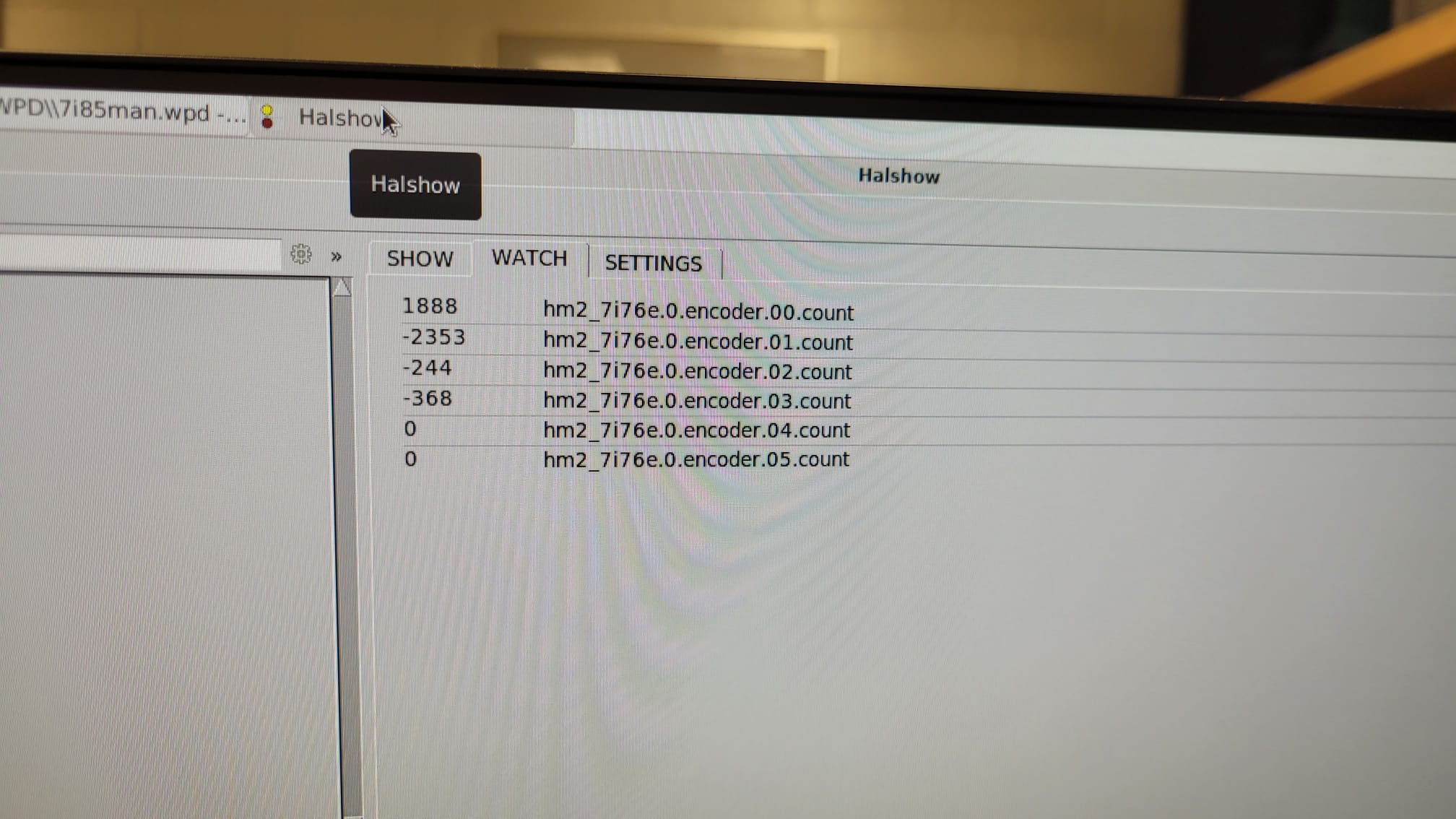
3) This evening I wired an encoder and checked it on all the 4 available enc positions (0, 1, 2, 3). I do see the steps increase/decrease in the watch window of halconfig. The signal pin names I look at are: hm2_7i76e.0.encoder.00.count up to hm2_7i76e.0.encoder.05.count. The enc. 0 (identifier from MESA manual image) corresponds to ....00.count and enc 4 to ....03.count. All seem to work nicely (cool to see this work!)
4) Off course I would appreciate this a lot. I also looked at the naming of a digital input from one of the 7i84 when connected via SSerial 4 (MESA manual image) on the 7i85 and this shows as : hm2_7i76e.0.7i84.0.6.input-00 and so on. These digital pins also work in this configuration Again I don't understand where the 6 comes from. In case I connect the same board to any of the other SSerial positions on the 7i85 than they don't show up at all.
02 Sep 2026 13:37
You can contact me on rothmarc227@gmail.com 
02 Sep 2026 13:02
A couple things:

1. SSerial ports will only show up in LinuxCNC  if a SSerial remote is connected and detected.
(so you would not see 6 SSerial channels in LinuxCNC unless 6 devices were connected and detected)
Only the low level hardware listings like readhmid will show all possible channels

2. With pncconf for unsupported firmware, you can use the "Discover" option

3. Do the other functions like the encoders work on the 7I85?

4. I can verify that firmware + 7I85 later today
02 Sep 2026 11:53
@mediocre_chloride

Thanks for the offer. If you`re up to it, I would be glad to try. Removing U3 and getting one of the exp ports to work would already be a huge help.

Is there a way to contact you? I didn`t find an option for personal messages.
Displaying 16 - 30 out of 373 results.
Time to create page: 1.128 seconds
Powered by Kunena Forum