Search Results (Searched for: )

  • tommylight
09 Dec 2025 07:56
Ini file in your configuration folder, there is a section there with what can be opened from LinuxCNC, so editing that file to include .nc should be all that is needed.
I think it is Filter section...
  • zz912
09 Dec 2025 07:49
GTK Mesa tests screen was created by zz912
Hello,

I am working on new builtin-panel for Gmoccapy. It is for Mesa users. This screen allows the user to verify whether they have a suitable and well-tuned PC for their Mesa card. It will help me when I have to debug the machine with someone over the phone again.

This screen is based on the part of MesaCT configurator program.


I need help with the license. MesaCT is MIT licensed. So I can use it. This built panel will be licensed the same as LCNC. I want to be the author because I spent a lot of time on it. I'm converting it from QT technology to GTK technology. On the other hand, I'm taking most of the ideas that jethornton created. I don't want to be considered a know-how thief. I'm only interested in the header file. Here's what I made a suggestion:
Code:
GTK Mesa tests screen Embedded panel for PC and Mesa tests by zz912 Based on the design of Mesa Configuration Tool II https://github.com/jethornton/mesact Copyright (c) 2022 jethornton This program is free software: you can redistribute it and/or modify it under the terms of the GNU General Public License as published by the Free Software Foundation, either version 2 of the License, or (at your option) any laforter version. This program is distributed in the hope that it will be useful, but WITHOUT ANY WARRANTY; without even the implied warranty of MERCHANTABILITY or FITNESS FOR A PARTICULAR PURPOSE.  See the GNU General Public License for more details.

Theoretically, there could be a situation where someone else wants to reuse or relicense this Build panel. I don't want my nickname or name jethornton to be lost. How are these situations handled?
 
  • abs32
09 Dec 2025 05:37
Yes, I tried it and reported the result—it doesn't help.
  • rbobey1989
09 Dec 2025 05:12
Hello Aciera, I don't know if you've taken a look at my homing.c modifications. If you could give me some ideas, especially regarding states 8 and 9, when I stop near the home switch as I explained in my previous post, a homing abort occurs. The quick solution I thought of was to continue with the fine-tuning. What do you think? Thanks in advance.
  • timo
09 Dec 2025 04:55
Replied by timo on topic Hybrid Manual/Stepper Control
The z-axis is supposed to be still usable, because it is heavy. 
 
  • unknown
09 Dec 2025 04:37
Replied by unknown on topic Experimental raspios Linuxcnc Trixie images.
Mentioned in first post but will add here, in case it catches anyone's attention.

Any issues please raise here, trying to cut back forum usage to almost nil.
github.com/ozzyrob/linuxcnc-rpi-2.9.7-image-issues/tree/main
  • mooser
08 Dec 2025 23:41
Is there a setting somewhere that I can change to have files with a .NC extension show in the open file dialog box without have to keep selecting the All Files drop down?
Not exactly a big issue but seems like there should a setting be somewhere I can't find.
Thanks
M
 
  • RaspII
08 Dec 2025 23:04 - 08 Dec 2025 23:08
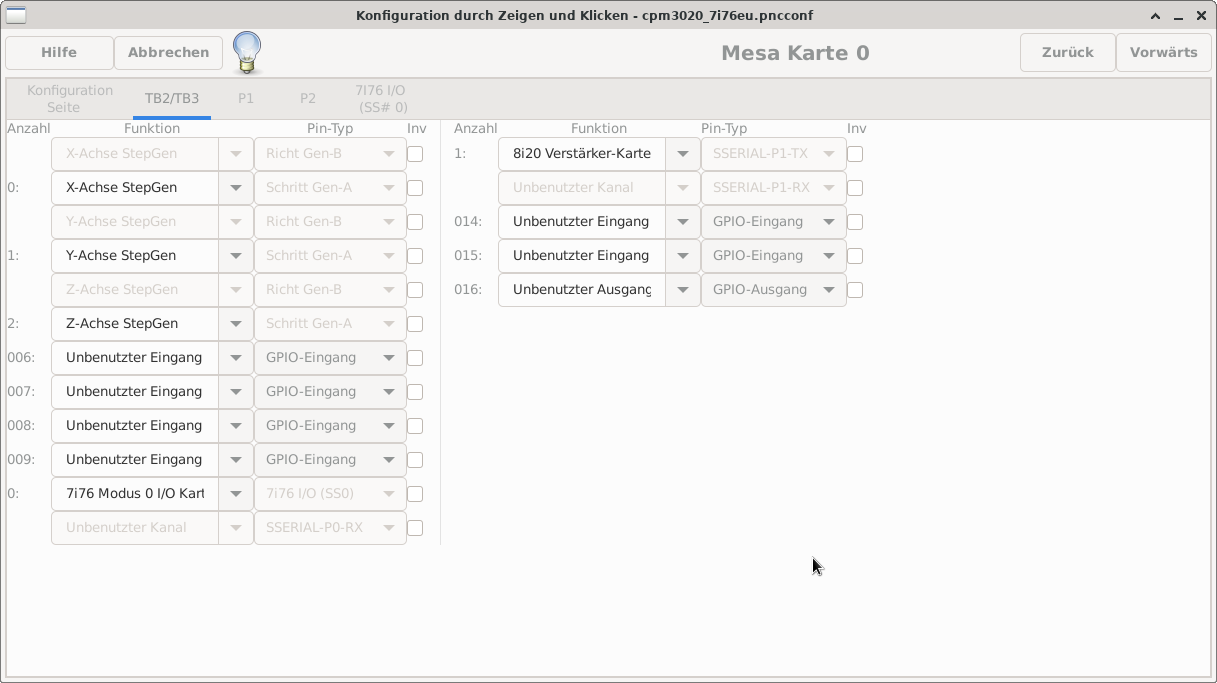
But If I don't select "7i76 Modus 2 I/O card" my settings are lost after closing and reloading Pncconf. 
Do I have to select Modus 2 anyway even If I change locale to UTF-8 EN_US ?
  • RaspII
08 Dec 2025 22:42
ok, after searching for the missing tab i found this post  
After enabling the option „Show advanced config pages“ I could modify the value "0: 7i76 Modus I/O Kart..". After modification the tab 7i76 I/O (SS#0) is available, now. 
  • tommylight
08 Dec 2025 22:42
Replied by tommylight on topic MESA 7i76EU - Pinzuordnung (z.B. Endschalter)
Use the LinuxCNC ISO written to USB to boot the PC in English language, start PncConf to make the config, save it on the hard drive or another USB.
Or change locale to UTF-8 EN_US
  • tommylight
08 Dec 2025 22:42
Replied by tommylight on topic Getting a Yaskawa Motoman back to life!

7I36 has encoder fault detection but is only for differential encoders
How did i miss this ? :)
Thank you.
  • andypugh
08 Dec 2025 22:27
Replied by andypugh on topic How to fix "Queue is not empty after probing"
The second example is compiled-out by
github.com/LinuxCNC/linuxcnc/blame/maste...s274ngc_pre.cc#L1542
(But I am not clear why, the commit message doesn't really say: github.com/LinuxCNC/linuxcnc/commit/b96c...de5e67d2dde0339bece3 )

So, it must be the first one causing the issue.

Did you try adding a queue-buster as suggested? (Not that that is the right fix, but maybe it will tell us something)
  • RaspII
08 Dec 2025 22:02 - 08 Dec 2025 22:10
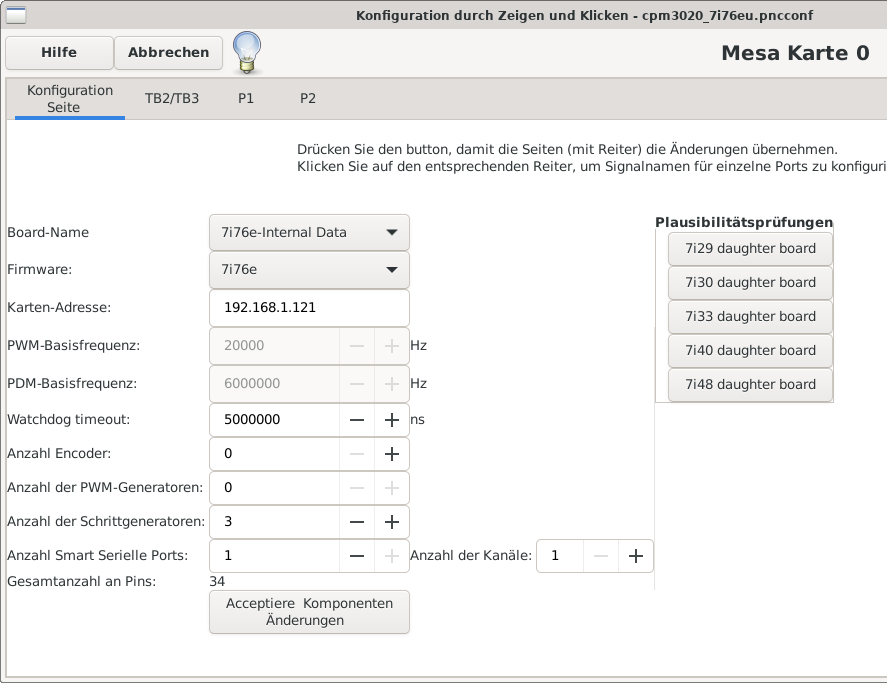
I don't have the tab with "7i76 I/O,

 
  • rodw
08 Dec 2025 21:25
Replied by rodw on topic Hybrid Manual/Stepper Control
Why not just close linuxcnc when you want to do manual machining?
  • speppino
08 Dec 2025 20:53
Replied by speppino on topic MesaCT 2.1.8: Scale vs Encoder Scale
I appreciate the time you spent to reply. You provide very good insight that made this work.
What I did was to put 4 in the axis scale and then I put 2500 in the encoder scale. For what I understood from your reply, Linuxcnc takes the 2500 counts and moltiply them by 4 (quadrature) then it divides it by the axis scale (4 again in this case). It was a bit confusing when reading the Mesact manual. I think that manual needs to be revised to explain this better for novice like me.

I tested this by changing a leadscrew with a 5mm pitch one. I had to place 5 in the axis scale and 2000 (2500 x 4 / 5) in the encoder scale. this worked also. I think this is such an important detail that should not be missed when setting up servos. So thank you all.

I was able to achieve a reasonable tuning as well following the servo tuning advice in this forum. I might have to tweak some small Ferror deviation at the very beginning and very end of the move. Lots to learn.
Displaying 10096 - 10110 out of 11914 results.
Time to create page: 0.197 seconds
Powered by Kunena Forum