
Search Results (Searched for: )
- mwc
The only thing I changed to test that XML snippet, was to remove the Z-axis stuff from the hal file, then paste that snippet in to replace the existing Z slave (slave 2) information.
The names used in my handcoded XML vary from the lcec_configgen names, so I can't do a straightforward copy and paste, but just running the XML with no hal parameter linking is enough to establish if the XML is good.
Ultimately if the XML is good, the ethercat slaves should be configured, even if hal makes no use of them.
It seems to be an error with how the ethercat PDOs are defined, but I've so far not found any kind of definitive guide about syncmanagers/PDOs, and what is expected.
- CNCJIM
Kernel driver in use: iwlwifi
Kernel modules: iwlwifi
00:1f.6 Ethernet controller [0200]: Intel Corporation Ethernet Connection (6) I219-LM [8086:15bd] (rev 30)
root@t490:/home/mylinux#
So those are the controllers - but the Intel Ethernet module is not loaded.
The power has been throttled back on each boot via a service . root@t490:/home/mylinux# cat /usr/local/bin/cnc-bench-init.sh
#!/bin/bash
# Enable thinkpad_acpi fan control and lock to Level 7
echo "level 7" > /proc/acpi/ibm/fan
# Lock Intel RAPL sustained power limit to 15W (15,000,000 uW)
echo 15000000 > /sys/class/powercap/intel-rapl/intel-rapl:0/constraint_0_power_limit_uw
--- Where the default power is 25W or 25000000
The /etc/systemd/system/cnc-bench-init.service -has to be created to get a systemctl enable cnc-bench-init-service
to start at run time.
oot@t490:/home/mylinux# systemctl status cnc-bench-init.service
○ cnc-bench-init.service - LinuxCNC Test Bench Power & Thermal Initialization
Loaded: loaded (/etc/systemd/system/cnc-bench-init.service; enabled; preset: enabled)
Active: inactive (dead) since Thu 2026-10-29 13:03:28 MDT; 1h 3min ago
Invocation: e7cfed2c425b41528e32b456cbcf7ef6
Main PID: 1019 (code=exited, status=0/SUCCESS)
Mem peak: 1.8M
CPU: 7ms
Oct 29 13:03:28 t490 systemd[1]: Starting cnc-bench-init.service - LinuxCNC Test Bench Power & Thermal Initialization...
Oct 29 13:03:28 t490 systemd[1]: cnc-bench-init.service: Deactivated successfully.
Oct 29 13:03:28 t490 systemd[1]: Finished cnc-bench-init.service - LinuxCNC Test Bench Power & Thermal Initialization.
root@t490:/home/mylinux# cat /etc/systemd/system/cnc-bench-init.service
[Unit]
Description=LinuxCNC Test Bench Power & Thermal Initialization
After=multi-user.target
[Service]
Type=oneshot
ExecStart=/usr/local/bin/cnc-bench-init.sh
[Install]
WantedBy=multi-user.target
root@t490:/home/mylinux# -
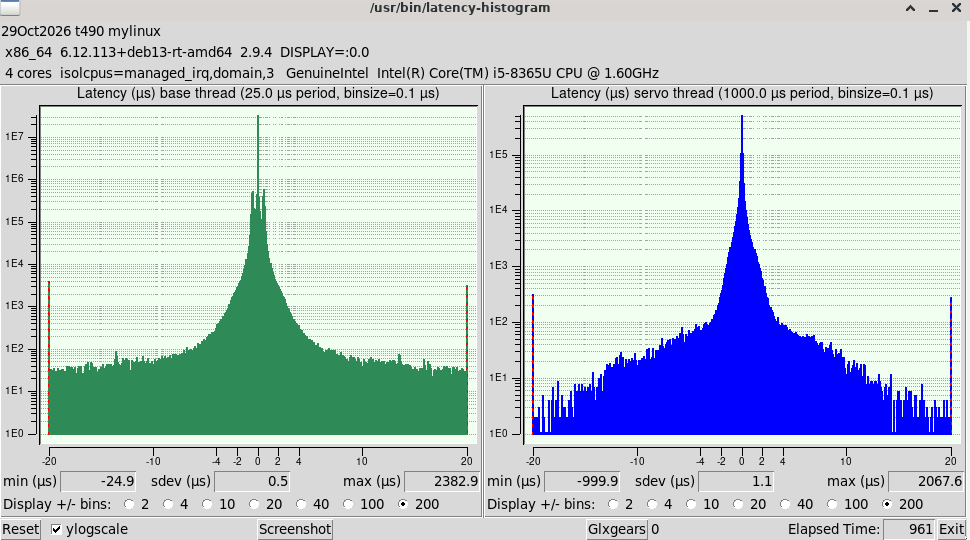
Summary - I did what I could - from my Mesa 7i96 settup there is a watchdog timer that defaults to 5ms - And I do not know if this watchdog will cover my 1430000ns servo thread jitter and the 2500000ns base thread jitter.
This is after all a laptop -and it has overhead and SMI's that are not completely managed.
I have a PI400 that is politely running 65us servo thread jitter and 125us base jitter. And a Gigabyte B250-4E3 that has an i5-gen 10 with 4 cores/4 threads - getting 16us servo thread jitter and 97us base thread. So I have systems I can use with Mesa cards. So my simple question- can I run production jobs with this T490 and its 1.4ms and 2.5ms Jitter. If the answer is no- so be it.
- mwc
AO0 looped back to AI0 gives comparable readings.
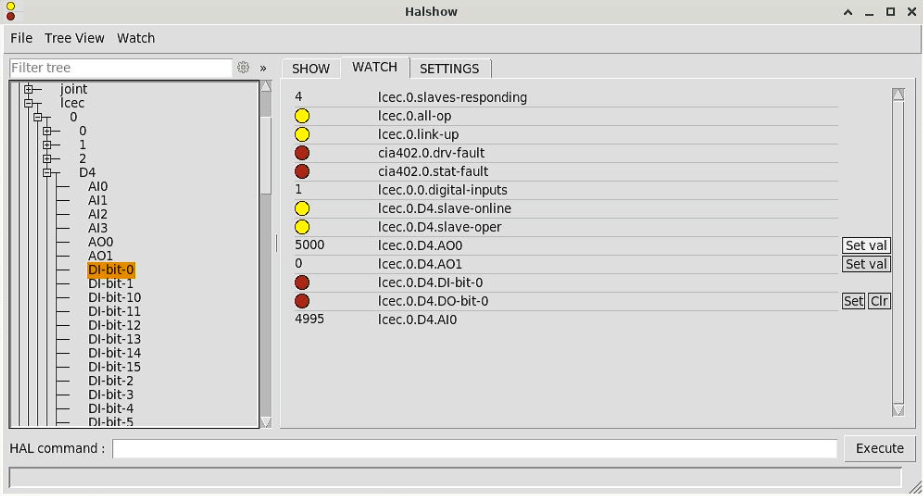
All it took was a bit copying and pasting, a few minor value edits, and I have the Analogue and Digital IO working with the following code-
<slave idx="3" type="generic" vid="0x00000b96" pid="0x00001400" name="D4">
<!--EC1A-CORE1-->
<syncManager idx="0" dir="in"/>
<syncManager idx="1" dir="out"/>
<syncManager idx="2" dir="out">
<pdo idx="1601">
<!--Digital Output process data mapping-->
<pdoEntry idx="7010" subIdx="01" bitLen="16" halPin="DO-bit" halType="bit"/>
</pdo>
<pdo idx="1603">
<!--Analog Output process data mapping-->
<pdoEntry idx="7030" subIdx="01" bitLen="16" halPin="AO0" halType="u32"/>
<pdoEntry idx="7030" subIdx="02" bitLen="16" halPin="AO1" halType="u32"/>
</pdo>
</syncManager>
<syncManager idx="3" dir="in">
<pdo idx="1a00">
<!--Digital Input process data mapping-->
<pdoEntry idx="6000" subIdx="01" bitLen="16" halPin="DI-bit" halType="bit"/>
</pdo>
<pdo idx="1a02">
<!--Analog Input process data mapping-->
<pdoEntry idx="6020" subIdx="01" bitLen="16" halPin="AI0" halType="u32"/>
<pdoEntry idx="6020" subIdx="02" bitLen="16" halPin="AI1" halType="u32"/>
<pdoEntry idx="6020" subIdx="03" bitLen="16" halPin="AI2" halType="u32"/>
<pdoEntry idx="6020" subIdx="04" bitLen="16" halPin="AI3" halType="u32"/>
</pdo>
</syncManager>
</slave>
Obviously doesn't include the ModBus stuff, but I have no use for that.
The lcec_configgen halPin naming did use duplicate names, and the unknown halTypes ( !!type 002e!! ) can be set to either bit or u32 depending on your own preferred usage. I've used bit for now.
- tommylight
-

loadrt lcec
line in the hal file?
If yes, there is something not right in that line.
-
This is just an educated guess from the error as i have no experience with EtherCat.
- mwc
<slave idx="2" type="generic" vid="0x00000a79" pid="0x00001000" name="D3">
<!--CL3-E57H-->
<syncManager idx="0" dir="out">
<pdo idx="1a01">
<!--TxPDO 2-->
<pdoEntry idx="603f" subIdx="00" bitLen="16" halPin="errorcode" halType="u32"/>
<pdoEntry idx="6041" subIdx="00" bitLen="16" halPin="2-statusword" halType="u32"/>
<pdoEntry idx="6064" subIdx="00" bitLen="32" halPin="position-actual-value" halType="s32"/>
<pdoEntry idx="60fd" subIdx="00" bitLen="32" halPin="digital-inputs" halType="u32"/>
<pdoEntry idx="6061" subIdx="00" bitLen="8" halPin="modes-of-operation-display" halType="s32"/>
</pdo>
<pdo idx="1601">
<!--RxPDO 2-->
<pdoEntry idx="6040" subIdx="00" bitLen="16" halPin="2-controlword" halType="u32"/>
<pdoEntry idx="6060" subIdx="00" bitLen="8" halPin="modes-of-operation" halType="s32"/>
<pdoEntry idx="607a" subIdx="00" bitLen="32" halPin="2-target-position" halType="s32"/>
<pdoEntry idx="6081" subIdx="00" bitLen="32" halPin="profile-velocity" halType="u32"/>
<pdoEntry idx="6099" subIdx="01" bitLen="32" halPin="search-switch" halType="u32"/>
<pdoEntry idx="6099" subIdx="02" bitLen="32" halPin="search-zero" halType="u32"/>
</pdo>
</syncManager>
<syncManager idx="1" dir="out"/>
<syncManager idx="2" dir="out">
<pdo idx="1600">
<pdoEntry idx="6040" subIdx="00" bitLen="16" halPin="out-controlword" halType="u32"/>
<pdoEntry idx="6060" subIdx="00" bitLen="8" halPin="mode-of-operation" halType="s32"/>
<pdoEntry idx="607a" subIdx="00" bitLen="32" halPin="out-target-position" halType="s32"/>
<pdoEntry idx="60ff" subIdx="00" bitLen="32" halPin="target-velocity" halType="s32"/>
</pdo>
</syncManager>
<syncManager idx="3" dir="in">
<pdo idx="1a00">
<pdoEntry idx="6041" subIdx="00" bitLen="16" halPin="in-statusword" halType="u32"/>
<pdoEntry idx="6061" subIdx="00" bitLen="8" halPin="mode-of-operation-display" halType="s32"/>
<pdoEntry idx="6064" subIdx="00" bitLen="32" halPin="position-actual" halType="s32"/>
<pdoEntry idx="606c" subIdx="00" bitLen="32" halPin="velocity-actual" halType="s32"/>
<pdoEntry idx="6077" subIdx="00" bitLen="16" halPin="torque-actual" halType="s32"/>
</pdo>
</syncManager>
</slave>
Which without editting results in this error -
Debug file information:
Note: Using POSIX realtime
Failed to register PDO entry: No such file or directory
LCEC: master 0 syncUnit default PDO entry registration failed
LCEC: failure, clearing config
LCEC: exiting
LCEC: returning -EINVAL
lcec: rtapi_app_main: Invalid argument (-22)
./my_EtherCAT.hal:10: waitpid failed /usr/bin/rtapi_app lcec
./my_EtherCAT.hal:10: /usr/bin/rtapi_app exited without becoming ready
./my_EtherCAT.hal:10: insmod for lcec failed, returned -1
1740
Stopping realtime threads
Unloading hal components
Note: Using POSIX realtime
Is there any kind of documentation about syncmanagers anywhere that explains what is required/how they work?
- tuxcnc
Use G1 F3.
- scsmith1451
I'm trying to write a surfacing program that slows the plunge rate of the spindle. I've tried:
G0 Z-0.005 F3
and
F3
G0 Z-0.005
Neither change the feed rate of the plunge. However, when using G38.2 combined with an F3 in a probing routine, the spindle slows as expected.
Does spindle plunge rate not respond to the Fn modal command or is there something that I'm missing?
- tuxcnc
Should be:So tried lcec.activate, but that results in an error that activate isn't a valid command.
- JT
-

JT
- meister
The external step generators are controlled by velocity commands, so they require a PID controller to convert the position into velocity commands.
To start with, set the error parameter for the rotary axis to 20 and the min-error to 2:
Flow -> StepDir plugin -> Joint -> General -> *error
I hope that sorts out the follow error for now.
You can also lower the acceleration parameter.
Most default settings are for linear axes and will not work well with rotary axes.
- my1987toyota
for a work related project I am working on (physical size constraints). As far as me using AI lets just say I have been
very reluctant to use it partially because of the incessant push to install data centers everywhere the tech bros can
put one (consequences be damned), the price of parts (that's a big one), and me not knowing how to efficiently use it. LOL.
I will give your recommendations a try.
- MirkoCNC
Since a week, I have been trying to set up a rotary axis A with a TangBob. It works at snail speed, but not at higher speed. I am always confronted with joint follow error of the axis.
I need the axis in a winder setup to wind bobbins. Hence A must rotate "endless" depending on the windings I want to achieve. I need to achieve at least 1000 rpm. There is no problem with a linear axis.
I have used rio-flow-gui to set up an open loop stepper type angular, 1600 micro steps. Scale in and scale out are set to 1600. Whatever I do with the ini parameters to achieve higher speeds it fails on the joint follow error.
As I do not understand the internal mechanics of the actual feedback that should confirm the requested speed, I am lost. Furthermore, I do not understand the fole of the PID, which should have no meaning for an open loop set up.
I also cannot find any example of my application to help me out.
Hence, I hope you can help me out to set up a rotary axis at 1000 rpm to overcome that joint follower error (in simulation mode and with the hardware (currently only with the Tangboard only - no ChinaBob attached).
Thanks a lot in advance.
- mwc
The lcec_configgen output didn't work due to a few reasons. The auto generated parameter names varied, and there seemed to be something weird going on with sync manager directions causing errors to be generated during initialising
- tommylight
-
For non essential stuff, vibe coding is fine and will save a lot of time, but being able to actually audit the code is a very nice bonus.
Claude has become pretty damn good at it, and so are some smaller models you can run locally on your PC, and Gemini is also very good at Python, it is free, so give it a try.
Despite what the internet would have you believe, you can run local models even on some low spec PC's and laptops, quite comfortably, and having a GPU with 8GB or more makes it way faster than you can read (that is my personal benchmark), and AMD APU's (GPU+CPU) are very good st it, i have Ryzen 7 laptops (3 of them) and they can run 4B parameter models exceptionally good, 7B and 8B with a bit of tweaking, all on 16GB of total memory.
Download LM Studio, download some 3-6GB models, play with them, you might be pleasantly surprised.
- tommylight
-
2. disable hyperthreading, TPM, secure boot
3. download the 2.9.9 and 2.8.4 ISO from the downloads page
4. boot from them, without installing, create a config for Mesa 7i96S
5. power on the Mesa 7i96S and wire it to laptop
6. run the config, run some gcode included and see if the connection drops
2.8.4 should be better on that CPU, but either way you look at it, gen 8 Intel are not good, they had to much power saving stuff included that causes huge delays.
I have a ThinkPad E580 with 4 core 8250 intel, it can be used with Mesa for testing, but not on a production machine.
6th gen CPU's were better for this, like 6300, but dual cores are getting to slow for new operating systems.
Here are some tested laptops:
forum.linuxcnc.org/18-computer/54369-use...mesa-ethernet-boards