
- Posts: 4819
- Thank you received: 2177
Kinematic model for a 5axis mill with universal (nutating) head
- Aciera
- Offline
- Administrator
-

Less
More
2 years 9 months ago - 2 years 9 months ago #289660
by Aciera
Replied by Aciera on topic Kinematic model for a 5axis mill with universal (nutating) head
Just as a disclaimer:
I really don't know much about 5axis machining. The machines I have worked on only had manual swivel heads. However TWP has already proved useful even for that, if only in it's most basic form.
Keep in mind that, on a real machine, consideration needs to be given to the conditioning of the angular values as calculated in the remap since real joints may not be able to turn 360°. I've only made a crude attempt at this.
Implementing, a much simplified version of TWP, has shown that a fair bit of work needs to be invested to make this as user friendly as possible. Mainly properly resetting the controller after an abort while TWP is active needs to be considered.
Since I posted the config, I have removed the TWP offset from the kinematic and included its handling in the remap (mostly). This avoids offsetting G53 (absolute machine coordinate moves) by TWP offset values when TWP is active.
Also, I have invested a lot of work in making the preview aware of TWP and the calculation of limit violations using the preview data.
I really don't know much about 5axis machining. The machines I have worked on only had manual swivel heads. However TWP has already proved useful even for that, if only in it's most basic form.
Keep in mind that, on a real machine, consideration needs to be given to the conditioning of the angular values as calculated in the remap since real joints may not be able to turn 360°. I've only made a crude attempt at this.
Implementing, a much simplified version of TWP, has shown that a fair bit of work needs to be invested to make this as user friendly as possible. Mainly properly resetting the controller after an abort while TWP is active needs to be considered.
Since I posted the config, I have removed the TWP offset from the kinematic and included its handling in the remap (mostly). This avoids offsetting G53 (absolute machine coordinate moves) by TWP offset values when TWP is active.
Also, I have invested a lot of work in making the preview aware of TWP and the calculation of limit violations using the preview data.
Last edit: 2 years 9 months ago by Aciera.
Please Log in or Create an account to join the conversation.
- JacobRush
- Offline
- Junior Member
-

Less
More
- Posts: 24
- Thank you received: 2
2 years 9 months ago #289670
by JacobRush
Replied by JacobRush on topic Kinematic model for a 5axis mill with universal (45° nutating) head
Regarding resetting the controller. On a Heidenhain control when you have a G7 work plane rotation, stopping in the middle of a program will leave the work plane tilted and you have to call an empty "G7" with no options to clear it.
Also It will prevent you from calling a G18, G19 etc tool plane while a G7 work plane rotation is active.
Also It will prevent you from calling a G18, G19 etc tool plane while a G7 work plane rotation is active.
The following user(s) said Thank You: Aciera
Please Log in or Create an account to join the conversation.
- Aciera
- Offline
- Administrator
-
Less
More
- Posts: 4819
- Thank you received: 2177
2 years 9 months ago - 2 years 9 months ago #289678
by Aciera
Replied by Aciera on topic Kinematic model for a 5axis mill with universal (45° nutating) head
I just updated the openening post with a generic version of the original config. The nutation angle is now settable from 0-90° using a slider in the side panel. Also the documentation has been updated and expanded.
forum.linuxcnc.org/show-your-stuff/49103...-head?start=0#271334
This is a somewhat weak point of using python remaps to introduce new Gcode as Linuxcnc really has no idea about the new functionality and so we cannot keep the operator from using any Gcodes that may not be compatible with our functionality. All we could do is have a helper component monitoring the python status channel and abort in case of a conflict.
On the other hand if we have an error while executing gcode with TWP active then Linuxcnc will revert to G54 and we will need to deal with things in a custom 'on_abort' file.
Anybody who wants to implement this on a real machine is going to have to spend a lot of thought to avoid 'awkward ' situations. The way it is is really just fit for a simulation configuration.
forum.linuxcnc.org/show-your-stuff/49103...-head?start=0#271334
Also It will prevent you from calling a G18, G19 etc tool plane while a G7 work plane rotation is active.
This is a somewhat weak point of using python remaps to introduce new Gcode as Linuxcnc really has no idea about the new functionality and so we cannot keep the operator from using any Gcodes that may not be compatible with our functionality. All we could do is have a helper component monitoring the python status channel and abort in case of a conflict.
On the other hand if we have an error while executing gcode with TWP active then Linuxcnc will revert to G54 and we will need to deal with things in a custom 'on_abort' file.
Anybody who wants to implement this on a real machine is going to have to spend a lot of thought to avoid 'awkward ' situations. The way it is is really just fit for a simulation configuration.
Last edit: 2 years 9 months ago by Aciera.
The following user(s) said Thank You: tommylight
Please Log in or Create an account to join the conversation.
- Paul01
- Offline
- Junior Member
-
Less
More
- Posts: 25
- Thank you received: 5
2 years 9 months ago #289752
by Paul01
Replied by Paul01 on topic Kinematic model for a 5axis mill with universal (nutating) head
Extremely impressive update.
The following user(s) said Thank You: Aciera
Please Log in or Create an account to join the conversation.
- Aciera
- Offline
- Administrator
-
Less
More
- Posts: 4819
- Thank you received: 2177
2 years 9 months ago #289964
by Aciera
Replied by Aciera on topic Kinematic model for a 5axis mill with universal (nutating) head
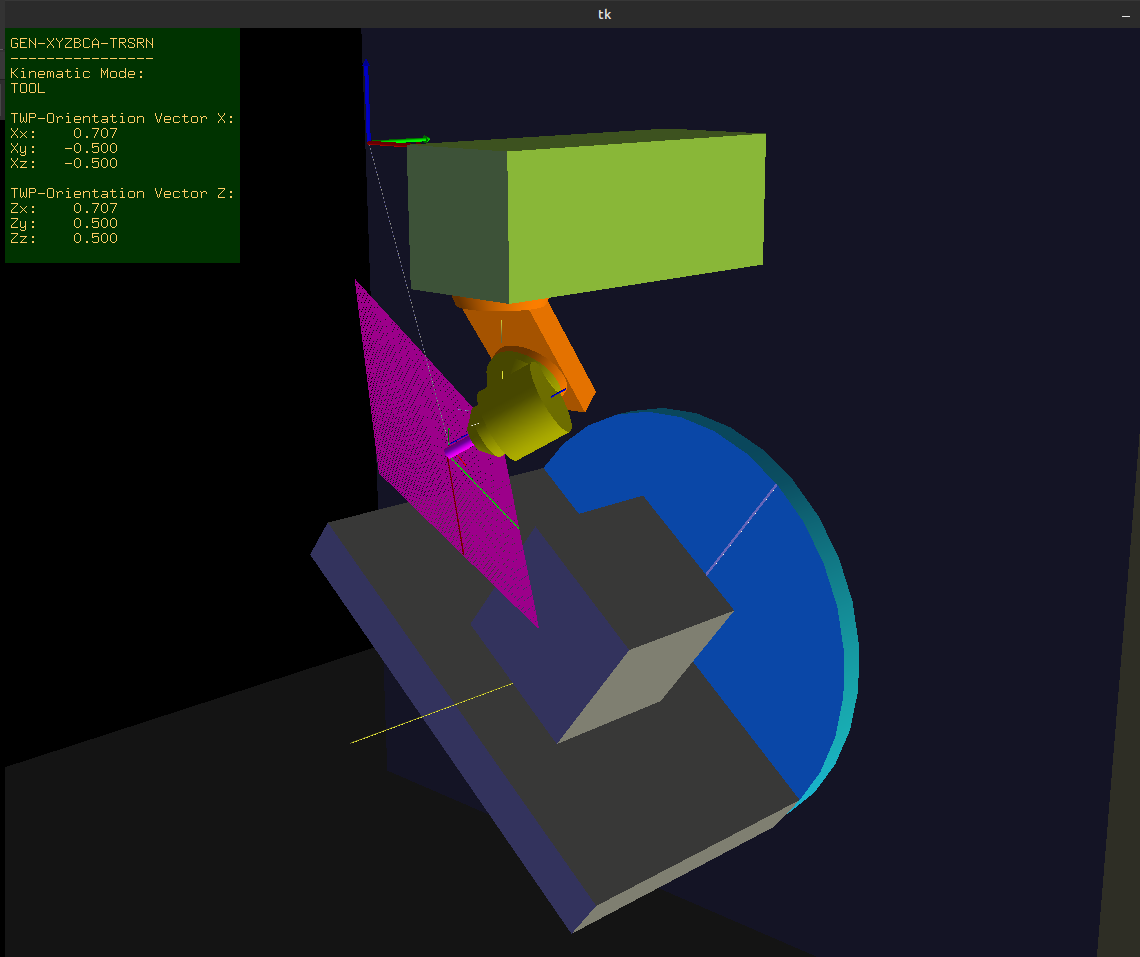
The folder in the opening post now also contains a complete generic config for a machine with a B rotary table and C rotating / A nutating spindle:
The following user(s) said Thank You: tommylight, Paul01
Please Log in or Create an account to join the conversation.
- Paul01
- Offline
- Junior Member
-
Less
More
- Posts: 25
- Thank you received: 5
2 years 9 months ago #290466
by Paul01
Replied by Paul01 on topic Kinematic model for a 5axis mill with universal (nutating) head
Hey Aciera,
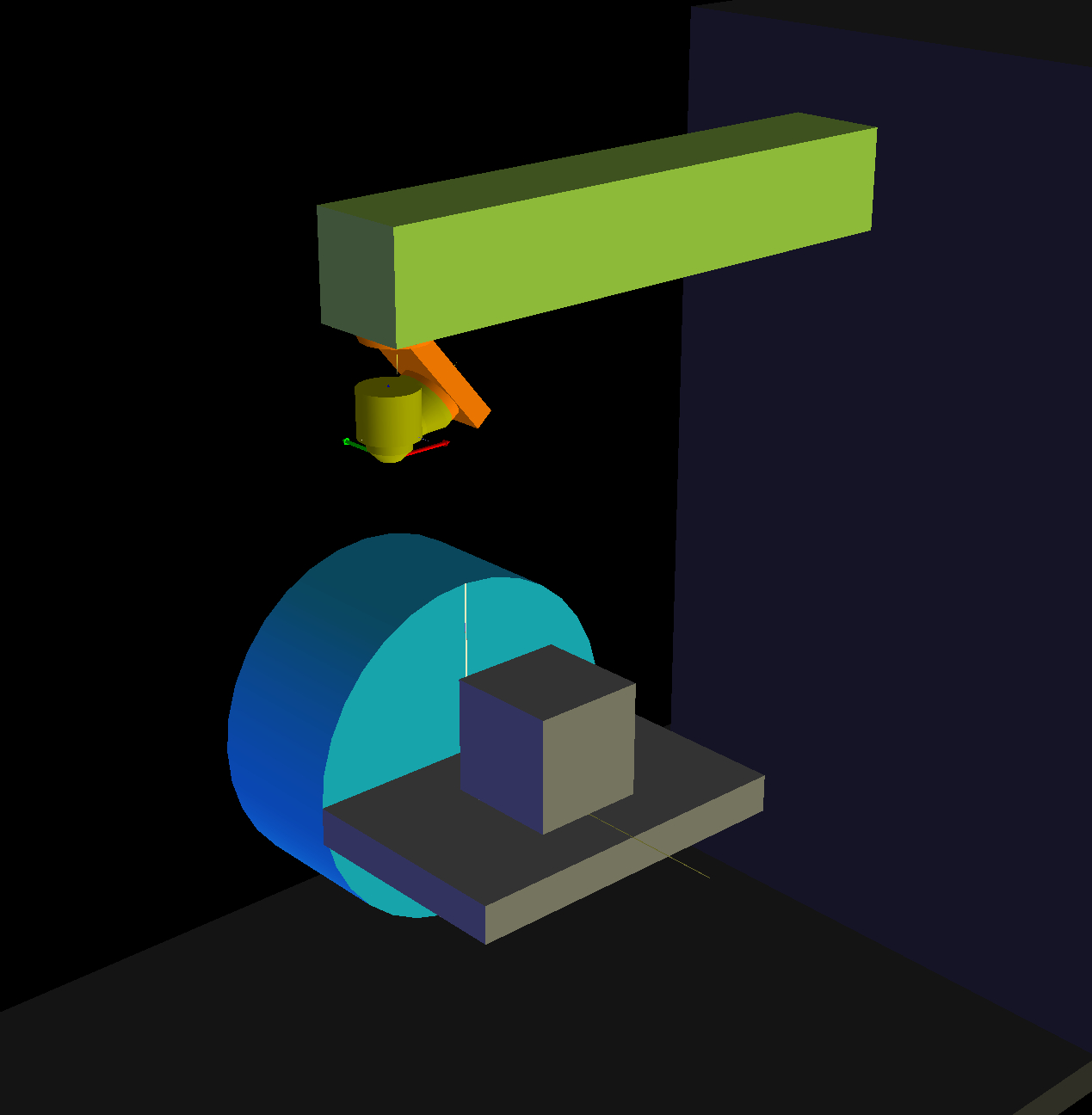
I have my machine running based on your original post. Now I'm going back to implement TWP's, so I'm using your updated generic-xyzbca files. The only difference is that my A axis is on the XZ plane not the YZ plane. See image attached for reference.
Other than a different rotation matrix for A (and Lx instead of Ly), it's much the same as your files. The r, s, t values are also the same.
However, I've clearly done something wrong in my TWP maths as I'm not getting the correct results, so some help would be much appreciated.
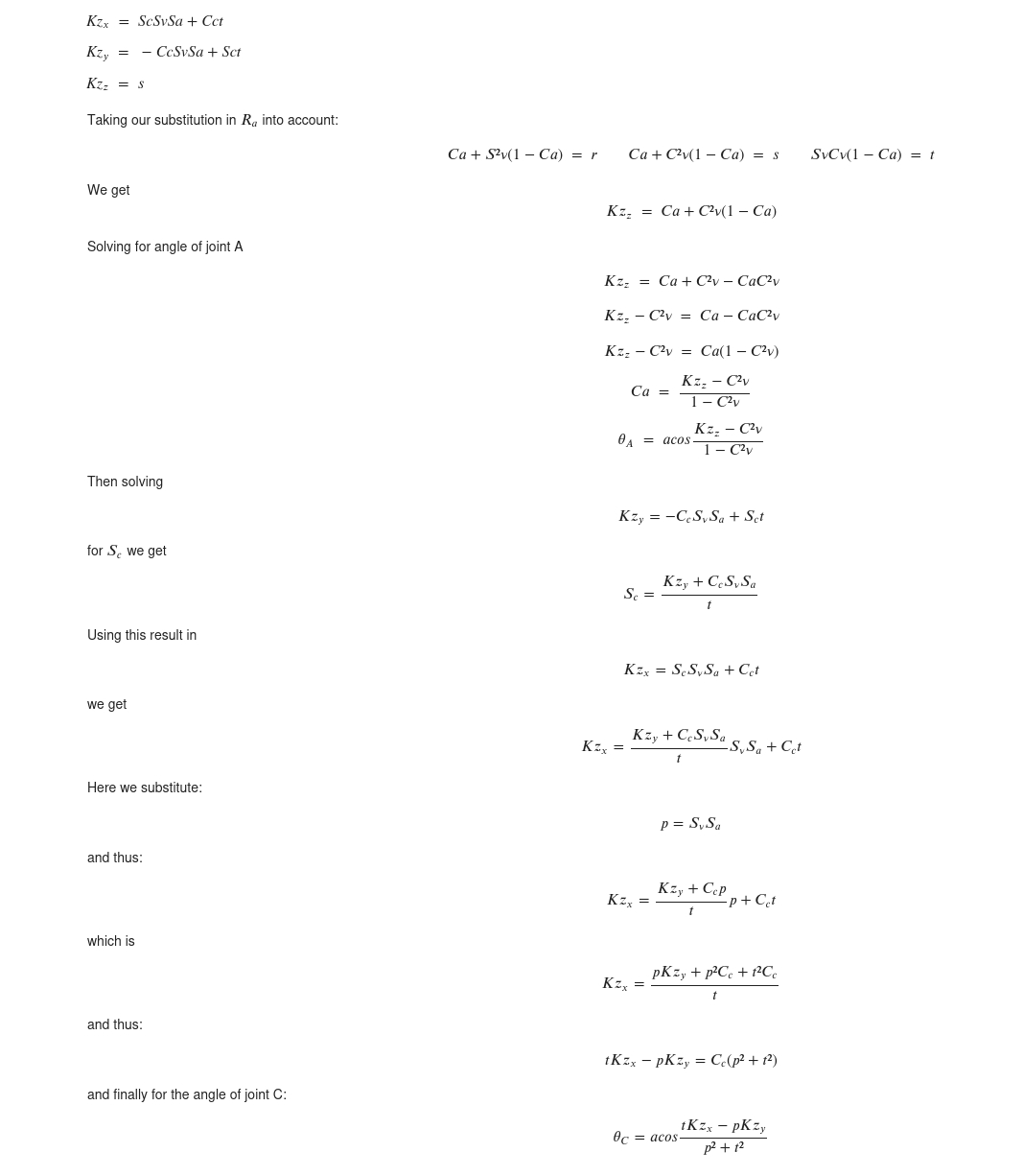
This is what I have for the rotary joints. The C axis generally doesn't rotate correctly to the TWP.
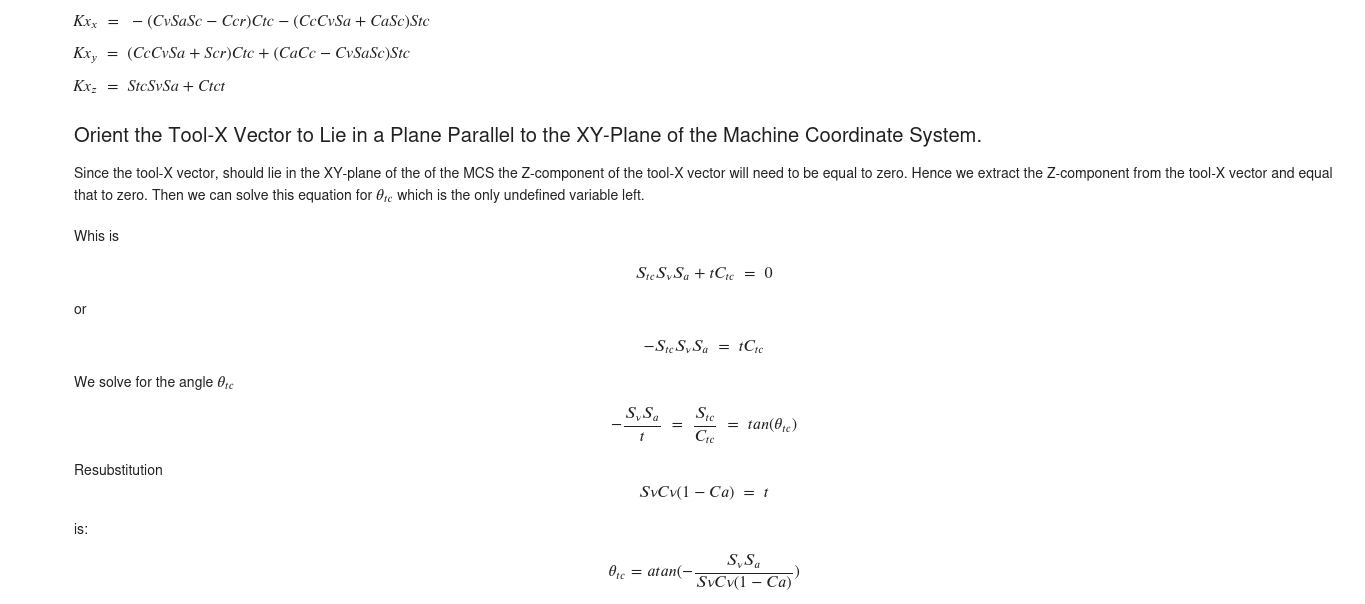
And this is what I have for the Tool-X vector. Also no behaving correctly.
I'm not great with maths so this is a little beyond my expertise.
I have my machine running based on your original post. Now I'm going back to implement TWP's, so I'm using your updated generic-xyzbca files. The only difference is that my A axis is on the XZ plane not the YZ plane. See image attached for reference.
Other than a different rotation matrix for A (and Lx instead of Ly), it's much the same as your files. The r, s, t values are also the same.
However, I've clearly done something wrong in my TWP maths as I'm not getting the correct results, so some help would be much appreciated.
This is what I have for the rotary joints. The C axis generally doesn't rotate correctly to the TWP.
And this is what I have for the Tool-X vector. Also no behaving correctly.
I'm not great with maths so this is a little beyond my expertise.
Please Log in or Create an account to join the conversation.
Time to create page: 0.184 seconds