
- Posts: 4819
- Thank you received: 2177
Kinematic model for a 5axis mill with universal (nutating) head
- Aciera
- Offline
- Administrator
-

Less
More
2 years 9 months ago #290506
by Aciera
Replied by Aciera on topic Kinematic model for a 5axis mill with universal (nutating) head
Likely a problem with the quadrant handling so get going change lines 64 and 65 like this:
And see what you get. Don't worry about the tool-x vector until you get the tool-z orientation worked out.
Also I think you have an error in the calculation of angle 'tc', here is what I get:
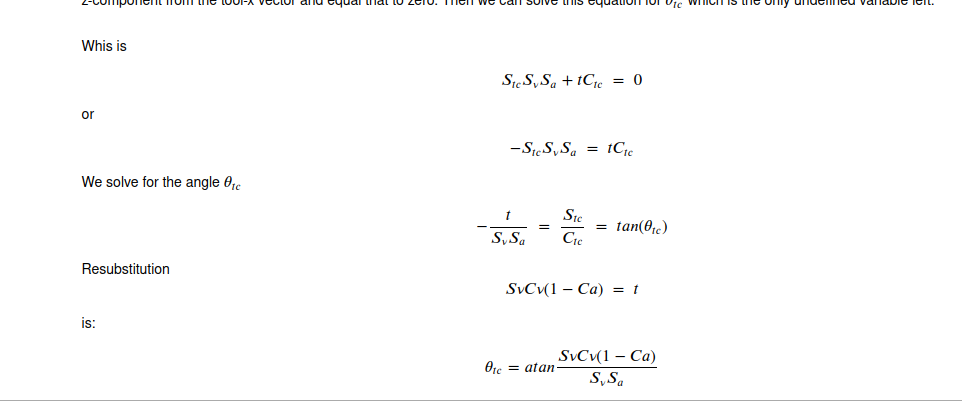
Just out of curiosity, it this for a home built machine or a retrofit of a commercial one?
Code:
if True: #Kwx >= 0:
if True: #Kwy >= 0:
A_j = acos((Kwz-Cv*Cv)/(1-Cv*Cv))
Sa_j = sin(A_j)
Ca_j = cos(A_j)
t = Sv*Cv*(1-Ca_j)
p = Sv * Sa_j
C_j = acos((t*Kwx-p*Kwy)/(p*p+t*t))
print('C_j new: ', C_j*180/pi)
quad = 111 #Done
And see what you get. Don't worry about the tool-x vector until you get the tool-z orientation worked out.
Also I think you have an error in the calculation of angle 'tc', here is what I get:
Just out of curiosity, it this for a home built machine or a retrofit of a commercial one?
Please Log in or Create an account to join the conversation.
- Aciera
- Offline
- Administrator
-
Less
More
- Posts: 4819
- Thank you received: 2177
2 years 9 months ago - 2 years 9 months ago #290521
by Aciera
Replied by Aciera on topic Kinematic model for a 5axis mill with universal (nutating) head
I've modified a sim config to reflect your situation. It's still a bit messy but I have run out of time for now.
Note the changed remap structure and how the python remap is being called from other ngc remaps. This gets rid of a bug where sometimes the spindle orientation would send the machine to some strange places. It looks quite solid now. I would very much recommend using this structure for use on a real machine.
Also there is a 'twp-helper-component' that is used as an intermediary between the remap and the gui.
Hope this helps.
Note the changed remap structure and how the python remap is being called from other ngc remaps. This gets rid of a bug where sometimes the spindle orientation would send the machine to some strange places. It looks quite solid now. I would very much recommend using this structure for use on a real machine.
Also there is a 'twp-helper-component' that is used as an intermediary between the remap and the gui.
Hope this helps.
Last edit: 2 years 9 months ago by Aciera.
Please Log in or Create an account to join the conversation.
- Paul01
- Offline
- Junior Member
-

Less
More
- Posts: 25
- Thank you received: 5
2 years 9 months ago - 2 years 9 months ago #290530
by Paul01
Replied by Paul01 on topic Kinematic model for a 5axis mill with universal (nutating) head
Amazing! Thank you so much. Changing to if True worked. I was really unsure how to rearrange the equation for angle 'tc', but what you've posted works too.
I'll go through your modified sim config and use that instead of what I've done. And with it I should have my machine properly up and running.
So this is for a home built machine. I use a Biesse Rover B at my job, and wanted something similar to use at home for myself. It's about what you'd expect for a home built machine and isn't at the level of a commercial machine. But my 2 axis head is loosely based on the HSD nutating head found on the Biesse CNC. Being very ignorant to the kinematics required at the time of designing and building it, I decided to go with a similar style of nutating head. I think that without finding the work you've posted in this thread I would have had a difficult time getting my machine up and running. And I've found the Jupyter file extremely invaluable. So I'm very grateful for the work you've put into these sim configs.
I work in furniture manufacturing, and a lot of what I do on a CNC involves pretty basic 2D toolpaths, often on angled faces. And because of the advantages TWPs offer, I'll be pretty happy to get that side of things up and running. And in the future when I have my machine fully working I'll post some of my stuff on this forum. The last thing I have to do to finish off my real machine is to purchase all the required hardware for the rotary table. Currently that's just something that I have working on my sim config, but I wanted to make sure I had everything sorted in my config so the addition of a B rotary unit would be easy.
I'll go through your modified sim config and use that instead of what I've done. And with it I should have my machine properly up and running.
So this is for a home built machine. I use a Biesse Rover B at my job, and wanted something similar to use at home for myself. It's about what you'd expect for a home built machine and isn't at the level of a commercial machine. But my 2 axis head is loosely based on the HSD nutating head found on the Biesse CNC. Being very ignorant to the kinematics required at the time of designing and building it, I decided to go with a similar style of nutating head. I think that without finding the work you've posted in this thread I would have had a difficult time getting my machine up and running. And I've found the Jupyter file extremely invaluable. So I'm very grateful for the work you've put into these sim configs.
I work in furniture manufacturing, and a lot of what I do on a CNC involves pretty basic 2D toolpaths, often on angled faces. And because of the advantages TWPs offer, I'll be pretty happy to get that side of things up and running. And in the future when I have my machine fully working I'll post some of my stuff on this forum. The last thing I have to do to finish off my real machine is to purchase all the required hardware for the rotary table. Currently that's just something that I have working on my sim config, but I wanted to make sure I had everything sorted in my config so the addition of a B rotary unit would be easy.
Last edit: 2 years 9 months ago by Paul01.
Please Log in or Create an account to join the conversation.
- Paul01
- Offline
- Junior Member
-
Less
More
- Posts: 25
- Thank you received: 5
2 years 9 months ago #290540
by Paul01
Replied by Paul01 on topic Kinematic model for a 5axis mill with universal (nutating) head
I've now gone through your modified sim config and got that working on my end too. Now I just need to build the Vismach model of my actual machine and then implement everything in the real world.
One thing I'm curious about with Vismach. It would be cool if it could display custom cutters when calling for a tool in your NC file. So if you're using something other than an end mill, Vismach could display an .obj from a folder of custom cutters and set it to the correct tool_length. Not sure if it's possible, but it would be useful for visual confirmation, especially if you're also importing your work_piece into Vismach.
One thing I'm curious about with Vismach. It would be cool if it could display custom cutters when calling for a tool in your NC file. So if you're using something other than an end mill, Vismach could display an .obj from a folder of custom cutters and set it to the correct tool_length. Not sure if it's possible, but it would be useful for visual confirmation, especially if you're also importing your work_piece into Vismach.
Please Log in or Create an account to join the conversation.
- Aciera
- Offline
- Administrator
-
Less
More
- Posts: 4819
- Thank you received: 2177
2 years 9 months ago #290548
by Aciera
Ultimately it would be nice to integrate the vismach simulation into the preview window.
I have customized the regular preview to show the current TWP, just like the vismach simulations.
Replied by Aciera on topic Kinematic model for a 5axis mill with universal (nutating) head
Certainly not impossible. The way the vismach component works it would basically need to load the geometry of all the tools when the config is started and then show only the one that matches the current tool number.It would be cool if it could display custom cutters when calling for a tool in your NC file.
Ultimately it would be nice to integrate the vismach simulation into the preview window.
I have customized the regular preview to show the current TWP, just like the vismach simulations.
The following user(s) said Thank You: Paul01
Please Log in or Create an account to join the conversation.
- Aciera
- Offline
- Administrator
-
Less
More
- Posts: 4819
- Thank you received: 2177
2 years 9 months ago #290843
by Aciera
Replied by Aciera on topic Kinematic model for a 5axis mill with universal (nutating) head
Just in case you are still working on the joint angle calculations in the remap:
While trying to get that case structure sorted out I realized that my approach, while useful for simple kinematics, was flawed for more complex ones like the generic nutating kinematic.
I have now changed to a different idea which is much more promising.
Since we are working with 'asin()' and 'acos()' functions, we get two solutions of interest to us:
For:
theta = asin(x): theta, pi-theta
and for
theta = acos(x): theta, -theta
Our problem is to determine which combination is the right one for us, which is what I was trying to do with that case structure.
The remap now calculates all four possible solutions pairs and calculates the resulting tool-z vector. This approach allows to choose the pair of angles that give the best movement of the head.
I'll also try to eliminate angles exeeding the relevant joint limits set in the ini file.
I'm still working on this so I have not updated the sim configs yet.
Please let me know if you are in need of an updated version.
While trying to get that case structure sorted out I realized that my approach, while useful for simple kinematics, was flawed for more complex ones like the generic nutating kinematic.
I have now changed to a different idea which is much more promising.
Since we are working with 'asin()' and 'acos()' functions, we get two solutions of interest to us:
For:
theta = asin(x): theta, pi-theta
and for
theta = acos(x): theta, -theta
Our problem is to determine which combination is the right one for us, which is what I was trying to do with that case structure.
The remap now calculates all four possible solutions pairs and calculates the resulting tool-z vector. This approach allows to choose the pair of angles that give the best movement of the head.
I'll also try to eliminate angles exeeding the relevant joint limits set in the ini file.
I'm still working on this so I have not updated the sim configs yet.
Please let me know if you are in need of an updated version.
Please Log in or Create an account to join the conversation.
Time to create page: 0.178 seconds