Kinematics and Delta Robot

More
7 years 5 months ago #133025 by Sockheaven
Thanks for all the info.
Finally got some time to look at this some more and was able to do the following:
  • Switch to LinuxCNC 2.8
  • Modified INI:
    Changed KINEMATICS=rotarydektakins
    Changed all Joint TYPE=ANGULAR (was linear)
  • Modified HAL and added the following commands:
    setp rotarydeltakins.platformradius 63.5
    setp rotarydeltakins.thighlength 115.0
    setp rotarydeltakins.shinlength 358.0
    setp rotarydeltakins.footradius 60.6
no other changes made to files, let me know if i missed something.

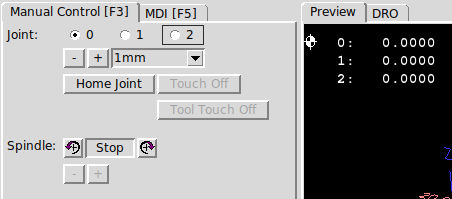
After re-starting LinuxCNC, I noticed that the manual control changed from Axis to Joint:


Next Question:
I notice that when i try to test/jog the axes, I am only jogging the individual joint.

Is there a way to test in machine space instead?

I was hoping to be able to jog in X/Y/Z machine space and make sure the individual servo drives were receiving the correct inverse kinematics values before i connect up the real motors.

I figure once i verify the IK is working correctly, then i can start working out what my home positions need to be. I dont have any home switches or anything. I was thinking i'd just run a homing routine on the servo drives manually, then tell LinuxCNC that it's been homed, but i'm not quite sure how homing will work with the inverse kinematics.

Thanks again guys
-Paul

Please Log in or Create an account to join the conversation.

More
7 years 5 months ago #133046 by andypugh
Replied by andypugh on topic Kinematics and Delta Robot
It ought to switch automatically to cartesian mode after homing.
If not, then the $ keyboard shortcut should do it.
The following user(s) said Thank You: Sockheaven

Please Log in or Create an account to join the conversation.

More
7 years 5 months ago - 7 years 5 months ago #133225 by Sockheaven
Thanks Andy, it didn't occur to me i needed to Home, but I can see that logic now.

Ok, I homed the axes and ran into an issue where the axes would start outside the bounds I defined for software limits, presumably due to the IK math, but I'm not certain.

I modified the bounds so that Home (0,0,0) is in the center of the workspace instead of the lower corner of the workspace and that problem went away.

Next, I'm noticing my scaling is off, so ignore that in the attached files. I suspect i need to reconfigure the resolution counts to incorporate the gearboxes. It appears the IK math assumes a degree of motion at the "joint" and not the motor shaft. So I think my resolution/motion distance errors makes sense until I rework the scaling.

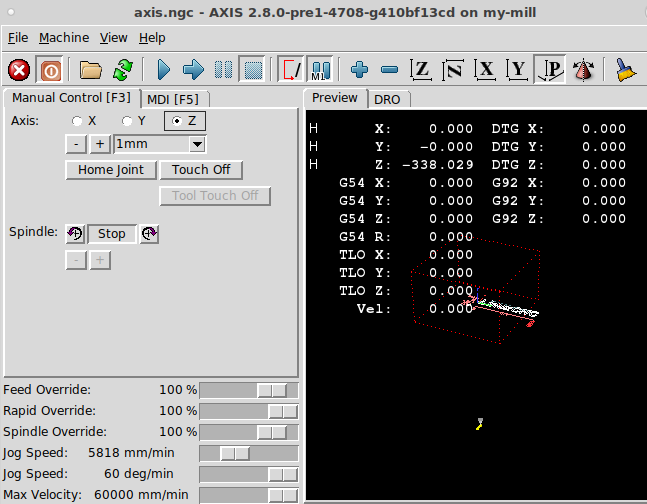
The only thing I can't seem to track down at the moment is that after homing, the Z Machine Axis starts at -338 mm instead of 0 like X and Y.
Further, it is the only axis I cannot Jog - both X and Y can be jogged, see below:


Did i mess something up in my config?
specifically with jogging, but I'm also puzzled on why it's setting the origin to that -338.029, i guess it could be a result of some IK calculation, but not sure.

HAL/INI attached

File Attachment:

File Name: my-mill.hal
File Size:3.75 KB

File Attachment:

File Name: my-mill.ini
File Size:2.25 KB

Last edit: 7 years 5 months ago by Sockheaven. Reason: clarification

Please Log in or Create an account to join the conversation.

More
7 years 5 months ago #133261 by andypugh
Replied by andypugh on topic Kinematics and Delta Robot
I haven't used rotarydeltakins, but -338 sounds pretty much right for the end-effector position when homed, as it is close to the "shin length" of your config.

I suspect that you need to set the Z axis limits to be -338 to -473 (shin + thigh). Don't worry about the absolute positions, your working coordinate system can be centred anywhere you want with G54(etc) offsets.
The following user(s) said Thank You: Sockheaven, slckzbn

Please Log in or Create an account to join the conversation.

More
7 years 5 months ago #133322 by Sockheaven
Ahh you're right.
Once I changed the axis limits so that the starting Z value was within the limits, i was able to jog the Z axis. Thanks!
I think there may be a bug in there because when X and Y start out of bounds, an error popped up to let me know i was in a software limit situation, but that doesn't happen with the Z axis, it just silently fails when you try to jog.

I think i'm ready to set the current limits low and try on hardware and see what else I've configured wrong :-)

I am still unsure what precisely the rotarydeltakins is doing with respect to homing. the start Z axis position makes me think I don't know precisely what angle the hips think "0 degrees" means for the joint.

Hopefully running on the real mechanics will be more enlightening to what the kinematics are expecting for the origin.
Will report back, thanks!

Please Log in or Create an account to join the conversation.

More
7 years 4 months ago #135956 by Sockheaven
Thank you all for your help. You guys were an immense help.
Had some distractions keeping me from this. but spent some more time and was able to get it all working.
I even played with FreeCAD and the DXF to GCode converter for LinuxCNC to make a sample 1" circle.
11 second video: photos.app.goo.gl/jvZbWctHABSjzXmN9

Looks like its time to get a high power laser!

General Question - about generating paths.
I found the page on the website with tools for CAD/DXF/GCODE generation. I've never done any of that before.
I mentioned before i just took a stab at FreeCAD.

What is everyone else using?
I don't want to spend too much time learning a poor software package, but it may not be worth it for me to invest in an expensive software toolset either.

Please Log in or Create an account to join the conversation.

Time to create page: 0.172 seconds
Powered by Kunena Forum