
CSS/G96 for other than X-axis?
- spumco
- Offline
- Platinum Member
-

- Posts: 2180
- Thank you received: 905
- INI
- V-axis
- change HOME/HOME_OFFSET to "0" (to match X-axis/Joint0)
- X-axis
- add min/max limit entries for switched state
- add max_vel & max_accel for switched state
- Remap M-codes
- [KINS]
- KINEMATICS = parting_slide (yes/no?)
- V-axis
- M-CODES
- M300 - normal mode; set #<kinstype> = 0, call M100
- M301 - switched mode; set #<kinstype> = 1, call M101
- M100 - set V-axis min/max limits and vel/accel to normal
- M101 - set V-axis min/max limits and vel/accel to switched values
- HAL
- net KINSTYPE-SEL <= motion.analog-out-01 => motion.switchkins-type
- (analog-out-01 verified to be free)
- COMPONENT
- parting_slide.comp created from millturn.comp.
- substituted @Aciera's suggested edits and added comments
- compile/install
- OPTIONAL?
- Add G53 G0 V0 initial move to M301 so V and X are both at "0" before switching anything
- Some sort of safety so joint0 jogging is inhibited when switched? Don't want to accidentally jog joint0 (actual X) when sub-spindle is clamped on to a part.
- I will probably also add an X jog-inhibit to my spindle/sub synch sequence.
- Some sort of safety so everything switches to normal on an abort/estop/similar
- I won't need new stepgen settings when switch is active because I'll be commanding the X-axis - which is now joint3. And nothing about joint3 will have changed. Millturn example M128/129 only changed the axis settings, not the joint settings.
- I won't need the G10 home offsets adjustments in the millturn example since I will be setting V and X home to 0.
- Is the INI [KINS] change, along with HAL file loadrt [KINS]... what calls up parting_slide.comp?
- what connects motion.switchkins-type to the Case0/Case1 settings in parting_slide.comp?
Comments/critique welcome as usual.
Please Log in or Create an account to join the conversation.
- spumco
- Offline
- Platinum Member
-
- Posts: 2180
- Thank you received: 905
Just because I set HOME = 0 for both axes doesn't mean the HOME_OFFSET is the same for both. And if I plan to use G54 offset to get the parting tool tip at spindle centerline I need the switched X-axis G54 values to be the same as V's.
Hmm...
Please Log in or Create an account to join the conversation.
- spumco
- Offline
- Platinum Member
-
- Posts: 2180
- Thank you received: 905
I have switchkins working. I have not yet tested CSS, but the axis/joint swap works with a couple of M-codes.
- Normal mode:
- jogging/g-code/MDI axis "V" moves the parting slide (joint-3)
- jogging/g-code/MDI axis "X" moves the real X-axis (joint-0)
- Switched mode
- jogging/g-code/MDI axis "X" moves the parting slide
- jogging axis V and joint-0 is disabled
- Pre-switch V-axis G54 offsets are written to the virtual X
- Appropriate max/min limits and accel/velocity are written to the virtual X
- Switched back to normal
- All jogging/g-code/MDI work normally
- X-axis position goes back to pre-switch position (G53 X0)
- Same for V-axis
- Axis GUI screen buttons can still jog joint-0/V-axis when in switched mode
- I don't plan to use Axis once I'm done configuring & sorting out the lathe, but I don't know how to stop NML background messages from a GUI from moving the true X-axis. Any ideas how to no-kidding stop an axis from being moved without disabling the drive? like DEACTIVATE_JOINT or something?
- Bad Things will happen if the real X-axis moves when I've got the main and sub-spindles both clamped on a part.
- Jogging the slide while in switched mode results in half the motion I'd expect.
- i.e. the DRO doesn't match the physical distance the slide moves.
- This may be due to a scale component I've got in the X-axis jogging logic so I can jog in diameter mode. Maybe I need to get rid of that and change the joint-0 scale.
Not posting config or other files until I've tested CSS and sort out the jog motion issue.
Big thanks to @Aciera for the help.
Please Log in or Create an account to join the conversation.
- Aciera
-

- Offline
- Administrator
-

- Posts: 4818
- Thank you received: 2176
Any ideas how to no-kidding stop an axis from being moved without disabling the drive? like DEACTIVATE_JOINT or something?
I'm not aware of a way to block the operator from commanding a move of a particular axis. Would be a handy feature to have.
- I use Gmoccapy where the onscreen jog buttons can be hidden and only physical jogging through hal pins needs to be handled.
- MDI entries are more involved as one would need to parse all commands that an operator enters, still possible without too much effort.
- Rehoming can be handled using 'motion.homing-inhibit'.
Still leaves program execution and any mdi commands that are not coming from the gui entry.
Please Log in or Create an account to join the conversation.
- spumco
- Offline
- Platinum Member
-
- Posts: 2180
- Thank you received: 905
I'm not aware of a way to block the operator from commanding a move of a particular axis. Would be a handy feature to have.
Appreciate you having a think about it.
I'd like to experiment with that NML message I found (DEACTIVATE_JOINT). If I can deactivate joint-0 near the beginning of the sub-spindle transfer process I can simplify the parting-slide jogging disable (which happens later in the overall sequence).
Any idea how I can send an NML message to LCNC?
Maybe it's done via python interface, but I don't see anything obvious in the LCNC manual section on python-interface that includes that specific command.
Please Log in or Create an account to join the conversation.
- Aciera
-
- Offline
- Administrator
-
- Posts: 4818
- Thank you received: 2176
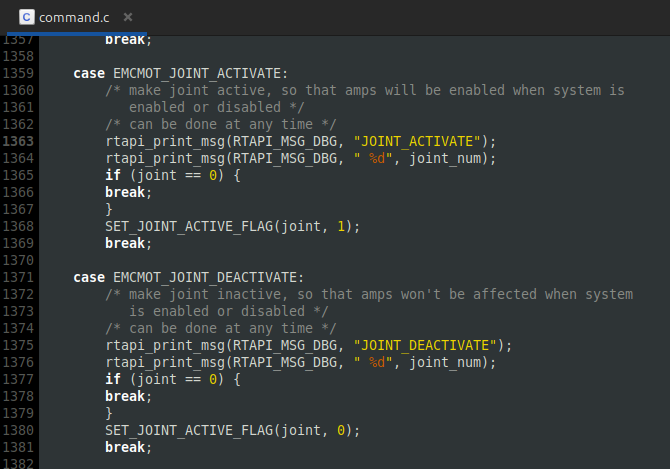
into 'EMCMOT_SPINDLE_ON' / 'EMCMOT_SPINDLE_OFF':
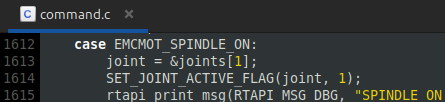
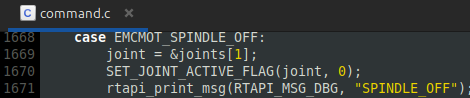
Which lets me clear 'joint.1.active' using the spindle control but it does basically the same as disabling the drive as 'joint.1.pos-cmd' is still updated as the axis is jogged or commanded through the interpreter:
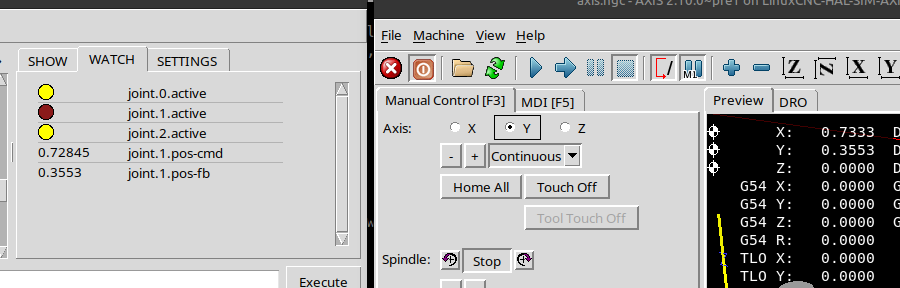
The problem with the following error when reactivating the joint remains the same as if it was done in hal or the drive disabled.
Attachments:
Please Log in or Create an account to join the conversation.
- Aciera
-
- Offline
- Administrator
-
- Posts: 4818
- Thank you received: 2176
Unfortunately I do not know how to dynamically pass the disabled axes to the interpreter during runtime.
Please Log in or Create an account to join the conversation.
- spumco
- Offline
- Platinum Member
-
- Posts: 2180
- Thank you received: 905
Do you think LCNC would throw an error if I just left joint-0 out while operating under Case 1?
Instead of this:
case 0:
            pos->tran.x = j[0];
            pos->tran.z = j[1];
            pos->c      = j[2];
            pos->v      = j[3];
            break;
        case 1:
            pos->tran.x = j[3];
            pos->tran.z = j[1];
            pos->c      = j[2];
            pos->v      = j[0];
            break;
    }
    // unused coordinates:
    pos->a = 0;
    pos->b = 0;
    pos->u = 0;
    pos->w = 0;
Maybe this:
case 0:
            pos->tran.x = j[0];
            pos->tran.z = j[1];
            pos->c      = j[2];
            pos->v      = j[3];
            break;
        case 1:
            pos->tran.x = j[3];
            pos->tran.z = j[1];
            pos->c      = j[2];
           break;
    }
    // unused coordinates:
    pos->a = 0;
    pos->b = 0;
    pos->v = 0;
    pos->u = 0;
    pos->w = 0;
And do something similar for the inverse later in the comp.
Please Log in or Create an account to join the conversation.
- spumco
- Offline
- Platinum Member
-
- Posts: 2180
- Thank you received: 905
But maybe there's a way to define the motion math of case 1 pos->v= j[0]; so that no motion results regardless of input.
Please Log in or Create an account to join the conversation.
- spumco
- Offline
- Platinum Member
-
- Posts: 2180
- Thank you received: 905
What would be needed here is to have the _interpreter_ reject the axis word which was disabled.
So the NML description in the LCNC manual isn't accurate? Or perhaps not exactly clear what happens?
8.10. DEACTIVATE_JOINTThe DEACTIVATE_JOINT command turns off all the calculations associated with a single joint, but does not change the joint’s amp enable output pin.I would have thought 'turns off all the calculations..." would have removed that joint/axis from the TP calcs entirely.
Please Log in or Create an account to join the conversation.