
- Posts: 19899
- Thank you received: 4655
Prototrak Plus Retrofit with Mesa 7i77 & 5i25 cards
- andypugh
- Offline
- Moderator
-

Less
More
9 years 7 months ago #89279
by andypugh
If you don't have a crimping tool then you _could_ cut off one end and do a splice, then solder and shrink-sleeve. But to be honest you are not going to get far through a retrofit without a crimping tool, and they are not all that expensive. I would, however, suggest a ratchet style one like www.amazon.com/Voilamart-Professional-In...imping/dp/B01N0Q9ZUM rather than the super-cheap ones that come with the sets.
This video shows how to make a good wire-splice.
Which PIN 1? Where?
Replied by andypugh on topic Prototrak Plus Retrofit with Mesa 7i77 & 5i25 cards
new2linux wrote: andtpugh, many thanks, I like you say need the tools, I plan to make shore the connection is tight when pushed together, then shrink tube so when twisted it is all good.
If you don't have a crimping tool then you _could_ cut off one end and do a splice, then solder and shrink-sleeve. But to be honest you are not going to get far through a retrofit without a crimping tool, and they are not all that expensive. I would, however, suggest a ratchet style one like www.amazon.com/Voilamart-Professional-In...imping/dp/B01N0Q9ZUM rather than the super-cheap ones that come with the sets.
This video shows how to make a good wire-splice.
EDIT: It appears the pin 1 can be used as 5v in; this can replace the separet power supply (connected to TB1) I currently have, correct?
Which PIN 1? Where?
The following user(s) said Thank You: new2linux
Please Log in or Create an account to join the conversation.
- new2linux
- Offline
- Platinum Member
-

Less
More
- Posts: 711
- Thank you received: 9
9 years 7 months ago #89282
by new2linux
Replied by new2linux on topic Prototrak Plus Retrofit with Mesa 7i77 & 5i25 cards
andypugh, thanks for all your help! the 7i77 (TB1) location, top left. Pin 1 is the (
servosystems.com/pdf/amc/12a8.pdf
) link page 4 of 9, very top of the page. This is the link from you, I think.
many thanks!
many thanks!
Please Log in or Create an account to join the conversation.
- andypugh
- Offline
- Moderator
-
Less
More
- Posts: 19899
- Thank you received: 4655
9 years 7 months ago - 9 years 7 months ago #89288
by andypugh
Replied by andypugh on topic Prototrak Plus Retrofit with Mesa 7i77 & 5i25 cards
No eBay APP ID and/or Cert ID defined in Kunena configurationAh. No. The 7i77 needs up to 700mA of 5V power according to the manual, and that output on the 6A80 is only rates at 3mA.
What other power supplies do you have? You can make other voltages quite easily from 12V or 24V using these:
(Item 2)
I use them a fair bit.
What other power supplies do you have? You can make other voltages quite easily from 12V or 24V using these:
(Item 2)
I use them a fair bit.
Last edit: 9 years 7 months ago by andypugh.
The following user(s) said Thank You: new2linux
Please Log in or Create an account to join the conversation.
- new2linux
- Offline
- Platinum Member
-
Less
More
- Posts: 711
- Thank you received: 9
9 years 7 months ago #89334
by new2linux
Replied by new2linux on topic Prototrak Plus Retrofit with Mesa 7i77 & 5i25 cards
Many thanks! to each of you who have help with this project!!
I am need to confirm leads. The pic is the end of the PCB with capacitor, the blue lead is to the right side of pic and I placed that on pin 5 on the P2 single connector (HIGH VOLTAGE DC Power Input) see this link: servosystems.com/pdf/amc/12a8.pdf .
I am attaching the white lead (the just to the left of center in the pic) to pin 4 the (POWER GND Power Ground (Common With Signal Ground))
I am attaching where the brown lead (hard to see, but is to the very far left) is to the pin 3 (POWER GND Power Ground (Common With Signal Ground)).
Now to P1 single connector: Pin 4 & Pin 5 go to 7I77 card DRV 0 & DRV 1.
Does this sound correct? Is there a way to confirm prior to powering up?
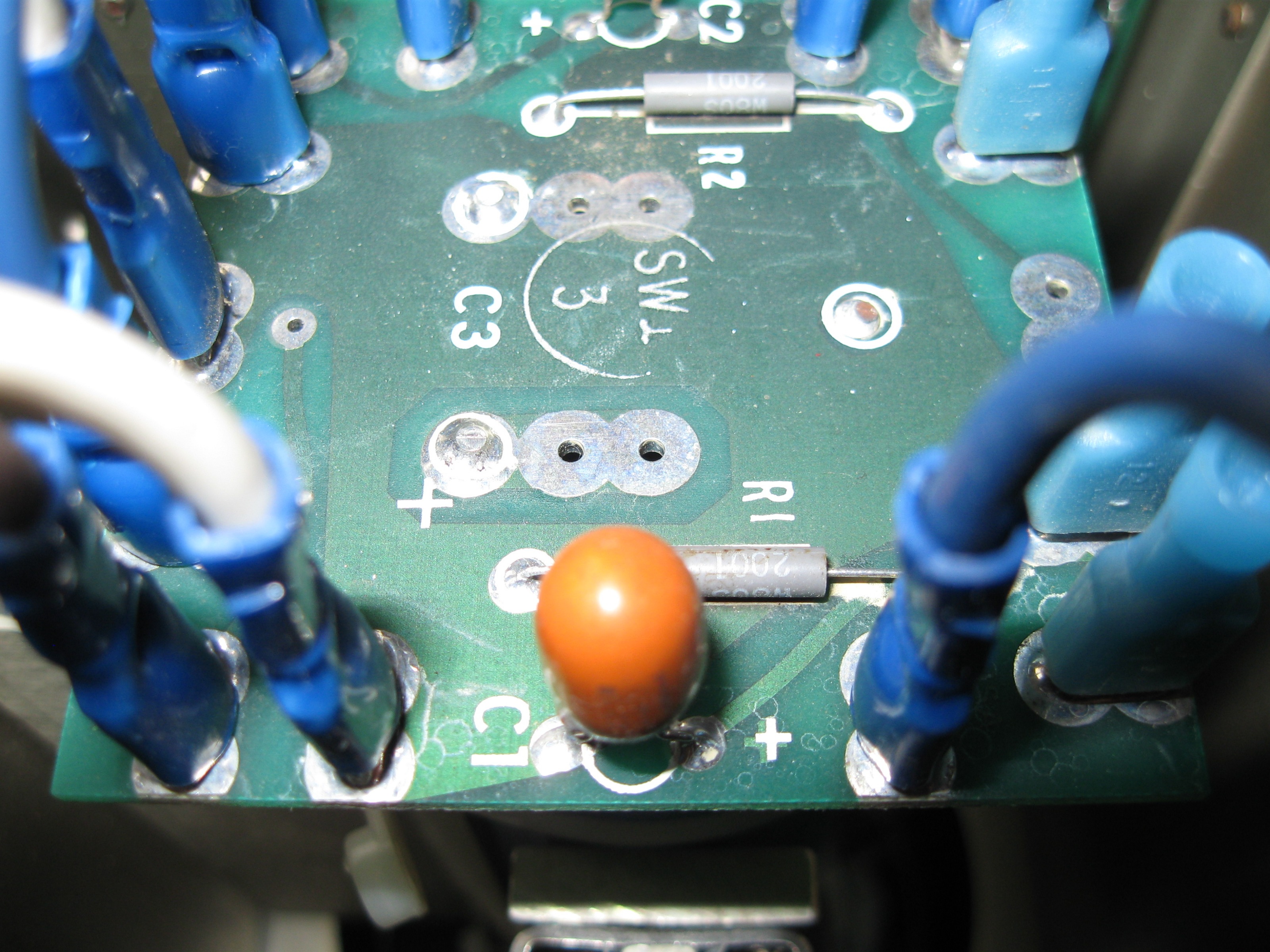
Many, many thanks in advance for help, it is warmly welcomed!
I am need to confirm leads. The pic is the end of the PCB with capacitor, the blue lead is to the right side of pic and I placed that on pin 5 on the P2 single connector (HIGH VOLTAGE DC Power Input) see this link: servosystems.com/pdf/amc/12a8.pdf .
I am attaching the white lead (the just to the left of center in the pic) to pin 4 the (POWER GND Power Ground (Common With Signal Ground))
I am attaching where the brown lead (hard to see, but is to the very far left) is to the pin 3 (POWER GND Power Ground (Common With Signal Ground)).
Now to P1 single connector: Pin 4 & Pin 5 go to 7I77 card DRV 0 & DRV 1.
Does this sound correct? Is there a way to confirm prior to powering up?
Many, many thanks in advance for help, it is warmly welcomed!
Please Log in or Create an account to join the conversation.
- lakeweb
- Offline
- Senior Member
-

Less
More
- Posts: 56
- Thank you received: 23
9 years 7 months ago #89338
by lakeweb
Replied by lakeweb on topic Prototrak Plus Retrofit with Mesa 7i77 & 5i25 cards
First is to power the power supply without hooking it up to the amp and use a volt meter to be sure where the positive out and ground are. Use an incandescent light bulb to load it and be sure. Then you can hook it up to P2, pin 4 and 5 of the amp accordingly.
I don't see any connector called DRV0 on the 7i77. The output from the 7i77 is from TB5 and called GND and AOUTx. See page 9, pdf 15 of the 7i77 manual. Those go to P1, pin 4 and 5 of the amp.
Best, Dan.
I don't see any connector called DRV0 on the 7i77. The output from the 7i77 is from TB5 and called GND and AOUTx. See page 9, pdf 15 of the 7i77 manual. Those go to P1, pin 4 and 5 of the amp.
Best, Dan.
The following user(s) said Thank You: new2linux
Please Log in or Create an account to join the conversation.
- andypugh
- Offline
- Moderator
-
Less
More
- Posts: 19899
- Thank you received: 4655
9 years 7 months ago #89340
by andypugh
Yes, you do
I see brown, blue and white leads. I have no idea how to tell which is which from here.
The rectifier is probably marked with + and -, as is the filter capacitor. You need to figure out which or white, blue and brown is connected to +ve and which to -ve, either by inspection of the PCB, buzzing through with a multimeter when the system is powered off (and has been for long enough to discharge the capacitor) and/or testing the voltage and polarity with the PSU powered up and no drives connected. You should also check that the voltage is no more than the 80V rating of your drives.
Replied by andypugh on topic Prototrak Plus Retrofit with Mesa 7i77 & 5i25 cards
new2linux wrote: I am need to confirm leads.
Yes, you do
I see brown, blue and white leads. I have no idea how to tell which is which from here.
The rectifier is probably marked with + and -, as is the filter capacitor. You need to figure out which or white, blue and brown is connected to +ve and which to -ve, either by inspection of the PCB, buzzing through with a multimeter when the system is powered off (and has been for long enough to discharge the capacitor) and/or testing the voltage and polarity with the PSU powered up and no drives connected. You should also check that the voltage is no more than the 80V rating of your drives.
The following user(s) said Thank You: new2linux
Please Log in or Create an account to join the conversation.
Time to create page: 0.790 seconds