Remora - ethernet NVEM / EC300 / EC500 cnc board

More
3 years 3 months ago #274666 by scotta
v1.0.0 is now ready for testing!

github.com/scottalford75/Remora-RT1052-cpp

I must say that the RT1052 has been a challenging learning curve, but now we have a fully functional C++ Remora firmware with the dynamic configuration capabilities of the original Remora firmware. There's been challenges along the way, and now the last issues with cache management have been resolved and things look to be working well. 

Feedback on bugs and issues appreciated, as well as feature requests welcome.
 
The following user(s) said Thank You: tommylight, MX_Master, Murphy, zmrdko

Please Log in or Create an account to join the conversation.

More
3 years 3 months ago - 3 years 3 months ago #274668 by zmrdko
I'm back from mach4 after a while.

I have just flashed new firmware and inputs and outputs seems to stop working on my recent settings.
And also some outputs seems to be on: 5, 7, 12, 14, 16 on startup.
And changing output states in Halshow (Pins->remora->output) does not really change output state.
What did I miss?
I tried default config ( github.com/scottalford75/Remora-RT1052-c.../remora-rt1052-basic ) and it's the same.
Last edit: 3 years 3 months ago by zmrdko.

Please Log in or Create an account to join the conversation.

More
3 years 3 months ago #274671 by scotta

I'm back from mach4 after a while.

I have just flashed new firmware and inputs and outputs seems to stop working on my recent settings.
And also some outputs seems to be on: 5, 7, 12, 14, 16 on startup.
And changing output states in Halshow (Pins->remora->output) does not really change output state.
What did I miss?
I tried default config ( github.com/scottalford75/Remora-RT1052-c.../remora-rt1052-basic ) and it's the same.
Hi, 

With the new firmware you will also need to upload a configuration file. I've done one for each for the NVEM, EC300 and EC500. They are located in the LinuxCNC directory.

Copy one of these into your configuration directory and run the upload script. eg
Code:
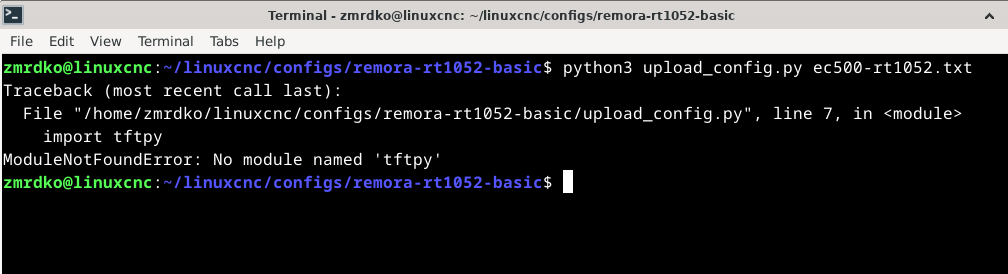
$ python3 upload_config.py ec500-rt1052.txt

 
The following user(s) said Thank You: zmrdko

Please Log in or Create an account to join the conversation.
More
3 years 3 months ago - 3 years 3 months ago #274679 by zmrdko
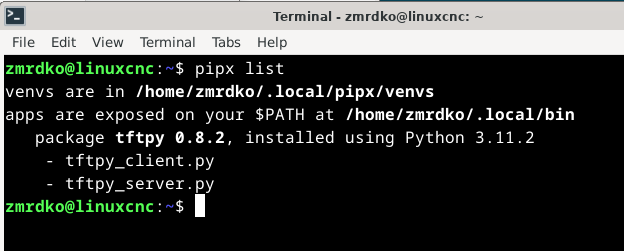
Thanks for reply.I was half successful. I installed tftpy using pipx, but it does not change anything for script upload_config.py and I am still gettingModuleNotFoundError: No module named 'tftpy'Meanwhile I am trying to google what's wrong.I guess it has something to do with venvs.

EDIT: I manually copied tftpy library to location where the rest of the python3 libraries were stored, so I successfully uploaded the configuration file. I looks like it works now.
Last edit: 3 years 3 months ago by zmrdko.

Please Log in or Create an account to join the conversation.
More
3 years 3 months ago #274686 by zmrdko
By the way, is there any way how to debug and sort out this annoying error?

Unexpected realtime delay on task 0 with period 1000000
This message will only display once per session.
Run latency test and resolve before continuing.

Please Log in or Create an account to join the conversation.

More
3 years 3 months ago - 3 years 3 months ago #274735 by Murphy
Ok so I am also having problems loading the firmware. It converted the stlink and it's showing up as the RT1052 drive. When I drop the bin file in , it does something but a fail .txt pops up in the drive and says
Error: Failed to initialize the target MCU
type: target

I tried to connect with mcuexpress , when I got the debug button to find the probe nothing happens.

I noticed the connection LED is constant on now. I hope they don't have an inbuilt bricking thing on the new boards
Last edit: 3 years 3 months ago by Murphy.

Please Log in or Create an account to join the conversation.

Time to create page: 0.490 seconds
Powered by Kunena Forum
